



Callplay Live Coupon Top Up on BitTopup
Recharging Callplay Live Coupons gives you direct access to all premium features across the Callplay social entertainment network. Whether you want to start private 1:1 video calls with popular hosts, send dynamic virtual gifts during interactive livestreams, or support creators in competitive PK battles, having an active coupon balance is essential.
BitTopup provides a fast and secure direct recharge system. By using only your numerical Callplay User ID, you can top up coupons directly to your balance without sharing login credentials or passwords.
What Are Callplay Live Coupons and What Can You Use Them For?
Callplay Live is a global interactive live streaming and video chat platform. The platform connects content creators, streamers, and viewers in real-time environments. Coupons function as the primary currency within the Callplay ecosystem, allowing users to unlock premium communication features and interact with their favorite broadcasters.
Primary Uses of Callplay Live Coupons
- 1:1 Private Video and Audio Calls: Connect directly with broadcasters in high-definition, private one-on-one video calls. Each call charges a per-minute rate deducted directly from your coupon balance.
- Virtual Gifting in Livestreams: Support live broadcasters by sending virtual gifts ranging from simple stickers to full-screen 3D animations. Gifting increases your contributor level and boosts the host's room ranking.
- PK Battle Support: Streamers frequently enter head-to-head PK competitions against other broadcasters. Viewers spend coupons to send battle gifts, helping their chosen creator win the match.
- Exclusive Room Access: Some creators host specialized VIP live streams. Coupons allow you to pay entry fees and access exclusive content.
- Profile Badges and Chat Customization: Stand out in crowded public chats with exclusive entrance banners, custom chat bubbles, and VIP profile frames unlocked via coupon spending.
Callplay Feature and Coupon Usage Overview
| Feature / Activity | Callplay Coupon Application | Direct In-App Benefit |
|---|---|---|
| 1:1 Private Calls | Direct per-minute connection with broadcasters | Private, uninterrupted video conversations |
| Streamer Gifting | Send animated stickers and visual effects | Increases creator ranking and viewer fan rank |
| Live PK Battles | Send points during creator versus creator matches | Decides match winner and boosts room visibility |
| VIP Stream Entry | Cover admission for specialized live rooms | Access exclusive private broadcast sessions |
| Profile Customization | Unlock chat bubbles, frames, and entrance effects | Distinguishes your account in public rooms |
How to Find Your Callplay Live User ID
To ensure your recharge reaches the correct account, you must locate your unique numerical User ID within the Callplay app. You do not need to submit your username or password.
- Open the Callplay application on your mobile device.
- Tap the Profile icon (labeled "My" or "Profile") at the bottom-right corner of the home screen.
- Your User ID is displayed right under your profile picture and nickname.
- Tap the Copy button next to the ID digits or write down the exact numerical sequence.
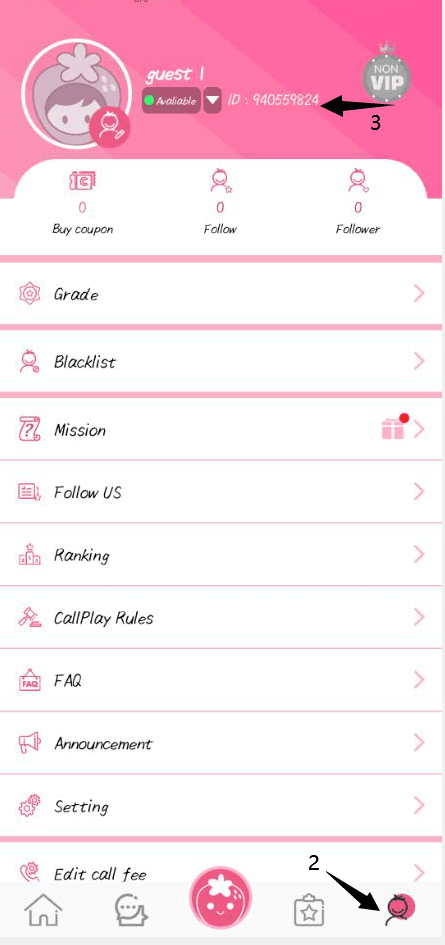
Important Tip: Always copy the numerical User ID rather than your display nickname. Nicknames can be changed at any time and are not unique, while your User ID is a permanent identifier assigned to your specific account.
Step-by-Step Guide to Recharge Callplay Live Coupons on BitTopup
Recharging through BitTopup takes only a few quick steps. Follow this guide to complete your top-up smoothly:
- Select the Coupon Package: Browse the available Callplay Live Coupon denominations on this page. Exact pricing and package sizes are displayed directly on the live checkout interface.
- Enter Your User ID: Type or paste your Callplay numerical User ID into the designated input box. Double-check the digits to ensure complete accuracy.
- Choose Your Payment Method: Select your preferred payment option from the supported international and local payment channels.
- Confirm and Pay: Review your order summary and finalize your transaction through our secure checkout system.
- Receive Your Coupons: Once payment is confirmed, the system delivers the coupons straight to your Callplay Live account. Open the app to verify your updated balance.
Why Recharge Callplay Live with BitTopup: Safe User ID Only Process
BitTopup is designed around player safety, straightforward checkout, and global convenience. Here is why users trust BitTopup for their Callplay Live recharges:
- Strictly User ID Only: We never request your login password, SMS verification codes, or linked social media access. Your account security remains 100% under your control.
- Global and Local Payment Options: BitTopup supports multiple payment gateways and handles currency conversions transparently, making it easy to buy coupons regardless of where you are located.
- Clear, Live Pricing: All package prices, fees, and currency calculations are visible on the checkout screen before you pay, ensuring zero unexpected charges.
- 24/7 Dedicated Customer Support: If you ever have a question about an order, our support team is available around the clock to assist you via live chat and ticket resolution.
- Automated Processing: Orders are handled automatically by our digital delivery network, getting your coupons into your account quickly so you can get back to streaming without delay.
Common Mistakes to Avoid When Recharging Callplay Live Coupons
Avoid these frequent mistakes to ensure your recharge goes through without issues:
- Entering the Wrong User ID: A single wrong digit can send coupons to an inactive or unintended user account. Always use copy-and-paste directly from the Callplay profile page.
- Submitting a Nickname Instead of an ID: Nicknames cannot be used for direct server recharges. Only numerical User IDs are valid.
- Forgetting to Refresh the App Balance: If you complete a recharge while the Callplay app is open, your balance might not refresh instantly. Force close the app and restart it to see your updated total.
- Using Unverified Third-Party Sellers: Never purchase from sellers asking for your account login details. Legitimate recharges require only your public User ID.
Troubleshooting Delivery and Order Status for Callplay Live Recharges
If your Callplay Live Coupons do not appear immediately after completing payment, follow these troubleshooting steps:
- Check Your Order Status on BitTopup: Go to your BitTopup profile and review your order history. Confirm whether the transaction is listed as Completed, Processing, or Pending.
- Restart the Callplay Live App: Completely close the Callplay application on your mobile device and relaunch it. Navigate to the profile tab and check your wallet balance.
- Verify Payment Confirmation: Ensure your payment provider approved the transaction. If a payment is undergoing routine authorization checks, delivery will finalize as soon as the provider clears the charge.
- Contact Customer Support: If your order status is marked Completed on BitTopup but your coupons do not reflect in-app after restarting, reach out to BitTopup 24/7 customer support. Provide your BitTopup Order Number along with your Callplay User ID for quick verification.
Callplay Live Coupon Recharge FAQ
What are Callplay Live Coupons used for?
Callplay Live Coupons are the in-app currency used to start 1:1 private video and audio calls with broadcasters, send animated virtual gifts in live streams, support creators during PK battles, and unlock VIP room admissions.
Where can I find my Callplay Live User ID for recharge?
Open the Callplay app, tap the Profile icon in the bottom-right corner, and locate the numerical ID directly beneath your profile avatar and nickname. Tap the copy icon to copy it.
Do I need to provide my Callplay account password to recharge coupons?
No. BitTopup requires only your Callplay numerical User ID. We will never ask for your account password, email credentials, or verification codes.
How quickly will the Callplay Live Coupons be credited to my account?
Recharges are processed digitally once your payment is confirmed. In most cases, the coupons appear in your Callplay wallet right after order completion.
Can I recharge Callplay Live Coupons for a friend using their User ID?
Yes. You can recharge for friends or family by entering their Callplay User ID in the input field instead of your own. Once the payment finishes, the coupons are sent directly to their account.
What should I do if my Callplay Live Coupons have not arrived after purchase?
First, force close and reopen your Callplay app to refresh your wallet balance. Next, check your BitTopup order history to verify order completion. If the balance has not updated, contact BitTopup 24/7 customer support with your Order Number and User ID.