

Elelive-小象直播 Top Up: How to Recharge Diamonds Online
Elelive (小象直播) is one of the most popular interactive live streaming platforms across Southeast Asia, connecting viewers with talented content creators, musical performers, and lifestyle hosts. To actively participate in live stream rooms, send customized gifts, support your favorite hosts during live PK battles, and upgrade your fan status, you need Elelive diamonds.
Recharging diamonds through BitTopup is designed to be straightforward and secure. Follow these steps to complete your top up in minutes:
- Select Your Diamond Package: Browse the available diamond denominations and pick the option that matches your gifting or interaction needs.
- Enter Account Details: Fill in your Elelive Player ID and Account Name in the designated input fields. Double-check both entries to prevent delivery errors.
- Choose Your Payment Option: Pick your preferred regional or international payment method from the available checkout list.
- Confirm and Complete Payment: Review your order summary and finalize the transaction. The diamonds will be credited directly to your Elelive account wallet.
Where to Find Your Elelive Player ID and Account Name
To ensure your diamonds arrive without delay, you must provide your exact Elelive Player ID and Account Name. Both details are accessible directly within your mobile app profile.
- Open the Elelive (小象直播) application on your mobile device.
- Tap the Profile icon (labeled Me or 我的) located in the bottom-right corner of the home screen.
- Your Player ID (a series of numeric digits) is displayed directly below your avatar and display name.
- Your Account Name is the nickname shown at the top of your profile page.
- Copy or write down both values accurately before entering them at checkout.
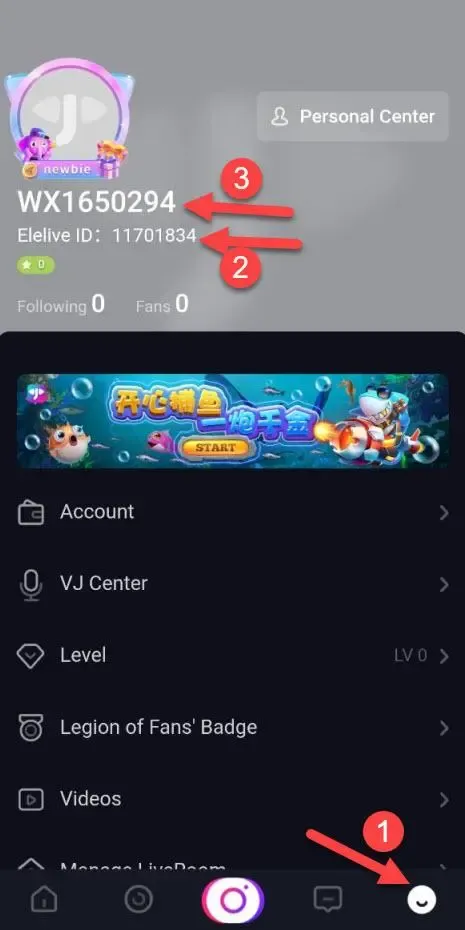
Entering both your Player ID and Account Name provides an extra layer of verification, ensuring that your recharge credits the correct account even if there are formatting discrepancies.
Elelive Diamond Packages and Pricing Overview
Elelive diamond bundles cater to different interaction styles, from casual chat supporters sending basic stickers to high-tier fans leading broadcast event leaderboards.
| Package Tier | Intended Usage | Required Information | Delivery Method |
|---|---|---|---|
| Starter Pack | Daily room chats, basic animated stickers, cheering | Player ID + Account Name | Direct ID Recharge |
| Popular Pack | Fan club badge level-ups, special entry effects | Player ID + Account Name | Direct ID Recharge |
| Premium Pack | High-value dynamic gifts, PK battle support | Player ID + Account Name | Direct ID Recharge |
| Event Pack | Streamer anniversary events, top donor ranking | Player ID + Account Name | Direct ID Recharge |
Live pricing is calculated and displayed in real time on the BitTopup checkout interface based on current exchange rates and available promotions. Check the product selection cards above for the exact pricing before finalizing your order.
Safe ID-Only Recharge: Why Password-Free Checkout Matters
Account security is essential when purchasing digital goods. BitTopup processes all Elelive-小象直播 orders via direct ID crediting, eliminating the need for credential sharing.
- Zero Password Requests: You will never be asked for your account password, login verification code, or linked social media credentials.
- No Account Handover: Your personal messages, account settings, and live room privileges remain entirely under your control.
- Official API Routing: The top-up process routes diamonds directly to your account using public user identifiers, protecting your profile against unauthorized access or account suspension.
- Safe for Friends: Because only public details are required, you can recharge accounts for friends, family, or your favorite streamers without needing their private login details.
Supported Payment Methods for Elelive Recharge
BitTopup supports a broad selection of localized and international payment options tailored for users across Southeast Asia and global regions:
- Digital E-Wallets: Fast checkout using popular regional e-wallet providers.
- Online Banking & Instant Transfers: Direct bank transfer channels for real-time order processing.
- Credit & Debit Cards: Major global cards including Visa and Mastercard.
- Convenience Store & QR Payments: Local QR-code-based scanning systems for supported countries.
All transactions use encrypted checkout gateways. The final payable amount is clearly stated before you confirm payment, with no hidden handling fees.
Troubleshooting Common Elelive Top-Up and Delivery Issues
If you experience any issues during or after your recharge, use the following guide to resolve them quickly:
1. Diamonds Not Appearing Immediately
Most direct ID orders process within moments of payment confirmation. If your balance has not updated:* Completely close the Elelive app (swipe it away from your active background applications).* Reopen the app and navigate to Me -> Wallet / Diamonds to refresh the server connection.* Check your order status on BitTopup to confirm payment settlement.
2. Incorrect Player ID Submitted
Because digital currency is delivered automatically based on the Player ID provided, orders sent to an incorrect but active account cannot be reversed or retrieved. Always verify your numeric ID before completing payment. If you notice a typo before payment confirmation, cancel the order and create a new one with the correct ID.
3. Payment Deducted but Order Marked Pending
During peak banking hours, payment gateways may take a few extra minutes to return a success status. Keep your transaction reference receipt handy. If the status does not update within 15 minutes, reach out to BitTopup customer support with your Order ID for immediate assistance.
4. Refund Policy on Digital Goods
Direct ID top-ups are classified as non-refundable once the digital diamonds have been successfully credited to the specified Player ID. Verify your purchase quantity and account data before confirming payment.
Frequently Asked Questions (FAQ)
如何给小象直播充值 (How to recharge Elelive)?
Recharging Elelive (小象直播) is simple: select your desired diamond bundle on BitTopup, input your numeric Player ID and Account Name, pick your preferred payment channel, and submit the order. The diamonds will automatically appear in your Elelive account wallet once payment clears.
Where can I find my Elelive Player ID and Account Name?
Open the Elelive app and tap the profile icon (Me / 我的) at the bottom right. Your Player ID is the numeric code shown directly beneath your profile photo. Your Account Name is your display username on that same profile screen.
Do I need to provide my Elelive login password to recharge?
No. BitTopup uses direct ID recharge, which only requires your public Player ID and Account Name. Never share your Elelive account password or verification codes with anyone.
How long does it take for Elelive diamonds to arrive after payment?
Diamond delivery is automated and typically completes shortly after payment confirmation. Once the transaction is finalized, simply reopen your Elelive app to view your updated diamond balance.
Can I recharge Elelive diamonds for a friend using their Player ID?
Yes. You can purchase diamonds for any user by entering their specific Elelive Player ID and Account Name during the order process. You do not need access to their device or login credentials.
What should I do if my Elelive diamond balance does not update after top up?
First, restart the Elelive app to trigger a balance refresh with the server. If the diamonds still do not show, check your BitTopup order history to verify the order status. If the order is marked successful but your balance remains unchanged, contact BitTopup 24/7 customer support with your Order ID and payment receipt.