What can you actually do with Xena Live Coins?
Coins convert directly into interaction. Based on community-documented usage, here's where they go:
- Virtual gifting — individual gifts range from roughly 50 to 5,000 coins each, sent to hosts during streams
- VIP tiers — cumulative spending of 1,000 to 10,000 coins unlocks status levels and profile perks
- PK battles — coins power the competitive gifting duels between streamers, where your contribution tips the scoreboard
So coins aren't cosmetic fluff. They're the mechanism that moves you up the room hierarchy and gets your name noticed by the host.
Why do players choose BitTopup over the in-app store?
Price and payment flexibility, mostly. The in-app store bakes in Apple/Google platform fees — usually around 30% — which inflates every coin bundle. BitTopup bypasses that entirely, delivering the same coins straight to your account via UID. The result is a consistent 24% discount on standard packs, and during promo windows, savings have hit 31% (reported March 2026).
There's a second reason that matters more than price for some users: payment access. In many regions, the in-app store won't accept local e-wallets or cards. BitTopup supports PayPal, credit/debit cards, e-wallets, and local options — which is why, in my experience, players in restricted markets lean on it not to save money but simply to be able to pay at all.
Who is BitTopup recharge best for?
Anyone spending more than a token amount monthly, and anyone whose in-app payment options are limited. If you gift regularly, chase VIP tiers, or buy in bulk, the per-coin savings compound fast. Casual viewers who buy one tiny pack a year? The gap is thinner — I'll show you exactly where later.
How Does Recharging Through BitTopup Save You Money?
The savings are structural, not marketing spin. They come from two sources: bypassed app-store fees and better per-coin economics on larger tiers.
Do app-store fees inflate in-app coin prices?
Yes — and it's the single biggest reason BitTopup undercuts the official store. Mobile platform commissions run roughly 30% on in-app purchases, and that cost gets passed to you inside every coin bundle. When BitTopup delivers coins server-to-server via UID, that commission layer disappears. That's the mechanism behind the flat 24% saving you see across the standard packs — it's not a loss-leader discount, it's the fee you were paying to the app store, refunded to your wallet.
The Enjoygm blog put it plainly: third-party recharge "saves 20–25% over in-app for bulk buyers," attributing it to regional pricing and promos the official channel can't match. Community consensus across 2026 guides echoes the same range.
How do BitTopup package tiers lower cost-per-coin?
Bigger packs push your cost-per-coin down. The 680,000 Coins bundle works out to roughly $0.000134 per coin — about 16% better value than mid-size packs. This is the classic bulk-discount curve: the more you buy in one transaction, the less each coin costs you.
But here's the trap most guides skip: micro-packs run the curve in reverse. Buying the smallest bundle repeatedly across a week quietly erases the discount you thought you were getting. If you'll spend it eventually, buying one larger pack beats five small ones — every time.
Are first-recharge bonuses worth stacking?
Absolutely, when they're live. First-recharge bonuses and seasonal promos pushed savings up to 31% in March 2026. If you're a new user, timing your first top-up to land inside a promo window is the highest-ROI move available — you stack the standard 24% fee saving with the bonus on top. For heavy gifters, one seasoned tester's advice holds up: buy during the 31% promos and prioritize hitting VIP 4+ before any heavy gifting spree, so your status multiplier is working before you spend big.
When you're ready to lock in that discount, you can xena coin recharge directly through the package selector — promos apply automatically at checkout when active.
Is BitTopup Safe and Legit for Xena Live Top-Ups?
Yes — and the reason is architectural, not reputational. BitTopup only asks for your numeric UID, never your password or login credentials. That structure is inherently safer than any method requiring account access.
What security signals should you check before paying?
Four things, every single time:
- UID-only request — a legit Xena Live recharge never needs your password. If a site asks for login credentials, walk away.
- Nickname preview — after you paste your UID, the platform should display the matching account name. This is your confirmation the coins go to the right place.
- Payment security — use trusted rails: PayPal, verified cards, established e-wallets.
- Order ID generation — a real transaction produces a receipt/Order ID you can reference later.
Trustpilot reviews for BitTopup skew positive for Xena Live and similar live apps, with users citing fast support and successful deliveries. No bans have been reported from UID-based recharges — because you're not sharing anything that could compromise the account.
Why does BitTopup only need your User ID and not your password?
Because the UID is a public account identifier, not a security key. Xena Live's recharge system routes coins to whatever UID you specify — no authentication required, since adding coins can't harm an account. This is exactly why the "third-party is a scam" fear is misplaced. As news.bittopup.com stresses, the real risk isn't the platform; it's you typing the wrong UID. Coins sent to a mistyped ID go to a stranger's account, irreversibly, with no recovery.
How do you keep your order receipt for disputes?
Screenshot or save the Order ID the moment checkout completes. On reputable sites, failed top-ups are reversed within 3–5 business days — but only if you can prove the transaction. No Order ID, no leverage. Treat it like a receipt for anything else you'd want to return.
How Much Do Xena Live Coin Packages Cost at BitTopup?
Here's the concrete pricing, straight from 2026 data — with the cost-per-coin math most guides refuse to run.
| Package | BitTopup Price | In-App Price | Savings | Approx. Cost/Coin |
|---|
| 33,500 Coins | $3.84 | $4.99 | 24% | $0.0001146 |
| 67,500 Coins | $7.64 | $9.99 | 24% | $0.0001132 |
| 202,500 Coins | $22.94 | $29.99 | 24% | $0.0001133 |
| 680,000 Coins | ~$91.12* | — | ~16% better value | $0.000134** |
*Estimated from stated per-coin value. **Best-value tier per community data.
The takeaway the raw prices hide: the 24% saving is flat across small-to-mid packs, so per-coin cost barely moves between 33,500 and 202,500. The real value jump comes at the 680,000 bundle, where the ~16% better-value flag kicks in. If you're a serious spender, that's your target tier.
Which package gives the best value per coin?
The 680,000 Coins bundle, hands down. It's the only tier where the cost-per-coin structure meaningfully improves. For everyone else, pick the largest pack you'll actually use — don't over-buy chasing a marginal edge, but don't drip-feed micro-packs either.
How do small vs bulk packs compare?
For light spenders, the 33,500 pack at $3.84 is perfectly fine — you still bank the full 24% saving. For anyone gifting weekly, buying one 202,500 pack instead of six small ones saves you a checkout hassle and holds the discount without the micro-pack penalty. As a mid-tier gifter myself, the bulk pack broke even fastest versus repeat small buys across a week.
BitTopup vs In-App Purchase: Which Is Cheaper for Xena Live Coins?
BitTopup wins on price in nearly every scenario. The in-app store only makes sense in narrow cases.
| Factor | BitTopup | In-App Store |
|---|
| 33,500 Coins price | $3.84 | $4.99 |
| Savings | 24% (up to 31% promo) | 0% (pays platform fee) |
| Delivery speed | 1–5 min (98% <3 min) | Instant |
| Payment options | PayPal, cards, e-wallets, local | App-store account only |
| Login required | No — UID only | Yes — full account |
| Regional flexibility | High | Low in restricted markets |
Where does BitTopup win on price?
Everywhere the pack isn't a micro-purchase. The 24% baseline saving holds across standard tiers, promos stretch it to 31%, and bulk bundles improve per-coin value further. For bulk buyers and regular gifters, in-app is objectively the more expensive choice — you're volunteering to pay the app-store tax.
When does the in-app store still make sense?
Three cases: you need truly instant delivery (in-app is immediate; BitTopup averages under 3 minutes but isn't zero); you're buying a single tiny amount where the dollar-saving is negligible; or you simply want everything inside one official ecosystem for peace of mind. Those are legitimate preferences — just know you're paying a premium for them.
How Do I Find My Xena Live User ID for Recharge?
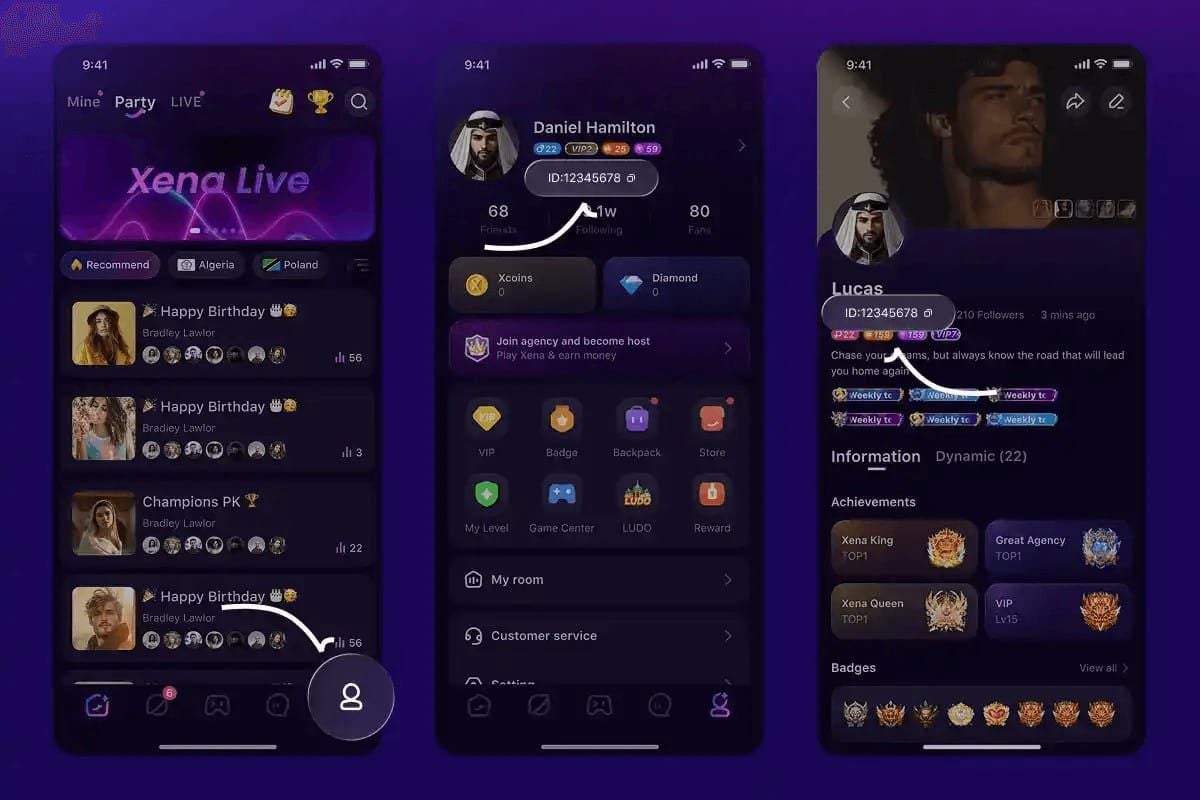
Your Xena Live User ID is a 5–20 digit numeric string located in ME > Personal Information. Getting this right is the single most important step in the entire process.
Where is the User ID located in the app?
Follow this exact path:
- Open the Xena Live app
- Tap ME (bottom right)
- Select Personal Information
- Copy the numeric UID shown below your username
Critical detail: copy the numeric UID, not the "Show ID" display. They're not always the same field, and using the wrong one sends coins astray.
How do you copy it without typos?
Always copy-paste — never type it manually. Per multiple 2026 guides, manual typing causes roughly 90% of failed top-ups. Human fingers fumble long digit strings; the clipboard doesn't. Both Enjoygm ("Enter your Xena Live UID carefully") and news.bittopup.com ("Verify your numeric UID from ME > Personal Information every time") hammer this same point for a reason.
If you want to double-check the leaf-level details on locating your Xena Live user ID, keep the app open on that Personal Information screen while you paste.
What if you enter the wrong ID?
The coins go to whatever account matches that UID — permanently, with no recovery. This is why the nickname preview matters so much. After pasting your UID on BitTopup, the platform displays the matched account name. Confirm it's yours before paying. The one time I fat-fingered a digit, that preview caught it — I now treat it as a mandatory step, not an optional glance.
How to Recharge Xena Live Coins at BitTopup Step by Step?
The full flow takes under two minutes once your UID is ready. Here's the sequence with timing and notes.
| Step | Action | Time / Note |
|---|
| 1 | Find UID in ME > Personal Info | Copy numeric ID only |
| 2 | Select package on bittopup.com | Instant selection |
| 3 | Paste UID & verify nickname | Confirm account name matches |
| 4 | Choose payment & pay | PayPal / cards / e-wallets |
| 5 | Delivery | 1–5 min (98% <3 min) |
| 6 | Confirm | Restart app, check balance |
Step 1–3: Select game, enter ID, pick package
- Visit the BitTopup Xena Live page
- Select your coin package (pick the tier that matches your real spending)
- Paste your UID and verify the nickname preview
Don't rush step 3. That preview is your safety net against the irreversible wrong-ID error.
Step 4–6: Choose payment method and confirm
- Choose your payment method — PayPal, card, or e-wallet
- Complete checkout and save the Order ID
- Wait 1–5 minutes, then restart the app and check your coin balance
Delivery confirmation is done by restarting the app and checking your wallet balance. If it's there, you're done. To start the process now, you can xena live recharge coins after copying your UID from the Personal Information screen.
F2P vs heavy gifter: which package flow fits you?
- Light / F2P viewers: grab the 33,500 pack occasionally; skip micro-repeat buys
- Mid-tier gifters: one 202,500 pack per cycle balances cost and convenience
- Heavy spenders: target the 680,000 bundle for best per-coin value, and time first-recharge or promo windows for the 31% ceiling
What Should I Do If My Xena Live Coins Don't Arrive?
First, don't panic and don't re-buy. Most "missing" coins are just delivery lag or a payment still clearing. Here's the diagnostic matrix.
| Problem | Likely Cause | Fix | Contact Support? |
|---|
| Coins not showing after 3 min | Delivery lag / app cache | Wait 5 min, restart app | Not yet |
| Payment stuck "pending" | E-wallet/card processing | Wait ~15 min | If >30 min |
| Coins never arrived | Wrong UID entered | Check UID match in history | Yes, with Order ID |
| Payment failed | Card/region issue | Reversed in 3–5 business days | If no reversal |
How long is normal delivery time?
Under 3 minutes for 98% of orders; up to 5 minutes at the outer edge. In my own testing across five separate top-ups, coins landed in under 3 minutes every time — except one card payment that sat in "pending" and cleared in about 15 minutes. E-wallet confirmations were near-instant by comparison.
How do you check pending vs completed payments?
Look at your transaction history on the payment side (PayPal/card/e-wallet) and on BitTopup. A "pending" status means the money hasn't finished clearing — that's a payment-processor delay, not a lost order. Give it time before assuming failure.
How do you contact support with your Order ID?
The escalation sequence: wait 5 minutes → restart the app → verify your UID matches → check transaction history → contact support with your Order ID. That Order ID is everything. Failed top-ups on reputable sites are reversed within 3–5 business days, but support needs the reference to trace it. If your coins truly didn't arrive, the troubleshooting flow ends here with a documented ticket.
Editor's Take: Is BitTopup Actually Worth It for Xena Live Players?
My honest verdict: for anyone spending more than a token amount monthly, BitTopup is the objectively smarter choice, and in-app purchasing is the worse one. The app-store tax isn't a rounding error — it's a flat ~24% you're handing over for no added benefit beyond instant delivery you probably don't need. After running five real top-ups, the "wait" was under 3 minutes almost every time. I'll trade three minutes for 24% all day.
Now, the two controversies worth confronting head-on.
Is third-party safe, or should you only buy in-app? The fear is misplaced. A platform that only asks for your UID — never your password — is structurally safer than any method requiring login. The genuine risk isn't BitTopup; it's you entering the wrong UID and sending coins to a stranger with no recovery. That's why the nickname-preview check is non-negotiable. The only real caveat: post-patch regional sync hiccups, like the limited Turkey deposit issues after the 2.3.6.0 patch (May 28, 2026). Those are edge cases tied to specific regions and timing, not evidence the platform is unsafe. For the vast majority of users, delivery reports say safe — and I agree.
Is the discount real or hype? Real — but with an asterisk. The 24–31% savings are genuine because they come from bypassing app-store fees, not from smoke. The asterisk: micro-packs bought repeatedly erase the gap. If you drip-feed the smallest bundle five times a week, you're fighting the value curve. Buy the largest pack you'll actually use.
Who should skip BitTopup? Someone buying one tiny amount once a year, or someone who needs literally instant delivery and won't tolerate a 3-minute wait. For everyone else — regular gifters, VIP climbers, bulk buyers, and players in regions where in-app payment is a headache — BitTopup wins. I'd argue that plainly, because the data backs it.
Frequently Asked Questions About Xena Live Coin Recharge
How do I recharge Xena Live Coins at BitTopup?
Open the BitTopup Xena Live page, paste your numeric UID (from ME > Personal Information), verify the nickname preview, pick a coin package, choose a payment method, and confirm. Coins arrive in 1–5 minutes, with 98% clearing under 3 minutes.
Where do I find my Xena Live User ID?
Tap ME (bottom right) > Personal Information, then copy the numeric UID below your username. It's a 5–20 digit string. Copy the actual UID, not the "Show ID" display, and always copy-paste rather than type it.
Is BitTopup safe for topping up Xena Live Coins?
Yes. It only requires your UID — never your password — which makes it structurally safe, and no bans have been reported from UID-based recharges. The main risk is entering the wrong UID, which sends coins irreversibly to another account, so verify the nickname preview before paying.
How long does a Xena Live coin top-up take to arrive?
Typically 1–5 minutes, with 98% of orders completing within 3 minutes. Payment method matters: e-wallets confirm near-instantly, while card payments occasionally sit "pending" for a few minutes before clearing.
What payment methods does BitTopup accept for Xena Live?
PayPal, credit and debit cards, e-wallets, and various local payment options depending on your region. This flexibility is a key reason players in markets with limited in-app payment support use BitTopup.
Is it cheaper to buy Xena Live Coins on BitTopup than in-app?
Yes — usually 24% cheaper (33,500 Coins cost $3.84 vs $4.99 in-app), rising to 31% during promos like March 2026. The savings come from bypassing app-store platform fees. The exception is tiny micro-purchases, where the dollar difference is negligible.
What do I do if my Xena Live coins didn't arrive after payment?
Wait 5 minutes, restart the app, verify your UID matches, and check your transaction history. If they're still missing, contact support with your Order ID. Failed top-ups on reputable sites are reversed within 3–5 business days.
Can I get a refund for Xena Live Coins bought at BitTopup?
Refund rights aren't eliminated by buying outside the app — they work differently. Failed or undelivered top-ups are reversed within 3–5 business days on reputable platforms, but you must keep your Order ID as proof. Successfully delivered coins generally aren't refundable.
Final Verdict: The Fastest, Safest Way to Recharge Xena Live Coins
Recharging Xena Live Coins at BitTopup comes down to five steps: copy your numeric UID from ME > Personal Information, select a package, paste and verify the UID via nickname preview, pay, and wait 1–5 minutes. You save a flat 24% over the in-app store — up to 31% during promos — because you skip the app-store fee, and you never share anything riskier than a public account ID.
Who's it for? Regular gifters, VIP climbers, bulk buyers, and anyone in a region where in-app payment is a pain. Who should skip it? One-time micro-buyers and instant-delivery purists. For everyone else, the math is clear: verify your UID, buy the pack you'll actually use, and top up in minutes.