Bigo Live Money Guide, October 2026: What 100 Diamonds Really Cost and How Beans Turn Into Cash
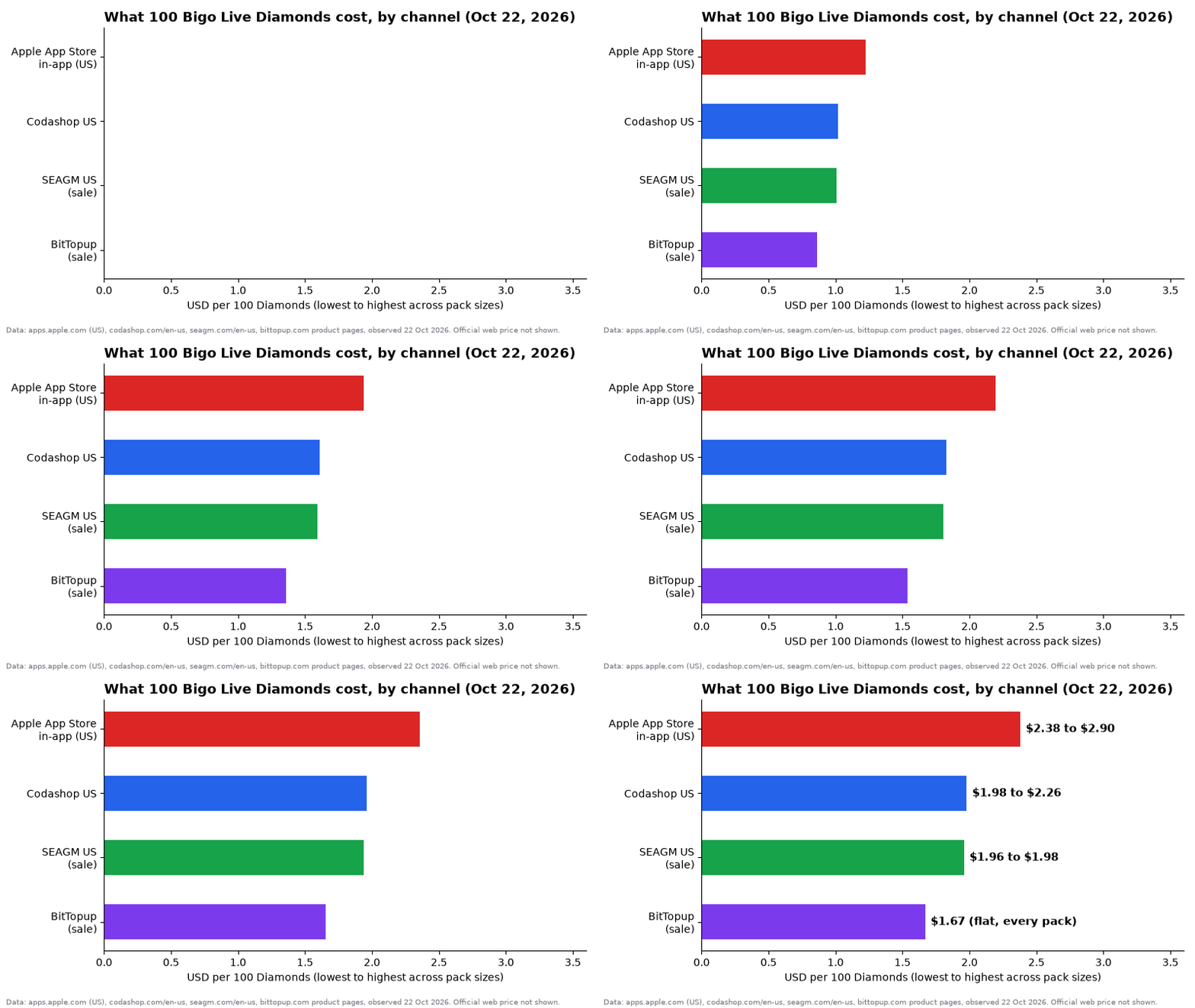
As of Oct 22, 2026, 100 Bigo Live Diamonds cost $2.38–$2.90 through Apple's in-app store, $1.98–$2.26 on Codashop, $1.96–$1.98 on SEAGM's sale and a flat $1.67 on BitTopup's Bigo Live diamonds top-up page. Gifts turn Diamonds into a host's Beans. Bigo still doesn't publish the Beans-to-cash rate or minimum.
Author: Sarah Mitchell Publish at: 2026/10/22 13 min read
As of Oct 22, 2026, 100 Bigo Live Diamonds cost $2.38–$2.90 through Apple's in-app store, $1.98–$2.26 on Codashop, $1.96–$1.98 on SEAGM's sale and a flat $1.67 on BitTopup's Bigo Live diamonds top-up page. Gifts turn Diamonds into a host's Beans. Bigo still doesn't publish the Beans-to-cash rate or minimum.
If you've been on Bigo a while, you know the problem: most "price lists" online are months old, unlabeled or written by the shop selling the Diamonds. So every number below was checked on Oct 22, 2026, it says where it came from, and anything unofficial is marked as unofficial.
Here's what this guide covers:
What Diamonds cost today, channel by channel, per 100.
How the Diamonds → gift → Beans → cash chain works, and which steps have an official number.
The questions players keep asking that no one has answered properly: cash-out rates, missing Diamonds, bans, scams, the iOS update gap and the Halloween event running right now.
Bigo Live Diamond prices by channel (checked Oct 22, 2026)
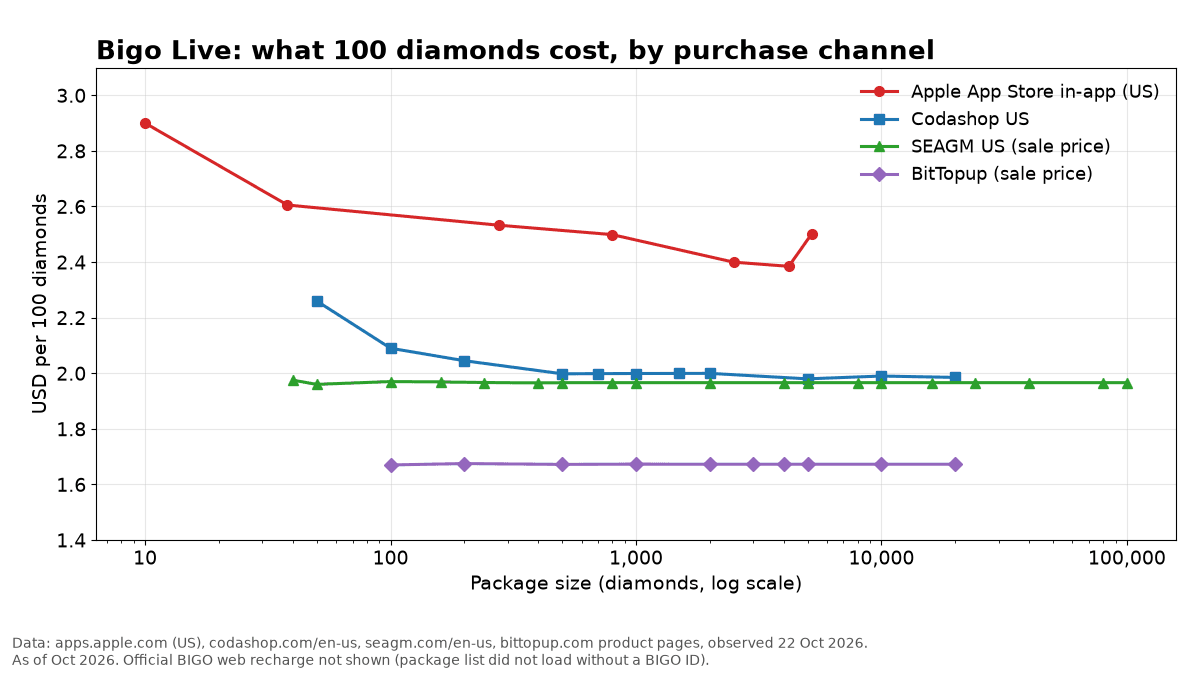
Quick summary: Apple's in-app store was the most expensive way to buy that I checked. The resellers charge one flat rate per Diamond whatever the pack size, so buying a bigger pack doesn't get you a better price there.
Small volume discount, but the 5,197 pack goes back up to $2.50
Codashop US
$1.98 (5,000 / 20,000)
$2.26 (50 for $1.13)
50 to 20,000
"From" price, lowest across payment methods
SEAGM US (13% off sale)
$1.96 (50 for $0.98)
$1.98 (40 for $0.79)
40 to 100,000
Pre-sale list price was $2.26 per 100
BitTopup (sale)
$1.67
$1.67
100 to 40,000
Shown as 42% off a $2.77 "was" price
Official web (mobile.bigo.tv)
Not recorded. The recharge page is a JavaScript app and showed no package list without a BIGO ID.
Same pack, side by side
Diamonds
App Store in-app
Codashop US
SEAGM US (sale)
BitTopup (sale)
100
—
$2.09
$1.97
$1.67
500
—
$9.99
$9.83
$8.36
800
$19.99
—
$15.73
—
1,000
—
$19.99
$19.66
$16.73
2,000
—
$39.99
$39.32
$33.45
5,000
—
$98.99
$98.30
$83.63
10,000
—
$198.99
$196.61
$167.26
"—" means that channel doesn't sell that exact pack. All prices are in USD, from each store's own page, observed Oct 22, 2026.
What the table actually tells you
Around $20 buys: 800 Diamonds in-app ($19.99), 1,000 on Codashop ($19.99), 1,000 on SEAGM ($19.66). On BitTopup, 1,000 cost $16.73.
BitTopup vs in-app: $1.67 per 100 is about 30% below Apple's best in-app rate ($2.38) and about 42% below its worst ($2.90). That's simple arithmetic on the listed prices.
Apple has extra SKUs: the US listing also shows 42 for $0.99, 297 for $6.99 and 850 for $19.99. These look like promo or variant items, so I left them out of the table. Check which one your phone actually shows.
Google Play: I didn't get a fresh capture today. A reseller (XPTopup) recorded 40 for $0.99, 285 for $6.99 and 816 for $19.99 in the Play wallet on July 20, 2026. That works out to roughly $2.45–$2.48 per 100, but it's a third-party capture and three months old.
Claims I would not trust yet
Claim seen online
Who says it
Status
Official web recharge = $1.96 per 100
Reseller blogs (TopUpList, July 15, 2026; others cite "public trackers")
Unofficial. I couldn't see it on Bigo's own page.
In-app = about $3.14 per 100
TopUpList, July 15, 2026
Not supported by today's App Store list ($2.38–$2.90)
+20% bonus on 500+ Diamonds on the web
Third parties only
Unofficial. Bigo's own "Recharge Bonus" page (updated Feb 4, 2026) gives no percentage.
One more honest note: different BitTopup pages don't all show the same number for 100 Diamonds. The live product page showed $1.67 today, while a price-comparison page (dated July 8, 2026) showed $1.86 and the homepage tile showed $1.98. What you pay is the price shown on the product page at checkout.
How to buy Diamonds without wasting money
Option A: inside the app (quickest, most expensive)
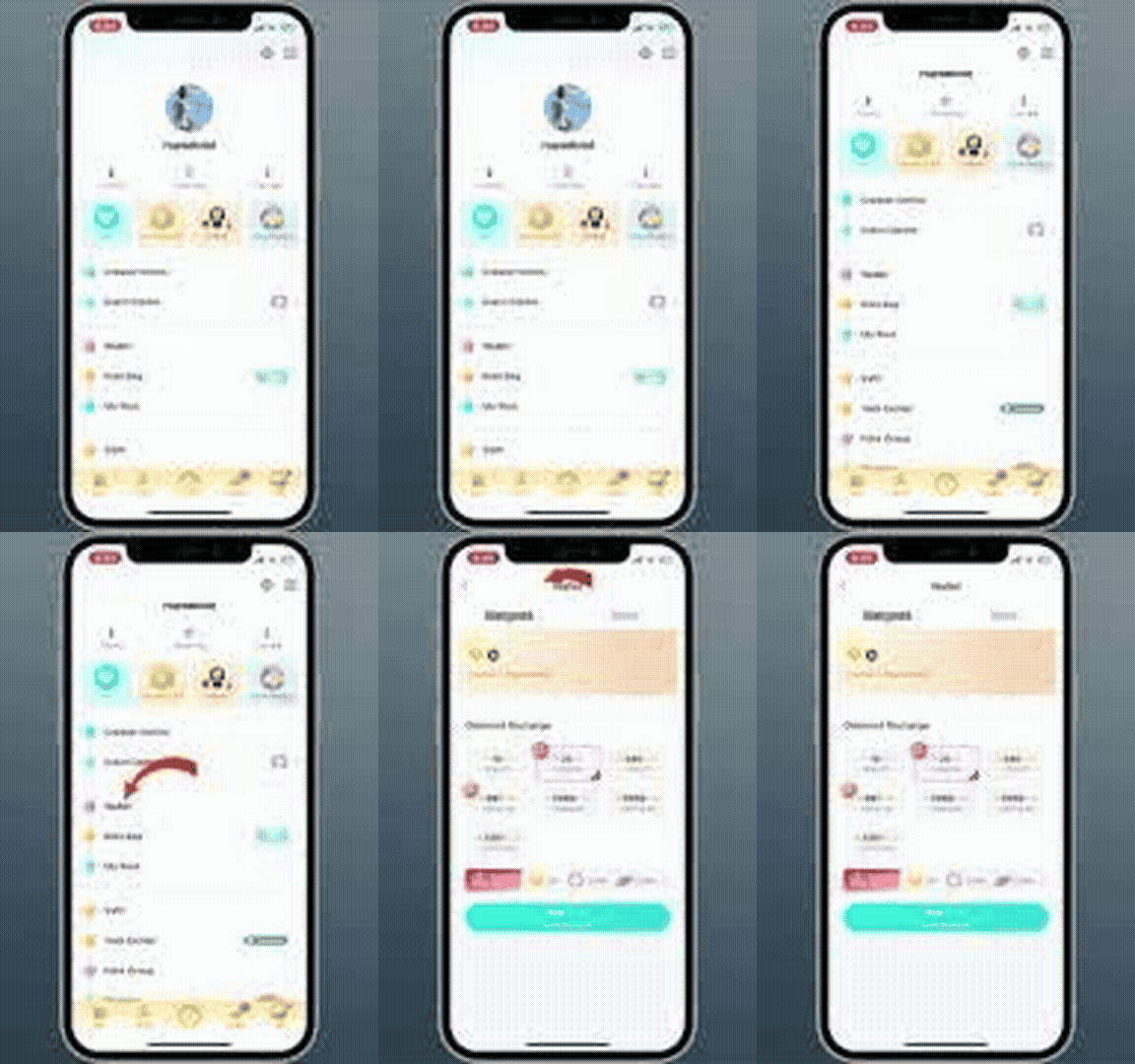
Open Bigo Live and tap Me (bottom right).
Tap Wallet, then Recharge on the Diamonds tab.
Pick a pack and confirm with Apple or Google.
Check your Diamond balance before you leave the screen.
Low-res preview made from the Wake&Tech tutorial below (0:20–0:29). It shows the path from your profile to the Diamond Recharge grid.
Option B: by BIGO ID (official web or a reseller)
In the app, tap Me and copy the numeric BIGO ID under your name. Use the ID, not your display name.
On Bigo's official page (mobile.bigo.tv), you can either log in or use Direct ID recharge. On a reseller, paste the ID into the order form.
Check the ID digit by digit. A typo sends the Diamonds to someone else, and a reseller can't pull them back after delivery.
Pay, and keep your order number and receipt until the Diamonds show up.
Never type your Bigo password or a one-time code into any recharge site. An ID is all a top-up needs.
If you'd rather buy Bigo diamonds cheaper than the in-app price, Option B is the way. Just remember that Bigo's own recharge blog says its link is "the only authorized platform operated by Bigo Technology", and Bigo hasn't published a list of authorized resellers.
The money path: Diamonds → gift → Beans → cash
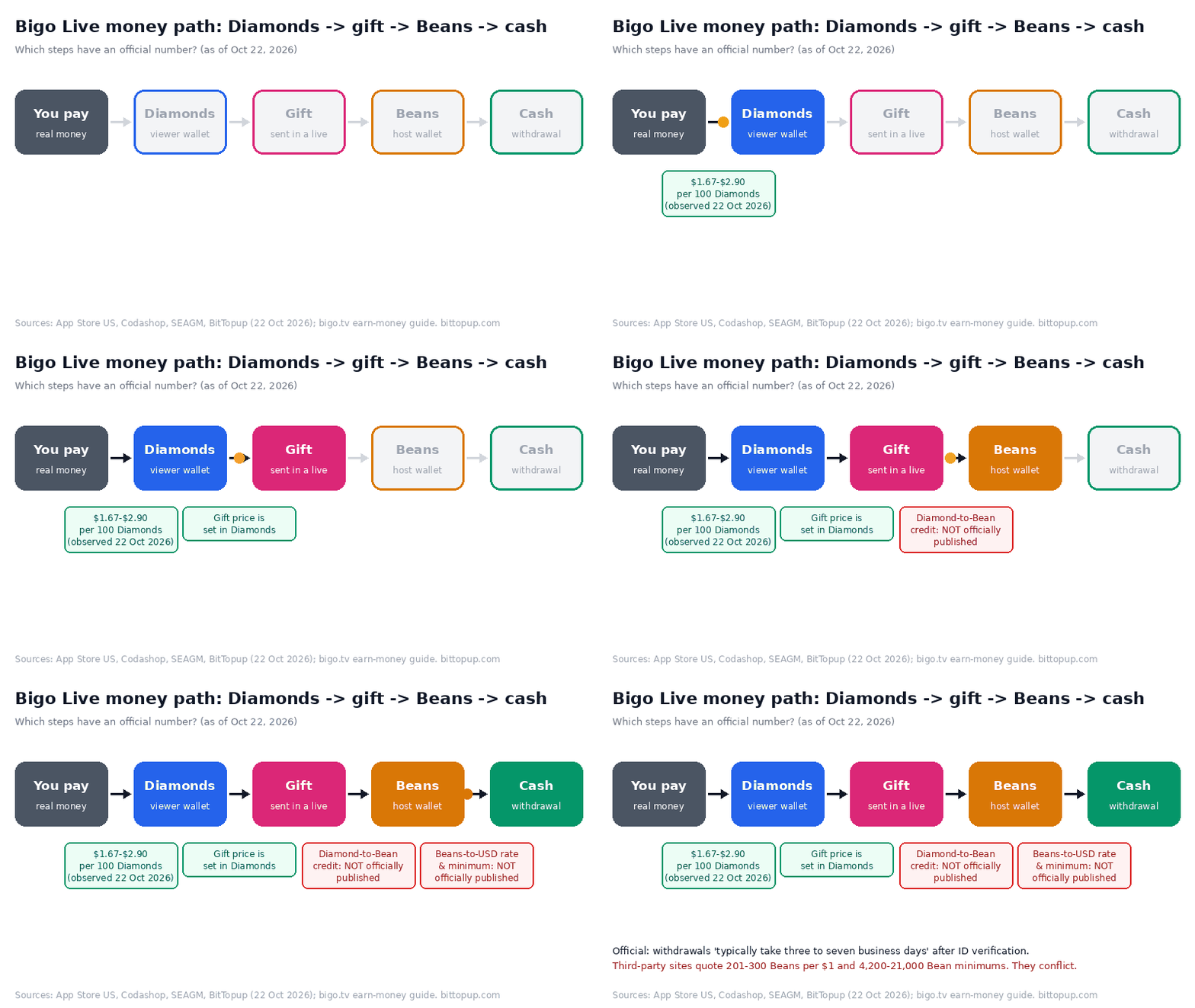
Here's the whole chain in one picture. Green boxes have a number you can check. Red boxes don't have an official one.
Step
What happens
Official number?
1. Pay → Diamonds
You buy Diamonds in-app, on the official web page or through a reseller
Store prices are public (see tables above)
2. Diamonds → gift
Every gift has a Diamond price in the gift panel
Only in the app. I found no dated official gift list. Third-party lists conflict (Rose = 1 Diamond in 2026 lists vs 30–50 in a 2025 BitTopup article).
3. Gift → host's Beans
The host receives Beans
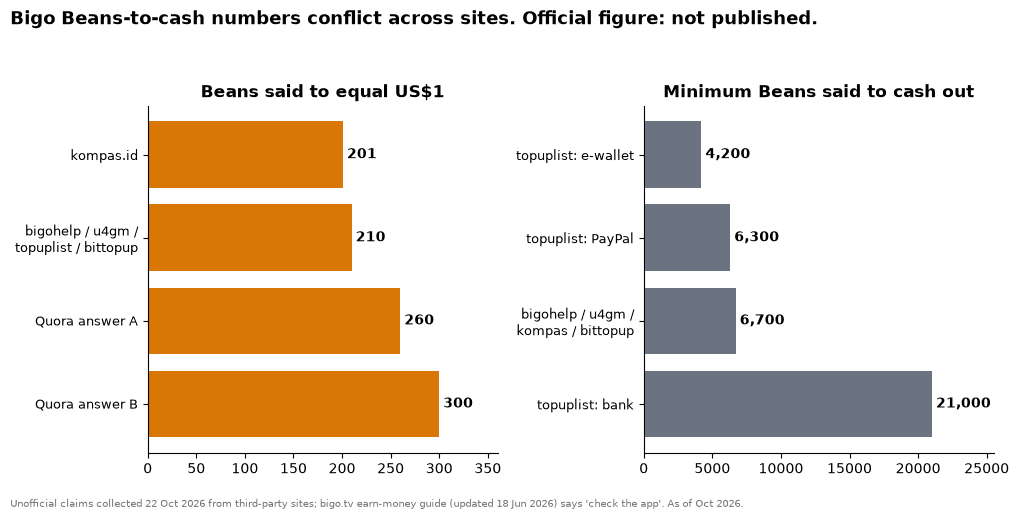
No. Claims online: 1:1 (BitTopup), about 80% (TopUpList), 0.5 (tiktonomics), "varies by server" (Buffget).
4. Beans → cash
Profile → Wallet → Withdraw, after identity verification
Rate and minimum: no ("check the app"). Timing: "typically three to seven business days".
4b. Beans → Diamonds
Exchange inside the Beans wallet (needs a Beans passcode, per bigohelp)
No. 3:1 (BitTopup) vs "8 Beans = 2 Diamonds", i.e. 4:1 (bigohelp).
Why those gaps matter: one gift, two answers
Say a viewer sends 1,000 Diamonds of gifts. Plug in different sites' numbers and you get different answers:
Assumption used
Beans the host gets
Cash at 210 Beans = $1
1 Diamond = 1 Bean (BitTopup article)
1,000
about $4.76
Diamonds × 0.5 (tiktonomics, Oct 11, 2026)
500
about $2.38
Meanwhile, the viewer paid $16.73 for 1,000 Diamonds on BitTopup, or $23.80–$29.00 at Apple's in-app per-100 rates. Neither line above is official. This is only to show how far apart the published claims are. The only number that counts is what your own Beans wallet shows.
One trend worth knowing: Bigo's parent company JOYY says AI-generated interactive gifts made up 34.3% of all virtual gift spending on Bigo Live in May 2026, up from 25% in October 2025.
Beans-to-cash rate and minimum withdrawal: the honest answer
This is the most-asked money question in the community, and the honest answer is that Bigo doesn't publish either number. Its official "How to Earn Money on BIGO LIVE" guide (updated June 18, 2026) tells you to "check the app for the current requirement, as it may update over time."
Question
Numbers seen online (all unofficial)
Official answer
How many Beans = $1?
210 (bigohelp, u4gm, TopUpList, BitTopup); 201 (kompas.id); 260 and 300 (two Quora answers); "200:1–230:1 by region" (TopUpList)
Complete identity verification first. Bigo requires it before any withdrawal.
Go to Profile → Wallet and open the Beans side.
Tap Withdraw and read the minimum shown on your screen. That's the real number for your account.
Link a payout method that's supported in your country or region.
Submit, then allow three to seven business days.
If you get stuck on verification, our separate Bigo Live Beans cashout walkthrough covers common errors. Treat any rate it quotes as unofficial, just like the ones above.
Two things trip people up:
Your Google wallet isn't your Bigo wallet. A viral September 2026 post (78.4K views) asked how to "grab" $253 that the poster thought was in their Google wallet. Beans sit in the Bigo app wallet and come out through Withdraw.
Official hosts are paid in Beans. Bigo's host page says official hosts "typically receive a salary after meeting their monthly gift and hour quotas, which is deposited as beans in their BIGO wallet", with earnings of about "$150 to over $10,000 per month". It doesn't give a payday or explain how to leave an agency.
Charged but no Diamonds? Follow the 30-minute rule
Wait 30 minutes after a successful payment. Bigo's support center uses that as the point to contact them.
Don't pay again. Bigo says: "Do not repeat the payment while the original transaction is still being reviewed."
Open Me → Help & Feedback → Feedback and pick the Recharge/Withdraw category.
Include your BIGO ID, order number, receipt, amount and payment time. You can attach up to 3 screenshots, each under 5MB.
Track the ticket under My Feedback. Bigo only says "Response times vary".
Bought through a reseller? Contact the seller first with your order number. BitTopup's product page, for example, says to contact support if 15 minutes pass with no Diamonds. For Google Play purchases, Google's own refund policy applies.
About "frozen" Diamonds: the community guidelines only say Bigo may freeze or deduct wallet balances for violations. I found no specific explanation for recharges that get frozen.
Locked out or banned: what's official and what isn't
Situation
Where to go
Official timeline
Can't log in, new phone or number, hacked
Login screen → Account Appeal (next to Forgot Password) → track in My Appeal
Reviewed "within three working days"
Can't reach the app at all
Email feedback@bigo.tv with your BIGO ID, country or region, time with time zone, and phone model
Not published
Ban or restriction
The Appeal button on that screen, or the official in-app message card
Not published
Flagged as underage by mistake
The general appeal routes above
No dedicated process published
"SVIP points can unban you": YouTube videos say this, but I found no official rule that says so.
Age checks are strict now: Bigo sets its minimum age at 18. Indonesia's PP Tunas child-safety rule took effect on March 28, 2026, and Bigo was named one of only two fully compliant platforms. Automated age detection like that means some adults will be wrongly flagged.
Lost Diamonds: Bigo doesn't say clearly whether a successful account appeal also restores your Diamonds.
Scams: "I can help you withdraw" and paid host applications
Under that viral September 2026 cash-out post, several accounts replied "I can help you withdraw it" and "DM me for a straight cash out". The post was also copied word for word by another account. That's the classic setup.
Red flag
What Bigo officially says
A stranger offers to cash out your Beans for you
Bigo will "never ask you to pay an individual… to release Diamonds, Beans, or a withdrawal"
Someone wants a fee to recover your account or lift a ban
Bigo never asks you to pay an individual to recover an account or remove a restriction
A "host application" with a fee (one non-bigo.tv site asks for $25 in USDT/USDC)
Official route is free: Me → Creator Center → Live Services → Apply for official hosts, or bigo.tv/apply-bigo-host-agency
Anyone asking for your password or verification code
Bigo never asks for them
Before you pick a seller, read up on where to buy Bigo Live diamonds safely. The rule is the same everywhere: an ID-only top-up is fine, and anything asking for your login isn't.
iOS vs Android: the update gap nobody mentions
iPhone (App Store)
Android (Google Play)
Latest update
Version 6.51.2, released July 23, 2026
Updated Oct 21, 2026 (version number not shown; APKMirror, a third-party site, lists 6.55.2 from Oct 19)
Release notes
"bug fixes and performance improvements"
"bug fixes and performance improvements"
Age rating
18+
Teen
Rating
4.5 (about 233K US ratings)
4.5 (6.51M reviews in the header; 6.38M in the ratings block)
Multi-guest room size in the store text
"Up to 8 people"
"Up to 11 friends" (bigo.tv says up to 12)
So for three months, iPhone users have been on a build from July while Android has kept updating. The same iOS 6.51.2 showed up in the US, Singapore, Indonesia, Saudi Arabia, UK, Japan and Vietnam stores. If a feature or event screen looks different on your iPhone than on a friend's Android, this gap is a likely reason. Bigo hasn't said why.
Happening now: BIGHOST NIGHT Halloween (Oct 17 – Nov 6, 2026)
What
Details
Event window
Oct 17 – Nov 6, 2026 (official X account). Shown as "Open now" on the App Store.
Categories
Costume & Makeup, Party & Chat, Singing & Dance
Ghost-hunting streams with SoloAmbush (Malaysia)
Oct 17, Oct 25, Oct 30, Nov 6, each at 23:30 MYT (UTC+8)
DINO Halloween Spooky Challenge
Announced Oct 19, 2026, 17:52 (UTC+8)
Google Play event card
"Events & offers – Begins on 10/30"
BIGOCON + BIGOWEEN 2026, Las Vegas
Teased Oct 15, 2026. Date not announced.
Here's my advice if you plan to spend during events. In past events the rules were tied to specific Diamond amounts. On Valentine's 2026, gifts of 100+ Diamonds triggered DINO blind boxes. At Christmas and New Year, 1 Diamond equaled 1 draw point. I couldn't find published reward rules for this Halloween event. Read the event page in your app before you recharge for it, and set your budget first.
Is Bigo still a healthy platform to spend on?
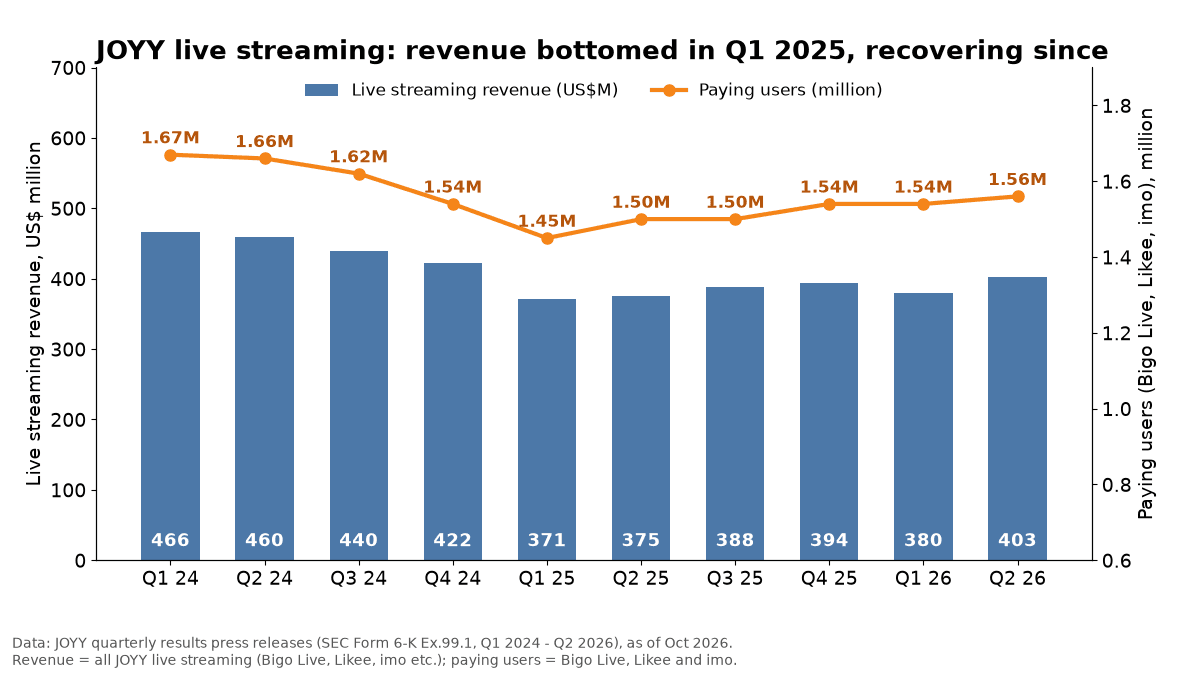
Bigo Live doesn't report its own revenue, but JOYY's reports give a decent proxy:
Live-streaming revenue fell from $466.4M (Q1 2024) to $371.3M (Q1 2025), then recovered to $402.6M in Q2 2026, up 7.3% year over year.
Paying users (Bigo Live, Likee and imo combined) went from 1.67M to 1.45M, then back to 1.56M. ARPPU in Q2 2026 was $220.5.
Average daily active streamers on Bigo Live rose 4.4% quarter over quarter in Q2 2026.
The Q3 2026 results weren't out as of Oct 22, 2026. JOYY guided total revenue of $602M–$622M.
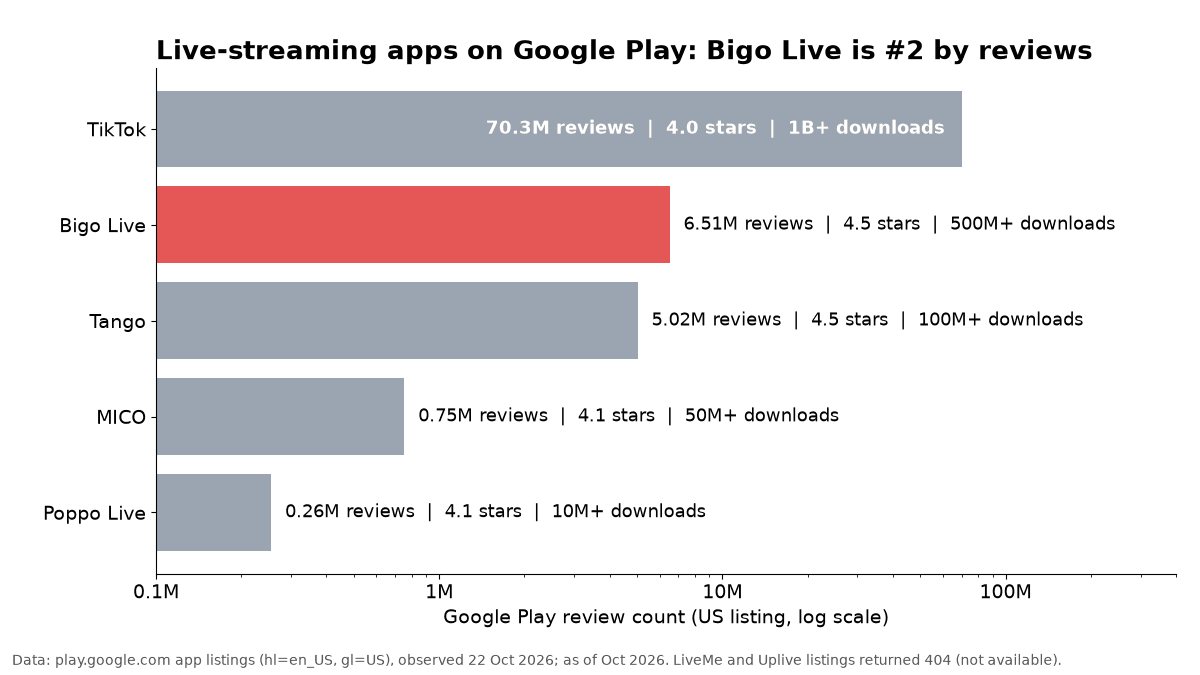
On Google Play, Bigo Live has 500M+ downloads and 6.51M reviews. Among the dedicated live-streaming apps I checked, it's the only one past 500M downloads. LiveMe's and Uplive's US Play listings returned 404 errors on Oct 22.
Quick answers
Do Bigo Diamonds expire?
Not settled. One guide says they don't expire, and an older BitTopup article says they're lost after 12+ months of inactivity. I found no official rule.
Can I get a refund on Diamonds?
I found no official refund policy for Diamonds or gifts. VIP bought with Diamonds is explicitly non-refundable under Bigo's VIP terms. For store purchases, the App Store or Google Play refund rules apply.
Is the web cheaper than in-app?
Every reseller I checked on Oct 22, 2026 was cheaper per 100 than Apple's in-app list ($1.67–$2.26 vs $2.38–$2.90). Bigo also says its official web recharge costs less than in-app because it "bypasses app store fees", but its prices weren't visible to me without a BIGO ID.
Can I turn Beans back into Diamonds?
Yes, there's an exchange option in the Beans wallet. The rate isn't official, and sites disagree: 3:1 vs 4:1.
All prices, versions and dates in this guide are as of Oct 22, 2026 (UTC+8). Bigo changes packs and promos often, so the number on your checkout screen is the one that counts.