



SUGO Coins Top Up: Voice Chat Rooms and Live PK Battles
SUGO is a popular voice-based social and live party platform where users join interactive voice chat rooms, participate in live audio PK battles, play casual group games, and connect with global hosts. SUGO Coins act as the official premium virtual currency within the app. With a coin balance, you can send animated gifts, support your favorite broadcasters, secure premium microphone seats, and raise your personal Wealth Level on your profile.
BitTopup provides a direct SUGO Coins recharge service that sends coins straight to your account using only your numeric User Account ID. There is no need to share account passwords or log in through third-party services. Select your preferred coin bundle, enter your ID, and complete payment to refresh your in-app balance.
What Are SUGO Coins and What Can You Use Them For?
SUGO Coins power all premium interactive features across the SUGO ecosystem. When you top up your coin balance, you unlock key communication and social tools:
- Virtual Gift Giving: Send dynamic, animated virtual gifts—ranging from small tokens like flowers and hearts to premium items such as supercars, yachts, and royal crowns—to room owners and microphone speakers.
- Live Stream PK Battles: Back your favorite creator during competitive timed PK battles against other hosts. Dropping gifts directly increases their battle points and helps them win rounds.
- Wealth Level and Profile Badges: Spending coins advances your profile's Wealth Level. Higher levels display distinct entry effects, special chat bubbles, customized avatar frames, and high-visibility status badges whenever you enter a room.
- Exclusive Party Room Features: Unlock VIP room privileges, open mystery gift boxes, pin special broadcast messages, and bid for priority seating in crowded audio rooms.
SUGO Coins vs Host Beans: Understanding App Currencies
SUGO uses a dual-currency ecosystem to distinguish between buyer spending and host earnings. Understanding how these currencies interact prevents confusion during checkout.
| Currency | Purpose | How to Obtain | Can It Be Withdrawn? |
|---|---|---|---|
| SUGO Coins | Consumer currency used to purchase gifts, unlock badges, and tip creators | Recharged online via BitTopup or in-app payment | No. Coins are non-withdrawable consumer tokens. |
| Host Beans / Diamonds | Creator earnings received when viewers send gifts | Received automatically when a user sends a coin-based gift | Yes. Qualified creators can convert and cash out beans. |
Viewers purchase SUGO Coins to participate in room activities and support creators. When a host receives a gift purchased with coins, the platform converts that gift value into Beans on the creator's backend balance.
Step-by-Step Guide: How to Recharge SUGO Coins Online
Recharging your SUGO account on BitTopup takes only a couple of minutes. Follow these direct steps:
- Select the Coin Package: Choose the SUGO Coins package that meets your needs from the available denominations.
- Enter Your User Account ID: In the User Account field, paste your exact numeric SUGO ID.
- Review Order Pricing: Check the live total displayed at checkout. Final prices and regional processing options are clearly shown prior to payment.
- Complete the Transaction: Choose your preferred payment method and confirm the payment.
- Check Your In-App Balance: Open the SUGO app, navigate to your profile, and check your updated coin total.
How to Find Your SUGO User Account (UID) in the App
To ensure your coins are delivered to the correct account, you must provide your permanent numeric User Account ID rather than your public display nickname. Nicknames can contain special characters, spaces, and frequent changes, while your numeric ID remains permanent and unique.
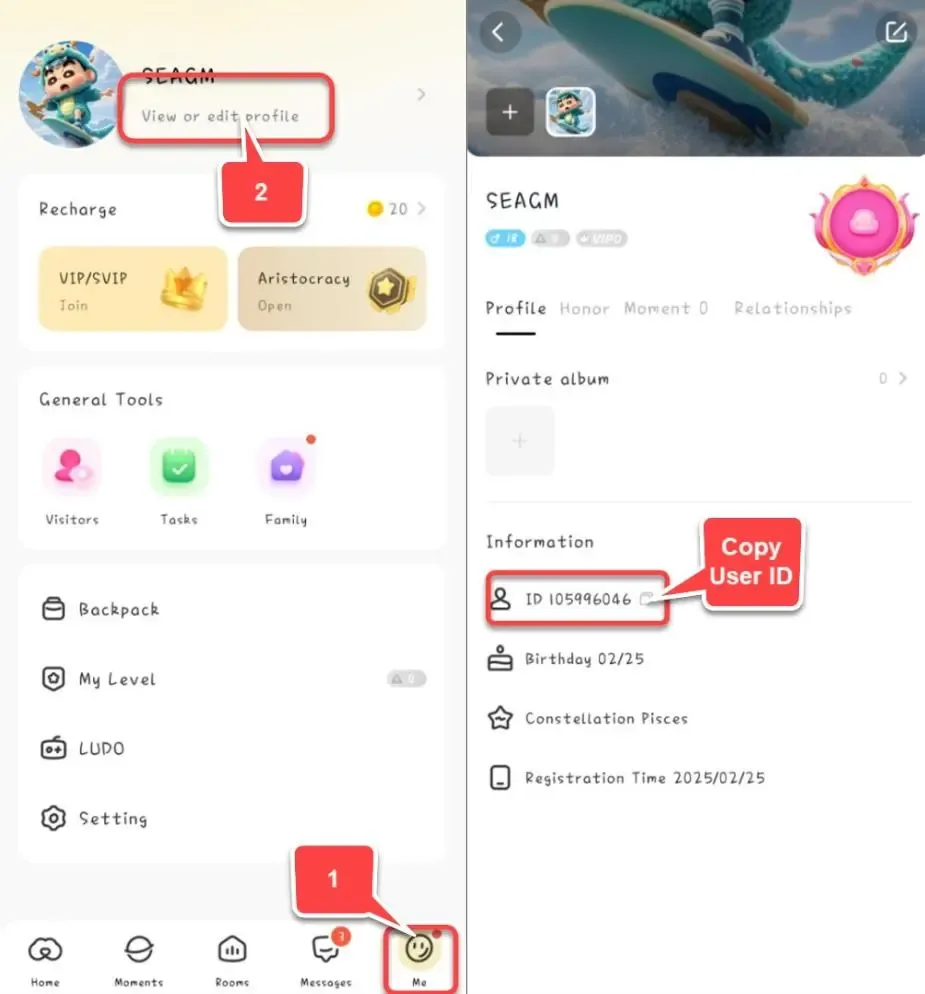
- Open the SUGO app on your mobile device.
- Tap the Me / Profile icon located at the bottom-right corner of the main screen.
- Locate your profile avatar at the top of the screen.
- Below your display nickname, you will see a numeric code labeled ID: XXXXXXX.
- Tap the small Copy icon next to the number to copy the exact digit string to your clipboard.
- Paste this number into the User Account input field on BitTopup.
Regional Account Compatibility: Ensure your SUGO account is registered on supported global servers. If you are recharging for an account registered in a distinct regional jurisdiction, double-check that the numeric ID is active and not restricted by local compliance rules.
Why Recharge SUGO Coins on BitTopup
BitTopup offers a secure, user-focused platform for your voice chat top-ups:
- 100% Password-Free Process: We never request your login credentials, email passwords, or SMS verification codes. Your top-up is processed purely through your public numeric UID.
- Clear Live Checkout: Current bundle rates and localized payment options are clearly presented on the product page, eliminating hidden processing surprises.
- Global Accessibility: Whether you connect from Southeast Asia, the Middle East, Europe, or the Americas, our multi-currency checkout system handles international transactions efficiently.
- Responsive Support: Our dedicated customer service team is available around the clock to investigate delayed orders, verify UID formats, and assist with transaction inquiries.
Safe SUGO Top-Up: Protecting Your Account with UID-Only Checkout
Protecting your social and gaming accounts requires strict security practices. Some unauthorized sellers demand full account access, asking for login credentials or SMS one-time passwords (OTP). Sharing login credentials compromises your personal chats, linked payment methods, and account ownership.
BitTopup uses UID direct-crediting. Because the numeric ID is public information visible on your SUGO profile card, you can recharge your balance—or top up coins for friends and favorite hosts—without exposing your private credentials to anyone.
Troubleshooting Common SUGO Recharge and Delivery Issues
If your coins do not reflect on your balance immediately after completing payment, try the following troubleshooting steps:
- Perform an In-App Cache Refresh: Open the SUGO app, go to Me > Settings > Clear Cache, then fully close the app and restart it. This forces the client to pull the latest balance from the central server.
- Verify UID Accuracy: Check your BitTopup order confirmation receipt. Compare the submitted User Account number against the ID on your SUGO profile. If you mistyped a digit, contact customer support immediately with your transaction details.
- Check Server Load Times: During large platform PK events or holiday room celebrations, high traffic may cause brief delivery queues. Allow a few moments for the system to process high-volume batches.
- Contact Support with Order Number: If your balance does not update after clearing the cache, provide your BitTopup Order ID and a screenshot of your in-app profile ID to our 24/7 support team for fast resolution.
Frequently Asked Questions
Can I recharge my SUGO app online?
Yes. You can recharge SUGO Coins online through BitTopup using your numeric User Account ID. The system credits the coins directly to your in-app balance without requiring you to use mobile app store payment mechanisms.
How do I recharge SUGO coins using my User Account ID?
Select your desired coin package on BitTopup, paste your numeric User ID into the User Account field, proceed through the checkout system, and complete payment. The coins will be deposited directly to that account.
Where can I find my SUGO numeric User ID?
Open the SUGO application, select the "Me" tab in the lower navigation bar, and look under your profile avatar and nickname. You will see "ID:" followed by a series of digits with a copy button next to it.
Do I need to share my SUGO password or OTP to recharge?
No. Recharging through BitTopup is completely password-free. You only provide your public numeric User ID. Never share your password, phone verification codes, or login tokens with anyone.
Why have my SUGO Coins not arrived after completing payment?
Delays are usually caused by an outdated app cache or temporary server traffic. Fully close and restart your SUGO app, or clear the app cache in settings. If the coins do not display, verify the submitted UID on your receipt and contact BitTopup customer support.
Can I recharge SUGO Coins for a friend or live host?
Yes. Because the recharge system only requires the numeric User Account ID, you can enter any valid user's UID at checkout to send coins directly to their account as a gift or event boost.