


Free Fire Diamonds EU TR Top Up: How to Recharge with Player ID
Topping up your Garena Free Fire account on European (EU) and Turkey (TR) servers is direct and straightforward on BitTopup. By using your in-game numeric Player ID, diamonds credit directly to your game balance without requiring account logins, third-party credentials, or manual voucher redemptions.
Step-by-Step Recharge Guide
- Select Your Diamond Denomination: Review the available diamond packages on the BitTopup product catalog. Diamond amounts and live regional pricing are displayed directly on the checkout screen.
- Enter Your Free Fire Player ID: Input your exact numeric UID into the designated field. Double-check your numbers to ensure the recharge reaches the correct profile.
- Complete the Checkout Process: Choose your preferred payment method from the available options and confirm your transaction.
- Check Your In-Game Balance: Open Free Fire on your device. Your newly purchased diamonds will reflect in your top-bar balance right away.
How to Find Your Free Fire Player ID in the Profile Menu
Your Player ID (UID) is a unique string of numbers assigned to your Free Fire account. You do not need to share your username or social login details—only this numeric ID.
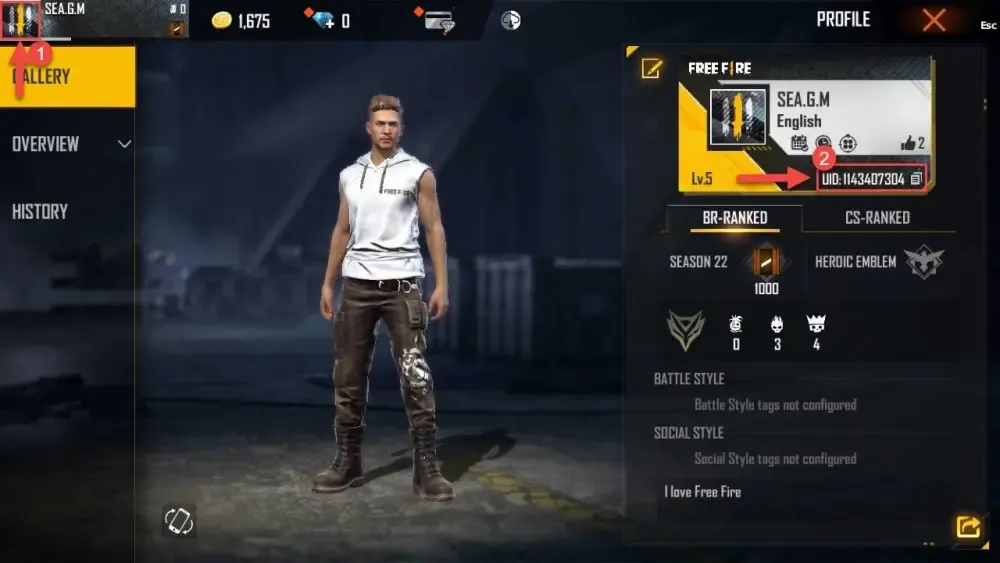
Locating Your UID Step-by-Step
- Launch the Free Fire application on your mobile device.
- Tap your profile banner or avatar icon located in the upper-left corner of the main lobby.
- Select the Basic tab in your profile menu.
- Locate your numeric UID displayed beneath your character nickname.
- Tap the Copy icon directly next to your UID string to copy it to your clipboard.
- Paste the copied ID into the Player ID input field on BitTopup.
Server Region Verification: Ensuring Account Compatibility for EU and TR
Free Fire operates with strict regional server partitions. Accounts registered in European countries or Turkey belong to the EU and TR server clusters. Recharging through this product page is specifically configured for accounts bound to these regions.
How to Confirm Your Account Server Region
- Open Free Fire and access the Settings menu via the gear icon in the top-right corner.
- On the Basic settings tab, look at the bottom-left corner of the screen.
- Confirm that your region displays Europe or Turkey.
- If your account belongs to another regional zone (such as LATAM, Brazil, or Southeast Asia), purchase diamonds from the dedicated catalog for that server to avoid delivery failure.
Direct Player ID Recharge vs Redeem Code Vouchers: Key Differences
Understanding how direct top-ups differ from traditional digital gift vouchers helps you choose the fastest and safest method to reload your balance.
| Feature | Direct Player ID Top-Up (BitTopup) | Digital Voucher Redeem Codes |
|---|---|---|
| Delivery Method | Credited directly into your in-game diamond wallet | 12-to-16 character alphanumeric code sent to your email |
| Action Required | None after payment; automated processing | Manual entry on external redemption portals |
| Account Security | Requires UID only; zero passwords requested | Requires external website login with linked game accounts |
| Input Error Risk | Minimal (verify numeric UID once during checkout) | Moderate (typing errors with complex alphanumeric strings) |
| Processing Speed | Instant account update upon checkout completion | Dependent on manual redemption steps and server verification |
What You Can Unlock with Free Fire Diamonds: Characters, Skins, and Luck Royale
Diamonds are the premium currency in Free Fire, enabling you to acquire competitive assets, cosmetic customizations, and seasonal progression items.
- Booyah Pass & Elite Upgrades: Unlock premium seasonal reward tracks containing exclusive outfits, weapon finishes, vehicle skins, and theme crates.
- Character Abilities & Bundles: Access active and passive characters, skill slots, and signature bundle outfits to customize your tactical loadout.
- Luck Royale Draws: Participate in the Diamond Royale, Weapon Royale, and Incubator events to roll for legendary weapon blueprints, evolving gun skins, and rare costume sets.
- Armory & Customization: Purchase Gloo Wall designs, weapon crates with stat attributes, dynamic lobby emotes, and companion pets with unique tactical abilities.
- In-Game Consumables: Secure Name Change Cards, Custom Room Cards, and level-up resource cards to manage your guild and profile presence.
Safe Top-Up Best Practices: Protecting Your Account Without Sharing Passwords
Account safety is essential when purchasing in-game currency. Following standard security guidelines protects your progress and personal data.
- Never Provide Account Passwords: Legitimate direct recharges only require your numeric Player ID. BitTopup will never ask for your Google, Facebook, Apple ID, VK, or Twitter login passwords.
- Avoid Unauthorized Diamond Generators: Websites or software claiming to generate free diamonds are scams that compromise account credentials or trigger permanent game bans under Garena's anti-cheat terms.
- Verify Your UID Before Payment: Ensure every digit of your UID is accurate before submitting payment. Direct recharges process instantly to the submitted ID, meaning typos can send funds to an incorrect account.
- Keep Transaction Records: Save your BitTopup Order ID and transaction receipts for reference whenever contacting customer support.
Why Choose BitTopup for Free Fire EU and TR Top-Ups
BitTopup provides a dedicated platform for EU and Turkey Free Fire players looking for reliable diamond delivery:
- Direct UID Processing: Top up instantly without sharing sensitive login details or managing external voucher websites.
- Server-Matched Compatibility: Tailored specifically for the EU and TR server architecture to ensure smooth delivery without regional lockouts.
- Transparent Pricing: Check current diamond packages and live checkout prices clearly before finalizing your order.
- Responsive Customer Support: Get assistance from our dedicated team if you have questions regarding your order status or UID entry.
Troubleshooting Common Diamond Recharge and Delivery Questions
If your diamonds do not reflect in your balance immediately after completing your order, follow these troubleshooting steps:
- Restart the Game App: Completely close Free Fire from your device's background app switcher and relaunch it. This forces the client to sync with the regional server and update your currency balance.
- Verify Order Status on BitTopup: Check your order history on BitTopup to confirm the transaction status shows as completed.
- Check In-Game Mail: Certain bonus diamonds, event top-up rewards, or promotional items may be delivered to your in-game mailbox rather than your top-bar balance.
- Confirm Your Submitted UID: Review your order details to ensure the Player ID provided matches your current profile.
- Contact Support: If your balance does not update after restarting, reach out to BitTopup customer support with your Order ID and Player ID for rapid resolution.
Frequently Asked Questions About Free Fire EU and TR Diamond Top-Ups
How to recharge diamonds in Free Fire?
To recharge diamonds, select your diamond package on BitTopup, input your numeric Free Fire Player ID, and complete your purchase. The diamonds will credit directly to your in-game balance without needing manual redemption steps.
Where can I buy Free Fire Diamonds for EU and TR servers?
You can purchase diamonds directly on BitTopup. Select the Free Fire Diamonds EU + TR catalog item to ensure your purchase matches your regional server.
How do I find my Free Fire Player ID for top-up?
Tap your profile banner in the top-left corner of the Free Fire main lobby. Your numeric Player ID (UID) is located in the Basic tab directly underneath your in-game name. Tap the copy icon next to it to copy your ID.
Do I need to share my Garena password to recharge Free Fire diamonds?
No. Recharging via BitTopup requires only your public numeric Player ID. You should never share your game passwords, social logins, or verification codes.
Can I recharge an EU or Turkey server account from another region?
Yes, as long as the recipient account is registered on the EU or Turkey server cluster and you input the correct EU/TR Player ID during checkout on BitTopup.
How long does it take to receive Free Fire diamonds after purchase?
Diamonds are processed and delivered directly to your account immediately after payment confirmation. Once the transaction completes, reopen your game client to see your updated balance.
What should I do if my Free Fire diamonds are not credited immediately?
First, restart your Free Fire application to refresh your account data. If your diamonds are still not visible, verify your transaction status in your BitTopup account and reach out to customer support with your Order ID.