

MIKA Chat Coins Top Up: Fast, Safe & Direct Recharge
MIKA Chat is a popular interactive social and live-streaming platform where users connect through real-time video, voice chat rooms, and dynamic creator broadcasts. Coins serve as the primary in-app currency, giving you full access to premium social interactions, animated gifting, and special room features.
BitTopup provides a direct MIKA Chat Coins top up service designed for speed, safety, and convenience. By processing orders directly through your unique Mika ID, you can top up your balance without sharing sensitive login credentials or personal passwords. Select your package, enter your ID, complete your purchase, and receive your coins directly in your account.
What Are MIKA Chat Coins and How Are They Used?
MIKA Chat Coins power every premium interaction across the MIKA platform. Whether you want to support your favorite broadcaster or stand out in high-traffic voice rooms, holding a balance of coins unlocks several core features:
- Virtual Gifting: Send dynamic, animated gifts to live hosts during their streams. Gifts range from entry-level reactions to exclusive VIP effects that rank you on the room’s top contributor leaderboard.
- Interactive Live Battles (PK): Help your favorite streamers win competitive live PK challenges by sending high-value gifts during battle rounds.
- 1-on-1 Video & Audio Calls: Connect directly with creators and friends through private matching and direct calling features that require coins per minute.
- Room Effects and Badges: Purchase exclusive entrance effects, speech bubbles, and special profile badges that display your status whenever you enter a public chat room.
- VIP Privileges: Unlock premium membership levels within the app to gain special visibility, priority chat placement, and dedicated profile customization.
Where to Find Your Mika ID in the MIKA App
To ensure your coins are delivered to the right account, you must provide your exact Mika ID. This numeric identifier is assigned to your profile upon registration and remains permanent even if you change your display name.
Follow these steps to locate your Mika ID:
- Open the MIKA app on your mobile device and log in to your account.
- Tap the Profile or Me icon located in the bottom right corner of the navigation bar.
- Locate your profile avatar at the top of the screen.
- Directly below your nickname, you will see your Mika ID (a series of numbers).
- Tap the Copy icon next to the ID number to copy it directly to your clipboard.
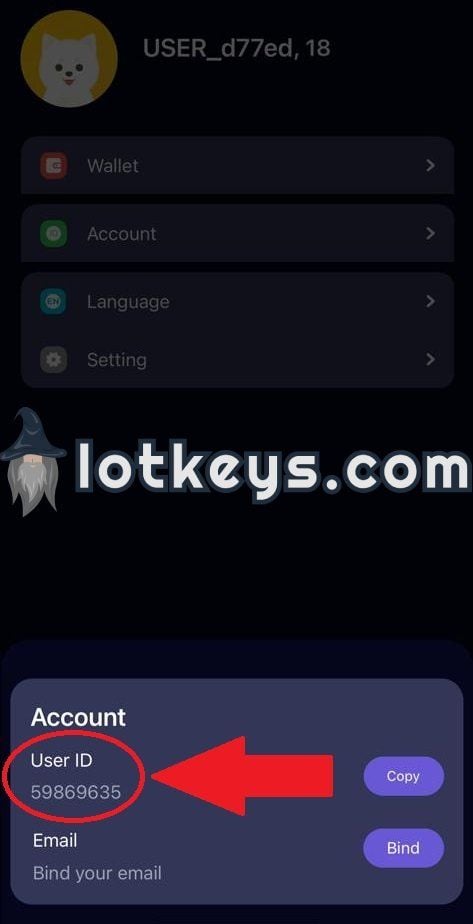
Paste this number into the Mika ID field on BitTopup to prevent manual entry errors.
How to Recharge MIKA Chat Coins Step-by-Step
To complete a MIKA Chat Coins recharge on BitTopup, follow this simple checkout procedure:
- Select Your Coin Package: Browse the available denominations and choose the package that fits your gifting and chatting needs.
- Enter Your Account Details: Paste your numeric Mika ID into the designated account field. Double-check the number to ensure accuracy.
- Select Your Payment Method: Choose from a wide selection of regional and global payment options, including digital wallets, credit/debit cards, and instant bank transfers.
- Confirm and Pay: Review your order summary and proceed through the secure checkout gateway.
- Check Your In-App Balance: Once payment is processed, open the MIKA app, navigate to your wallet or profile page, and verify your updated coin balance.
Supported MIKA Chat Coin Packages and Values
BitTopup offers multiple denominations suitable for casual chatters, regular gifters, and high-tier streamer supporters. Pricing varies by region and currency; check the live selector above for current real-time rates.
| Package Tier | Typical Coin Volume | Recommended Use Case |
|---|---|---|
| Starter Tier | Small coin bundles | Casual chat rooms, basic entry gifts, quick direct messages |
| Popular Tier | Medium coin bundles | Regular live stream support, animated gifts, group audio rooms |
| Supporter Tier | Large coin bundles | PK battles, private 1-on-1 video calls, daily room events |
| Elite / VIP Tier | Bulk coin packages | Leaderboard ranking, major streamer sponsorship, luxury virtual gifts |
All package prices and promotional rates are updated live on the checkout panel above.
Safe & Secure Top-Up: Why You Only Need Your Mika ID
Account safety is a top priority when purchasing in-app currencies online. BitTopup utilizes direct ID-based fulfillment, offering significant security advantages over third-party account logins:
- Zero Password Risk: You never need to provide your MIKA account password, email credentials, phone verification codes, or linked social media details.
- No Account Sharing: Your account remains strictly in your hands at all times, removing the risk of unauthorized access or compromised personal data.
- Secure Payment Processing: All transactions are handled through encrypted payment channels that protect your financial information.
- Gift Directly to Others: Because only the Mika ID is required, you can easily top up coins for friends, creators, or family members simply by entering their ID at checkout.
- Dedicated Support: BitTopup maintains 24/7 customer service to assist with order tracking, verification questions, and payment queries.
Frequently Asked Questions About MIKA Chat Coin Recharge
How do I find my Mika ID to recharge coins?
Open the MIKA app, tap the Me / Profile icon in the bottom right corner, and look below your profile picture and display name. Your numeric ID is displayed there with a small copy icon next to it. Tap the icon to copy the ID directly to your clipboard.
How long does it take for MIKA Chat Coins to be credited to my account?
Most orders are credited to your MIKA account immediately after your payment is confirmed by the payment gateway. In rare instances of network delays, delivery may take a few minutes. Refreshing your profile or restarting the MIKA app will update your balance.
Do I need to provide my MIKA Chat account password to recharge?
No. BitTopup requires only your public Mika ID to process the top-up. Never share your account password, SMS verification codes, or personal login information with anyone.
What can I do with MIKA Chat Coins in the app?
Coins can be spent on sending virtual animated gifts to broadcasters, participating in live PK battles, joining private voice or 1-on-1 video chats, purchasing special chat bubble styles, unlocking entrance effects, and upgrading your profile status.
Can I recharge MIKA Chat Coins for a friend or another user?
Yes. Enter the recipient's Mika ID in the account field instead of your own. Once the payment is complete, the coins will be credited directly to their MIKA balance.
What should I do if my MIKA Chat Coins do not appear after payment?
First, force-close the MIKA app and reopen it to refresh your wallet data. If the balance still has not updated after 10–15 minutes, check your BitTopup order history to ensure the transaction shows as completed. If the status is completed but coins are missing, contact the BitTopup 24/7 customer support team with your Order ID and the Mika ID entered during checkout for immediate assistance.