


1Star Chat Top Up: In-App Coins and Voice Party Features
1Star Chat is a global social voice platform where users connect in real-time audio rooms, host interactive party clubs, and participate in lively multiplayer casual games. In-app coins serve as the primary virtual currency across the entire 1Star Chat ecosystem. Having an active coin balance allows you to fully engage with room hosts, send animated gifts, and access exclusive community perks.
When you top up 1Star Chat coins, you gain direct access to premium interaction tools. Whether you want to support your favorite audio streamer, celebrate a friend's milestone on stage, or equip rare profile decorations, recharging your coins gives you the freedom to customize your social presence.
BitTopup provides a direct, secure reload system tailored for global 1Star Chat users. By using only your public numerical Player ID, you can top up your account balance without sharing passwords or sensitive login credentials.
How to Recharge 1Star Chat on BitTopup Using Player ID
Recharging your 1Star Chat account on BitTopup is quick and straightforward. Follow these steps to complete your top-up:
- Select the Coin Package: Choose the desired amount of 1Star Chat coins from the available catalog on this page.
- Input Your Player ID: Enter your numerical 1Star Chat Player ID into the required field. Ensure every digit matches your in-app profile.
- Review Your Selection: Verify the coin denomination and check that the entered account ID is accurate.
- Proceed to Checkout: Select your preferred payment method from the secure local and international options displayed on the payment screen.
- Complete the Transaction: Follow the on-screen instructions to finalize payment. Once confirmed, your 1Star Chat coins will be credited directly to your account.
| Order Step | Action Required | Key Verification |
|---|---|---|
| 1. Select Package | Choose the coin bundle you need | Check live pricing at checkout |
| 2. Enter Player ID | Type your 1Star Chat ID | Match numbers with in-app profile |
| 3. Payment | Select payment channel | Complete secure authorization |
| 4. Delivery | Open 1Star Chat app | Verify updated coin balance |
How to Find Your 1Star Chat Player ID
To ensure your recharge arrives at the correct account, you must provide your official 1Star Chat Player ID. Locating this number inside the application takes only a few seconds:
- Open the 1Star Chat application on your mobile device.
- Tap the Profile or Me tab located in the bottom-right corner of the main screen.
- View your profile header directly below your avatar and display name.
- Find the row labeled ID showing your unique sequence of digits.
- Tap the copy icon next to the number to copy your Player ID to your clipboard.
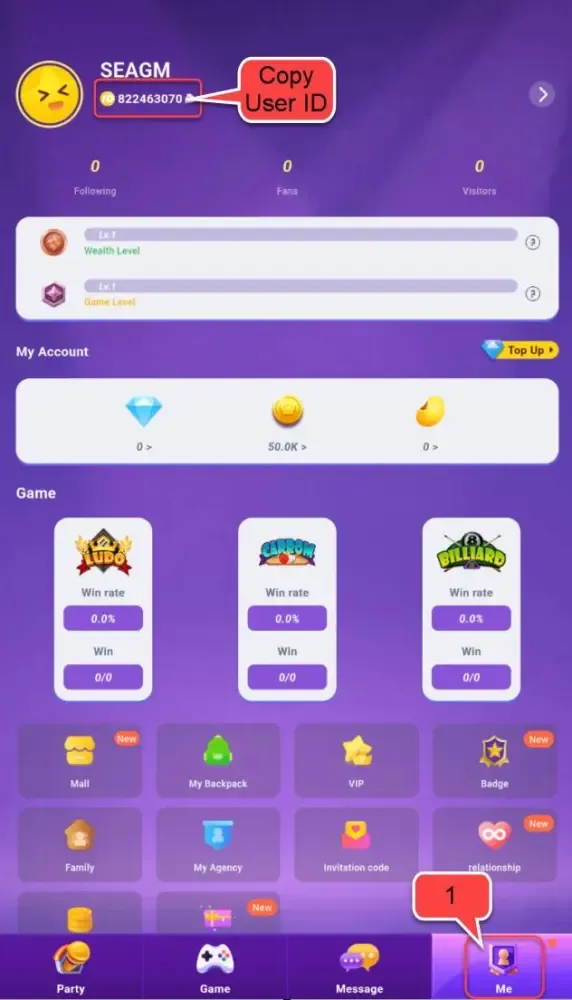
Always use the built-in copy button rather than typing the number manually. This eliminates typographical errors and ensures smooth, direct delivery to your account.
Benefits of 1Star Chat Coins for Voice Rooms and Virtual Gifting
Acquiring 1Star Chat coins enhances your experience across audio party rooms, private lounges, and competitive games. Here is how coins add value to your time on the platform:
- Dynamic Virtual Gifting: Express appreciation for room hosts and friends by sending animated gifts ranging from modest tokens to grand visual effects that broadcast across the entire room.
- Entrance Effects and Luxury Vehicles: Equip customized arrival animations and virtual vehicles that announce your entry whenever you step into a voice chat room.
- Mic Frames and Chat Bubbles: Stand out while speaking by applying custom microphone frames, unique text bubble themes, and glowing avatar rings.
- VIP Badges and Leaderboard Ranking: Climbing the daily and weekly contributor rankings earns you exclusive status badges, showing your support within the community.
- Room Creation and Management: Unlock special features for hosting your own voice clubs, custom party games, and community events.
Account Safety: Why You Never Need to Share Your Password
Account security is essential when purchasing digital goods online. BitTopup uses a direct-to-ID fulfillment architecture designed to protect your private information:
- No Password Required: You never have to share your 1Star Chat password, email login, or social media credentials. All transactions are completed solely using your public Player ID.
- Zero Risk of Unauthorized Access: Because no login details are transferred, your private messages, friend lists, and account settings remain completely secure in your hands.
- Encrypted Checkout: Every transaction is processed through secure, industry-standard encrypted payment gateways.
- Privacy Compliance: Your user data is handled with strict confidentiality and is never shared with unauthorized third parties.
Troubleshooting Common 1Star Chat Top-Up Issues
While most recharges process smoothly, occasional delays or user errors can happen. Use the following guide to resolve common issues:
- Balance Not Updating Immediately: Exit the 1Star Chat app completely, wait 30 seconds, and relaunch it. Check your profile wallet to see if the coin count has refreshed.
- Typo in Player ID: If you entered the wrong numerical ID during checkout, contact BitTopup customer support immediately with your order number. If the order has not yet been processed by the system, our team can assist in correcting the details.
- Payment Pending: Some payment methods require brief authorization periods from your local banking provider. Check your email for a payment confirmation receipt before reaching out.
- Need Direct Help?: BitTopup offers 24/7 customer service. If you experience any delay or have questions regarding your order, reach out directly through our live customer support channel with your transaction details.
Frequently Asked Questions About 1Star Chat Top Up
How do I recharge 1Star Chat on BitTopup?
Select your preferred 1Star Chat coin bundle, enter your numerical Player ID in the designated box, select a payment option at checkout, and complete the payment. The coins are sent directly to your in-app balance.
Where do I find my 1Star Chat Player ID?
Open the 1Star Chat app and tap the Profile icon in the bottom menu. Your numerical ID is displayed directly below your profile name and avatar. Tap the copy icon next to the number to copy it.
Do I need to share my password to recharge 1Star Chat?
No. BitTopup only requires your public numerical Player ID. You should never share your account password or verification codes with anyone.
What can I purchase with 1Star Chat coins?
Coins can be used to send virtual gifts, equip animated entrance effects, purchase custom microphone frames and chat bubbles, and participate in room activities and community leaderboards.
How long does it take for 1Star Chat coins to arrive?
Most orders are processed promptly after payment confirmation. Once the transaction completes, reopen your 1Star Chat app to view your updated coin balance.
What should I do if I entered an incorrect Player ID?
Contact the BitTopup 24/7 customer support team immediately with your order reference number. If the order has not yet been finalized on the network, support staff will assist in updating the destination account.