



Taka Live Top Up: What Are Taka Coins and What Can You Use Them For?
Taka Live is a popular interactive voice chat, live streaming, and social entertainment platform. Users connect across voice party rooms, watch live broadcasters, share creative content, and play built-in party mini-games. The primary in-app virtual currency powering these interactions is Taka Coins.
When you top up Taka Live coins, you gain access to the core social and entertainment mechanics across the app:
- Sending Virtual Gifts: Send animated gifts, customized micro-effects, and luxury room-wide banners to your favorite live streamers and voice room hosts. Gifting increases host ranking and earns you social visibility on the leaderboards.
- Interactive Party Room Mini-Games: Many voice party rooms run interactive games such as Ludo, Domino, Greedy, and Wheel events. Taka Coins let you participate directly in these competitive casual titles with friends.
- Upgrading VIP and Noble Status: Accumulating and spending coins increases your VIP tier, providing distinct chat bubbles, exclusive profile frames, custom room entry animations, and special audio effects when taking a seat on the mic.
- Room Effects and Audio Tools: Host and decorate your own voice room with exclusive themes, custom soundboards, and special entrance announcements.
Step-by-Step Guide: How to Recharge Taka Live Coins on BitTopup
Recharging your Taka Live coin balance on BitTopup is direct, safe, and requires only your account ID and Area Code.
- Choose Your Coin Package: Browse the available Taka Live coin bundles on this page. Current pricing and coin counts are shown on the live checkout selection above.
- Enter Your Taka ID: Input your numeric user ID into the Taka ID field.
- Enter Your Area Code: Type your server Area Code (such as 1001 or 1002) into the Area Code field.
- Select Payment and Checkout: Select your preferred payment option, review the order details to ensure your ID is accurate, and confirm payment.
- Receive Coins Instantly: Once the payment finishes processing, your Taka Live coins are credited directly to your in-app account balance.
How to Find Your Taka ID and Area Code in the App
Taka Live uses both a unique numeric user ID and an Area Code to route recharges to the correct regional database partition. Providing both values ensures your coins land in your profile without manual routing delays.
Follow these steps to find both details inside your app:
- Open the Taka Live application on your mobile device.
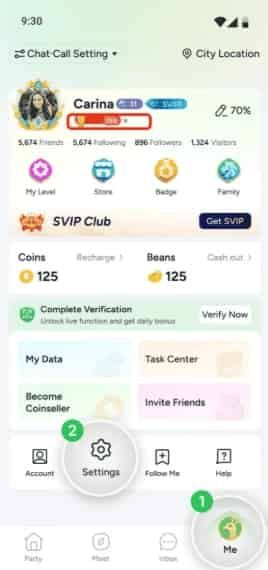
- Tap the Profile (often labeled Me) icon in the bottom-right corner of the main screen.
- Locate your numeric Taka ID displayed directly under your profile avatar and nickname.
- Locate your Area Code (standard codes are 1001 or 1002), which is listed next to your regional profile information or in your account settings overview.
Account Information Reference Table
| Input Field | Example Value | Description | Purpose |
|---|---|---|---|
| Taka ID | 87654321 | Unique numeric identifier | Identifies your personal user profile |
| Area Code | 1001 or 1002 | Server region code | Routes the recharge to your specific regional database |
Why Choose BitTopup for Taka Live Coin Recharges
BitTopup provides a direct, user-focused top-up service designed for smooth digital entertainment purchases:
- Zero Password Risk: You never share passwords, verification SMS codes, or linked social accounts. Recharges process strictly through your public Taka ID and Area Code.
- Live Order Tracking: Every transaction receives a dedicated order record so you can monitor processing status in real time.
- Flexible Global Payment Options: Pay with convenient international and local payment methods suited to your location.
- Live Support Assistance: If you enter an incorrect Area Code or experience an unexpected delay, the BitTopup customer support team is available to verify transaction logs and assist in resolving account routing.
VIP and Noble Perks: Maximizing the Value of Taka Live Coins
Investing your Taka Coins strategically can give you distinct visual perks across active community spaces:
- Exclusive Entrance Animations: High-tier VIP members trigger special entrance graphics and audio banners whenever they enter a live stream or voice room.
- Custom Chat Bubbles and Micro-Badges: Stand out in fast-moving live stream chat feeds with colored text styles, glowing borders, and rank tags.
- Room Host Privileges: Broadcasters who reward their communities and maintain active coin circulation gain higher discovery priority on the explore page, attracting more organic listeners.
- Event Leaderboards: Participate in seasonal ranking events. Broadcasters and gifters who reach the top tiers during community battles unlock limited-edition digital badges and profile decorations.
Important Tips to Avoid Taka Live Top-Up Delivery Delays
To ensure your recharge arrives promptly without manual verification holds, keep these pointers in mind:
- Verify Your Area Code Carefully: Entering
1001when your account is registered under1002(or vice versa) causes the server to search the wrong partition, resulting in temporary order holds. - Avoid Manual Typos in the UID: Always copy and paste your numeric Taka ID directly from your profile screen rather than typing it from memory.
- Refresh Your App After Payment: Once your order displays as completed on BitTopup, force-close and reopen Taka Live, or visit the in-app wallet to refresh the cached balance.
- Keep Your Order Reference Number: Save the BitTopup order ID shown on your receipt in case you need our support team to verify your transaction.
Taka Live Recharge Frequently Asked Questions
What details do I need to provide to recharge Taka Live coins?
You only need to provide your numeric Taka ID and your Area Code (e.g., 1001 or 1002). BitTopup never asks for your password, email login, or private credentials.
Where do I find my Taka ID and Area Code?
Open Taka Live and tap the Me / Profile tab in the bottom-right corner. Your Taka ID is listed below your profile picture. Your Area Code is shown in your account details section.
Is it safe to top up Taka Live coins with only my UID?
Yes. Recharging via UID is the safest method because it does not expose your login credentials or third-party linked accounts. The system sends the purchased coins directly to your public player identifier.
Can I convert earned Beans into Taka Coins in the app?
Yes. Broadcasters and hosts who receive gifts accumulate Beans. Inside Taka Live's wallet settings, eligible users can exchange accumulated Beans into Taka Coins according to the app's internal conversion rules.
How do I use Taka Coins for games like Ludo and Domino in party rooms?
Once your coin balance is loaded, join any voice party room featuring mini-game widgets. Tap the game icon (such as Ludo or Domino), choose your entry tier, and use your coins to join the match.
What should I do if my Taka Live coins do not reflect after checkout?
First, restart the Taka Live app to refresh your profile balance. If the coins still do not appear after a few minutes, check your BitTopup order history to confirm your Taka ID and Area Code were entered correctly, then contact BitTopup support with your Order ID for rapid verification.
Can I get free Taka Live coins legitimately?
You can earn small amounts of in-app currency and reward items by completing daily sign-in tasks, joining official seasonal events, and achieving active streamer milestones within the app. Avoid third-party generators or unauthorized software claiming to provide unlimited free coins, as these can compromise your account safety.