



StarMaker: Sing Karaoke Coins Top Up Overview and In-App Perks
StarMaker: Sing Karaoke Coins serve as the primary premium virtual currency within the global StarMaker singing community. Whether you want to support talented vocalists, climb live room leaderboards, or customize your profile, having an adequate coin balance is essential.
Coins allow you to interact directly with singers, room hosts, and community creators across thousands of live audio and video rooms. When you top up coins, they credit directly to your StarMaker account balance for immediate spending.
Primary Utilities of StarMaker Coins
| Coin Utility | In-App Benefits and Perks |
|---|---|
| Virtual Gifting | Send animated gifts, luxury items, and musical tokens to singers during live performances. |
| Room Effects | Activate entry animations, microphone effects, and screen banners inside party rooms. |
| VIP & Rank Boosts | Increase your contributor level, display exclusive badges, and gain entry to VIP karaoke rooms. |
| Song Duets & Collabs | Access premium studio audio filters, VIP backing tracks, and special duet collaboration tools. |
| Profile Customization | Purchase custom avatar frames, chat bubbles, and profile themes to stand out in the community. |
Beware of Free Coin Scams and Unauthorized Generators
Many external websites advertise "free StarMaker coin generators," "modded StarMaker APKs," or "coin glitch scripts." These tools are fraudulent and designed to harvest credentials or install malware. StarMaker verifies coin transactions directly on official game servers. Attempting to use unauthorized third-party injection tools can lead to permanent account termination. To keep your account safe, always use direct SID top-ups through trusted platforms like BitTopup.
How to Recharge StarMaker Coins on BitTopup Using SID
Recharging your balance on BitTopup takes only a few simple steps. You do not need to log into your social media or share private credentials.
- Select Your Coin Package: Review the available coin denominations on the product page. Choose the pack that suits your budget and gifting goals. Real-time pricing is displayed directly on the live checkout interface.
- Enter Your StarMaker SID: Type your numeric StarMaker User ID (SID) into the designated player ID field. Ensure every digit is accurate.
- Choose a Payment Method: Select your preferred payment option from the supported international and local payment channels.
- Complete the Checkout: Finalize your payment. The system processes your order and sends the coins directly to your StarMaker account.
- Check In-App Balance: Open the StarMaker app and verify that your updated coin balance appears in your wallet.
How to Find Your StarMaker SID (User ID)
Your StarMaker SID is your unique numeric account identifier. Follow these steps to find and copy it directly from the app:
- Launch the StarMaker: Sing Karaoke app on your mobile device.
- Tap the Me tab located in the bottom-right corner of the main screen to open your personal profile.
- Look directly beneath your profile picture and username.
- You will see your unique numeric code labeled as SID: [Numbers].
- Tap the small Copy icon next to the digits to copy the exact SID to your clipboard.
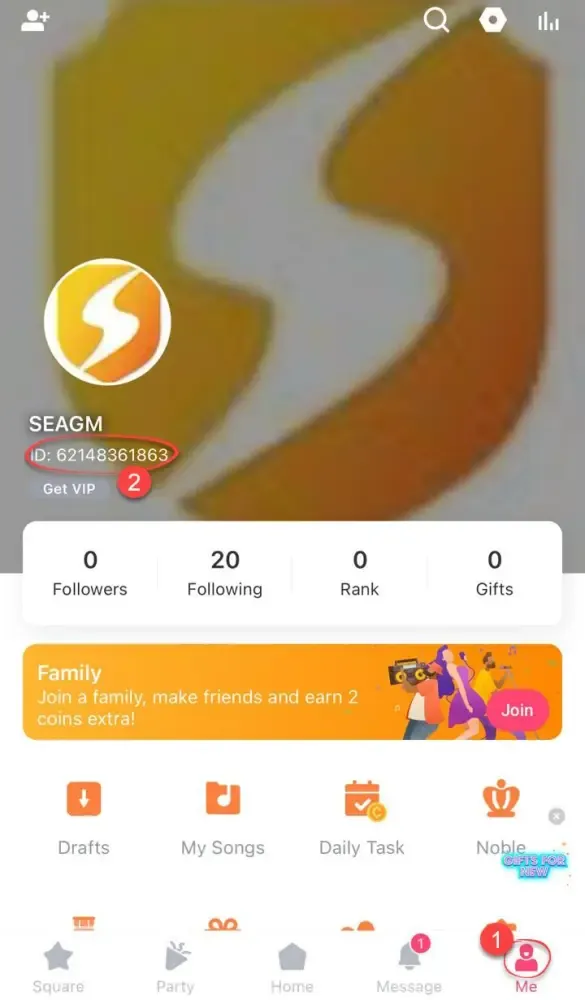
Tip: Always copy and paste your numeric SID instead of typing it manually to prevent typos. Do not enter your display name, as top-ups require the numeric SID.
Secure Top-Up Guarantee: No Account Password Required
Account safety is a top priority when purchasing digital game currency. BitTopup processes StarMaker: Sing Karaoke Coins top ups strictly through direct SID routing.
- No Login Credentials Needed: You never have to provide your password, phone number, Google account, or Facebook login.
- Zero Risk of Account Takeover: Because no login access is granted, your private messages, recordings, and account settings remain completely secure.
- No Third-Party Policy Violations: Direct SID top-ups comply with standard user safety practices, ensuring your account remains in good standing without risk of bans.
- Encrypted Checkout: All transaction details are processed through encrypted payment gateways to protect your financial data.
StarMaker Coins Delivery and Order Status Tracking
Once you submit an order on BitTopup, transaction processing begins immediately. You can track your purchase status in real time:
- Order Confirmation: Once payment is verified, your order status switches to "Processing."
- Automated Dispatch: The system credits the requested coin package directly to your specified SID via server integration.
- Status Update: The order displays as "Completed" once the balance transfer is confirmed.
- Order History: You can review past receipts, transaction dates, and coin pack details anytime in your BitTopup account dashboard.
What to Do If StarMaker Coins Are Delayed After Recharge
While most coin recharges reflect quickly, network delays or server synchronization issues can occasionally occur. If your coins have not appeared in your balance, follow these troubleshooting steps:
- Restart the StarMaker App: Force-close the StarMaker application completely on your device and relaunch it. This forces the app to refresh your wallet balance from the server.
- Check Your In-App Wallet: Go to the Me tab, select Coins or Daily Tasks / Wallet, and check if the total balance has updated.
- Verify Your SID on the BitTopup Receipt: Check your order confirmation on BitTopup to confirm you entered the correct numeric SID. If you accidentally entered an incorrect SID, the coins may have been routed to that account.
- Check Network Connectivity: Ensure your mobile data or Wi-Fi connection is stable. A weak connection can prevent the app from updating your balance display.
- Contact BitTopup Support: If your order status shows completed on BitTopup but your balance does not update after 15 minutes, reach out to BitTopup 24/7 customer support with your Order ID for assistance.
Frequently Asked Questions
How to buy coins in StarMaker using my SID?
To buy coins using your SID, select your desired coin denomination on BitTopup, enter your numeric StarMaker SID in the player ID box, pick your payment method, and complete the purchase. The coins credit directly to your account.
Where can I find my StarMaker SID?
Open the StarMaker app, tap the "Me" icon in the bottom-right corner, and look below your profile picture. Your numeric SID is displayed there with a convenient copy button next to it.
Can I recharge StarMaker Coins for free?
No. Legitimate StarMaker Coins must be purchased or earned through official in-app events. Websites claiming to offer "free coin generators" or "coin hacks" are fraudulent scams that compromise account security.
Is it safe to recharge StarMaker Coins with only an SID?
Yes. SID top-up is one of the safest methods available because it only requires your public user identifier. You never share passwords, social logins, or private account access.
What can I spend StarMaker: Sing Karaoke Coins on?
You can spend coins on virtual gifts for singers in live rooms, party room effects, entry banners, VIP status upgrades, exclusive audio filters, and profile customization items.
How long does it take for StarMaker Coins to reflect in my account?
Coins are dispatched through automated systems right after payment verification. In most cases, the balance updates in your StarMaker wallet shortly after completion. Restarting the app helps refresh the balance display.