

Lita Coin Top Up: What is Lita and What Are Lita Coins Used For?
Lita is a social gaming platform that connects players around the world for cooperative play, voice chat, and social networking. Whether you want skilled teammates to climb competitive ranks in titles like Mobile Legends, PUBG Mobile, Free Fire, and Valorant, or you want to hang out in interactive audio party rooms, Lita provides the community space to do so.
Lita Coins serve as the primary in-app virtual currency. They give you full access to premium interactive features across the platform:
- Teaming Up with Pro Gamers: Order gaming sessions with skilled players, coaches, or entertainers to improve your rank and enjoy multiplayer matches.
- Virtual Gifting: Send animated digital gifts to creators, voice room hosts, and teammates to show appreciation and boost room popularity.
- Audio Party Rooms: Unlock special entrance effects, send premium chat stickers, and access exclusive voice room privileges.
- Tipping and Direct Support: Support your favorite gaming companions directly during live voice sessions.
Lita Coin Utility Overview
| Feature | How Coins Are Used | Main Benefit |
|---|---|---|
| Companion Orders | Pay per game or per hour for co-op play | Play with vetted, skilled teammates |
| Voice Party Gifting | Send dynamic gifts to room hosts and speakers | Increase room rank and unlock badges |
| Profile Customization | Purchase chat bubbles, badges, and avatar frames | Stand out in community voice rooms |
| Special Interactions | Send direct tips and personalized sound effects | Build closer connections with creators |
How to Recharge Lita Coins on BitTopup (Step-by-Step)
To recharge Lita Coins online on BitTopup, follow this direct checkout process:
- Select Your Coin Package: Browse the available Lita Coin package options on the product page and pick the amount you need.
- Enter Your Lita User ID: Type or paste your numerical Lita User ID (UID) into the designated field. Double-check the number to make sure your balance routes correctly.
- Review Order Details: Check the live checkout price displayed for your chosen package.
- Complete Payment: Select your preferred payment option from the available regional or international gateways and confirm the transaction.
- Receive Your Coins: Once payment completes, the coins are sent directly to your Lita in-app wallet via your UID. Open your app and refresh your balance.
How to Find Your Lita User ID (UID)
Your Lita User ID is a unique numeric identifier linked directly to your profile. You only need this number to complete a top-up.
- Launch the Lita app on your iOS or Android device.
- Tap the Account or Profile icon located in the bottom-right corner of the bottom navigation bar.
- Locate your profile picture at the top of the screen. Directly below your nickname, you will see ID: followed by a series of numbers.
- Tap the Copy icon next to the number to copy your UID directly to your clipboard.
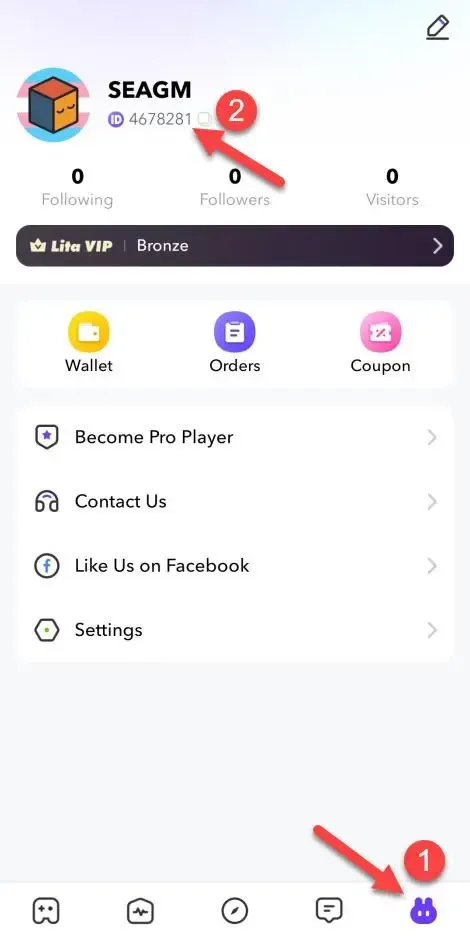
Tip: Always use the copy button rather than typing the numbers manually to avoid accidental typos during checkout.
Why Choose BitTopup for Lita Coin Recharge
- 100% Account Safety (UID-Only): BitTopup never asks for your Lita account password, phone verification codes, or social logins. Your personal login credentials stay completely in your control.
- Competitive Pricing: Live transparent checkout prices ensure you get the best value when you buy Lita Coins without unexpected processing fees.
- Instant Order Fulfillment: Automated delivery protocols credit your Lita account quickly once your payment clears.
- Flexible Payment Methods: BitTopup supports a wide selection of global and localized payment channels to provide a frictionless payment experience wherever you are located.
- 24/7 Dedicated Support: If you ever have a question about your order status or UID submission, our customer service team is on standby around the clock to help.
Safe and Fast Delivery: What to Expect
When ordering your Lita Coin recharge on BitTopup, here is how the delivery lifecycle works:
- Automated Processing: As soon as your payment is verified, the system routes the specified coin package to your Lita UID through direct account crediting.
- No Account Sharing: Because top-ups only require your public User ID, your account security remains uncompromised. You never have to log out or hand over access to anyone else.
- Fast Balance Update: In most cases, the coins reflect in your in-app wallet within moments of transaction completion. You will receive an on-screen confirmation and order receipt on BitTopup.
Troubleshooting Common Lita Recharge Issues
If your coins do not display immediately after completing your order, follow these troubleshooting steps:
1. Refresh the Lita Application
Mobile app balances sometimes do not update in real time if the app is running in the background. Close the Lita app completely, relaunch it, navigate to your profile, and check your coin counter again.
2. Verify Your Order Status
Check your order receipt on BitTopup to confirm that the payment went through and that the order status shows as completed. If the payment is still processing with your payment provider, delivery will proceed as soon as funds clear.
3. Check the Submitted UID
Compare the User ID on your BitTopup receipt with the ID displayed in your Lita profile. If you submitted an incorrect UID, contact BitTopup customer support immediately with your order ID and the correct UID. Note that orders delivered to a valid but incorrect third-party account cannot be recalled.
4. Contact Customer Support
If your order is marked complete and your UID is verified, but your balance has not updated after a few minutes, reach out to BitTopup 24/7 support with your order number and a screenshot of your Lita profile for fast manual verification.
Frequently Asked Questions About Lita Coin Recharge
What is the Lita app and what are Lita Coins used for?
Lita is a social gaming platform where users meet gaming companions for popular multiplayer games and join audio chat rooms. Lita Coins are the in-app currency used to hire teammates, tip streamers, send dynamic gifts in voice rooms, and unlock profile perks.
How do I find my Lita User ID for a top up?
Open the Lita mobile app, tap the Account tab in the lower-right corner, and look right below your username for ID:. Tap the copy icon next to the number to copy your UID accurately.
How long does a Lita top up take to process?
Orders placed on BitTopup are processed automatically. Most recharges arrive in your Lita in-app balance within seconds to a few minutes after payment confirmation.
Do I need to provide my Lita password to recharge coins?
No. BitTopup requires only your public Lita User ID (UID). You should never share your account password, email access, or verification codes with third parties.
What should I do if my Lita Coins do not arrive immediately?
First, restart the Lita application to force a balance refresh. If the coins still do not appear, verify that your payment completed on BitTopup and contact 24/7 customer support with your order ID for immediate assistance.
Can I top up Lita Coins for a friend using their User ID?
Yes. Because the top-up process only requires a Lita UID, you can send coins to friends or creators by simply entering their User ID in the UID field at checkout.