


Soul Chill Top Up: What Is SoulChill and In-App Crystals?
Soul Chill (also recognized as SoulChill) is a global social voice chat and lifestyle streaming platform designed to connect people across the world through shared interests, audio rooms, and interactive live broadcasts. The app allows users to create group voice rooms, host live PK battles, engage in 1-on-1 conversations, post audio moments, and discover new friendships based on personality-driven matching.
Inside the Soul Chill platform, the primary in-app currency is known as Soul Chill Crystals (sometimes incorrectly searched as "Crestals" on informal forums). Crystals power all real-time social dynamics in the app. When you top up Soul Chill Crystals, you gain the ability to send animated virtual gifts to room hosts, participate in timed gifting battles, unlock luxury avatar frames, activate premium chat bubbles, and progress through the platform's VIP status tiers.
Crystals reflect direct support for content creators and hosts on the platform. Whether you want to boost a friend during a competitive PK stream or make your presence recognized across popular voice rooms, having a balance of Crystals is essential for active participation.
How to Find Your Soul Chill Player ID in the App
Recharging on BitTopup requires only your official Soul Chill Player ID. You never have to share account passwords or sensitive personal credentials. Your Player ID is a permanent numeric string assigned directly to your account upon registration.
Follow these quick steps to copy your Player ID:
- Launch the Soul Chill app on your mobile device.
- Tap the Me / Profile tab located in the bottom-right corner of the navigation bar.
- Locate the profile header section beneath your nickname and display picture.
- Find the row marked ID: followed by a sequence of numbers (e.g.,
12345678). - Tap the copy icon immediately next to your ID to copy the number directly to your clipboard.
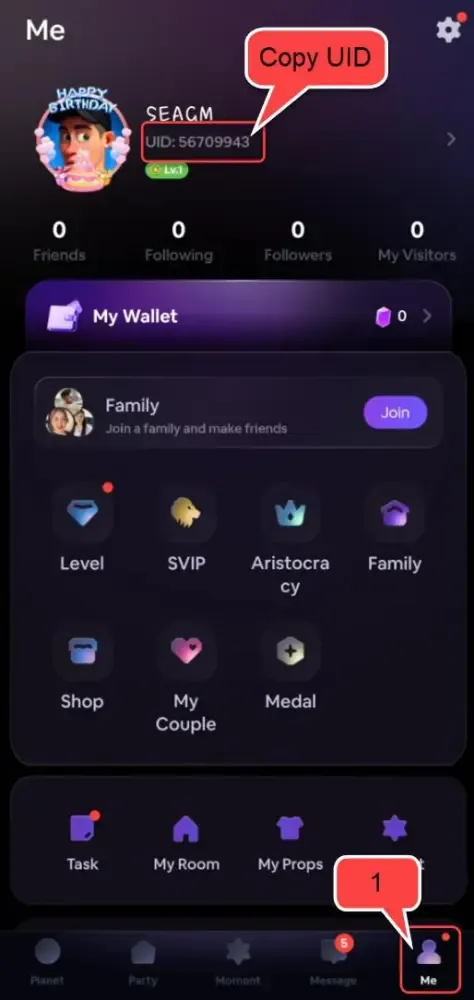
Make sure to copy the numeric Player ID rather than your custom display nickname, as display names can change and cannot be used by the automated delivery system.
Step-by-Step Guide: How to Recharge Soul Chill Crystals on BitTopup
BitTopup provides a direct Player ID reload process that delivers Crystals straight to your account. Follow these steps to complete your purchase:
- Select Your Crystal Amount: Browse the available package denominations on this page. All current rates, Crystal quantities, and pack details are shown directly on the live checkout interface.
- Enter Your Soul Chill Player ID: Paste your numeric Player ID into the designated input box.
- Confirm Account Accuracy: Double-check the entered number to ensure your Crystals reach the correct profile.
- Choose Payment and Finalize Checkout: Select your preferred payment method from the available checkout options and complete the transaction.
- Check Your In-App Balance: Once payment confirmation is received, the delivery system credits your account directly. Open Soul Chill, access your wallet, and view your updated Crystal total.
Soul Chill In-App Perks: Voice Rooms, Gifting, and VIP Status
Crystals grant access to features that enhance your visibility and social presence within the Soul Chill community. The table below outlines how Crystals are used and what benefits they deliver:
| Feature / System | Crystal Usage | In-App Reward & Impact |
|---|---|---|
| Live Room Gifting | Purchase 2D and 3D animated gifts | Boosts host popularity scores and room rankings |
| PK Battle Support | Send event-specific battle gifts | Drives host point totals to win competitive room matchups |
| VIP Membership Tiers | Accumulate spent Crystal points | Unlocks exclusive entry banner effects, noble badges, and custom titles |
| Profile Decoration Store | Buy limited-edition avatar frames | Enhances profile appearance in voice seats and comment sections |
| Chat Bubbles & Effects | Customize text styling in chat feeds | Makes your messages stand out in crowded public rooms |
| Direct Audio Interaction | Tip creators during private or group calls | Builds closer connections with favorite hosts and streamers |
Why Choose Player ID Top-Up: Safe, Fast, and No Password Needed
Account protection is paramount when purchasing virtual goods. Using BitTopup for your Soul Chill reload provides several key security and convenience advantages:
- No Login Credentials Required: You do not need to provide your Soul Chill password, email access, phone verification codes, or third-party social login details. Recharges are fulfilled exclusively using your public Player ID.
- Zero Risk of Account Lockouts: Because third-party logins are not used, your account remains safe from security flags, temporary access suspensions, or unauthorized profile changes.
- Gift for Friends and Creators: You can recharge Crystals for any user worldwide simply by inputting their Player ID at checkout, making it simple to reward hosts, friends, or guild members.
- Real-Time Order Tracking: BitTopup provides live tracking from payment processing through order completion, ensuring full transparency for every transaction.
Soul Chill Recharge Troubleshooting and Payment Support
If you encounter any questions or delays during your top-up, use the following operational guide to resolve the situation:
- Crystals Not Appearing Immediately: Restart the Soul Chill app completely to force a data refresh with the server. Head to your profile settings and check your wallet balance. Under normal conditions, delivery is near-instant, but high server traffic can cause brief delays.
- Entered an Incorrect Player ID: Automated delivery systems process orders according to the exact Player ID submitted. Once Crystals are credited to an active account on the Soul Chill server, the transaction cannot be recalled or transferred. Always verify your numeric ID before completing checkout.
- Payment Completed but Order Pending: If your payment went through but your order status on BitTopup remains pending, allow a few moments for the payment provider to send final confirmation. As soon as the payment gateway clears the transaction, delivery completes automatically.
- Contacting 24/7 Support: If your order shows as completed on BitTopup but your balance does not update after restarting the app, reach out to BitTopup customer support. Provide your Order ID along with a screenshot of your in-app profile showing your Player ID to receive prompt assistance from a support agent.
Frequently Asked Questions About Soul Chill Top Up
What is the SoulChill app and what are Crystals used for?
Soul Chill is a global audio social application where users join voice chat rooms, participate in PK stream competitions, and share lifestyle moments. Crystals are the premium in-app currency used to purchase virtual gifts, unlock profile cosmetics like avatar frames and chat bubbles, support room hosts during events, and raise your VIP noble rank.
Where can I find my Soul Chill Player ID for recharging?
Open the Soul Chill app and tap the Me / Profile icon in the bottom-right corner. Your Player ID is the numeric code displayed at the top of your profile screen, directly beneath your nickname and profile photo. Tap the copy icon next to the number to copy it for checkout.
Do I need to provide my Soul Chill password to buy Crystals?
No. Recharging through BitTopup requires only your public numeric Player ID. You should never share your account password, SMS verification codes, or linked social account details with anyone.
How long does it take for Soul Chill Crystals to arrive after payment?
Under standard network conditions, Crystals are credited to your Soul Chill account within moments of successful payment confirmation. If you do not see the new balance immediately, restart the Soul Chill app to refresh your wallet balance.
What should I do if I entered the wrong Player ID during recharge?
Orders are dispatched automatically to the Player ID submitted at checkout. Because digital currency transfers are permanent on the Soul Chill platform, completed deliveries cannot be reversed or refunded. If you notice a typo before payment confirmation, immediately contact BitTopup support to check if the order can be corrected prior to dispatch.
Can I recharge Soul Chill Crystals for a friend using their Player ID?
Yes. Because the top-up process only requires a Player ID, you can purchase Crystals for friends, room hosts, or family members. Enter their numeric Soul Chill Player ID at checkout, complete payment, and the Crystals will be delivered directly to their account.