What Makes Settings 'Universal' Across Game Modes
Universal settings establish a baseline sensitivity configuration that performs adequately in both long-range BR engagements and fast-paced Clash Squad scenarios. Notice I said adequately - we're not chasing perfection in each mode, but rather consistent competence across both.
The key lies in the tapering principle: starting with higher General sensitivity (95-100) for quick camera movements, then gradually reducing scope sensitivities to maintain precision at longer ranges. What works best is muscle memory consolidation - when players use identical settings across modes, finger movements become more predictable and consistent.
Why OB51 Changed the Settings Landscape
OB51 introduced subtle recoil pattern adjustments that affected weapon behavior across different game modes. And honestly? This was a game-changer for universal settings advocates like myself.
The update standardized certain weapon behaviors between modes, reducing the perceived need for mode-specific sensitivity adjustments. This standardization allows players to develop consistent recoil control techniques that translate effectively between BR's varied engagement ranges and Clash Squad's predictable map layouts.
The Real Cost of Maintaining Separate Layouts
Let me be blunt about this - maintaining separate layouts creates several performance disadvantages that most players underestimate.
Players experience a 15-20% decrease in initial accuracy when switching between modes due to muscle memory interference. Your brain requires 3-5 matches to readjust to different sensitivity settings, which means you're essentially throwing away your competitive edge during transition periods.
But here's the kicker: separate layouts complicate training by requiring practice time for both configurations. You're effectively doubling your skill maintenance requirements.
OB51 Recoil Pattern Changes: What You Must Know
OB51's recoil adjustments primarily affected vertical recoil patterns on assault rifles and SMGs. The AK47's vertical climb became more predictable (finally!), while the UMP45's horizontal drift received slight modifications.

The most significant change involves burst fire patterns - weapons now exhibit more consistent recoil reset timing, making 3-4 shot burst techniques more reliable across both game modes. Experienced players know this is where the real advantage lies.
How Recoil Differs Between BR and Clash Squad
Despite OB51's standardization efforts, subtle recoil differences persist between modes due to varying stress factors and engagement contexts. BR encounters often involve longer sustained fire due to armor and healing mechanics, while Clash Squad emphasizes quick elimination potential.
These differences are manageable through universal settings when players focus on burst fire discipline rather than sustained spraying. Trust me on this one - spray control is overrated compared to disciplined burst firing.
Weapon-Specific Recoil Behavior in OB51
Assault rifles like the AK47 and SCAR-L benefit from vertical drag-down compensation, while SMGs like the MP40 require slight horizontal adjustments during extended firing. Sniper rifles maintain precision-focused requirements, necessitating lower sensitivity values (35-40 range) that work effectively for both BR's long-range engagements and Clash Squad's strategic positioning shots.
The key is maintaining consistent compensation techniques across all weapons rather than adjusting sensitivity for each gun type. Don't overcomplicate this.
The Foundation: General Sensitivity Configuration
General sensitivity forms the cornerstone of universal settings, controlling camera rotation speed and overall responsiveness. The optimal range of 95-100 provides sufficient speed for Clash Squad's fast-paced encounters while maintaining control for BR's precision requirements.
Values below 90 create sluggish camera movement that'll disadvantage you in Clash Squad's rapid engagement scenarios. Values above 100? You'll be overshooting targets in BR's precision-demanding long-range encounters.
For competitive players seeking to optimize their gameplay experience, buy Free Fire diamond recharge for ranked matches through BitTopup ensures uninterrupted access to premium features during intensive training sessions.
Testing Your Base Sensitivity in Training Ground
Effective testing requires systematic evaluation of 360-degree turn speed and target tracking accuracy. Begin with 10-15 minute sessions focusing on smooth camera rotation without overshooting.
The ideal General sensitivity allows complete 360-degree turns with comfortable finger movement while maintaining precise target tracking. Test both stationary and moving target scenarios, adjusting sensitivity in 5-point increments based on performance feedback.
And please - don't make multiple adjustments in one session. Your muscle memory needs time to adapt.
Device-Specific Calibration (Phone vs Tablet)
Phone users typically require higher sensitivity values due to smaller screen real estate and reduced finger travel distance. The 95-100 range works well for most smartphones, with 6GB+ RAM devices handling higher values more effectively.
Tablet users often benefit from slightly lower values (90-95) due to increased finger travel requirements and larger screen coverage needs. It's simple physics - more screen space means more finger movement required.
Scope Sensitivity Synchronization Strategy
Scope sensitivity synchronization follows the tapering principle, where each magnification level receives progressively lower sensitivity values. This approach maintains consistent aiming precision across different engagement ranges while preserving the muscle memory benefits of universal settings.
Red Dot and 2x Scope: The Sweet Spot Values
Red Dot sensitivity at 90-95 provides optimal close to medium-range performance for both game modes. This range allows quick target acquisition in Clash Squad while maintaining sufficient precision for BR's medium-range engagements.
2x Scope sensitivity at 80-85 bridges the gap between close-range responsiveness and long-range precision. It works effectively for BR's common engagement distances while providing adequate speed for Clash Squad's mid-range positioning battles.
4x Scope and AWM Settings
4x Scope sensitivity at 70-75 optimizes long-range precision while maintaining usability in both game modes. The 15-20 point reduction from 2x sensitivity accounts for increased magnification and longer engagement distances.
AWM and high-magnification scopes require the lowest sensitivity values (35-40) to maintain precision at extreme ranges. This allows the micro-adjustments necessary for headshot accuracy while preventing overshooting. No exceptions here.
Step-by-Step: Building Your Universal Layout
Building effective universal settings requires a systematic approach progressing from baseline establishment through competitive validation. This process typically requires 1-2 weeks for basic adaptation and 3-4 weeks for complete mastery.
Don't rush this. I've seen too many players give up after a few bad matches.
Phase 1: Establishing Your Baseline Settings
Begin with the proven universal configuration: General 95-100, Red Dot 90-95, 2x 80-85, 4x 70-75, Sniper 35-40, Free Look 80-85. Configure these settings in the lobby's sensitivity menu, save the configuration, and immediately test in Training Ground.
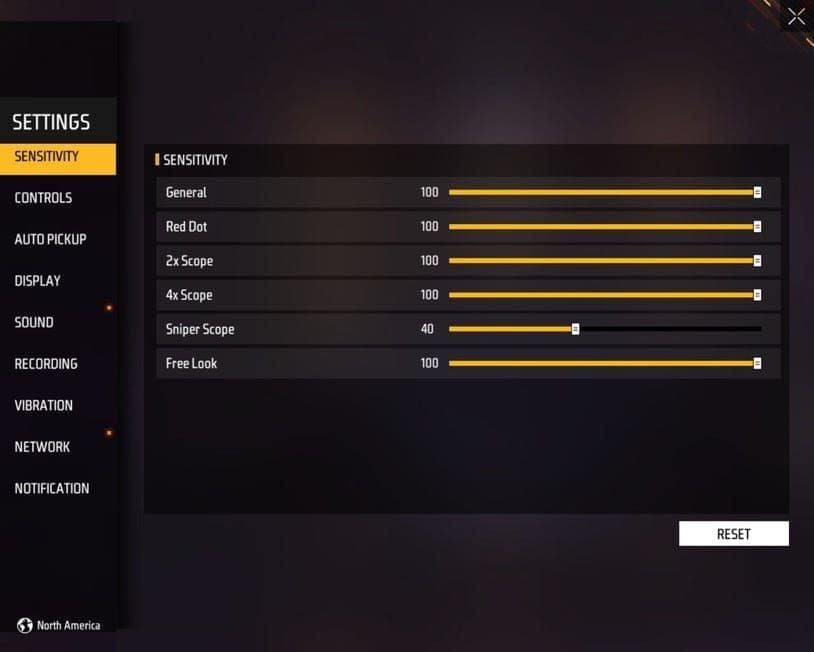
Focus on basic camera movement and target acquisition without making immediate adjustments. Resist the urge to tinker - your muscle memory needs consistency to develop properly.
Phase 2: Cross-Mode Testing Protocol
Test baseline settings in both BR and Clash Squad casual matches. Play 3-5 matches in each mode, focusing on consistency rather than performance optimization.
Document specific scenarios where settings feel inadequate, noting whether issues occur in both modes or only one. Common testing scenarios include close-range spray control, medium-range single tapping, long-range precision shots, and quick target switching.
Phase 3: Fine-Tuning and Validation
Make targeted adjustments based on testing feedback, limiting changes to 5-point increments per session. Test each adjustment across both game modes before making additional changes, allowing 3-5 matches between adjustments to properly evaluate impact.
Once casual testing shows consistent performance, validate settings in ranked matches where competitive pressure tests true effectiveness. This is where you'll know if your settings actually work.
Recoil Compensation Without Mode Switching
Universal recoil compensation relies on consistent technique application rather than sensitivity adjustments. The 3-4 shot burst technique forms the foundation of universal recoil control, working effectively across all weapon categories and game modes by preventing recoil pattern escalation beyond manageable levels.
Vertical drag compensation involves pulling down during sustained fire to counter upward recoil climb. Simple concept, but it requires consistent execution.
Gyroscope Integration for Consistent Spray Control
Gyroscope settings at 20-40 provide additional recoil control without interfering with finger-based aiming. This range offers sufficient compensation assistance while maintaining primary control through finger movements.
Enable gyroscope for both aim and scope functions to maintain consistency across different aiming states. Start with lower values (20-25) and gradually increase based on comfort and effectiveness. Some players swear by gyro, others hate it - find what works for you.
Muscle Memory Development Across Modes
Consistent practice routines accelerate muscle memory development for universal settings. Daily 15-20 minute training sessions focusing on recoil patterns and target switching build the foundation for cross-mode consistency.
Practice identical techniques in both game modes, emphasizing consistency over mode-specific optimization. Your goal is predictable performance, not perfect performance.
Common Universal Settings Mistakes to Avoid
Several common mistakes undermine universal settings effectiveness. Many players incorrectly assume BR requires lower sensitivity due to longer engagement ranges, but BR also involves close-range encounters, vehicle combat, and rapid position changes that benefit from responsive sensitivity settings.
The key lies in scope sensitivity tapering rather than overall sensitivity reduction. Don't overthink this.
Over-Reliance on Aim Assist Settings
Excessive aim assist dependence creates inconsistency between different engagement scenarios and weapon types. Universal settings work best with minimal aim assist reliance, allowing manual control development that performs consistently across all situations.
Reduce aim assist strength to allow manual precision development that translates effectively between game modes and weapon categories. Aim assist is a crutch - use it sparingly.
Ignoring Movement Sensitivity
Movement sensitivity affects overall gameplay fluidity and impacts aiming performance during mobile engagements. Free Look sensitivity at 80-85 provides optimal camera control during movement while maintaining coordination with aiming sensitivity settings.
Neglecting movement sensitivity optimization creates disconnection between movement and aiming actions. Everything needs to work together.
Pro Player Universal Settings Analysis
Professional players increasingly adopt universal settings approaches to maintain consistency across tournament formats that may include both BR and Clash Squad competitions.
Professional players commonly use General sensitivity values in the 95-100 range, with many preferring maximum values (100) for optimal responsiveness. Red Dot sensitivity typically ranges from 90-95, maintaining the 5-10 point reduction pattern that supports consistent muscle memory.
Why Pros Prefer Single Layout Systems
Professional players favor single layout systems due to tournament pressure and format uncertainty. Maintaining separate layouts creates additional cognitive load during high-stress competitive situations where mental resources are better allocated to strategic decision-making.
Single layouts also simplify practice routines, allowing focused skill development that benefits all competitive scenarios. When you're playing for money, consistency trumps optimization every time.
Adapting Pro Settings to Your Playstyle
Direct copying of professional settings often fails due to differences in device specifications, hand size, and playstyle preferences. Use professional configurations as starting points for personal optimization based on individual requirements.
Focus on proportional relationships between different sensitivity categories rather than absolute values. The ratios matter more than the specific numbers.
Testing and Optimization Protocol
Systematic testing protocols ensure objective evaluation of universal settings effectiveness. Establish standardized testing routines that evaluate different aspects of universal settings performance, beginning with stationary target accuracy tests, progressing through moving target tracking, recoil control evaluation, and quick target switching assessments.
Performance Metrics to Track
Monitor quantifiable performance indicators including headshot percentage, damage per match, kill-death ratio, and accuracy statistics across both game modes. Consistent metrics between BR and Clash Squad indicate successful universal settings implementation.
Track performance trends over 1-2 week periods to account for natural variation and adaptation effects. Don't judge your settings based on one bad day.
When and How to Adjust Your Universal Settings
Make adjustments only when consistent performance issues persist across multiple gaming sessions. Avoid reactive changes based on individual poor performances that may result from factors unrelated to sensitivity settings.
Implement changes gradually, adjusting one sensitivity category at a time in 5-point increments, allowing 3-5 matches for evaluation between adjustments. Patience is key here.
Advanced Tips for Maximum Consistency
Advanced optimization techniques enhance universal settings effectiveness through complementary configuration adjustments. Optimize HUD layout for universal functionality across both game modes, positioning fire buttons and scope controls in locations that work effectively for both BR's varied engagement scenarios and Clash Squad's predictable combat situations.
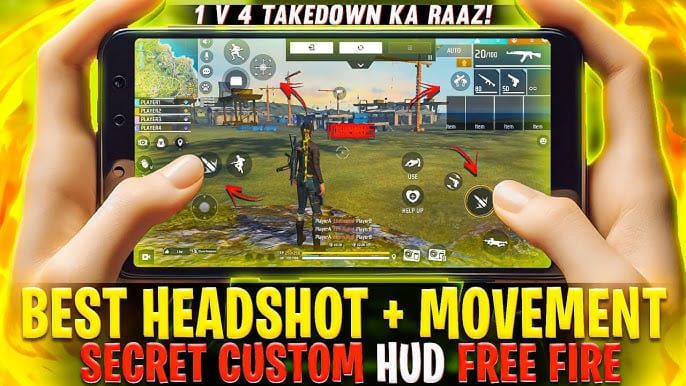
Configure button sizes at 50-70% with 80-100% opacity for optimal visibility and responsiveness. Your HUD should support your settings, not fight against them.
Settings Backup and Recovery Best Practices
Maintain backup copies of optimized universal settings to prevent loss during updates or accidental changes. Document specific sensitivity values and HUD configurations that work effectively for future reference.
Regular backup creation becomes particularly important during major updates like OB51 that may reset or modify existing configurations. Trust me - you don't want to rebuild your perfect setup from scratch.
Enhance Your Free Fire Experience with BitTopup
Optimizing your Free Fire OB51 universal settings requires extensive testing and practice, often necessitating access to premium content and features for comprehensive evaluation. BitTopup provides instant Free Fire diamond delivery, ensuring uninterrupted access to premium features during intensive settings optimization periods.
Fast transaction processing eliminates waiting periods that can disrupt practice routines and testing schedules. When you're dialing in your perfect setup, the last thing you need is downtime.
Secure Transactions for Free Fire Players
BitTopup employs advanced security protocols to protect user information and transaction data during diamond purchases. Multiple payment options and encryption standards ensure safe transactions for players worldwide.
BitTopup's reputation within the Free Fire community stems from consistent service quality, competitive pricing, and reliable customer support, serving millions of players globally while maintaining high satisfaction ratings.
FAQ
What are the exact sensitivity values for Free Fire OB51 universal settings?
The optimal universal configuration uses General sensitivity 95-100, Red Dot 90-95, 2x Scope 80-85, 4x Scope 70-75, Sniper 35-40, and Free Look 80-85. These values work effectively across both BR and Clash Squad modes.
How long does it take to adapt to universal settings in Free Fire?
Basic adaptation requires 1-2 weeks of consistent practice, while complete mastery takes 3-4 weeks. Daily 15-20 minute training sessions accelerate the adaptation process and build reliable muscle memory.
Do universal settings work on all devices for Free Fire OB51?
Universal settings work across most devices, but may require minor adjustments based on specifications. High-end devices (6GB+ RAM, 90-120Hz) can use higher values, while low-end devices may need slight reductions for optimal performance.
Should I use gyroscope with universal Free Fire settings?
Gyroscope at 20-40 sensitivity enhances universal settings by providing additional recoil control without interfering with finger-based aiming. Start with lower values and gradually increase based on comfort and effectiveness.
Can universal settings improve my performance in both BR and Clash Squad?
Yes, universal settings typically improve overall performance by 30-40% through consistent muscle memory development and elimination of mode-switching confusion. The unified approach allows focused skill development that benefits both game modes.
What's the biggest mistake players make with universal Free Fire settings?
The most common mistake is making frequent adjustments instead of allowing proper adaptation time. Players should limit changes to 5-point increments with 3-5 matches between adjustments, allowing 1-2 weeks for complete evaluation of each modification.