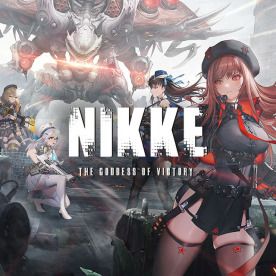


Goddess of Victory NIKKE Top Up on BitTopup
Acquiring Gems in Goddess of Victory: NIKKE gives commanders the resources needed to recruit elite Nikkes, pull on limited-rate banners, and accelerate squad development. BitTopup provides a fast, direct Player ID top-up service that sends Gems directly to your game account without requiring your account login or password.
Whether you are preparing for a Pilgrim rate-up banner, securing a seasonal Mission Pass costume, or purchasing daily resource packages to break through level walls, BitTopup provides direct server-level crediting across all regional partitions. Current gem pack prices and live options are displayed in the selection menu above.
How to Top Up Goddess of Victory: NIKKE Gems on BitTopup
Completing a Goddess of Victory NIKKE recharge on BitTopup takes only a few quick steps:
- Select Your Gem Pack: Browse the catalog above and choose the amount of NIKKE Gems or packages you wish to purchase.
- Enter Your Player ID: Input your in-game Player ID (UID) into the designated field.
- Select Your Server: Pick the exact server partition where your account resides (Global, JP, NA, KR, or SEA).
- Complete Checkout: Review your order details and proceed through the secure payment process.
- Receive Your Gems: Once the transaction completes, your Gems credit directly to your in-game balance. Launch or restart Goddess of Victory: NIKKE to verify your updated total.
How to Find Your NIKKE Player ID and Game Server
To ensure your purchased Gems reach the correct account, you must provide your exact in-game Player ID and server region.
- Launch Goddess of Victory: NIKKE on your mobile device or official PC client.
- In the main Outpost lobby screen, tap your Commander profile avatar in the upper-left corner.
- In the Commander Profile menu, locate the field labeled ID or Member ID underneath your nickname.
- Tap the copy icon next to your ID number to copy it to your clipboard.
- Check the server name (Global, JP, NA, KR, or SEA) listed on your start screen or under account details.
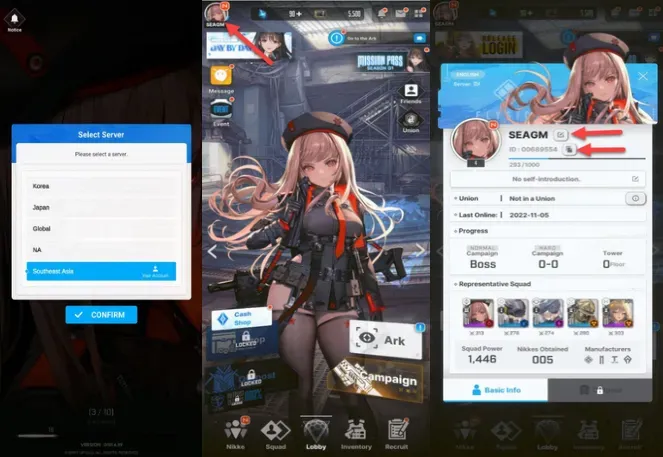
Double-check your copied Player ID before completing your order to prevent delivery delays to an incorrect account.
Supported NIKKE Servers: Global, JP, NA, KR, and SEA
Goddess of Victory: NIKKE divides its player base into specific regional server partitions. BitTopup supports direct UID top-up for all active operational game partitions.
| Server Region | Regional Coverage | Delivery Method |
|---|---|---|
| Global | Europe, Latin America, Oceania, International | Direct UID Crediting |
| JP | Japan | Direct UID Crediting |
| NA | North America (United States & Canada) | Direct UID Crediting |
| KR | South Korea | Direct UID Crediting |
| SEA | Southeast Asia (Singapore, Malaysia, Philippines, Thailand, Indonesia, etc.) | Direct UID Crediting |
Because account data is partitioned per server, ensure you select the server where your active squad is built. Gems delivered to one server partition cannot be transferred to a different server on the same login account.
Why Choose BitTopup for NIKKE Recharge (Safe UID Delivery, No Password Required)
Account safety is critical when purchasing game currency online. BitTopup processes your order through a direct Player ID delivery system built for maximum security:
- Zero Password Requirement: You never have to share your Level Infinite Pass, Google, Apple ID, or social media login credentials. Your account stays entirely under your control.
- No Account Sharing Risks: Because staff never log into your profile, your account is protected from location-flagging bans, device unauthorized access, and credential exposure.
- Fast Order Processing: Orders are handled through automated routing systems that send Gems directly to your game profile immediately after payment confirmation.
- 24/7 Customer Assistance: If you ever have a question regarding order status, server selection, or delivery verification, BitTopup customer support is available around the clock to assist you.
What You Can Purchase with NIKKE Gems: Recruitment Banners, Mission Pass & Packages
Gems serve as the primary premium currency in Goddess of Victory: NIKKE. Managing your Gems efficiently allows you to build stronger squads and progress through campaign chapters:
Pick-Up & Pilgrim Recruitment Banners
Limited-time Rate-Up banners feature newly released Nikkes and high-tier Pilgrim units. Each single pull costs 300 Gems, and a 10-pull costs 3,000 Gems. Pulling on these banners awards Gold Mileage Tickets at a 1:1 ratio. Collecting 200 Gold Mileage Tickets allows you to purchase the featured Rate-Up character directly from the mileage shop without relying on RNG.
Ordinary Recruitment & Wishlist Management
Ordinary Recruitment utilizes standard recruit tickets or Free/Paid Gems. Setting up your 15-Nikke Wishlist (5 per major manufacturer: Elysion, Missilis, Tetra) ensures that any SSR pulled from standard recruitment belongs exclusively to your selected pool, helping you break the Level 160 Synchro Device barrier by obtaining duplicate body cores.
Synchro Device Expansion
As your roster grows, you need slots in the Synchro Device to match the levels of your top five Nikkes. While you can earn some slots through Academy lessons, unlocking extra slots using Gems ensures your newly recruited combat units are immediately battle-ready for Union Raids, Tribe Towers, and Special Interception.
Outpost Defense Wipeout
Wipeout instantly awards 2 hours of accumulated Outpost Defense rewards, including Commander EXP, Credits, Battle Data Sets, and Core Dust. Spending Gems on daily Wipeout attempts during high-tier campaign chapters accelerates Core Dust accumulation for leveling past Synchro Level 200.
Event Passes and Costume Bundles
Special collaborative events and monthly Mission Passes feature exclusive character outfits, Advanced Recruit Vouchers, and manufacturer molds. Premium tracks can be unlocked to claim high-value summon materials alongside limited cosmetic skins.
NIKKE Top-Up Troubleshooting and Delivery FAQs
How do I find my Goddess of Victory: NIKKE Player ID?
Open the game, tap your Commander avatar in the top-left corner of the main lobby screen, and locate your numeric ID displayed directly beneath your Commander Name. Tap the copy icon next to the number.
Do I need to provide my account login password for NIKKE top up?
No. BitTopup only requires your numeric Player ID and your selected server region. We will never ask for your password, email verification codes, or third-party login credentials.
Which servers are supported for NIKKE gem top-up?
BitTopup supports all official game servers: Global, JP (Japan), NA (North America), KR (South Korea), and SEA (Southeast Asia).
How long does it take for NIKKE gems to be credited to my account?
Delivery occurs shortly after payment confirmation. Once your transaction is marked complete, the Gems are added directly to your in-game balance.
Can I top up NIKKE gems for a friend using their Player ID?
Yes. As long as you know your friend's exact Player ID and their active server region, you can enter their details at checkout on BitTopup to send Gems directly to their account as a gift.
What should I do if my purchased NIKKE gems do not appear immediately?
First, restart the game client to refresh your server connection and balance display. If your Gems still do not show up, check your in-game mailbox in case the pack was delivered as a claimable mail item. If you still need help, contact BitTopup 24/7 customer support with your order number and Player ID for immediate assistance.