Land of Empires Dragon Roar Coins Top Up on BitTopup
Land of Empires: Immortal Glory challenges lords to rebuild their city, command legendary infantry, cavalry, and archers, and tame mighty titans and dragons to conquer the Dark Forces. Upgrading city infrastructure, researching high-tier military tactics, and healing troops require resources, stamina, and specialized items.
Dragon Roar Coins serve as the premium exchange currency inside Land of Empires. Buying Dragon Roar Coins through BitTopup gives you immediate purchasing power inside the game without relying on traditional app store billing setups. Recharge directly with your User ID to fund your war efforts and maintain an advantage across your kingdom.
How to Recharge Land of Empires Dragon Roar Coins on BitTopup
- Select your desired Dragon Roar Coins denomination from the catalog above.
- Enter your Land of Empires User ID in the required field.
- Verify your User ID to ensure the currency is credited to the correct lord profile.
- Click Buy Now and choose your preferred local or international payment option.
- Complete the payment. Once verified, your Dragon Roar Coins will be delivered directly to your in-game balance.
How to Find Your Land of Empires User ID
To ensure your recharge arrives without delay, provide your exact User ID. You do not need to share passwords or login credentials. Follow these visual steps inside the game client:
- Launch Land of Empires on your mobile device or emulator.
- Tap your Lord Avatar in the upper-left corner of the main kingdom screen.
- In the Lord Profile window, locate your User ID (a series of numbers displayed beneath your lord name and server designation).
- Tap the Copy icon next to the number to copy the numeric string directly to your clipboard.
- Paste the copied ID into the User ID input box on the BitTopup checkout page.
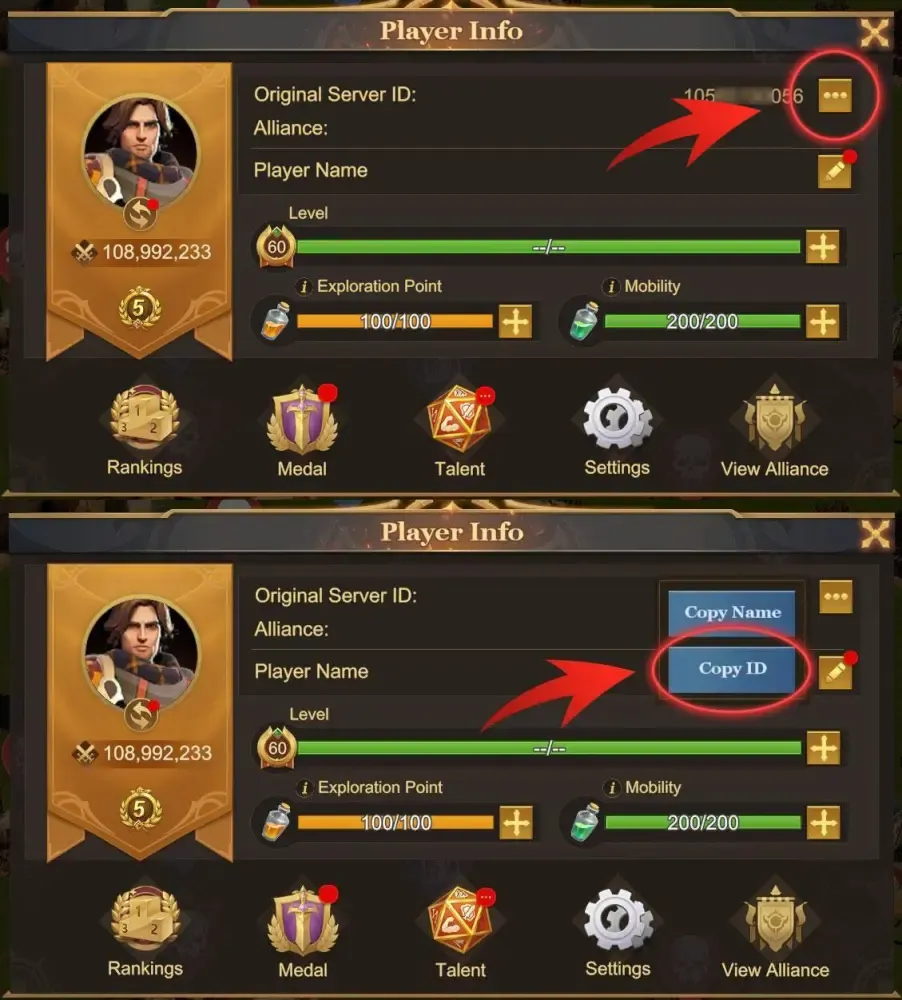
Double-check that you enter the complete numeric string without spaces or special characters to avoid misdirected deliveries.
What Are Dragon Roar Coins and How to Use Them In-Game
Dragon Roar Coins act as a universal in-game credit balance in Land of Empires. Instead of purchasing each bundle or pack through mobile app store microtransactions, you can hold a balance of Dragon Roar Coins and spend them directly on in-game offers.
In-Game Pack Value Conversion
Dragon Roar Coins follow a direct value conversion structure:* 100 Dragon Roar Coins = $1.00 USD equivalent in-game pack value* 499 Dragon Roar Coins = $4.99 USD equivalent bundle* 999 Dragon Roar Coins = $9.99 USD equivalent bundle* 1,999 Dragon Roar Coins = $19.99 USD equivalent bundle* 4,999 Dragon Roar Coins = $49.99 USD equivalent bundle* 9,999 Dragon Roar Coins = $99.99 USD equivalent bundle
(Note: Live store pricing, local taxes, and promotional exchange rates display transparently on the BitTopup checkout screen.)
What You Can Buy With Dragon Roar Coins
- Speedups: Building, research, troop training, and healing speedups to rush kingdom milestones during kill events and kingdom wars.
- Hero Shards and Recruitment Tokens: Summon legendary lords and upgrade their command talents.
- Titan and Dragon Materials: Acquire Dragon Essence, feeding materials, and Titan gear enhancement stones.
- VIP Points and Privileges: Increase your VIP level to unlock permanent economic and combat buffs, extra march queues, and exclusive daily chests.
- Limited-Time Bundles: Purchase event-limited growth funds, seasonal festival packs, and supply passes.
First Purchase & Alliance Cumulative Event Compatibility
Using Dragon Roar Coins in Land of Empires is fully integrated into the game's official reward mechanics. When you spend Dragon Roar Coins to acquire bundles in the store, the game registers the purchase toward all active spending events.
| Event / Feature | Dragon Roar Coin Compatibility | In-Game Reward Triggered |
|---|---|---|
| First Purchase Gift | Fully Supported | Unlocks legendary starter heroes, bonus speedups, and resource packs on first spend. |
| Daily Recharge Milestones | Fully Supported | Credits progress toward daily tiered reward chests for reaching spending thresholds. |
| Total Purchase Events | Fully Supported | Accumulates points toward major multi-day cumulative top-up reward tracks. |
| Alliance Gift Chests | Fully Supported | Generates alliance gift chests for your entire guild whenever you buy eligible packs. |
| VIP Progression | Fully Supported | Grants the full VIP point value corresponding to the purchased bundle tier. |
Because Dragon Roar Coins function as cash-equivalent vouchers inside the game engine, your purchases trigger all corresponding bonuses, guild benefits, and limited-time rebate points.
Safe & Secure User ID-Only Top Up Without Password Sharing
Account security is essential in competitive strategy games where account development requires substantial time and resources. BitTopup uses a direct UID top-up system designed to protect your account security:
- Zero Password Sharing: You never have to share your Google Play, Apple ID, Facebook, or game account passwords.
- No Account Handover: The entire transaction is completed remotely using only your public User ID.
- Direct System Fulfillment: The currency credits directly to the game server via official integration channels, eliminating third-party account tampering.
- Payment Protection: BitTopup provides secure payment processing with encrypted data transmission to protect your billing information.
Troubleshooting Delivery Delays and Account Verification
Most Dragon Roar Coin deliveries complete shortly after payment confirmation. If you experience any delay in seeing your balance update, follow this verification checklist:
- Restart the Game App: Completely swipe away and close the Land of Empires application from your device's app switcher, then reopen it. This forces the game client to query the server and update your currency balance.
- Check the In-Game Mail and Mall: Some bundle items or coins appear in your system mail or require you to open the pack shop to refresh the display.
- Verify Your UID Submission: Check your BitTopup order confirmation email to verify that the submitted User ID matches your in-game profile ID.
- Check Payment Status: Ensure your bank or payment provider marked the transaction as successful and completed.
- Contact BitTopup Support: If your coins do not appear after completing these steps, contact BitTopup 24/7 customer support with your Order Number and in-game User ID for quick assistance and order tracking.
Land of Empires Dragon Roar Coins FAQ
What are Land of Empires Dragon Roar Coins used for?
Dragon Roar Coins are the premium voucher currency in Land of Empires. You can exchange them in the in-game mall to purchase resource bundles, speedups, hero recruitments, VIP points, and limited-time event packs directly.
Where can I find my Land of Empires User ID for top-up?
Open Land of Empires, tap your Lord Avatar in the top-left corner of the screen, and view your profile info. Your User ID is the numeric code located below your lord name. Tap the copy icon next to the number to copy it.
Do I need to share my Land of Empires login password to recharge?
No. BitTopup only requires your Land of Empires User ID. You never need to share passwords, login credentials, or third-party linking information.
Can Dragon Roar Coins be used to trigger 1st Purchase and Total Purchase rewards?
Yes. Spending Dragon Roar Coins on in-game packs triggers First Purchase gifts, Daily Recharge goals, Total Purchase milestones, and Alliance gift chests exactly like standard direct purchases.
How long does it take for Dragon Roar Coins to be delivered to my account?
Orders are processed immediately upon payment verification. Once the transaction completes, coins are credited directly to your in-game account.
What should I do if my Dragon Roar Coins have not appeared after payment?
First, force close and restart the Land of Empires app to refresh your balance with the server. If the balance does not update, verify your payment confirmation and contact BitTopup customer support with your Order ID and User ID for prompt verification.