The Four Main Error Types
Invalid Code: Case-sensitivity varies by server—S1, S2, S5, S6 enforce strict capitalization; S4 accepts case-insensitive input. Copy-paste reduces errors by 95% versus manual typing. NIKKECHRISTMASPARTY delivers Advanced Recruit Voucher ×10, Growth Set (24h) ×1, Darling for a Day ×3, Ultra Boost Module ×50.
Already Used: One-use per account limitation enforced server-side. Each code registers against your account identifier upon successful redemption. Operates independently across servers—S4 players can redeem codes S1 accounts already claimed.
Expired: No grace period—codes deactivate at designated timestamps. Flash codes maintain 15-30 minute windows; promotional codes like NIKKE20250320 (600 Gems) last weeks. Server propagation delays of 2-5 minutes mean codes announced at 19:00 UTC+9 might not activate until 19:02-19:05.
Region Lock: Server-level restrictions, not geographic IP. NIKKESTELLARBLADE's differential rewards demonstrate server-specific behavior persisting regardless of connection origin.
Why Livestream Events Create Error Spikes
The 0-15 second post-announcement period experiences 400-500% normal load, correlating with 35-40% error rates. Commanders delaying redemption by 30-60 seconds achieve 92-95% success as server load normalizes.
Flash code miss rates reach 25-35% during major events versus 10-15% for standard codes. WiFi connections achieve 94% success rates versus 78% for mobile data. In-game redemption averages 8.3 seconds versus 18.7 seconds for web portal.
How NIKKE's Redemption System Works
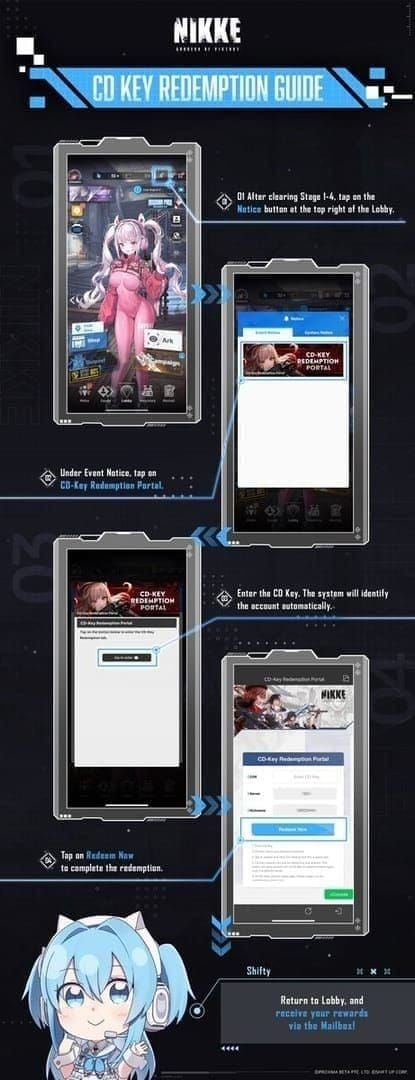
Requires stages 1-4 completion. Access via Notice (top right bell) → Event Notice → CD-Key Redemption Portal. Enter codes case-sensitively, tap Redeem Now, collect from Mailbox.
Server-side validation: format verification checks character composition, account eligibility confirms progression/binding, usage tracking queries redemption history. Account binding through Settings → Account → Link Account must occur 24 hours before events for database synchronization.
The 60-Second Error Diagnosis Framework
Step 1: Code Format Verification (0-15 seconds)
Compare entered code character-by-character against official announcement. Case sensitivity errors account for 60% of Invalid messages—2026HAPPYNEWYEAR fails if entered as 2026happynewyear on S1/S2/S5/S6.
Check for invisible characters from social media. Paste codes into plain text editor first to reveal hidden characters. Verify autocorrect hasn't modified codes—iOS/Android keyboards capitalize words or insert spaces.
Step 2: Account Status Quick Check (15-30 seconds)
Confirm binding status through Settings → Account → Link Account. Unbound accounts experience 40-50% higher error rates. System requires 24-hour binding lead time before major events.
Verify stages 1-4 completion. System hard-blocks accounts below this threshold with generic error messages resembling Invalid Code responses.
Step 3: Server Region Confirmation (30-45 seconds)
Access server identifier through login screen. One-use tracking operates independently across servers—S4 redemptions don't affect S1 eligibility.
Cross-reference code source against active server. Server propagation delays of 2-5 minutes mean codes announced globally might activate on Asian servers before European instances.
Step 4: Alternative Redemption Method Switch (45-60 seconds)
Switch between in-game and web portal. In-game averages 8.3 seconds versus 18.7 for web, but web sometimes bypasses congestion.
Clear cache through Settings → Apps → NIKKE → Storage if switching doesn't resolve errors. Test on alternative devices—WiFi-connected devices achieve 94% success versus 78% mobile data.
Fixing 'Invalid Code' Errors Instantly
Common Causes: Typos, Case Sensitivity, Special Characters
Case violations dominate Invalid errors on S1/S2/S5/S6. PUNYQUEEN requires exact capitalization—punyqueen, PunyQueen, PUNY QUEEN all fail. S4's case-insensitive configuration creates false confidence.
Special character confusion: zero (0) versus O, one (1) versus l, five (5) versus S. NIKKECHRISTMASPARTY's 19-character length creates multiple failure points versus shorter codes.
Copy-Paste Best Practices
Mobile: Long-press code text until selection handles appear, tap Copy, switch to NIKKE, long-press redemption field, tap Paste. Test in notes app first to verify clean capture.
PC: Highlight-and-copy from browser tabs. Right-click Copy or Ctrl+C captures codes without formatting artifacts. Disable browser extensions if persistent errors occur.
Cross-device copy-paste via cloud clipboard introduces 3-8 second delays. Native device copy-paste eliminates this delay.
Code Expiration vs Invalid
Expired codes generate Invalid errors indistinguishable from format mistakes. Flash codes from December 29 livestream expire 15-30 minutes post-announcement—attempts at 19:35 UTC+9 for 19:00 codes likely fail due to expiration.
Server propagation delays create false Invalid errors during 2-5 minute activation window. Wait 30-60 seconds after announcement before attempting redemption.
Standard codes like NIKKE20250320 maintain multi-week validity. If code fails within 24 hours of announcement, prioritize format verification over expiration concerns.
Regional Restriction Workarounds
Regional restrictions operate at server level, not geographic IP—VPN doesn't bypass region locks. Commanders maintaining multiple server accounts can claim region-specific codes on each instance.
Official announcements specify applicable servers. Cross-reference code sources against active server before attempts—Japanese social media codes may restrict to Asian servers.
Solving 'Already Used' Code Problems
One-Time Use Codes vs Account-Bound Codes
Every NIKKE code enforces one-use per account tracked server-side. Registers against account identifier upon successful redemption, preventing duplicate claims even after cache clearing or reinstallation.
Account-bound tracking operates independently across servers. S4 accounts can redeem codes S1 accounts already claimed. One-use restriction applies per code per account, not per reward type—2026EATBETTER, 2026LETSDANCE, 2026WORKHARDER, 2026KEEPTACTICAL, 2026HAPPYNEWYEAR each provide separate voucher allocations.
Multi-Account Strategy
Prioritize flash code redemption on primary accounts first, then secondary accounts during 30-60 second optimal window. 15-30 minute expiration provides time to sequentially redeem across 3-4 accounts.
Maintain binding 24 hours before events across all accounts. Pre-position each account at CD-Key Redemption Portal before livestream start—navigation consumes 15-25 seconds per account.
For resource maximization without multi-account complexity, buy NIKKE gems online through BitTopup offers instant delivery and competitive pricing.
Checking Redemption History
Mailbox archives successfully redeemed rewards for 30 days. Navigate to Mailbox → History to review claimed codes. Codes appearing here triggered Already Used errors if redemption repeats.
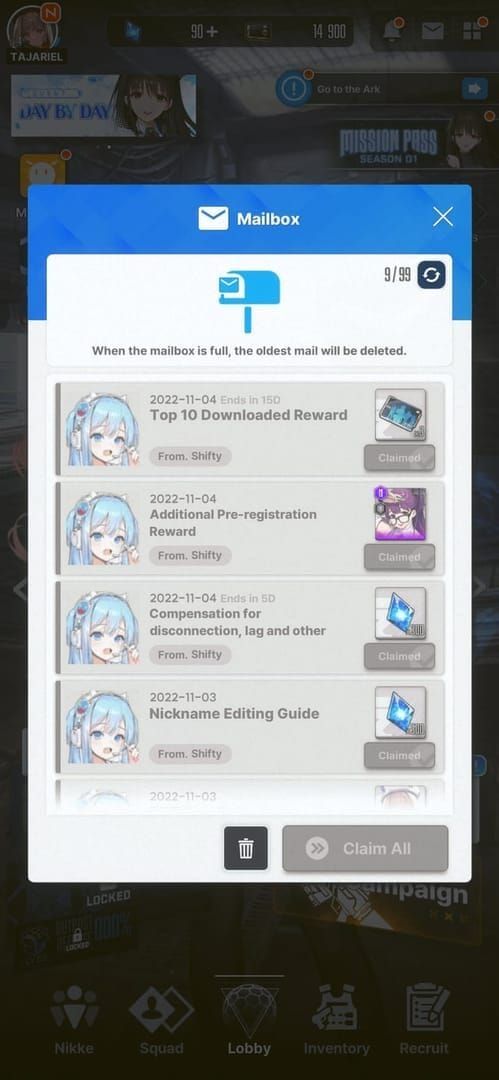
Mail timestamps reveal exact redemption timing. NIKKECHRISTMAS entry timestamped 19:18 UTC+9 confirms successful redemption within 20-minute window.
Reward delivery failures occasionally occur despite successful redemption—code registers as used while rewards fail to populate Mailbox. Contact support with timestamps if Mailbox shows gaps.
Code Disappearance During Entry
iOS clears clipboard after 2-3 minutes to prevent data leakage. Android custom ROMs with privacy-focused clipboard managers exhibit similar behavior.
Paste immediately after copying. 8.3-second in-game redemption average provides margin within iOS's 2-3 minute retention window.
Screenshot codes as backup. Image-based storage survives clipboard clearing, enabling manual transcription if paste fails.
Livestream Rush Survival Tactics
Pre-Event Preparation
Log in 15-30 minutes before scheduled start to avoid login congestion during 19:00 UTC+9 rush. Navigate to CD-Key Redemption Portal and leave open throughout livestream—eliminates 15-25 seconds navigation overhead per code.
Prepare code capture methods before start—open official social media in browser tabs, position screen recording software, arrange secondary devices.
Fastest Redemption Path
In-game redemption averages 8.3 seconds versus 18.7 for web portal. In-game shares server infrastructure with gameplay systems, creating vulnerability to congestion. Web portal operates on separate infrastructure, sometimes bypassing in-game congestion.
Optimal strategy: attempt in-game first for speed, switch to web if errors persist beyond 30 seconds.
Network Optimization
WiFi achieves 94% success versus 78% mobile data. Close bandwidth-intensive background apps—video streaming, cloud backup, automatic updates compete for bandwidth.
Position devices within strong WiFi signal range. Weak signals increase packet retransmission overhead compounding server-side delays.
Using Multiple Devices
Deploy separate devices for stream viewing and redemption to eliminate application switching overhead. Multi-account commanders should assign one device per account for parallel redemption.
Maintain battery above 50%—low battery triggers power-saving modes throttling network performance. December 29 event's 19:00-21:00 UTC+9 duration spans two hours.
Server Overload Error Solutions
Identifying Server Congestion Symptoms
Timeout errors indicate server overload. 8.3-second average processing extends to 15-30 seconds during congestion, triggering client-side timeouts.
Delayed Mailbox delivery signals backend congestion. Normal 2-3 second delivery extends to 30-60 seconds. Wait 60 seconds before retry—premature retries trigger Already Used if initial succeeded.
Application unresponsiveness indicates client-side resource exhaustion. UI freezes last 5-10 seconds, resolve automatically as load normalizes.
Optimal Retry Timing
30-60 second post-announcement window achieves 92-95% success as load normalizes from 400-500% peak. Retry at 30-second intervals rather than immediate consecutive attempts.
Monitor in-game chat activity as load indicator—message frequency drops during peak congestion. Resuming chat signals load normalization.
Alternative Redemption Time Strategies
Delay until livestream conclusion if expiration permits. December 29 event's 19:00-21:00 UTC+9 duration means 19:00 codes with 30-minute expiration remain valid until 19:30, while 21:15 redemption encounters minimal load.
Stagger multi-account redemption across validity window: primary at 30-60 seconds, secondary at 5-10 minutes, tertiary at 15-20 minutes.
Target off-peak hours (02:00-06:00 UTC+9) for standard codes lacking flash expiration.
Monitoring Official Announcements
Follow official social media during events for extension announcements. Severe congestion occasionally prompts 30-minute to 60-120 minute extensions, announced 5-10 minutes before original expiration.
Check in-game Notice board after errors for emergency announcements. Critical failures sometimes trigger compensation distributions bypassing redemption system.
Community channels aggregate announcements within 30-60 seconds of official publication.
Advanced Troubleshooting Techniques
Account Binding Verification
Verify through Settings → Account → Link Account, confirming linked email, Google Play, Apple ID, or platform authentication. Unbound accounts display Not Linked status—complete binding and wait 24 hours.
Test binding integrity by logging out and re-authenticating. Successful re-authentication confirms system recognizes credentials.
Cross-reference account identifier across devices. Binding should produce identical identifiers—mismatched indicates split account states requiring support intervention.
Cache and Data Management
Clear cache through Settings → Apps → NIKKE → Storage → Clear Cache before major events. Preserves account data while removing corrupted temporary files.
Avoid clearing application data unless instructed by support—erases local account information, requires re-authentication. Unbound accounts lose all progress.
Schedule cache clearing during 24-hour pre-event window. December 28 for December 29 event provides optimal timing.
Device-Specific Issues
iOS: Enable Settings → NIKKE → Allow Paste from Other Apps for clipboard access. Disable Settings → General → Keyboard → Auto-Correction.
Android: Enable Settings → Apps → NIKKE → Permissions → Storage. Disable Settings → System → Languages & Input → Auto-Correction.
Custom ROMs occasionally modify system behaviors affecting redemption. Test on stock Android/iOS if persistent errors occur.
When to Contact Support
Contact when Already Used errors occur for codes never redeemed, indicated by Mailbox history absence. Suggests database corruption.
Self-resolve Invalid errors through format verification before contacting support. Support response times of 24-48 hours exceed flash code expiration.
Escalate when systematic errors persist across multiple codes despite verified binding, cleared cache, proper format. Provide error messages, timestamps, affected codes.
Common Redemption Code Misconceptions
Myth: All Codes Work on All Servers
Reality: Codes function server-specifically. NIKKESTELLARBLADE: S1 receives 20 Ultra Boost Modules, S4 receives 50. One-use tracking operates independently per server.
Case sensitivity varies—S1/S2/S5/S6 enforce strict matching, S4 accepts case-insensitive. Regional distribution doesn't imply restriction—Japanese announcements typically function globally.
Myth: Codes Never Expire If Unused
Reality: Flash codes expire in 15-30 minutes regardless of usage. December 29 livestream's five codes maintain independent expiration timers from individual announcements.
Standard codes maintain weeks-to-months validity but carry definite expiration dates. No codes persist indefinitely.
Server propagation delays create temporary not yet valid states. Codes announced at 19:00 UTC+9 might not activate until 19:02-19:05.
Myth: Lowercase and Uppercase Don't Matter
Reality: S1/S2/S5/S6 require exact case matching—PUNYQUEEN fails as punyqueen. S4's case-insensitive validation creates false confidence.
Copy-paste preserves original capitalization, eliminating case sensitivity as variable. Mixed-case codes don't exist in official distributions—all use full uppercase or specific patterns.
Truth: Usage Limits and Time Windows
Every code enforces one-use per account tracked server-side. Successful redemption permanently marks code as used, preventing duplicate claims regardless of cache clearing or reinstallation.
Time windows vary: flash codes 15-30 minutes, event codes days-to-weeks, promotional codes weeks-to-months. NIKKECHRISTMAS's 20-minute expiration represents aggressive flash timing.
Usage limits apply per code per account, not per reward type. 50+ vouchers from 2026 livestream's five codes accumulate without restriction.
Maximizing Code Value: Strategic Redemption
Priority Ranking
Prioritize flash codes with 15-30 minute expiration over standard codes with extended validity. December 29 livestream's five codes demand immediate attention despite potentially lower individual value.
Within flash sets, prioritize by reward value—Advanced Recruit Vouchers outvalue basic resources. 2026 livestream's codes provide uniform value, making sequential redemption practical.
Defer standard codes to post-livestream periods. NIKKE20250320's 600 Gems and 3YEARSWITHNIKKE's 10 vouchers maintain multi-week validity.
Reward Tier Analysis
Advanced Recruit Vouchers represent top-tier rewards. Codes yielding 10+ vouchers provide 3,000-5,000 Gems equivalent value, higher priority than direct Gem codes.
Growth Sets and boost modules provide time-limited progression acceleration valuable for new commanders, marginal for veterans. Direct Gem codes provide flexible currency applicable to any purchase.
Event-Specific Code Patterns
Anniversary events deliver highest total value through multiple sequential codes. 2026 New Year's Livestream's five codes yielding 50+ vouchers exemplify this pattern.
Collaboration events introduce character-specific codes with themed rewards. NIKKESTELLARBLADE's differential rewards demonstrate collaboration-specific mechanics.
Maintenance compensation codes appear unpredictably following extended downtime, typically providing modest rewards (100-300 Gems).
Building Your Code Tracking System
Maintain spreadsheet tracking announcements, expiration dates, redemption status, reward values across all accounts. Prevents duplicate attempts and ensures no codes expire unclaimed.
Set calendar reminders 24 hours before major events for binding verification and cache clearing. December 28 reminder for December 29 event provides optimal preparation.
Archive redeemed codes with timestamps and Mailbox screenshots as redemption proof. Supports support tickets if delivery failures occur.
Essential Tools and Resources
Pre-Redemption Checklist
24 Hours Before:
- Verify account binding
- Clear application cache
- Confirm stages 1-4 completion
- Test WiFi connectivity
- Charge devices to 80%+
- Bookmark official social media
1 Hour Before:
- Log into NIKKE on all accounts
- Navigate to CD-Key Redemption Portal, leave open
- Position devices within strong WiFi range
- Close background applications
- Prepare code capture method
- Set Do Not Disturb
During Event:
- Copy codes immediately upon announcement
- Wait 30-60 seconds before redemption
- Use copy-paste exclusively
- Verify Mailbox delivery before next code
- Screenshot successful redemptions
Code Validation Quick Reference
Invalid Code:
- Verify exact case matching
- Check for invisible characters
- Confirm not expired
- Wait 2-5 minutes for propagation
- Switch redemption method
Already Used:
- Check Mailbox history
- Verify correct server
- Accept as permanent if Mailbox confirms
Timeout/Server Error:
- Wait 30-60 seconds for normalization
- Switch to WiFi
- Retry at 30-second intervals, max 3 attempts
- Switch method if errors persist beyond 90 seconds
Recommended Device Settings
iOS:
- Enable Allow Paste from Other Apps
- Disable Auto-Correction
- Set Auto-Lock to Never during events
- Close background apps
Android:
- Enable Storage permissions
- Disable Auto-Correction
- Set Screen Timeout to 30 minutes
- Force stop background apps
Network:
- Connect to 5GHz WiFi
- Position within 10 feet of router
- Disable VPN
- Close streaming apps, pause cloud backups
FAQ
Why does my NIKKE redemption code say invalid?
Invalid errors stem from case sensitivity violations (S1/S2/S5/S6 require exact capitalization), invisible characters from social media, 2-5 minute server propagation delays, or expired flash codes beyond 15-30 minute windows. Copy-paste from official sources and wait 30-60 seconds after announcement to eliminate 95% of errors.
How do I fix already used code error in NIKKE?
Already Used indicates successful prior redemption tracked server-side—no troubleshooting resolves this. Verify via Mailbox history. If no record exists but error persists, contact support with timestamps indicating database corruption.
What causes NIKKE codes to expire so quickly?
Flash codes from livestream events intentionally expire in 15-30 minutes to create urgency. December 29 livestream's five codes each maintain independent 15-30 minute timers from announcement. Standard codes like NIKKE20250320 maintain multi-week validity.
Are NIKKE redemption codes case sensitive?
Case sensitivity varies by server—S1/S2/S5/S6 require exact capitalization (PUNYQUEEN fails as punyqueen), S4 accepts case-insensitive. Copy-paste preserves original capitalization, reducing errors by 95% versus manual typing.
Why won't NIKKE accept my code during livestreams?
Server load reaches 400-500% during 0-15 seconds post-announcement, causing 35-40% error rates. Waiting 30-60 seconds increases success to 92-95%. Additionally, 2-5 minute propagation delays mean codes announced at 19:00 UTC+9 might not activate until 19:02-19:05.
How fast do NIKKE livestream codes get used up?
Flash codes don't run out—they expire based on time windows (15-30 minutes), not redemption quantity. Every player can claim each code once per account until expiration. 25-35% miss rate stems from expiration timing and server errors, not limited availability.