What Makes Vine Sensitivity Unique for Zero Recoil
Three critical adjustments differentiate vine sensitivity:
- Aggressive gyroscope values: 400% TPP/FPP no scope enables instant target acquisition from Corruption Plant Zones
- Graduated scope reduction: 300-400% at 2x down to 50-100% at 8x maintains control across distances
- Optimized free look: 150% for monitoring multiple threats like Bramblewood Scorpion
Zero recoil matches gyroscope movement to weapon-specific recoil vectors. Mini-14 (48 damage, 990 m/s) uses 180-275% 3x gyroscope for 70%+ hit accuracy at 50-100m. SKS/SLR (58 damage, 840 m/s) needs 160-200% 4x gyroscope for heavier recoil.
Who Should Use This Setup
Targets competitive players using 6-finger claw on 6.7+ inch screens. Layout code 6960-4887-1407-8797-709 requires 130-150% button scaling. Extra control points enable simultaneous Vine Manipulation, aim adjustment, and movement.
Requirements:
- Android 5.0+ with 8GB RAM minimum (APK: 1.18GB)
- iOS users: code 7120-0143-8549-4140-855
- Android users: code 7182-2143-7949-4840-905
- 120Hz+ displays benefit most
How to Import Vine Sensitivity Code
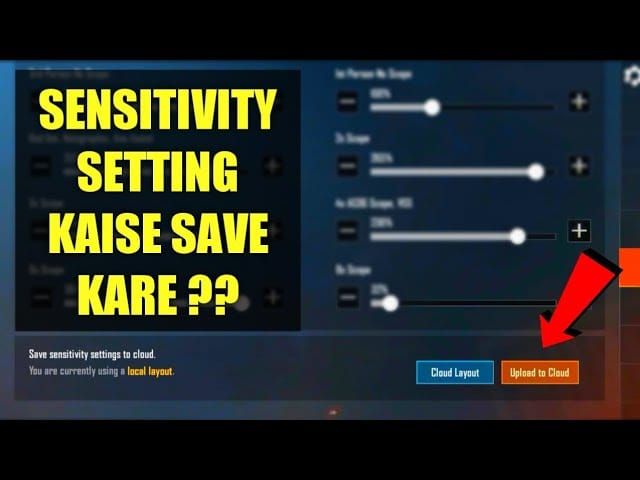
Navigate to Settings > Sensitivity > Cloud icon (top-right).
Import Steps:
- Tap Cloud icon (cloud with downward arrow)
- Select Enter Code from dropdown
- Input 1-7435-8846-3421-0303-0728 with hyphens
- Tap green Confirm button
- Settings auto-apply (2-3 seconds)
Common error: confusing 0 (zero) with O or 1 (one) with I.
Alternative Codes by Device
- Android compatibility: 1-7462-2496-3022-3831-210
- iOS optimized: 1-7478-5115-3389-3888-855
- Training room: 7307-1085-6780-4282-435
6-finger layout import: Settings > Customize Buttons > Layout Management > paste 6960-4887-1407-8797-709 > Search > Apply. Alternative for smaller hands: 6960-5068-1059-6336-109 (crouch button 15% lower).
Complete Breakdown of Vine Sensitivity Values
Camera sensitivity controls view rotation without ADS. Vine code sets TPP no scope at 120-150% for rapid 180-degree turns against Bramblewood Scorpions (72 km/h Burrow mode). FPP drops to 100-120%.
Gyroscope Sensitivity Integration
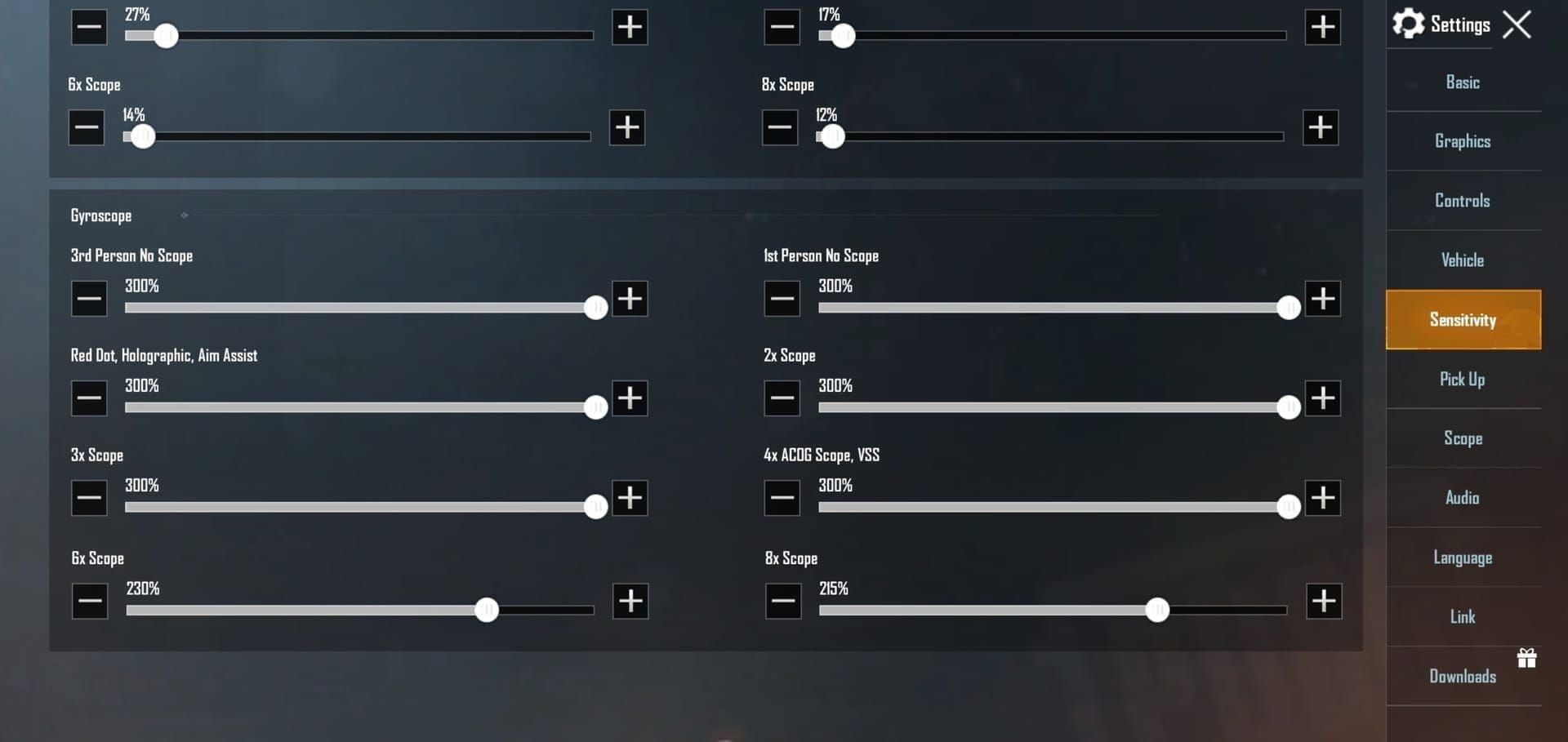
400% TPP/FPP no scope means 1-degree tilt = 4-degree camera rotation. Proportional reduction by magnification:
- Red Dot/Holo/2x: 300-400% for close-quarters vs Groot summons (200 HP, 25% damage resistance)
- 3x Scope: 180-275% for mid-range precision
- 4x Scope: 160-200% for Florawings wearable flight engagements
- 6x Scope: 80-120% for sustained fire stability
- 8x Scope: 50-100% prevents over-correction
Free look 150% scans Corruption Plant Zones while maintaining aim—critical against Thornstrike (85 damage, 25m range, 0.8s cast).
ADS Sensitivity for Weapon Control
ADS determines scoped rotation speed. 50-70% Red Dot range: M416 at 50-60%, AKM at 55-65%. Values multiply with gyroscope: 60% ADS × 300% gyroscope = 180% effective sensitivity.
Manually adjust 6x to 80-120% and 8x to 50-100% matching gyroscope for unified feel across scopes.
Setting Up 6-Finger Claw Layout
Finger assignments:
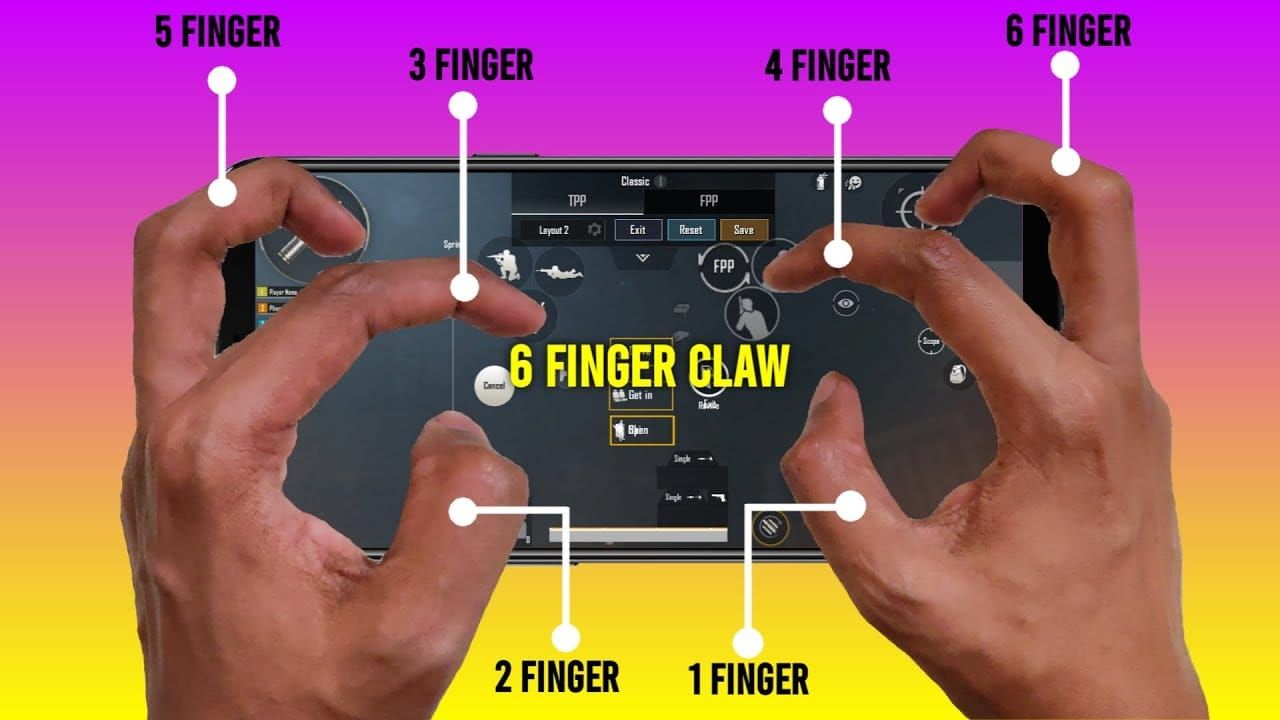
- Index: primary fire (right), ADS/scope (left)
- Middle: jump (right), crouch/prone (left)
- Thumbs: movement (left), camera (right)
Eliminates thumb-lifting, maintains constant directional control during Vine Manipulation.
PUBG Mobile instant UC top up zero recoil sensitivity packs available through BitTopup with fast delivery.
Device Requirements
6.7+ inch screens needed for six touch points. Button scaling 130-150%—smaller causes missed inputs, larger creates overlap. Code 6960-4887-1407-8797-709 assumes 6.9-inch screens; tablets use 6960-5068-1059-6336-109.
Screen protectors affect touch—increase Settings > Basic > Touch Sensitivity to High/Very High if unresponsive.
Ergonomic Positioning
Hold device with pinky/ring fingers supporting bottom, middle fingers on upper back near top edge, index hovering over upper corners. Thumbs naturally fall on lower third.
Start with 10-minute intervals, extend to 30 minutes as muscle memory develops. Practice Healing Blossom (8 HP/s in 5m radius for 15s) while maintaining full movement/aim control.
Achieving Zero Recoil in Plant Trap Mode
Zero recoil provides gyroscope values that auto-counter recoil patterns. 400% no scope means 1-2 degree tilt produces 4-8 degree movement, matching M416 vertical climb. Enable Settings > Sensitivity > Gyroscope > Always On.
Weapon-Specific Techniques
Tilt requirements:
- M416: 2-degree steady downward tilt
- AKM: 3-degree tilt
- Mini-14: 1-degree at 3x (low recoil)
- SKS/SLR: pulsed tilting synced with shots
Vine Trap's 3.2-second binding creates guaranteed damage window. Land 85% of shots during immobilization for eliminations. Practice with code 7307-1085-6780-4282-435 in training mode.
Combining Sensitivity with Manual Compensation
Gyroscope handles vertical climb, thumb manages horizontal drift. 50-60% M416 ADS allows precise adjustments. During sustained fire: apply 10-15% downward thumb pressure with 2-degree device tilt for perfect spray up to 50m. Beyond 50m, switch to single-fire and rely on gyroscope.
Plant Trap Mode Optimization
Primewood Genesis introduces Corruption Plant Zones for harvesting abilities. Vine Trap (85 damage, 3.2s binding, 60s cooldown) creates guaranteed damage windows requiring rapid acquisition and sustained accuracy.
Strategic Advantages
Three competitive edges:
- Immediate follow-up: 3.2-second window allows 40-50 AR rounds = 1,600-2,000 damage
- Multi-target engagement vs Groot summons (200 HP, 25% resistance, 50m revival radius)
- Aerial accuracy with Florawings wearable flight
Bramblewood Scorpion mount (40 km/h flat, 72 km/h Burrow) needs 120-150% TPP camera for tracking during movement. 150% free look monitors pursuers during escapes.
Best Weapons
Optimal loadout:

- Primary: Mini-14 (48 damage, 990 m/s, 70%+ hit rate 50-100m)
- Secondary: M416 (50-60% ADS for controlled spray)
- Alternative DMR: SKS/SLR (58 damage, 840 m/s)
Avoid bolt-actions—high gyroscope creates instability during bolt-cycling. Create secondary preset with 50% reduced gyroscope for sniping via Settings > Sensitivity > Presets.
Fine-Tuning for Your Playstyle
Make single adjustments per session, play 3-5 matches before evaluating. If camera feels too fast, reduce TPP no scope from 150% to 130% in 5% increments. If targets escape crosshair, increase Red Dot gyroscope from 300% to 350%.
Device-Specific Modifications
iOS: 5-10% lower values than Android (different touch curves). If code 1-7478-5115-3389-3888-855 feels sluggish, increase camera 5%.
Android 120Hz+: 10-15% higher values to match perceived speed.
Screen size adjustments:
- Under 6.5 inches: 15-20% higher camera sensitivity
- Over 8 inches (tablets): 10-15% lower values
Testing Process
Establish baseline in training (code 7307-1085-6780-4282-435): time to eliminate 10 stationary targets at 50m, then 10 moving. Adjust one parameter 5-10%, retest. Only adopt changes improving metrics 10%+.
Mastery timeline (2-3 weeks):
- Week 1: Team Deathmatch for muscle memory
- Week 2: Classic mode tactical application
- Week 3: Edge cases (long-range, vehicles, Plant Trap scenarios)
Training and Mastery
Start with stationary targets at progressive distances: 25m, 50m, 75m, 100m. Use Mini-14 with 3x (180-275% gyroscope). Aim for 90%+ accuracy before advancing.
Recoil Control Drills
Wall spray: Stand 10m from wall, empty M416 magazine on single point. Pattern should form tight vertical line under 50cm width. If wider, increase downward thumb pressure or verify gyroscope calibration.
Moving targets: Practice crosshair placement while strafing perpendicular to target. Simulate Vine Trap engagements while repositioning. Advanced: add jumping/crouching.
Performance Metrics (10-match samples)
- Headshot %: 25%+ AR, 40%+ DMR
- Damage/Match: 500+ Classic aggressive play
- Accuracy Rate: 30%+ hit rate
- Knockdown Distance: 50m+ average
- Vine Trap Conversion: 70%+ elimination when binding succeeds
Expect 15-25% accuracy improvement within two weeks. If under 10%, try alternative codes or manual customization.
Advanced Competitive Tips
Codes (1-7435-8846-3421-0303-0728 and variants) comply with official PUBG Mobile competition rules as of 4.2 Beta. Verify current tournament regulations before events.
Performance Optimization
Create situation-specific presets:
- Early-game: higher camera for building clearing
- Mid-game: balanced settings
- Final circles: lower sensitivity for precision
Quick-switch via Settings > Sensitivity > Presets takes 2-3 seconds. Maintain identical sensitivity across modes for universal muscle memory.
Consistency Maintenance
Environmental factors:
- Screen temperature affects touch—avoid sunlight, use cooling accessories
- Hand moisture impacts accuracy—keep dry, consider finger sleeves
Monthly verification: Return to training baseline tests. If accuracy drops 10%+, verify values unchanged and recalibrate gyroscope via Settings > Basic > Gyroscope > Calibrate.
FAQ
How do I import sensitivity codes in PUBG Mobile 4.2 Beta?
Settings > Sensitivity > Cloud > Enter Code, input 1-7435-8846-3421-0303-0728 with hyphens, tap Confirm. For 6-finger: Settings > Customize Buttons > Layout Management, paste 6960-4887-1407-8797-709, Search, Apply.
Does Vine sensitivity work for all devices?
Universal code works broadly, but use device-specific variants: iOS 1-7478-5115-3389-3888-855, Android 1-7462-2496-3022-3831-210. Screens under 6.5 inches need 15-20% higher camera sensitivity, tablets over 8 inches need 10-15% lower.
Can sensitivity codes give zero recoil?
Codes provide optimized gyroscope values that auto-counter recoil when device tilt is enabled. Enable Settings > Sensitivity > Gyroscope > Always On for full functionality.
What's best for Plant Trap mode?
Code 1-7435-8846-3421-0303-0728: 400% no scope gyroscope (rapid acquisition), 50-60% M416 ADS (controlled damage during 3.2s binding), 150% free look (zone monitoring). Pair with 6-finger layout 6960-4887-1407-8797-709.
How does 6-finger claw improve gameplay?
Assigns dedicated functions per finger: index for fire/ADS, middle for jump/crouch, thumbs for movement/camera. Eliminates thumb-lifting, maintains constant directional input. Essential for simultaneous Vine Manipulation, aim, and evasive movement.
Is Vine sensitivity allowed in tournaments?
Yes, all in-game sensitivity configs including imported codes comply with official regulations. External hardware faces restrictions, but software settings remain legal. Verify specific tournament rules before competition.