What Are Sensitivity Codes
Sensitivity codes represent cloud-stored configuration files bundling camera sensitivity, ADS sensitivity, gyroscope settings, and scope-specific adjustments into a single shareable identifier.
Code categories:
- General codes: Universal settings (7435-8846-3421-0303-0728)
- Platform-specific: Android (7462-2496-3022-3831-210), iOS (7478-5115-3389-3888-855), iPad (7478-5115-3389-3888-854)
- Layout-integrated: 4-finger (7275-1794-4178-8556-303), 6-finger (6960-4887-1407-8797-709)
- Mode-specific: TPP/FPP gyro (7307-1085-6780-4282-435)
Each code contains 40-60 individual parameter values covering third-person camera speed, first-person ADS multipliers, gyroscope sensitivity across seven scope magnifications, and free look rotation speed.
How Sensitivity Codes Enable Zero Recoil
Zero recoil minimizes weapon muzzle climb through precise sensitivity calibration allowing natural hand movements to counteract recoil patterns. Code 7435-8846-3421-0303-0728 achieves this through balanced ADS sensitivity values reducing swipe distance needed for recoil compensation.
Camera sensitivity: 120% for third-person enabling quick target acquisition. ADS sensitivity drops to 100% no-scope, then progressively decreases to 35% for 2x scopes and 25% for 3x magnification. Higher magnification scopes require smaller finger movements for recoil compensation.
Gyroscope integration amplifies this effect. ADS gyroscope set to 400% no-scope, 365% Red Dot, 275% 3x/4x, 120% 6x, 90% 8x. Players use subtle device tilting to maintain crosshair placement during automatic fire. Combination of reduced ADS sensitivity and elevated gyroscope values creates dual-input control system.
Vitality Gun Mode Sensitivity Requirements
PrimeWood Genesis Mode overhauls Erangel around Pochinki and Yasnaya with new terrain features and engagement distances. Environmental redesign necessitates sensitivity adjustments balancing close-quarters building combat with medium-range open-field engagements.
Early testing indicates maintaining gyroscope no-scope settings between 300-400% provides optimal control for modified weapon physics. Scope-specific sensitivities remain effective using graduated reduction approach.
6-finger layout code 6960-4887-1407-8797-709 addresses multi-finger control requirements for PrimeWood's vertical gameplay elements. Positions fire buttons, ADS toggles, and movement controls for simultaneous input from six contact points.
Complete Breakdown of Code 7435-8846-3421-0303-0728
Camera Sensitivity Values
Camera sensitivity controls rotation speed when dragging screen to look around without aiming down sights. Code sets camera sensitivity at 120% third-person, providing responsive 360-degree awareness while preventing over-rotation.
Free Look sensitivity: 150%, allowing rapid peripheral scanning without disrupting character movement. Third-person no-scope camera: 120-150% depending on device type, tablets receiving higher value to compensate for increased screen real estate.
ADS Sensitivity Configuration
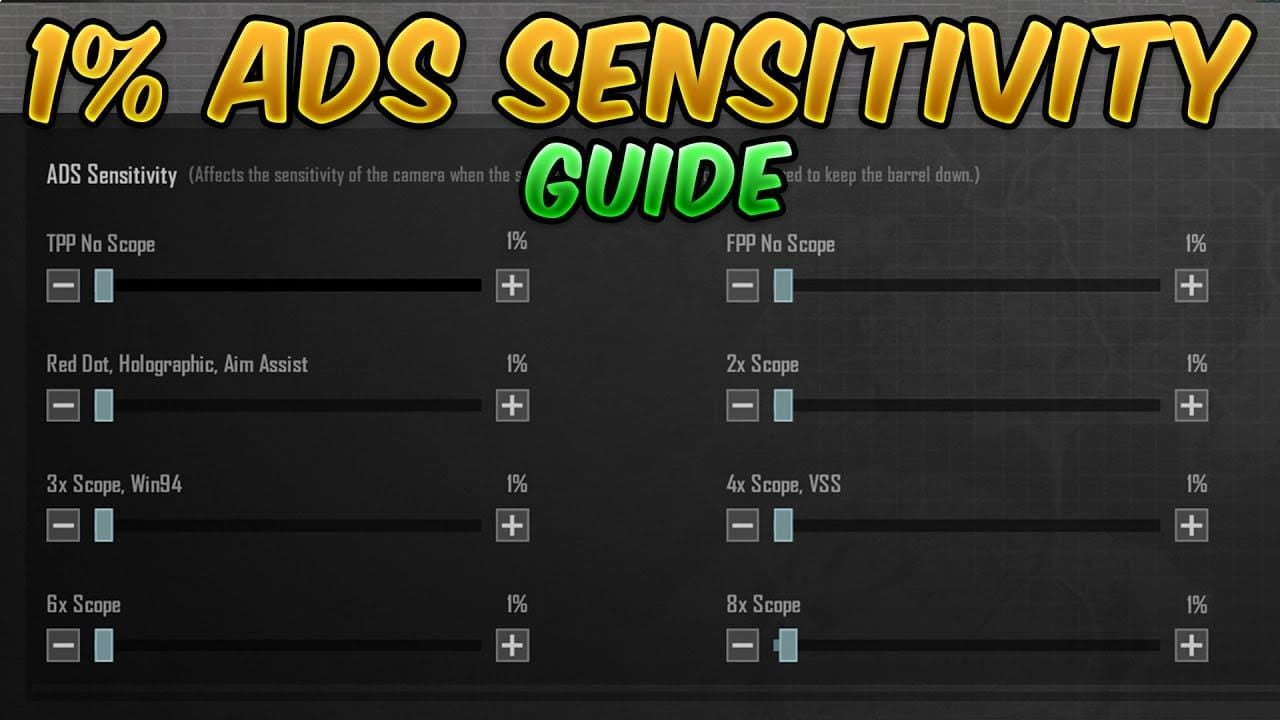
ADS sensitivity determines crosshair movement speed when actively aiming through weapon optics. Progressive reduction system:
- No Scope: 100% baseline
- Red Dot/Holographic: 50-60%
- 2x Scope: 35%
- 3x Scope: 25%
- 4x Scope: 25-30%
- 6x Scope: Further reduced
- 8x Scope: 12%
Higher magnification optics require proportionally smaller finger movements. M416 with Red Dot at 50% ADS allows easy recoil pull-down while maintaining target tracking. Achieves 70% burst accuracy at 50 meters when combining these ADS values with proper gyroscope integration.
Gyroscope Settings
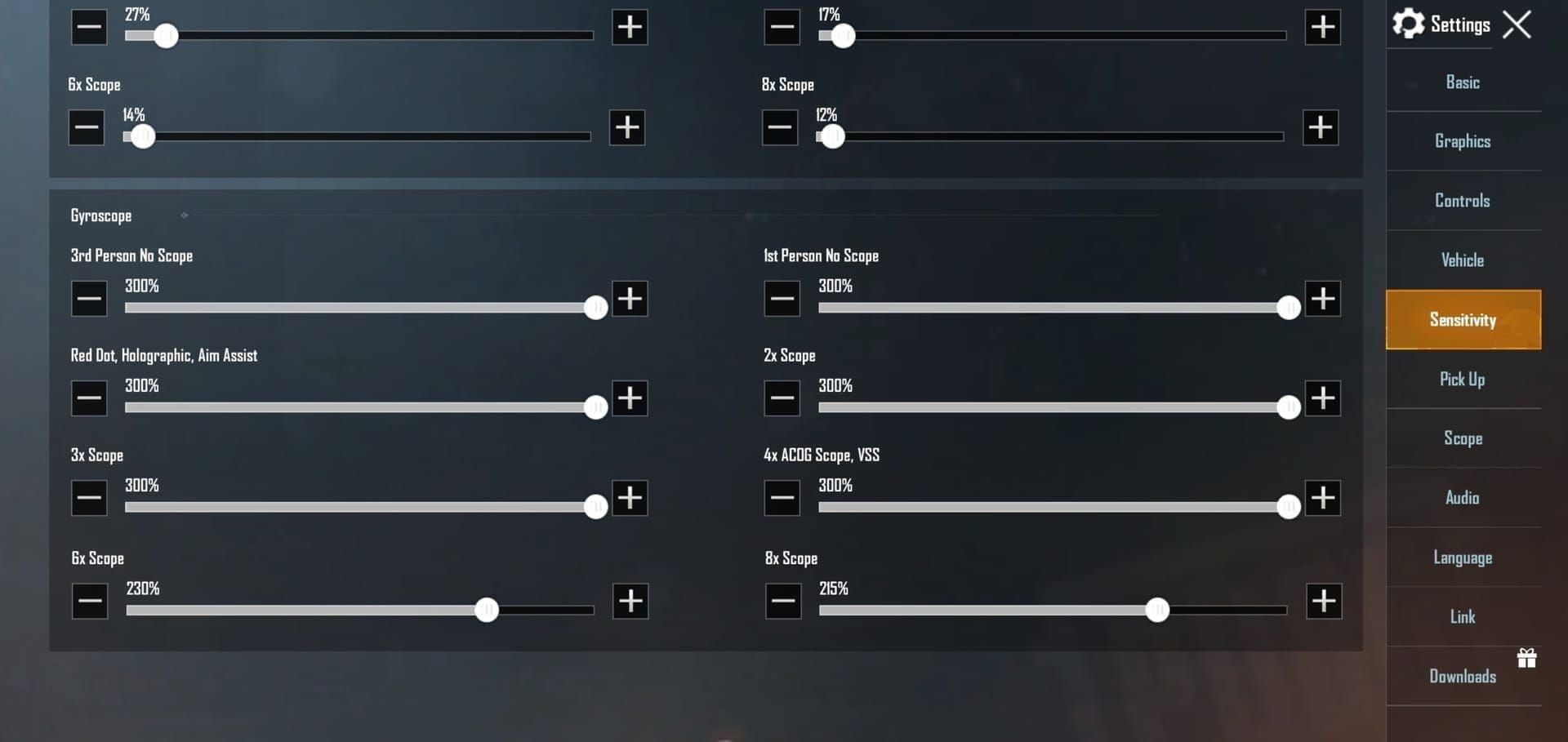
Gyroscope sensitivity enables recoil control through physical device tilting. Code implements aggressive gyroscope values transforming subtle wrist movements into precise crosshair adjustments:
- No Scope Gyro: 400%
- Red Dot Gyro: 365-400%
- 2x Scope Gyro: 300-320%
- 3x Scope Gyro: 275%
- 4x Scope Gyro: 275%
- 6x Scope Gyro: 120%
- 8x Scope Gyro: 90%
Elevated gyroscope values work synergistically with reduced ADS sensitivity. Low ADS sensitivity limits touch-based movement, high gyroscope sensitivity compensates by allowing device tilting for fine adjustments.
Scope-Specific Adjustments
Red Dot and Holographic at 50% ADS with 365% gyro create responsive close-to-medium range configuration. 1x magnification maintains relatively high sensitivity for target tracking during strafing.
2x and 3x Scopes drop to 35% and 25% ADS respectively, with 275% gyroscope for 3x. Dramatic sensitivity reduction accounts for magnified view where small crosshair movements translate to large angular changes.
6x and 8x Scopes receive lowest sensitivity values at 120% and 90% gyroscope. Long-range optics demand extreme precision, reduced sensitivity prevents breathing, hand tremors, or minor device shifts from disrupting aim.
TPP no-scope setting at 120-150% bridges gap between camera sensitivity and ADS values, ensuring smooth transitions when toggling between observation and engagement modes.
Step-by-Step Guide: Importing the Sensitivity Code
Accessing Settings Menu
Launch PUBG Mobile, tap gear icon in bottom-right corner. Navigate to Sensitivity tab in top navigation bar. Before importing, create backup: scroll to Use Layout section, tap Layout Share to generate shareable code for existing configuration.
Navigating to Import Section
Within Sensitivity tab, locate Customize subsection. Find Copy from ID button opening code import interface. Alternatively, access via Settings > Sensitivity > Cloud for dedicated code entry field.
Entering Code 7435-8846-3421-0303-0728
Tap code entry field, input: 7435-8846-3421-0303-0728. For error-free entry, use copy-paste function. Long-press code text, select Copy, return to PUBG Mobile, long-press entry field, select Paste.
After entering complete code, tap OK or Confirm. System validates code format and retrieves associated sensitivity configuration. Successful import displays confirmation message.
Review imported values by scrolling through sensitivity customization section. Verify ADS sensitivity shows expected graduated reduction (100% no-scope, 50% Red Dot, 35% 2x, 25% 3x, 12% 8x) and gyroscope values reflect high-responsiveness configuration.
Verifying Successful Application
Navigate to Training Ground from main lobby. Select shooting range area with stationary and moving targets at various distances.
Equip M416 with Red Dot sight, fire sustained bursts at 50-meter target. Successful zero recoil configuration maintains crosshair within tight grouping with minimal upward drift. Apply gentle downward pressure while firing to assess sensitivity's recoil compensation effectiveness.
Test scope-specific settings by switching between 2x, 3x, 4x, 6x, 8x optics. Each magnification level should feel progressively more stable. 8x scope at 12% ADS sensitivity should exhibit extreme precision.
Activate gyroscope control, tilt device while aiming. Crosshair should respond smoothly to physical movement, with higher sensitivity at lower magnifications and reduced responsiveness at 6x/8x zoom levels.
Spend 10-15 minutes daily in Training Ground testing different weapon and scope combinations. Benchmark performance by measuring burst accuracy at 50 meters—achieving 70% hit rate indicates successful sensitivity integration.
Zero Recoil Mechanics
Understanding Recoil Patterns
Every weapon exhibits unique recoil pattern—predetermined sequence of vertical and horizontal crosshair displacement during sustained fire. M416 demonstrates primarily vertical recoil with slight rightward drift, AKM produces aggressive upward kick with pronounced horizontal variance.
Recoil patterns remain consistent, meaning first 10 bullets of M416 magazine follow same displacement trajectory every time. This predictability enables compensatory muscle memory.
Zero recoil achievement requires matching weapon's recoil vector with equal and opposite player input. If M416 climbs 15 pixels vertically per bullet at default sensitivity, reducing ADS sensitivity to 50% means same physical finger movement now produces 30 pixels downward crosshair displacement—effectively doubling recoil compensation per unit of hand movement.
How Sensitivity Affects Recoil Compensation
Lower ADS sensitivity reduces physical distance players must swipe for specific crosshair movement. At 100% sensitivity, counteracting 10 pixels vertical recoil might require 10mm downward swipe. At 50% sensitivity, same 10mm swipe produces 20 pixels downward movement.
This explains graduated sensitivity reduction across magnification levels. 2x scope doubles visual representation of recoil. Reducing ADS sensitivity to 35% for 2x scopes compensates for magnified perception.
Gyroscope introduces secondary compensation mechanism. Touch input handles gross recoil correction, gyroscope manages micro-adjustments through device tilting. 400% no-scope gyroscope value means minimal wrist rotation produces significant crosshair movement.
Competitive players leverage both input methods simultaneously. Initial burst control uses touch-based downward swiping for primary vertical recoil, while gyroscope tilting addresses horizontal drift and maintains precise target tracking.
Measuring Zero Recoil Effectiveness
50-Meter Burst Accuracy Test: Equip M416 with Red Dot, fire 10-round bursts at stationary target, calculate hit percentage. Achieving 70%+ accuracy indicates effective recoil control. Default sensitivity typically yields 40-50% accuracy.
Spray Transfer Evaluation: Engage multiple targets in rapid succession, measure time to eliminate three enemies positioned 5 meters apart at 30-meter distance. Effective zero recoil enables spray transfers under 3 seconds.
Scope Transition Consistency: Switch between Red Dot, 3x, 6x scopes on same weapon during single engagement. Consistent accuracy across magnification changes indicates proper graduated sensitivity implementation.
Gyroscope Integration Assessment: Disable touch-based aiming, rely exclusively on gyroscope control during Training Ground session. Successfully maintaining target tracking through device tilting alone confirms proper gyroscope sensitivity values.
Track metrics over 15-minute daily Training Ground sessions. Performance improvement plateaus after 5-7 days indicate successful muscle memory development.
Optimizing 6-Finger Claw Layout
Ideal Finger Placement
6-finger claw layout distributes control responsibilities across both hands. Optimal finger placement for 6960-4887-1407-8797-709 layout code:
Left Hand (3 fingers):
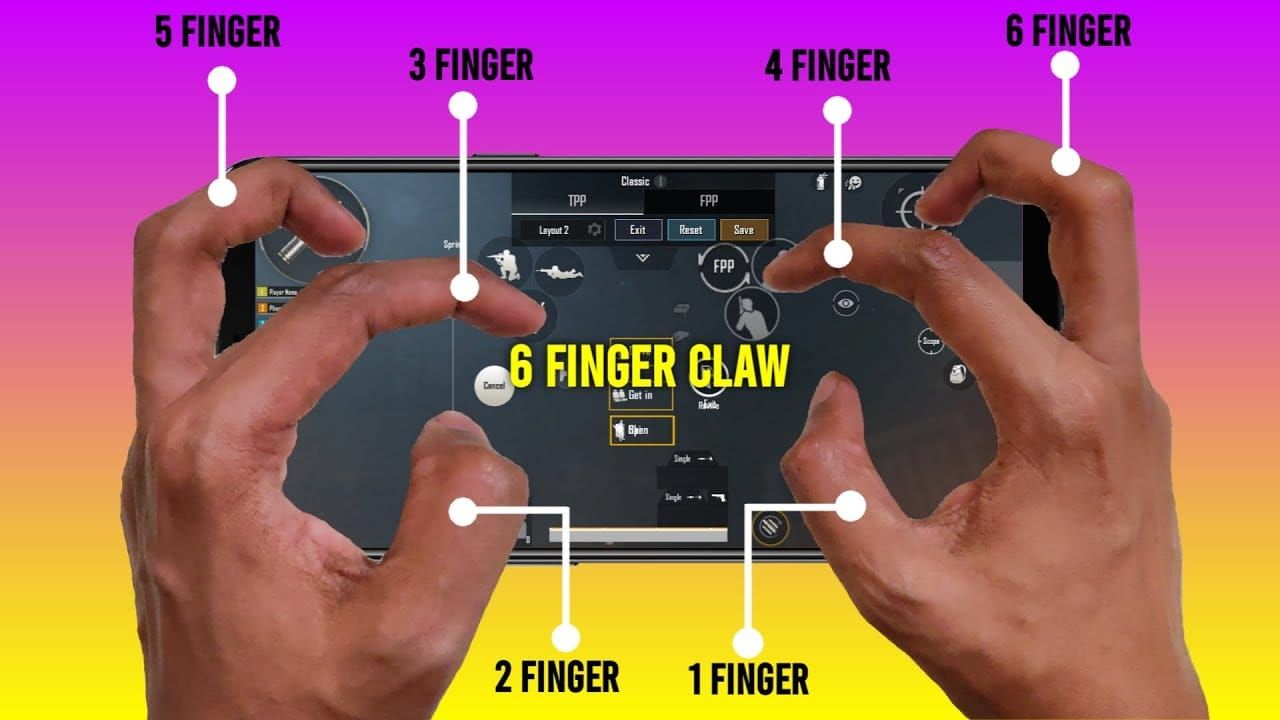
- Index finger: Jump button (top-left corner)
- Middle finger: Crouch/prone toggle (left edge, mid-screen)
- Thumb: Movement joystick (bottom-left)
Right Hand (3 fingers):
- Index finger: Fire button (top-right corner)
- Middle finger: ADS toggle (right edge, mid-screen)
- Thumb: Aim control (center-right screen area)
Tablets increase camera, ADS, and gyroscope effectiveness by 20-30% compared to phones due to expanded screen space reducing finger crowding.
HUD Customization
Access HUD customization through Settings > Controls > Customize. Code 6960-4887-1407-8797-709 includes pre-configured button positions, but individual hand sizes may require adjustments.
Fire Button: Top-right corner, sized at 120-150% of default. Position secondary fire button near right thumb's natural resting position.
ADS Toggle: Right screen edge at approximately 40% screen height from bottom. Enable Hold to ADS for sustained scoping or Tap to ADS for quick-scope engagements.
Jump and Crouch: Mirror right-hand configuration on left side. Place jump in top-left corner, crouch at 40% screen height on left edge. Size at 100-120% of default.
Scope Switching and Reload: Position near top center of screen, accessible to either index finger during brief pauses.
Test HUD configurations in Training Ground before applying to ranked matches.
Combining Sensitivity Code with Custom Layout
Import layout code first through Settings > Controls > Use Layout > Enter Code, then apply sensitivity code via Settings > Sensitivity > Copy from ID. This sequence ensures button positions load before sensitivity calibration.
Combined setup enables advanced techniques: jump-shotting (simultaneous jumping and firing), drop-shotting (instant prone while maintaining aim), strafe-firing (continuous movement during sustained fire).
For competitive arsenal enhancement, PUBG Mobile UC purchase PMGC finals Polar Party rewards through BitTopup ensures fast, secure transactions.
Practice combined layout and sensitivity:
- Days 1-3: Basic movement and firing with all six fingers
- Days 4-7: Incorporate jump and crouch during engagements
- Days 8-14: Execute advanced techniques like drop-shots and spray transfers
- Days 15+: Apply full skillset in Team Deathmatch and ranked matches
Device Compatibility and Performance
Best Devices for 6-Finger Codes
Tablets provide optimal 6-finger claw performance due to screen sizes exceeding 9 inches. iPad models running iOS demonstrate superior touch response rates, with code 7478-5115-3389-3888-854 specifically calibrated for iPad touch sensitivity.
High-refresh-rate devices (90Hz, 120Hz, 144Hz) deliver smoother visual feedback enhancing recoil control perception. Devices supporting 90fps gameplay provide competitive advantages when combined with optimized sensitivity codes.
Android flagship devices with Snapdragon 8 Gen series handle computational demands of 6-finger multi-touch input without latency. Code 7462-2496-3022-3831-210 accounts for platform-specific touch processing differences.
Screen size impact:
- Phones (6-7 inches): Require higher sensitivity values
- Tablets (9-12 inches): Benefit from 20-30% sensitivity increases
- Foldable devices: May need custom calibration
FPS and Graphics Settings
Optimize settings to prioritize frame rate stability:
Graphics Settings:
- Style: Smooth
- Frame Rate: Extreme (60fps) or Ultra Extreme (90fps)
- Anti-Aliasing: Disabled
- Shadows: Disabled
Advanced Settings:
- Auto-Adjust Graphics: Disabled
- Colorblind Mode: Enable if beneficial
- Brightness: 120-150%
Maintain device temperature below 40°C to prevent thermal throttling. Clear background applications before launching. Devices with 8GB+ RAM handle 6-finger multi-touch input more reliably.
Touch Sensitivity and Screen Protectors
Tempered glass protectors maintain better touch responsiveness than plastic film alternatives. Matte finish screen protectors reduce finger friction, enabling smoother swipe movements.
Enable maximum touch sensitivity in device settings (often labeled Touch Sensitivity or Glove Mode). Clean screens regularly with microfiber cloths to remove oils and debris.
Fine-Tuning and Personalization
Adjusting Individual Parameters
Modify specific values through Settings > Sensitivity > Customize without discarding entire imported configuration.
Camera Sensitivity: If 120% third-person feels too fast, reduce in 5% increments to 115%, 110%, or 105%. Players preferring aggressive scanning can increase to 130-140%.
ADS Fine-Tuning: M416 Red Dot sensitivity at 50% serves most players, but those with larger hands may prefer 55-60%. Sniper specialists often decrease 6x and 8x sensitivity below baseline values, dropping to 100% and 80% gyroscope.
Gyroscope Calibration: Test by aiming at target, then tilting device without touching screen. If crosshair movement feels excessive, reduce gyroscope values by 10-15% across all magnifications.
Document all modifications in notes application, recording original code values alongside personalized adjustments.
Testing and Iteration
Dedicate 15-minute daily Training Ground sessions to systematic sensitivity testing:
Session 1-3: Weapon familiarization across all categories
Session 4-6: Scope-specific testing, firing 30-round magazines through each magnification
Session 7-9: Movement integration, practicing strafing, jumping, crouching while maintaining aim
Session 10+: Scenario simulation, replicating common engagement situations
Use Team Deathmatch mode for live-fire sensitivity validation. Track performance metrics:
- Accuracy percentage: Target 25-30% overall, 40-50% with ARs
- Headshot rate: Aim for 15-20% improvement
- Damage per match: Monitor for consistent increases
Compare weekly statistics to identify performance trends.
Creating Backup Profiles
Create device-specific and mode-specific backups:
Device Profiles:
- Phone Configuration: Optimized for smaller screens
- Tablet Configuration: Incorporating 20-30% sensitivity increases
Mode Profiles:
- Classic Mode: Balanced settings
- Arena Mode: Higher sensitivity for close-quarters
- Sniper Profile: Reduced sensitivity for long-range precision
Generate shareable codes via Settings > Sensitivity > Layout Share. Store codes in secure notes application or cloud storage.
Common Mistakes and Troubleshooting
Why Codes May Not Work
Incomplete code entry: Missing single digit or hyphen invalidates entire code. Device compatibility mismatches: Using iOS code 7478-5115-3389-3888-855 on Android produces suboptimal sensitivity values. Outdated game versions: 4.2 Beta codes launching late December 2025 may not function on current 4.1 version released November 6, 2025. Conflicting settings: Previous configurations sometimes persist after code import.
Fixing Import Errors
When game displays Invalid Code or Code Not Found errors, verify code accuracy character-by-character. Common transcription errors:
- Confusing 0 (zero) with O (letter O)
- Misreading 1 (one) as I (letter I)
- Omitting hyphens between digit groups
Copy codes directly from trusted sources. If copy-paste fails, clear PUBG Mobile cache through device settings, restart game, retry import.
Server connectivity issues: Verify stable internet connection, preferably WiFi. Retry after 30-60 minutes if errors persist.
For persistent failures, use manual sensitivity configuration method. Reference code's parameter breakdown, manually adjust each sensitivity value through Customize interface.
Addressing Over-Sensitivity or Under-Sensitivity
Over-sensitivity symptoms: Crosshair overshooting targets, difficulty maintaining steady aim, excessive camera rotation from minimal finger movement. Reduce camera and ADS sensitivity by 10-15% increments.
Under-sensitivity indicators: Inability to track fast-moving targets, sluggish camera rotation requiring excessive finger swiping, fatigue from extended swipe distances. Increase sensitivity values by 10-15% increments.
Gyroscope-specific issues: Recalibrate gyroscope through device settings or PUBG Mobile's built-in calibration tool (Settings > Sensitivity > Gyroscope > Calibrate). Place device on flat, stable surface during calibration.
Inconsistent sensitivity perception: Lock frame rate to consistent value (60fps or 90fps) through graphics settings, as variable frame rates create perception of changing sensitivity.
Advanced Techniques
Combining Sensitivity Code with Gyroscope Control
Elite players develop dual-input muscle memory distributing control responsibilities between touch and gyroscope. Code 7307-1085-6780-4282-435 specifically optimizes this integration.
Recoil Compensation Technique: Use touch input for initial downward pull during burst initiation, then transition to gyroscope for sustained fire control.
Spray Transfer Method: Maintain continuous fire while switching between multiple targets by using touch for gross lateral movement between enemies and gyroscope for fine-tuning aim on each target.
Scope Quick-Switch: Use gyroscope for initial target acquisition at low magnification, then quick-switch to higher magnification scopes while maintaining gyroscope-based tracking.
Practice gyroscope integration:
- Gyroscope-Only Aiming: Disable touch aiming, rely exclusively on device tilting for 5-minute sessions
- Touch-to-Gyroscope Transitions: Initiate aim with touch, complete with gyroscope fine-tuning
- Hybrid Spray Control: Combine both inputs during sustained automatic fire on moving targets
Weapon-Specific Sensitivity Switching
Create weapon-specific profiles:
Assault Rifle Profile: Maintain code baseline values (50% Red Dot ADS, 35% 2x, 25% 3x)
Sniper Rifle Profile: Reduce 6x and 8x gyroscope to 100% and 80% for extreme precision
SMG Profile: Increase no-scope and Red Dot sensitivity to 110-120% for aggressive close-quarters
DMR Profile: Balance between AR and SR profiles, using 30% 3x ADS and 250% 3x gyroscope
Implement profile switching through saved sensitivity codes. Before matches where you anticipate specific weapon usage, import corresponding sensitivity code.
Continuous Improvement
Week 1-2: 15 minutes daily Training Ground recoil control practice, focus on single weapon (M416) with single scope (Red Dot), establish baseline accuracy metrics
Week 3-4: Rotate through all scope types on familiar weapons, practice scope quick-switching, measure accuracy consistency across magnifications
Week 5-6: Apply sensitivity to all weapon categories, identify weapons that feel suboptimal, create weapon-specific adjustment notes
Week 7-8: Transition from Training Ground to Team Deathmatch, apply techniques in Classic mode matches, review death replays
Week 9+: Make micro-adjustments based on performance data, experiment with alternative codes, develop personalized sensitivity profile
Track progress through PUBG Mobile's career statistics, comparing monthly performance metrics.
FAQ
What is the best sensitivity code for PUBG Mobile 4.2 Beta zero recoil?
General sensitivity code 7435-8846-3421-0303-0728 provides universal zero recoil optimization across all devices, implementing Red Dot ADS at 50%, 8x scope at 12%, gyroscope no-scope at 300%. Platform-specific alternatives: 7462-2496-3022-3831-210 for Android, 7478-5115-3389-3888-855 for iOS.
How do I import sensitivity codes in PUBG Mobile?
Navigate to Settings > Sensitivity > Customize > Copy from ID, enter 19-character code (7435-8846-3421-0303-0728), tap OK. Alternatively, access Settings > Sensitivity > Cloud and paste code directly. Verify successful import by checking ADS and gyroscope values match code specifications.
Will using sensitivity codes get me banned?
No. Sensitivity codes represent legitimate in-game features designed for configuration sharing. System functions identically to manual sensitivity adjustment through Customize interface. PUBG Mobile officially supports code sharing through Layout Share feature.
Can I use 6-finger sensitivity codes on a phone?
Yes, though tablets provide superior 6-finger claw performance due to larger screen sizes. Phones require careful HUD customization to prevent button crowding. Code 6960-4887-1407-8797-709 functions on phones but may need position adjustments based on screen dimensions.
How long does it take to adapt to new sensitivity settings?
Most players develop basic muscle memory within 5-7 days of consistent practice, requiring 15-minute daily Training Ground sessions. Full adaptation achieving pre-import performance levels typically occurs within 2-3 weeks. Advanced technique mastery using dual-input gyroscope control may require 4-6 weeks.
Do I need to change sensitivity codes when PUBG Mobile updates?
Not necessarily. Sensitivity codes remain functional across updates unless developers modify underlying sensitivity system mechanics. 4.2 Beta launching late December 2025 introduces PrimeWood Genesis Mode but reportedly maintains existing sensitivity frameworks. Monitor community feedback after major updates.
Ready to dominate PUBG Mobile 4.2 Beta with perfect sensitivity settings? Power up your gameplay with instant UC top-ups from BitTopup – the trusted platform for competitive players. Get exclusive deals, secure transactions, and 24/7 support. Visit BitTopup now and unlock your full potential!