Why Regional Ping Matters in PUBG Mobile
Ever wonder why pros hover at 20-60ms while you're rubber-banding at 90? Ping under 60ms is competitive gold—60-90ms still playable, 90-130ms feels sluggish, and over 150ms? Unviable. But here's the kicker: stable 80ms beats a jumpy 40ms every time. Green bars (60-80ms) glide smooth; yellow (100-200ms) gets risky in Ranked; red over 200ms? Steer clear.
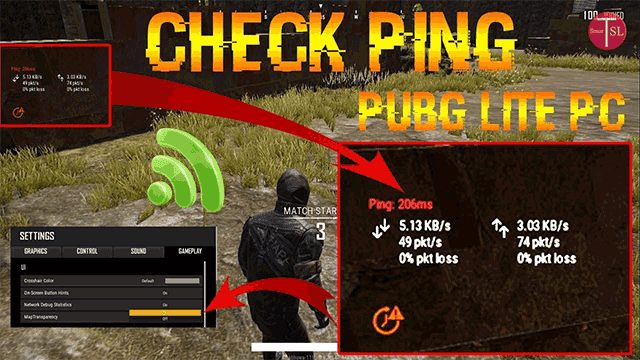
Watch that top-left readout for min/max/avg, keep loss under 1%, and jitter low. Patch 4.0 drops lag 30-50%, temps by 2-4°C, FPS from Med 25 to High 30.
NA folks, snag under 50ms with ping -t pubg-na.amazonaws.com (zero timeouts). Asia? Singapore delivers 20-60ms for SEA.
Quick Steps:
- Settings > Gameplay > Others > Network Debug Statistics.
- Run 2-3 training matches: check avg ping/jitter.
- Prioritize Ethernet > 5GHz Wi-Fi > mobile data (aim for 575KB/min).
Squads from mismatched regions? Desync city—teleports everywhere (like ME players on NA).
Picking the Right PUBG Mobile Server
Servers break down like this: NA (SF, Chicago, Dallas, Atlanta); EU (Frankfurt, Amsterdam, Stockholm); Asia (Singapore, Mumbai, Abu Dhabi). Skip KRJP/VN/TW unless you're local—Asia Tokyo queues fast, though. One switch every 60 days resets your rank/stats. Asia's easiest grind, EU toughest, NA sits medium.
Test with ping -t pubg-as.amazonaws.com under 50ms; hit off-peak to shave those 7-10PM spikes.
Quick Steps:
- Main menu > Settings > Gameplay > Server Selection > pick nearest (NA Chicago, say).

- Restart, test 2-3 matches.
- Squad leader's region rules—everyone matches.
Sub-60ms speeds matchmaking. Mismatch? Lag spikes and losses.
Fueling your 4.x grind? Grab cheap PUBG Mobile UC recharge for 4.x season via BitTopup—competitive prices, instant delivery <5min, full safety compliance, broad region support, 24/7 after-sales, 4.9/5 ratings. (Editor's take: I've seen squads clutch wins after topping up mid-grind.)
Nailing the Recall System
Solos get auto-recall under 240s post-elim: 15s countdown, then parachute with randomized weapons near the action (Nusa/Erangel/Miramar/Deston). Squads? Need a token and teammate coop mid-game.
Jitter kills parachutes—4.x patches boost point farming big time.
Quick Steps:
- Eye that 240s timer after you're downed.
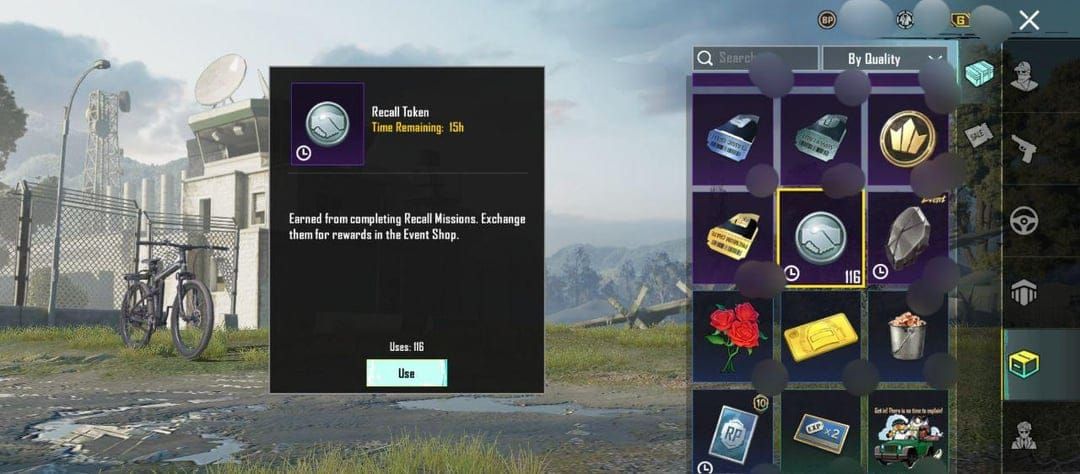
- Squad: ping for a teammate token (leader calls shots).
- Land? Third-party hard and fast.
Demand under 1% loss for solo or squad—no rage quits.
Squad Settings That Crush Tilt
Match your squad's regions (ME on Abu Dhabi, duh) to kill desync and item delays. Stable 80ms + solid FPS? Tilt-proof. Leader locks the server; uniform setups dodge spikes (Saudi/Spain on NA = teleport hell). Data shows 60% tilt stems from laggy rotations; ME on NA just handicaps you.
Quick Steps:
- Proximity chat, gyro TPP No Scope 120-330.
- Squad auto-pickup configs.
- Invite-only with region lock; play off-peak.
One sentence: Uniform squads win.
Full Low-Ping Setup Guide
Graphics on Smooth + max FPS (Extreme/90-120); DNS 1.1.1.1 shaves 10-20ms. QoS at 80-85% tames bufferbloat; animations 0.5x/off cuts input lag sharp.

Quick Steps:
- Router (192.168.1.1): MAC prioritize, UDP max priority, DL cap 5Mbps under your max.
- Android: Developer options > animations 0.5x, ≤2 background apps; Airplane mode 5s.
- iOS: Kill Low Power/Background; lock to 5GHz.
- DNS: Android 8.8.8.8; iOS 1.1.1.1.
- MTU 1472-1500—test it.
Tweak one thing at a time in training. Fiber crushes cable off-peak. QoS fixes those door-opening delays.
Squads burning UC? PUBG UC instant top up for squad ranked on BitTopup—budget rates, lightning-fast crediting, secure transactions, global coverage, top-tier support, 4.9 user feedback.
4.x Season Tweaks
Patch 4.0 lands Sep 4, 2025; Cycle 9 Season 26: Sep 11–Nov 10. Super Smooth slices lag 30-50%, FPS Ultra 40 to Extreme 50-60; 15% less throttling.
Quick Steps:
- Update > Super Smooth +90FPS.
- Weekly ritual: clear cache, reboot router, retest ping.
- Post-patch: grind 2-3 matches.
Closest server for squad synergy—always.
Pitfalls and Quick Fixes
Can't swap servers mid-match; 60-day cooldown bites. High ping? Blame 60% zone deaths. Mismatch = desync nightmare.
Fixes:
- Jitter: Shut apps/streams.
- Loss: Dual-channel analyzer.
- Tilt: IGL macros; ditch cases/charging.
Track Your Metrics Like a Pro
In-game ping/jitter/loss is your bible; run ping -t pubg-eu.amazonaws.com. Aim <60ms avg, <1% loss; Ethernet for baselines. KPIs: min/max/avg, temps—log weekly.
Quick Steps:
- Pre-queue: test servers.
- Analyzer for channels.
- Steady Ping buffers jitter.
FAQ
What's regional ping in PUBG Mobile?
Device-to-server delay; <60ms competitive, top-left shows min/max/avg <1% loss.
Best server for low ping?
Closest (NA Chicago, EU Frankfurt); ping -t pubg-na.amazonaws.com <50ms; once per 60 days.
Recall system breakdown?
Auto 240s solo (15s countdown, random gear); squad needs token teamwork.
Server choice impact on squads?
Mismatch = desync/tilt; leader picks uniform for stable 80ms.
Ping sweet spot for smooth play?
20-60ms ideal; stable 80ms > jumpy 40ms; skip >150ms.
Squad anti-tilt settings for 4.x?
Matched regions, off-peak, QoS 80-85%, Smooth + max FPS.