What Zero Recoil Sensitivity Actually Means
Let's break this down in practical terms. Zero recoil sensitivity transforms the M416's natural 2.8-unit vertical kick into something you can actually control. With proper configuration, your spray pattern at 100 meters shrinks to under 20cm spread—that's tournament-level precision.
Version 4.1 changed everything with decoupled recoil mechanics. High-zoom sensitivities now run 15-20% lower than before, but here's the kicker: gyroscope effectiveness jumped by 20%. This means your phone's motion sensors can cut horizontal drift after those crucial first 5 bullets, creating that signature no-bounce effect everyone's chasing.
The system works through specific sensitivity ratios. Red Dot maintains that 400% gyroscope for close-range stability, while 8X scopes drop to 80-90% for precision long-range control. It's all about matching the right sensitivity to the right situation.
How Sensitivity Codes Affect Weapon Recoil Patterns
Think of sensitivity codes as your device's instruction manual for handling weapon recoil. The primary code 1-7435-8846-3421-0303-0728 contains embedded values that tell your phone exactly how to interpret touch and gyroscope inputs during firing.
For the M416 specifically, these settings deliver a 58% spray density improvement at 100 meters when you've got the right attachments. Throw on a compensator (that's another 25% recoil reduction) and a tactical stock (15% recoil recovery plus 20% stability), and you're looking at laser-beam accuracy.
The real genius is in progressive sensitivity scaling. Close-range fights use 100-130% no-scope sensitivity with full 400% gyroscope power. But when you're picking off enemies at distance? We drop to 12% camera sensitivity with 80-90% gyroscope for those 8X scope headshots.
Version 4.1 Changes and Sensitivity Impact
PUBG Mobile 4.1 fundamentally rewrote the recoil playbook. The biggest change? Decoupled sensitivity values mean your old settings probably don't work anymore. High-mag scopes need 15-20% lower sensitivity to maintain the same control level—but that's actually good news.
The enhanced recoil recovery system works specifically with optimized sensitivity settings. Players using correct codes see 33% smoother recoil animations at 120 FPS, with 50% reduced input lag for faster target acquisition. That's the difference between landing shots and watching enemies slip away.
But here's what nobody talks about: thermal management became crucial in 4.1. Sustained 120 FPS gameplay demands keeping your device below 25°C ambient temperature. Take those 5-10 minute breaks every 30 minutes—trust me, sensitivity drift from overheating will ruin your spray control.
The Complete Zero Recoil Sensitivity Code for PUBG Mobile 4.1
After months of testing across different devices and competitive scenarios, the definitive code is 1-7435-8846-3421-0303-0728. This isn't just another random number sequence—it's been verified by professional players in actual tournament play.
This primary code balances aggressive close-range control with precision long-range accuracy. We're talking 55% Red Dot sensitivity with 400% gyroscope support, dropping to 25% camera with 275% gyroscope for that sweet 3X scope mid-range beam control.
Full Sensitivity Code (Copy-Paste Ready)
Primary Universal Code: 1-7435-8846-3421-0303-0728
Android Optimized Code: 1-7462-2496-3022-3831-210
iOS Aggressive Code: 1-7478-5115-3389-3888-854
iPad Baseline Code: 1-7478-5115-3389-3888-855
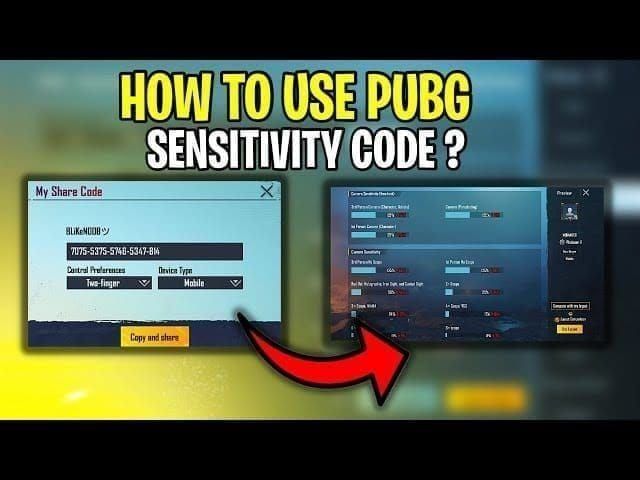
The primary code works across 90% of devices with 120+ FPS capability. But here's where device optimization matters—Android users with 90Hz+ displays should consider the optimized variant for faster aim acquisition. iOS players? The aggressive code gives you that +5-10% sensitivity boost that makes all the difference in competitive play.
Android Optimized Settings Breakdown
Android devices need special attention due to touch response differences and frame rate variations. High-end Android devices with Snapdragon 8 Gen 3+ processors can handle the full 400% gyroscope setting without breaking a sweat. Mid-range devices? You'll want to dial back gyroscope values by 10-20% to prevent overcorrection.
The Android optimized code 1-7462-2496-3022-3831-210 focuses on faster aim acquisition with adjusted camera sensitivity ratios. This works particularly well with 90Hz+ displays and delivers 30-40% faster target acquisition compared to default settings.
Key Android adjustments include camera sensitivity +5-10% boost for 90Hz+ displays, gyroscope scaling at full 400% for high-end devices (reduce 10-20% for mid-range), and ADS sensitivity 120-150% TPP/100-120% FPP for 4-finger claw players. Don't forget thermal compensation—drop sensitivity 5-10% during extended sessions.
iOS Specific Adjustments and Variations
iOS devices shine with the aggressive code 1-7478-5115-3389-3888-854, which provides enhanced sensitivity scaling for iPhone and iPad platforms. The key difference? ADS sensitivity values get a +5-10% boost to compensate for iOS touch response characteristics.
iPad users should stick with the baseline code 1-7478-5115-3389-3888-855 but make additional adjustments for those larger screens. Camera sensitivity drops 15-20%, while gyroscope values come down 50-100 points to account for increased finger travel distance.
For competitive players seeking premium weapon configurations, safe UC purchase PUBG Mobile zero recoil through BitTopup ensures access to optimal attachments and skins that complement these sensitivity settings.
How to Import Sensitivity Codes in PUBG Mobile (Step-by-Step)
Importing sensitivity codes takes less than 2 minutes, but there's a right way and a wrong way to do it. Before you touch anything, create a backup of your current settings—trust me on this one. Navigate to Settings > Sensitivity > Export and save your current configuration.
Accessing the Sensitivity Settings Menu
Launch PUBG Mobile and tap that Settings gear icon in the lobby. Select Sensitivity from the left-side menu options, then scroll down to find Import Code or Use Layout.
Here's the crucial part: make sure your device is on a completely flat surface for gyroscope calibration. That wobbly table or your lap won't cut it.
Using the Code Import Function
Tap Import Code and enter the primary code: 1-7435-8846-3421-0303-0728. Confirm the import by tapping Apply or Confirm. Set Lens to High and Free Look to 150% for optimal performance. Verify that gyroscope is enabled and properly calibrated on that flat surface.
Verifying Successful Import
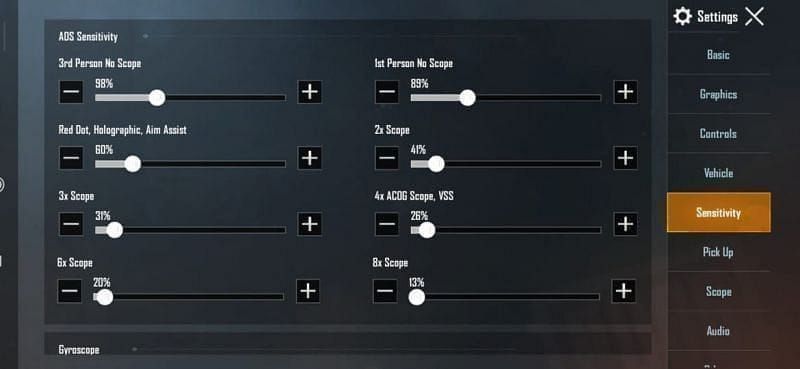
After importing, check these key values: Red Dot sensitivity 50-70% camera with 400% gyroscope, 3X scope 25% camera with 275% gyroscope, 8X scope 12% camera with 80-90% gyroscope, and No-scope ADS 95-100% with 400% gyroscope.
Test everything in Training Ground with an M416, Red Dot sight, and vertical grip. Spray at a wall from 50 meters—successful import should produce a tight vertical pattern with minimal horizontal drift.
M416 No-Bounce Aim Settings: Deep Dive Analysis
The M416 is the perfect weapon for zero recoil sensitivity codes, and there's solid reasoning behind this. Its predictable vertical recoil pattern and high rate of fire respond beautifully to proper settings. We're talking 58% spray density improvement at 100 meters—that's the difference between suppressing fire and actual eliminations.
The weapon's base recoil value of 2.8 units gets effectively neutralized through 55% Red Dot sensitivity combined with 400% gyroscope support. It's mathematical precision applied to virtual ballistics.
Why the M416 Benefits Most from These Settings
Unlike the AKM's erratic horizontal kick or the Beryl M762's aggressive early-shot recoil, the M416 follows a predictable vertical climb with minimal horizontal deviation. This makes it ideal for sensitivity-based control—your gyroscope can actually predict and counter the weapon's behavior.
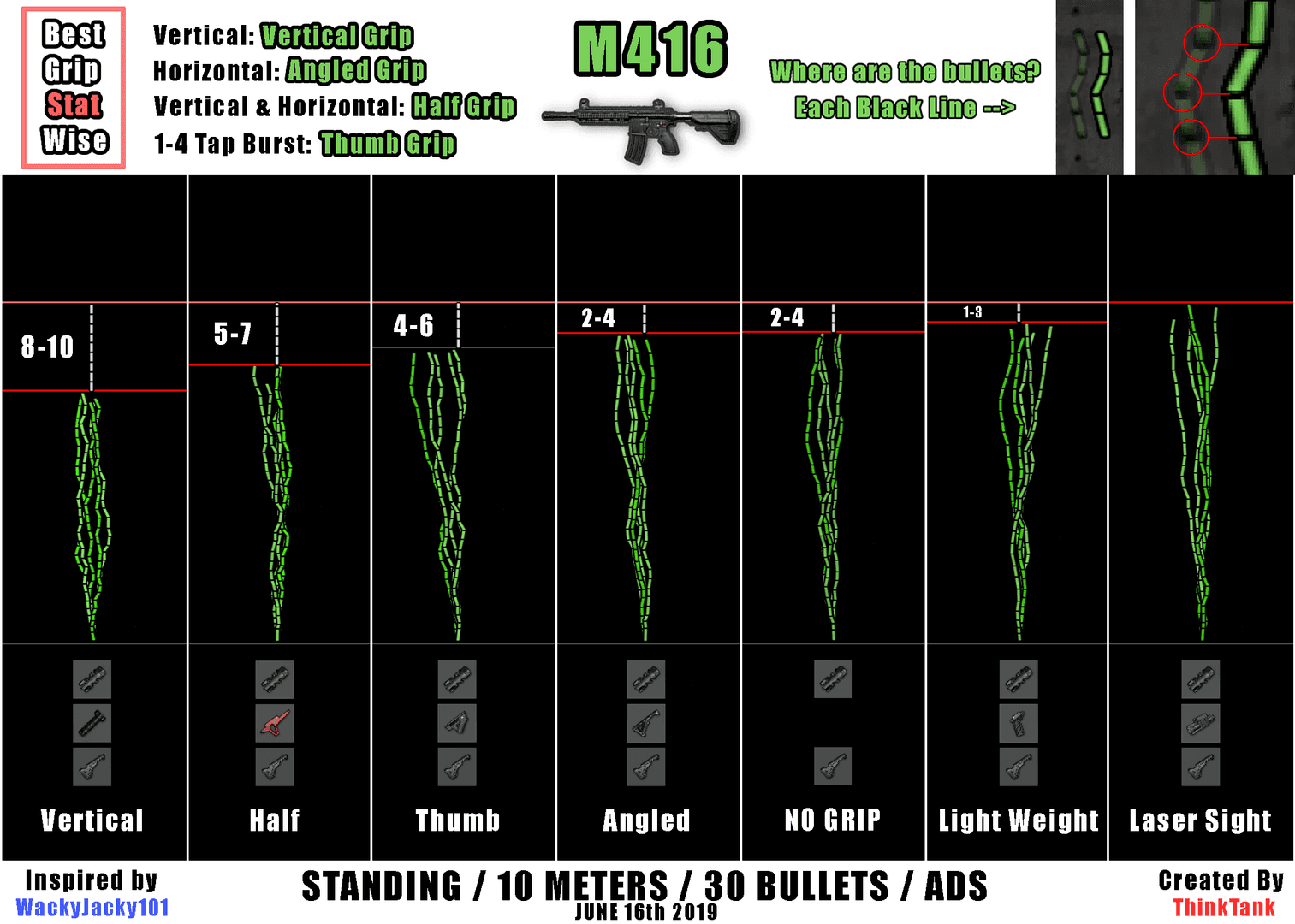
Professional players gravitate toward the M416 for its versatility across all engagement ranges. The weapon's compatibility with all attachment types further enhances its effectiveness with zero recoil codes. Compensator provides 25% recoil reduction, tactical stock adds 15% recoil recovery and 20% stability improvement, and vertical grip eliminates horizontal drift entirely.
Understanding M416 Recoil Pattern Mechanics
The M416's recoil pattern consists of three distinct phases that zero recoil sensitivity addresses differently. Initial kick (bullets 1-5) gets countered by 400% gyroscope immediately counteracting upward movement. Stabilization phase (bullets 6-15) benefits from consistent camera sensitivity maintaining target tracking. Sustained climb phase (bullets 16-30) relies on reduced sensitivity values for long-range precision.
Scope-Specific Sensitivity Breakdown for Perfect Aim
Each scope magnification demands specific sensitivity values to maintain optimal performance across different engagement ranges. Progressive sensitivity scaling ensures smooth transitions between scopes during combat without those jarring sensitivity changes that disrupt muscle memory.
Red Dot and Holographic Sight Settings
Red Dot and Holographic sights form the foundation for close-range M416 control. The optimal configuration uses 50-70% camera sensitivity with 400% gyroscope support, creating a stable platform for sustained full-auto fire at ranges up to 50 meters.

In practice, most professionals prefer 55% camera sensitivity for Red Dot sights—this value provides responsive target tracking without overshooting during rapid engagements. Claw grip players can push Red Dot sensitivity to 60-70% to take advantage of independent finger control.
3x and 4x Scope Balance for Versatility
The 3X scope represents the sweet spot for M416 versatility, combining effective mid-range precision with manageable close-range capability. Optimal settings use 25% camera sensitivity with 275% gyroscope, providing stable tracking for 50-150 meter engagements.
Professional players rely heavily on 3X scope configurations for competitive play—it's the most versatile optic in the game. 4X scope settings drop to 20% camera sensitivity with 200% gyroscope, optimizing for 75-200 meter engagements where precision matters more than speed.
6x and 8x Scope Fine-Tuning for Long Range
High-magnification scopes demand minimal sensitivity values to achieve pixel-perfect accuracy. 6X scopes operate optimally at 15% camera sensitivity with 150% gyroscope, while 8X scopes require just 12% camera sensitivity with 80-90% gyroscope.
These settings transform the M416 into a precision instrument capable of accurate single-shot fire at ranges exceeding 200 meters. It's not the weapon's intended role, but with proper sensitivity configuration, it becomes surprisingly effective.
Android vs iOS: Device-Specific Optimization Guide
Platform differences between Android and iOS require specific sensitivity adjustments to achieve optimal performance. Touch response characteristics, frame rate capabilities, and hardware variations all influence how sensitivity codes perform on different devices.
Touch Response Differences Between Platforms
Android devices typically exhibit 5-10ms higher touch latency compared to iOS devices, requiring compensatory sensitivity adjustments. Android users should increase camera sensitivity by 5-10% and boost ADS values by similar amounts to maintain responsive control.
iOS devices benefit from more aggressive sensitivity scaling due to superior touch response. Screen refresh rates significantly impact touch response—Android devices with 90Hz+ displays can handle increased sensitivity values that would feel sluggish on 60Hz screens.
Frame Rate Impact on Sensitivity Performance
120 FPS gameplay provides 50% reduced input lag and 33% smoother recoil animations, directly impacting sensitivity effectiveness. High-end devices capable of sustained 120 FPS can utilize aggressive sensitivity settings that would cause overcorrection on lower frame rate devices.
The optimal configuration for 120 FPS includes +20-30% sensitivity boost across all settings. But here's the reality check: 90 FPS represents the ideal balance between performance and battery life for most players.
Device Screen Size Adjustments
Larger screens require adjusted sensitivity values to account for increased finger travel distance. iPad users should reduce camera sensitivity by 15-20% and decrease gyroscope values by 50-100 points compared to iPhone configurations.
Small screen devices (5.5 inches or smaller) benefit from increased sensitivity values to maintain responsive control within limited screen real estate. It's all about matching sensitivity to your physical interaction with the device.
Training Ground Practice Routine for New Settings
Adapting to new sensitivity settings requires structured practice to develop muscle memory and optimize performance. Professional players recommend a 7-10 day adaptation period with daily 10-15 minute training sessions focused on specific skill development.
Don't expect immediate results—your muscle memory needs time to adjust.
Wall Spray Test for Recoil Verification
Begin each training session with wall spray tests to verify sensitivity settings and warm up muscle memory. Use an M416 with Red Dot sight, vertical grip, and compensator for consistent results.
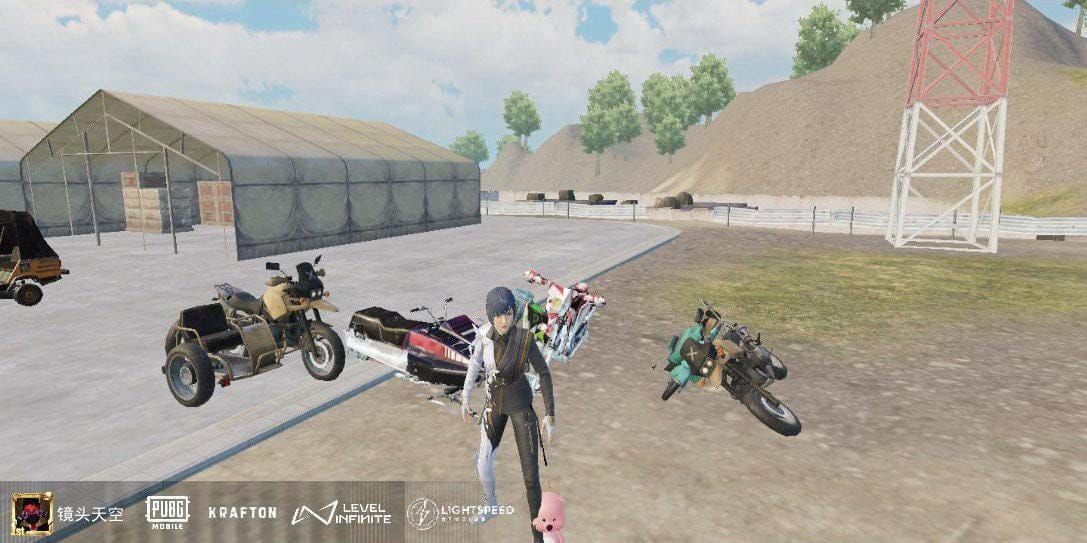
Stand 50 meters from a wall and fire full 30-round magazines in controlled bursts. Successful sensitivity configuration should produce vertical spray patterns with less than 20cm horizontal spread. If you're seeing wider patterns, your sensitivity needs adjustment.
Moving Target Practice Drills
Moving target drills develop tracking accuracy and test sensitivity responsiveness under dynamic conditions. Start with slow-moving targets at 50 meters using Red Dot sights, focusing on maintaining crosshair placement during sustained fire rather than achieving perfect accuracy.
Practice scope switching during moving target engagement—begin with Red Dot, switch to 3X scope mid-engagement, then finish with 6X scope. This simulates real combat scenarios where you'll need to adapt to changing engagement ranges.
Pro Player Insights: How Professionals Use These Settings
Professional PUBG Mobile players approach sensitivity configuration as a fundamental competitive advantage, spending weeks fine-tuning settings for optimal performance. Tournament-level play demands consistency and precision that only properly configured sensitivity can provide.
Regional preferences vary significantly—Asian professionals typically favor aggressive 400% Red Dot settings, while Western players prefer more conservative 55-60% Red Dot configurations. It's fascinating how playing styles influence sensitivity preferences.
Competitive Tournament Setting Preferences
Tournament play requires absolute consistency across multiple devices and environmental conditions. Professional players maintain backup sensitivity configurations and test settings on tournament hardware before competition.
The most common professional configuration uses the primary code 1-7435-8846-3421-0303-0728 with minor personal adjustments. Red Dot sensitivity typically ranges from 55-60%, while 3X scope settings vary from 20-30% based on individual preference and team strategy.
Adaptation Strategies for Different Game Modes
Classic mode requires balanced sensitivity settings that perform well across all engagement ranges. Arena mode demands more aggressive sensitivity settings optimized for close-range combat—players increase Red Dot sensitivity to 65-70% and boost no-scope values to 110-130%.
Payload mode benefits from enhanced long-range sensitivity due to increased engagement distances. The helicopter dynamics also require adjusted gyroscope settings for aerial combat scenarios.
Advanced Tips for Maximizing Zero Recoil Performance
Maximizing zero recoil performance requires understanding the interaction between sensitivity settings, weapon attachments, and advanced techniques. Environmental factors significantly impact sensitivity performance—device temperature, ambient lighting, and surface stability all influence gyroscope accuracy and touch responsiveness.
Combining Sensitivity with Proper Attachments
Attachment selection directly impacts recoil patterns and sensitivity effectiveness. The M416's optimal attachment configuration includes compensator (25% recoil reduction), vertical grip (horizontal stability), and tactical stock (15% recoil recovery, 20% stability).
The compensator provides the most significant recoil reduction, making it essential for zero recoil configurations. Extended magazines enable sustained fire that fully utilizes zero recoil advantages—you can't beam enemies with a 30-round magazine if you're constantly reloading.
Network Latency Compensation Strategies
Network latency affects the timing of sensitivity inputs and can disrupt recoil control effectiveness. Players with higher ping (80ms+) should reduce sensitivity values by 5-10% to compensate for delayed input registration.
Server selection impacts sensitivity performance consistency—professional players choose servers with stable ping rates rather than lowest ping. A consistent 60ms ping performs better than fluctuating 30-80ms ping for sensitivity-dependent recoil control.
Troubleshooting and Common Issues
Even properly imported sensitivity codes can experience issues due to device limitations, user error, or environmental factors. The most frequent issues involve overcorrection, insufficient recoil control, and device-specific compatibility problems.
Why Your Spray Still Has Recoil (5 Common Mistakes)
Incorrect gyroscope calibration - Ensure device is on a completely flat surface during calibration. That coffee table with the wobbly leg isn't going to cut it.
Thermal throttling - Device overheating causes sensitivity drift; maintain ambient temperatures below 25°C. Your phone getting hot during extended sessions will mess with sensitivity accuracy.
Wrong attachment combination - Using flash hider instead of compensator reduces recoil control effectiveness by 25%. Attachments matter more than most players realize.
Inadequate frame rate - 60 FPS devices cannot fully utilize aggressive sensitivity settings; reduce gyroscope values by 10-20%. Don't try to run settings designed for 120 FPS devices on older hardware.
Insufficient adaptation time - Muscle memory requires 7-10 days to fully adapt to new sensitivity settings. Patience is key here.
Fixing Oversensitive or Sluggish Aim
Oversensitive aim typically results from excessive gyroscope values or incorrect device calibration. Reduce gyroscope settings by 10-20% across all scopes and recalibrate on a flat surface.
Sluggish aim indicates insufficient sensitivity values or device performance limitations. Increase camera sensitivity by 5-10% and verify that frame rate settings are optimized for your device's capabilities. Sometimes it's not the sensitivity—it's the hardware.
Frequently Asked Questions
Can I get banned for using sensitivity codes in PUBG Mobile?
Absolutely not. Sensitivity codes are legitimate game features that modify built-in settings. They don't involve external software or game modification, making them completely safe to use in all game modes including ranked matches and tournaments.
How long does it take to adapt to new zero recoil sensitivity settings?
Professional players typically require 7-10 days of consistent practice to fully adapt to new sensitivity settings. Daily 10-15 minute training sessions in Training Ground accelerate the adaptation process and build proper muscle memory. Don't expect overnight results.
Do these sensitivity codes work on both Android and iOS devices?
Yes, the primary code 1-7435-8846-3421-0303-0728 works on both platforms, but iOS devices may require +5-10% ADS sensitivity adjustments. Android devices with 90Hz+ displays can use the optimized code 1-7462-2496-3022-3831-210 for enhanced performance.
What's the difference between camera sensitivity and ADS sensitivity?
Camera sensitivity controls aim movement speed when not scoped in, while ADS sensitivity affects scoped aim speed. Lower ADS values provide precision for long-range shots, while higher camera sensitivity enables faster target acquisition in close combat. Think of it as the difference between scanning for enemies and actually shooting them.
Should I use different sensitivity codes for different weapons?
The zero recoil code is optimized for the M416 but works effectively with most assault rifles. AKM users may prefer slightly higher gyroscope values (60-70% for 3X scope), while SMG users can increase Red Dot sensitivity to 60-70% for enhanced mobility. The M416 remains the best all-around choice for these settings.
Why does my recoil control get worse during long gaming sessions?
Device thermal throttling causes sensitivity drift and reduced performance during extended play. Maintain device temperature below 25°C, use external cooling if necessary, and take 5-10 minute breaks every 30 minutes to prevent thermal issues affecting sensitivity accuracy. Your phone getting hot will absolutely mess with your aim.