Optimizing your controls in Harry Potter: Magic Awakened requires stabilizing your frame pacing and eliminating input latency during arena combat. On mobile devices, dropping graphic presets to the minimum setting locks in a stable baseline around 20 FPS to prevent stutter during spell exchanges, while PC players using BlueStacks should allocate at least 4 CPU cores and 4 GB of RAM to hit a consistent 60+ FPS. Because arena movement is strictly constrained by finite movement cards and an invisible dividing boundary, positioning your casting fingers or emulator keybindings to handle movement without blocking incoming spell hitboxes is essential for competitive dueling.
Mobile Display Presets and Input Responsiveness
Input latency during high-stakes duels often stems from erratic frame rates rather than touch hardware failure. The mobile client features three graphics presets (Low, Medium, and High) that correspond to roughly 20, 30, and 45 FPS caps according to technical testing on an Asus ROG Phone 6 Pro (Android Police). Crucially, the game renders exploration and live duels at differing framerates, which leads to jarring input stutter when transitions occur.
Lowering the in-game graphic settings to the absolute minimum preset is the only documented method to establish framerate consistency across matches (Android Police). While 20 FPS appears modest on paper, a stable frame cadence ensures that taps on movement cards and targeting reticles register without dropped inputs when heavy spell effects flood your arena half.
| Setting Profile | Target Frame Rate | Impact on Dueling Controls | Source |
|---|
| Mobile Low Preset | ~20 FPS | Most consistent frame pacing; eliminates duel stutter | Android Police Review |
| Mobile Medium Preset | ~30 FPS | Balanced visuals; potential stutter during complex spell effects | Android Police Review |
| Mobile High Preset | ~45 FPS | Noticeable frame variances between duels and exploration | Android Police Review |
| BlueStacks PC High | 60+ FPS | Smooth cursor aiming and instant keybind responsiveness | BlueStacks Features Guide |
Arena Movement and Boundary Rules
Movement in Harry Potter: Magic Awakened does not function like a standard action RPG with continuous virtual joystick movement. Your character operates behind an invisible dividing wall that splits the arena in two, separating you from your opponent's territory (GameRefinery).
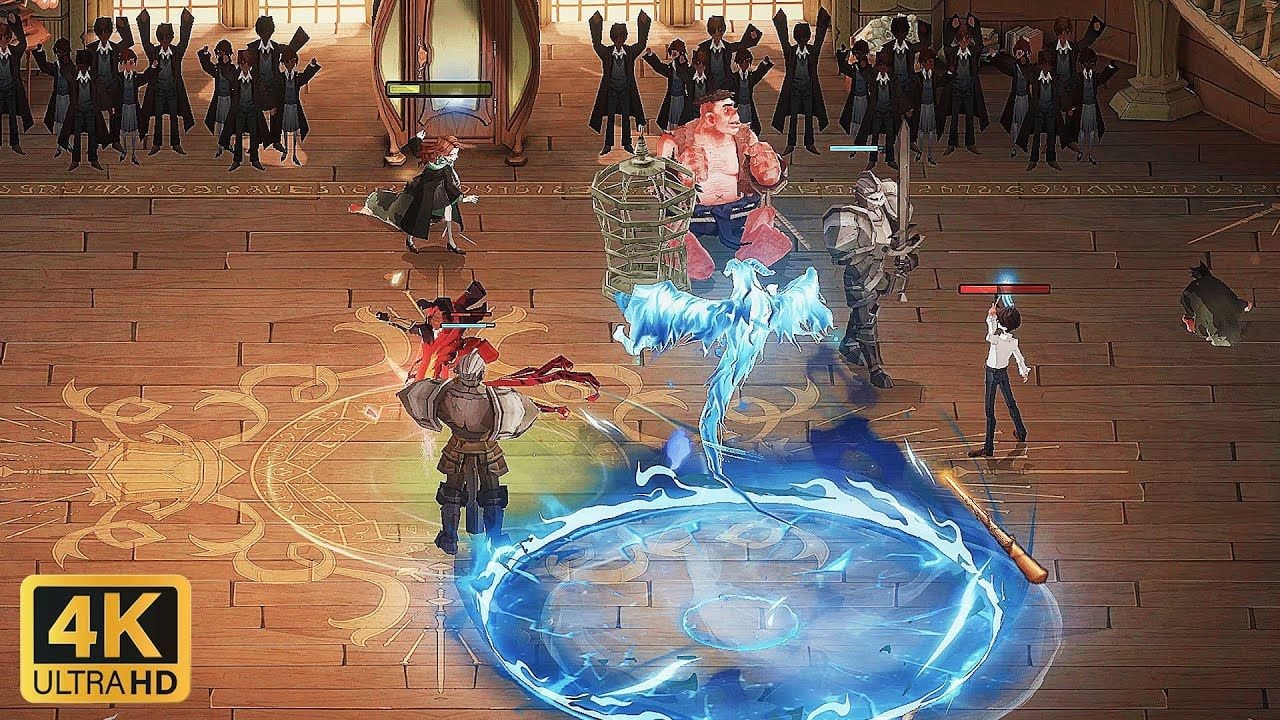
To change positions, you must actively tap a movement card and tap a specific destination on your half of the arena floor (Android Police). Every positional adjustment burns a limited resource: moving cards. These moving cards are split between step and whirl cards (GameRefinery). Because these resources are finite, movement must be deliberate rather than frantic. Repositioning serves three functional purposes during combat:
- Stepping out of hostile spell hitboxes before they detonate.
- Angling projectile trajectories so they bypass enemy summons.
- Bringing offensive abilities within range of the enemy witch or wizard (Android Police).
Because spell and creature cards carry cooldown timers before they cycle back into your active hand (GameRefinery), keeping your non-dominant thumb anchored over the movement card area avoids misclicks while your primary hand directs targeting reticles.
Configuring BlueStacks PC Keybinds Setup
For players who prefer mouse precision over touch controls, playing on an emulator like BlueStacks replaces on-screen touch buttons with physical mouse and keyboard bindings. This completely removes thumb obstruction from the arena floor, making it simpler to track enemy spell markers.
Setting Up the Keymapping Tool
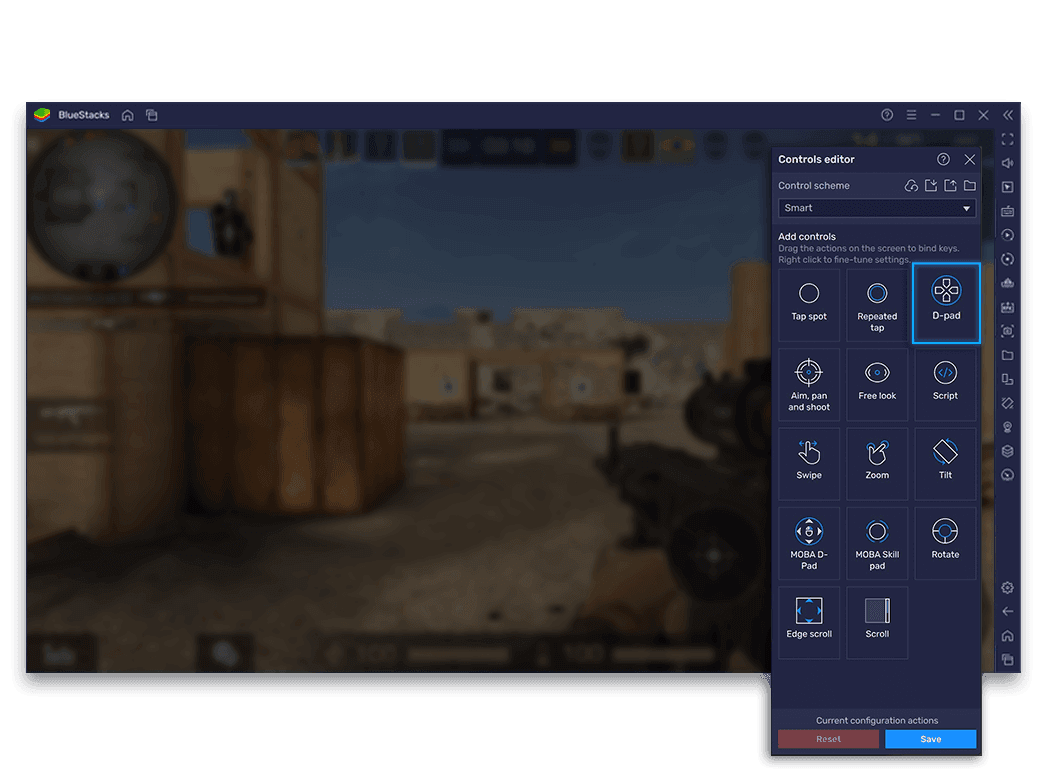
You can configure your control overlay directly inside BlueStacks by following these steps (BlueStacks):
- Launch the game and press Ctrl + Shift + A to open the Advanced Editor.
- Review your current bindings across the active card hand, companion slots, and movement buttons.
- Click on any existing binding to reassign it to a preferred keyboard key.
- Remove unwanted or redundant buttons by hovering your cursor over them and clicking the X icon.
- Drag and drop new functions from the rightmost panel directly onto your target on-screen locations.
- Click the Save button in the lower right corner to apply your changes.
Required Emulator Performance Settings
Keybind responsiveness on PC degrades rapidly if the emulator experiences frame drops or CPU throttling. To achieve smooth combat, configure your BlueStacks engine with these parameters (BlueStacks):
- CPU Allocation: Assign at least 4 CPU cores.
- Memory Allocation: Assign at least 4 GB of RAM.
- Performance Mode: Set strictly to "High performance".
- Frame Rate Slider: Set to 60 FPS or higher, and verify that changes are saved before launching ranked matches.
Matching these emulator settings with high in-game graphics provides a stable 60+ FPS experience that eliminates the arbitrary 20–45 FPS limits found on mobile hardware.
Managing Movement Depletion with Companion Cards
Running out of movement cards leaves your wizard static, making you an easy target for area-of-effect spells. When your base supply of step and whirl cards runs dry, companion choices can rescue your positioning.
Summoning the companion card Rubeus Hagrid places your wizard into a motorbike sidecar (BlueStacks). This action instantly grants:
- 5 additional movement cards to restore arena mobility.
- Boosted movement speed across your arena boundary.
- Collision damage when driving into enemy units along your path.
- Damage absorption, where the motorcycle absorbs hostile damage in your place (though it cannot be healed or shielded).
Managing your deck resources efficiently also extends to your out-of-match economy. Acquiring key cards, seasonal progression items, and cosmetic upgrades often involves Harry Potter: Magic Awakened Jewels, which serve as the primary paid currency for Clockturn Keys, Ruby Keys, and special bundles.
Troubleshooting Control and Responsiveness Issues
Why does my character fail to move when I tap the arena floor?
Movement requires an active movement card. If your counter displays zero step or whirl cards, tapping the arena floor will not reposition your wizard until cards regenerate or a card like Rubeus Hagrid restores them (Android Police, GameRefinery). Taps registered past the arena's central dividing line are also ignored because movement is restricted to your own half of the board.
Why do my spell casts feel delayed during mobile duels?
Framerates on mobile fluctuate between exploration and duels across arbitrary presets of roughly 20, 30, and 45 FPS (Android Police). If you experience input delay, open the in-game settings and set graphics to the minimum preset. This stabilizes combat frame delivery and prevents dropped touch events.