Setting up Tencent QQ VIP, Super VIP (SVIP), or Qzone Yellow Diamond requires prioritizing functional tools over cosmetic widgets during your first week. Subscribers should immediately activate cloud chat roaming (retaining history for up to 30 days on regular VIP or up to 2 years on SVIP), expand critical communication channels into 2,000-member Super Groups if holding SVIP, configure Qzone privacy whitelists, and set online presence status to maximize roster visibility. Daily account growth rates reach up to 1.8x acceleration under standard VIP and up to 3.2x under SVIP, significantly cutting the time needed to climb from Sun (太阳) to Crown (皇冠) rank.
Core differences: QQ VIP vs SVIP features and Yellow Diamond
Tencent splits privileges across distinct ecosystem roles instead of bundling everything into a single pass. QQ VIP serves as an entry messaging tier. QQ SVIP handles high-volume chat management, multi-device syncing, and accelerated leveling. Parallel to these, Qzone Yellow Diamond focuses on social feed customization, uncompressed cloud photo storage, and web gaming perks.
| Feature Category | QQ VIP | QQ Super VIP (SVIP) | Qzone Yellow Diamond |
|---|
| Core Platform Focus | Messaging personalization and identity | Flagship messaging, storage, and leveling speed | Qzone space customization and web games |
| Level Growth Speed | Up to 1.8x daily acceleration | Up to 3.0x - 3.2x daily acceleration | Qzone and game-specific boosts |
| Cloud Chat Roaming | Up to 30 days | Up to 2 years multi-device roaming | None (local client storage only) |
| Group Capacity Limit | Standard 500-member groups | Up to four 2,000-member Super Groups | Standard group limits |
| Media & Storage Perks | Standard cloud storage limits | Accelerated file transmission | Uncompressed original photo album storage |
(Sources: BitTopup QQ Membership Guide, Taobao Yellow Diamond Listing)
Match the tier to your workload. If you manage large communities or require multi-year business chat logs, regular VIP and Yellow Diamond lack the necessary capacity; SVIP covers those operational demands, whereas Yellow Diamond is designed for personal media preservation.
First-week setup checklist for new subscribers
A new Tencent QQ subscription opens dozens of privilege toggles. Configure storage and visibility settings first, before customizing cosmetic themes.
1. Enable long-term cloud chat roaming
New devices and fresh PC client installations do not download past conversations by default.
- Standard VIP accounts: Chat roaming retains history for up to 30 days.
- SVIP accounts: Cloud sync secures history for up to 2 years across mobile and desktop logins (BitTopup).
Turn on multi-device roaming in chat settings immediately. This keeps media files and chat logs accessible across phone and desktop clients without manual backups.
2. Claim and assign 2,000-member Super Groups
Free accounts and regular QQ VIP accounts operate under a strict 500-member ceiling per group. SVIP grants the ability to create and manage up to four 2,000-person Super Groups (BitTopup).
Older membership tiers like VIP7 once offered a mix of 500- and 1,000-person caps, but current SVIP provisions expand directly to 2,000 members. Upgrade existing 500-person groups in group management settings before member limits block new invites.
3. Optimize group roster ranking priority
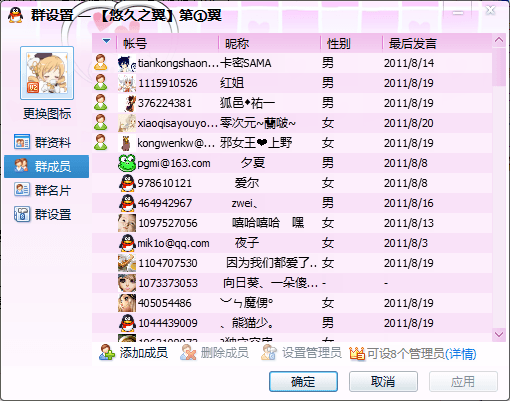
Member rosters in QQ groups are sorted dynamically rather than alphabetically. Your position in that list depends on your account status and presence settings:
- Presence hierarchy: QQ sorts presence in descending order: "I want to chat" / "I'm available" > "I'm online" > "Busy" > "Away" > "Do not disturb" > "Invisible offline" (Zhihu QQ Status Guide).
- VIP priority: QQ VIP and SVIP subscribers receive ranking priority over standard, non-paying users within the same presence category.
To keep your profile at the top of shared group directories, keep your subscription active and manually toggle your presence to "I want to chat" or "I'm available."
4. Configure Qzone storage and stealth parameters
If your subscription includes Yellow Diamond, open your Qzone profile settings to adjust media and privacy toggles:
- Uncompressed uploads: Select original photo quality for your albums. Yellow Diamond bypasses standard compression, allowing you to store full-resolution media directly in cloud albums (BitTopup).
- Stealth visit mode: Turn on hidden browsing (踩空间不留痕迹) to visit other profiles without leaving a footprint on their visitor logs.
- Access whitelists: Restrict specific sensitive photo albums so that only designated friends can view them.
How to level up QQ VIP growth points and account tiers
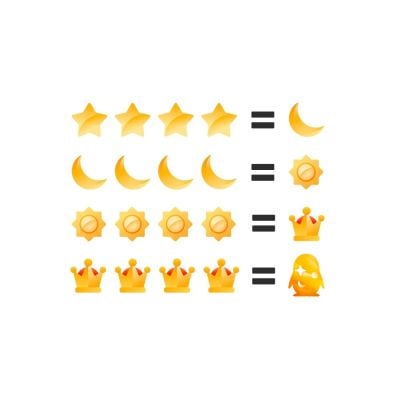
Account prestige in QQ centers on badge progression, moving sequentially through Stars, Moons, Suns (太阳), and Crowns (皇冠). Each rank requires an escalating threshold of active days.
Standard accounts earn 1 baseline active point per eligible day. Premium subscriptions multiply this accumulation rate:
- QQ VIP: Grants up to 1.8x daily level acceleration.
- QQ SVIP: Grants up to 3.0x to 3.2x daily level acceleration (BitTopup).
At 3.2x acceleration, an SVIP subscriber reaches milestone tiers in less than a third of the time required by an unsubscribed account. Maintaining active login habits daily ensures you receive the maximum multiplied points credit.
Managing subscription transitions and pauses
If you hold an active QQ VIP subscription and decide to buy SVIP, your remaining regular VIP days are not wasted. SVIP activates immediately upon purchase, and your remaining regular VIP balance pauses automatically (BitTopup).
Once your SVIP duration runs out, the paused regular VIP days resume counting down. Subscriptions of the exact same tier stack linearly, adding days directly onto your current expiration date.
Retired systems to avoid
Do not waste time looking for growth tasks tied to Qzone Flower Vine (花藤). While older guides highlight Flower Vine acceleration as a daily Yellow Diamond routine, the feature officially shut down on October 18, 2022. Stick to profile visits, client logins, and active chat presence for supported growth point routines.
Setting up Qzone Yellow Diamond features
Yellow Diamond customizes your Qzone feed, profile, and affiliated web spaces. Choosing between the base tier and Luxury Yellow Diamond comes down to whether you use Tencent's bundled external media services.
Standard vs Luxury Yellow Diamond
Standard Yellow Diamond covers essential utility: original photo album storage, exclusive skins, yellow nickname text, and stealth visitor tracking (Taobao Yellow Diamond Listing).
Luxury Yellow Diamond adds:
- Dynamic nickname styling and dynamic avatar frames.
- High-definition photo albums with background music support.
- One monthly partner membership pass (such as Tencent Video or Yuewen reading services).
Luxury Yellow Diamond annual subscriptions cannot be cancelled mid-year once activated. If you do not plan to use the bundled monthly streaming or reading voucher, standard Yellow Diamond fulfills storage and stealth needs without extra commitment.
Frequently asked questions
What happens to my active QQ VIP days if I purchase QQ SVIP?
SVIP activates immediately upon purchase, pausing your remaining QQ VIP days. Once the SVIP duration expires, your paused QQ VIP subscription resumes automatically (BitTopup).
Can I transfer or share QQ VIP/SVIP membership across multiple accounts?
No. Privileges bind strictly to the specific numeric QQ ID entered during checkout. They cannot be transferred, split, or shared with other accounts (BitTopup).
Can the streaming video benefit included with Luxury Yellow Diamond be redeemed on third-party platforms like iQIYI or NetEase Cloud Music?
No. The monthly partner benefit is restricted to Tencent ecosystem platforms, such as Tencent Video and Yuewen, and cannot be redeemed on competing third-party services like iQIYI or NetEase Cloud Music (Taobao Yellow Diamond Listing).