

Roblox Hong Kong Top Up: Fast Digital Code Delivery
A Roblox Hong Kong top up gives you direct access to official HKD Roblox gift card codes, allowing you to load digital balance straight into your account. Roblox credit functions as a flexible stored-value balance that you can convert directly into Robux or use toward active Roblox Premium subscriptions. Whether you want to customize your avatar with limited accessories, purchase developer products inside top community games, or acquire exclusive VIP game passes, digital vouchers provide an instant and reliable funding route.
Purchasing your Roblox HK voucher online eliminates the need to visit physical retail stores or convenience outlets in Hong Kong. You receive an alphanumeric redemption key immediately upon payment verification, which you apply directly to your account through the official Roblox portal. Because digital codes do not expire before redemption, you can use them immediately or store them for upcoming in-game seasonal events and avatar shop drops.
How to Recharge Roblox in Hong Kong with Digital Codes
Recharging your Roblox balance with an HKD digital code takes only a few minutes. Follow these step-by-step instructions to purchase and apply your balance:
- Select Your HKD Voucher Value: Choose the denomination that matches your intended Robux package or subscription budget on BitTopup.
- Complete Checkout: Select your preferred payment method on the checkout screen and complete the transaction. Current exchange rates and total amounts display in real time on the order summary.
- Retrieve Your Digital Code: Go to your BitTopup order history page to copy your unique digital redemption PIN.
- Open the Official Redemption Page: Open a web browser on your computer or mobile device and navigate to
roblox.com/redeem. - Log In to Your Roblox Account: Sign in to the specific Roblox profile where you want to add the funds.
- Enter the Code: Paste your digital PIN into the text box labeled Code.
- Click Redeem: Hit the Redeem button. Your account balance updates instantly with the corresponding HKD credit value.
- Convert Credit to Robux: Select Convert to Robux on the confirmation screen or navigate to the Robux purchase section to use your newly added stored balance.
How to Locate Your Roblox Account Details and Username
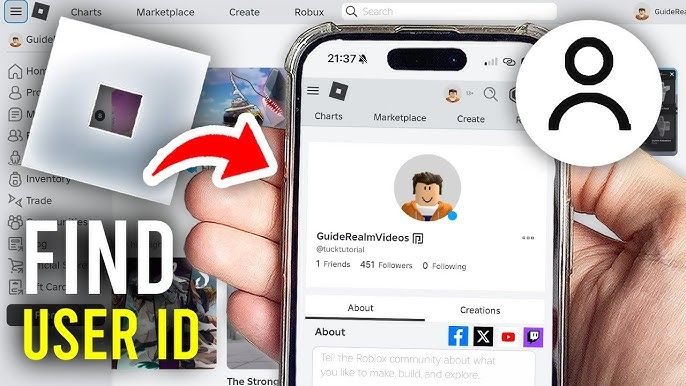
When buying digital codes on BitTopup, you never need to hand over your login credentials. You only need to verify your account identity yourself when applying the code on the official Roblox website. Verifying your username and User ID (UID) ensures that you do not accidentally redeem funds onto an alternate or secondary account.
Here is how to check your account details:
- Log in to Roblox via browser or the Roblox desktop/mobile client.
- Look at the top right corner of the home interface. Your display name appears prominently, while your unique handle begins with an
@symbol (e.g.,@RobloxPlayerHK). - Click on your profile icon to open your profile overview page.
- Check your browser address bar. The URL follows this format:
roblox.com/users/123456789/profile. The numerical string in the middle is your permanent Roblox UID. - Confirm that this profile matches the account you have open at
roblox.com/redeembefore submitting your digital code.
Available HKD Denominations and Robux Credit Options
Roblox digital vouchers in Hong Kong come in multiple HKD denominations. When redeemed, the code converts into stored Roblox credit equal to the face value in Hong Kong Dollars. You can allocate this credit across multiple transactions or spend it in a single purchase.
| Voucher Denomination (HKD) | Primary Usage | Account Credit Type | Key Advantage |
|---|---|---|---|
| HKD 50 - HKD 100 | Starter Robux packs & basic avatar cosmetics | Stored Cash Balance | Fast budget top up for individual items |
| HKD 150 - HKD 300 | Mid-tier Robux packages & monthly Premium | Stored Cash Balance | Ideal for multiple game passes and accessories |
| HKD 400 - HKD 800+ | Large Robux bundles & high-tier limiteds | Stored Cash Balance | Maximum purchasing power for developers & collectors |
Robux vs. Roblox Premium Subscriptions
Once your HKD voucher balance is credited to your Roblox account, you have two primary spending routes:
- Direct Robux Purchase: Convert your balance immediately into a set batch of Robux. This gives you liquid in-game currency to spend on custom animations, clothing, accessories, and private server rentals.
- Roblox Premium Membership: Use your stored balance to pay for monthly Premium tiers. Premium grants a monthly Robux stipend, unlocks a 10% bonus on additional Robux purchases, enables item trading with other members, and allows access to exclusive avatar shop discounts.
Account Safety: 100% Secure Checkout Without Password Sharing
Account safety is essential when purchasing digital gaming products online. Many unauthorized top-up methods require buyers to hand over their account usernames, passwords, or two-factor authentication (2FA) verification codes. Sharing this information violates account safety guidelines and puts your inventory, rare limited items, and payment details at risk.
BitTopup uses a code-only delivery model. This means:
- Zero Password Requests: You never provide your Roblox login password or authentication tokens at any point during checkout.
- Direct User Redemption: You receive an unredeemed digital key and enter it yourself on Roblox's official encrypted website (
roblox.com/redeem). - Protected Account Privacy: Your account settings, personal email address, linked phone number, and friend lists remain completely private.
- Clean Transaction Records: Digital vouchers generate a standard redemption record directly within your official Roblox billing history.
Redemption Troubleshooting: Currency and Invalid Code Solutions
If you experience an issue when applying your code at roblox.com/redeem, check these common causes and solutions:
1. Currency and Region Mismatch Errors
Roblox enforces region and currency compatibility rules on digital gift cards. HKD vouchers are meant for accounts set to Hong Kong or regions configured for HKD balance redemption. If your account currency is permanently set to a different fiat currency (such as USD, GBP, or EUR), the system may reject the code. Verify your account location and currency settings in your account settings before redeeming.
2. Typo and Character Confusion
Digital codes consist of alphanumeric strings. Manual entry errors are the most common reason for "Invalid Code" messages. Double-check for easily confused characters:* The number 0 vs. the letter O* The number 1 vs. the uppercase letter I or lowercase l* The number 5 vs. the letter S* The number 8 vs. the letter B
To prevent typos, copy the code directly from your BitTopup order screen and paste it into the redemption box.
3. "Code Already Redeemed" Notice
If you receive a message stating the code has already been redeemed, check your transaction tab at roblox.com/transactions. Refresh the page to see if your Roblox Credit balance or Robux counter has already updated. Browser lag occasionally processes the credit while displaying a delayed error message on the front end.
4. Browser Script and Cache Conflicts
If the Redeem button fails to load or does not respond when clicked, clear your web browser cache or open an incognito/private browsing window. Certain aggressive script blockers or ad-blocking browser extensions can block the verification script that processes code redemption.
Why Choose BitTopup for Roblox Hong Kong Recharges
Getting your Roblox HK vouchers through BitTopup offers clear advantages for speed, security, and purchasing convenience:
- Instant Digital Delivery: Digital redemption codes are generated immediately after your payment is confirmed, allowing you to top up without delays.
- Transparent Live Checkout: All prices, fees, and currency conversions are clearly displayed on the checkout screen before you finalize your purchase.
- Comprehensive Payment Options: Complete your order using a wide range of secure regional and international payment methods.
- Reliable 24/7 Support: Dedicated customer support specialists are available around the clock to assist with order tracking, transaction verification, or redemption guidance.
- Order History Tracking: Every digital code you purchase remains archived in your personal BitTopup account dashboard for easy reference at any time.
Frequently Asked Questions
Is Roblox available and supported in Hong Kong?
Yes, Roblox is fully accessible in Hong Kong across PC, Mac, iOS, Android, PlayStation, and Xbox platforms. Players in Hong Kong can access all global community experiences, trade avatar items, and redeem HKD gift card vouchers on their accounts.
How do I redeem a Roblox Hong Kong digital code?
Log in to your account on a web browser and go to roblox.com/redeem. Enter your digital PIN into the field and click Redeem. The value will be added to your account balance as Roblox Credit, which you can then convert to Robux or use for Premium memberships.
Can I use a Hong Kong HKD Roblox code on an account with a different currency?
Roblox gift cards and digital codes generally require the code's currency to match the currency setting of your Roblox account. If your account is registered in a region using a different currency, you may encounter a currency mismatch error during redemption.
Do I need to share my Roblox account password to recharge on BitTopup?
No. BitTopup delivers digital codes that you redeem yourself on the official Roblox website. You never need to share your password, email address, or 2FA codes.
How much Robux can I get from a Roblox HKD gift voucher?
The exact amount of Robux you receive depends on the HKD face value of the voucher and the Robux package you select upon conversion. Current Robux package rates and credit conversion options are displayed in your Roblox account billing menu at the time of purchase.
What should I do if my Roblox redemption code shows an error?
First, verify that you copied the code correctly without extra spaces or mistaken characters. If the code still shows an error, check roblox.com/transactions to confirm whether the balance was already applied. If you still cannot redeem the code, contact BitTopup 24/7 customer support with your order ID for prompt assistance.