



What is Dynasty Warriors: Overlords Package Top Up?
Dynasty Warriors: Overlords brings classic Three Kingdoms hack-and-slash action directly to mobile platforms. Building an army capable of clearing high-difficulty stages, dominating PvP arenas, and completing alliance campaigns requires continuous character progression, stamina replenishment, and weapon upgrades.
A Dynasty Warriors: Overlords Package top up delivers in-game bundles, premium coupons, officer fragments, and growth resources directly to your game account. Rather than purchasing individual items through standard mobile storefronts, top-up packages combine high-demand materials into cost-effective bundles. These packages provide coupons that function as universal currency for limited-time gacha banners, weapon refinement materials, and exclusive cosmetics.
BitTopup provides a direct top-up service that processes orders using only your Character ID (UID) and Server selection. This method ensures your account stays secure while crediting your game account accurately.
Overview of Packages, Coupons, and In-Game Benefits
Dynasty Warriors: Overlords features several distinct package tiers designed for different progression needs. Understanding what each bundle contains helps you select the right package for your current gameplay objectives.
| Package Type | Primary Contents | Gameplay Utility |
|---|---|---|
| Coupons & Vouchers | Direct premium coupons | Universal in-game exchange for gacha summons, VIP points, and shop items |
| Growth & Officer Bundles | Officer shards, skill books, breakthrough materials | Fast-tracks character ascension and skill level caps for SSR officers |
| Stamina & Resource Packs | Energy pots, silver coins, weapon refinement ore | Sustains extended farming sessions for equipment crafting and stage sweeps |
| Monthly / Privilege Passes | Daily coupon distribution, stamina cap expansion | Continuous daily value and quality-of-life perks over 30 days |
Coupons are the core premium currency in Dynasty Warriors: Overlords. Unlike standard bound gold, coupons can be used across all special event shops, recruit banners for top-tier generals like Lu Bu and Guan Yu, and limited-edition officer skins.
How to Find Your Dynasty Warriors: Overlords Character ID and Server ID
To ensure your package is credited to the correct profile, you must provide your exact in-game Character ID and Server name. Locating this information takes only a few seconds within the game client:
- Launch Dynasty Warriors: Overlords on your mobile device and log in.
- On the main lobby screen, locate and tap your Character Avatar in the top-left corner.
- The Player Profile window will open, displaying your basic stats, current server, and Character ID (UID).
- Tap the Copy button next to your numeric Character ID to copy it directly to your clipboard.
- Note your Server ID / Server Name displayed in the same profile window.
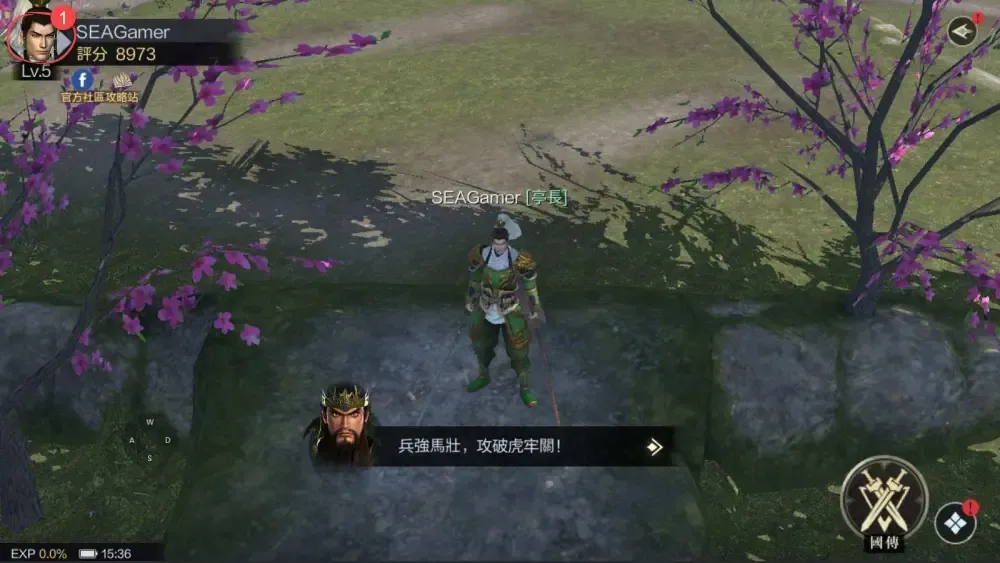
Always double-check your server selection before submitting an order. If your account exists on Server 3, selecting Server 1 will result in a failed delivery or send the items to an incorrect character on that server.
Step-by-Step Guide to Recharge Dynasty Warriors: Overlords on BitTopup
Recharging your account on BitTopup requires only a few clear steps:
- Select Your Package: Browse the available Dynasty Warriors: Overlords packages and coupon amounts on this page. Choose the item that fits your current goals.
- Enter Account Details: Paste your numeric Character ID (UID) into the input field and choose your active Server from the dropdown menu.
- Proceed to Checkout: Click the buy button to move to the secure payment screen.
- Select Payment Method: Pick your preferred payment method from the available local and global options shown on the checkout page.
- Complete Payment: Finalize the transaction. The final price and any applicable regional taxes are displayed directly on the live checkout interface.
- Receive In-Game Items: Open Dynasty Warriors: Overlords. Check your in-game mailbox or directly review your coupon balance to confirm delivery.
Account Security: Why Passwordless ID Recharge is Safe
Account safety is critical when purchasing game top-ups online. Traditional account sharing—where a buyer gives login credentials to a seller—exposes your personal data, linked social media accounts, and game profile to theft or unauthorized access.
BitTopup eliminates these risks by utilizing direct UID-based delivery:
- No Passwords Required: You never share your Google, Apple, Facebook, or guest account passwords.
- No Account Handover: Your account remains entirely in your hands, eliminating the risk of unauthorized gear recycling, resource spending, or credential alterations.
- Direct System Injection: Recharges are processed directly into the official server queue for your specified UID and server.
- Safe Data Handling: Your numeric UID is public information in-game and cannot be used by anyone to access your personal details or compromise your account.
Supported Payment Methods and Regional Currencies
BitTopup supports a wide selection of payment options tailored to players across various global regions. Whether you prefer using international bank cards, digital wallets, or local payment channels, the checkout system adapts to your location.
Live pricing, applicable regional currency conversions, and available payment processors are calculated in real time and displayed clearly at checkout before you authorize any payment. This ensures total transparency with no hidden conversion surprises.
Troubleshooting and Order Verification Guide
If your package does not appear immediately after completing payment, follow these troubleshooting steps:
- Restart the Game Client: Completely close Dynasty Warriors: Overlords from your device's background task manager and reopen it. This forces the client to synchronize with the server database.
- Check the In-Game Mailbox: Some packages, event vouchers, and bonus items are delivered as claimable attachments inside the in-game Mail tab rather than added directly to your resource bar.
- Inspect Your Inventory (Bag): Gift boxes and material bundles often appear as usable items in your inventory that must be manually opened.
- Verify Order Status on BitTopup: Check your order history on BitTopup to confirm the transaction status shows completed.
- Contact 24/7 Customer Support: If you have checked your mailbox and restarted the client but the items have not arrived, contact the BitTopup customer support team. Provide your BitTopup Order ID, Character ID, and Server name so support agents can trace the delivery and resolve it promptly.
Frequently Asked Questions
How do I recharge Dynasty Warriors: Overlords packages on BitTopup?
Select the package or coupon tier you want, enter your in-game Character ID (UID), choose your server, and complete the payment on the checkout page. The items credit directly to your account.
Where can I find my Character ID and Server ID in Dynasty Warriors: Overlords?
Open the game, tap your player avatar in the top-left corner of the main lobby, and view the Player Profile screen. Your numeric Character ID and current Server Name are displayed clearly with a copy button next to the ID.
Do I need to provide my game account password to recharge?
No. BitTopup requires only your public Character ID (UID) and server selection. You should never share your account password, email login, or linked social media credentials.
What items and vouchers are included in Dynasty Warriors: Overlords packages?
Depending on the bundle selected, packages contain premium coupons, officer recruitment tokens, weapon materials, breakthrough stones, skill books, stamina items, and privilege passes.
What should I do if my recharged package does not appear in-game?
First, restart the game app and check both your in-game mailbox and inventory bag. If the items are still missing, check your BitTopup order status and contact BitTopup 24/7 customer support with your Order ID and Character ID for fast assistance.
Which payment methods are accepted for recharging Dynasty Warriors: Overlords?
BitTopup accepts a wide range of global and regional payment options, including major credit/debit cards and localized online payment solutions. View the live checkout page to see the specific payment channels available for your country.