

Dynasty Warriors: Overlords Coupons Top Up Guide
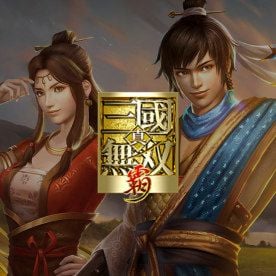
Dynasty Warriors: Overlords brings classic musou hack-and-slash combat to mobile devices, allowing players to command legendary Three Kingdoms generals, clear massive waves of enemy soldiers, and build their personal principalities. To maximize your roster strength, recruit top-tier officers, and access premium growth materials, you need in-game Coupons.
BitTopup provides a direct recharge service for Dynasty Warriors: Overlords Coupons. You only need your Player ID and Game Server to complete an order—no account passwords or sensitive login credentials required.
What Are Dynasty Warriors: Overlords Coupons and In-Game Uses
Coupons serve as the primary premium currency in Dynasty Warriors: Overlords. Acquiring Coupons allows you to purchase resources and unlock game modes that accelerate officer progression and combat effectiveness.
Key uses for Coupons include:
- Officer Recruitment: Purchase Special Recruitment Tokens to draw legendary SSR officers such as Lu Bu, Guan Yu, Zhao Yun, and Cao Cao during standard and rate-up banners.
- Growth and Upgrade Materials: Buy weapon forging stones, promotion manuals, and skill books directly from the in-game shop to boost officer combat power (CP).
- Stamina Refills: Exchange Coupons for stamina tokens to sweep campaign stages, farm evolution materials, and participate in daily syndicate raids.
- Battle Passes and Bundles: Unlock premium tier rewards in seasonal passes, level-up investment plans, and daily discount boxes.
- Exclusive Cosmetics and Mounts: Acquire exclusive character skins, warhorses, and visual effects that provide minor passive stat bonuses.
How to Recharge Dynasty Warriors: Overlords Coupons on BitTopup
To complete a Dynasty Warriors: Overlords recharge on BitTopup, follow these steps:
- Select Your Coupon Package: Choose the desired Coupon denomination from the product catalog. Current prices and package options are displayed live on the checkout selection screen.
- Enter Account Details: Input your numeric Player ID and select your active Game Server in the designated fields.
- Confirm Your Order: Double-check your entered ID and server name to make sure the delivery arrives at the correct character.
- Select Payment Method: Pick your preferred payment channel from the regional options available at checkout.
- Receive Your Coupons: Once your transaction is confirmed, the Coupons are delivered directly to your Dynasty Warriors: Overlords account balance. You can verify your balance in-game immediately.
How to Locate Your Dynasty Warriors: Overlords Player ID and Game Server
Locating your Player ID and Game Server takes just a few seconds inside the game client.
- Launch Dynasty Warriors: Overlords on your mobile device and log in to your account.
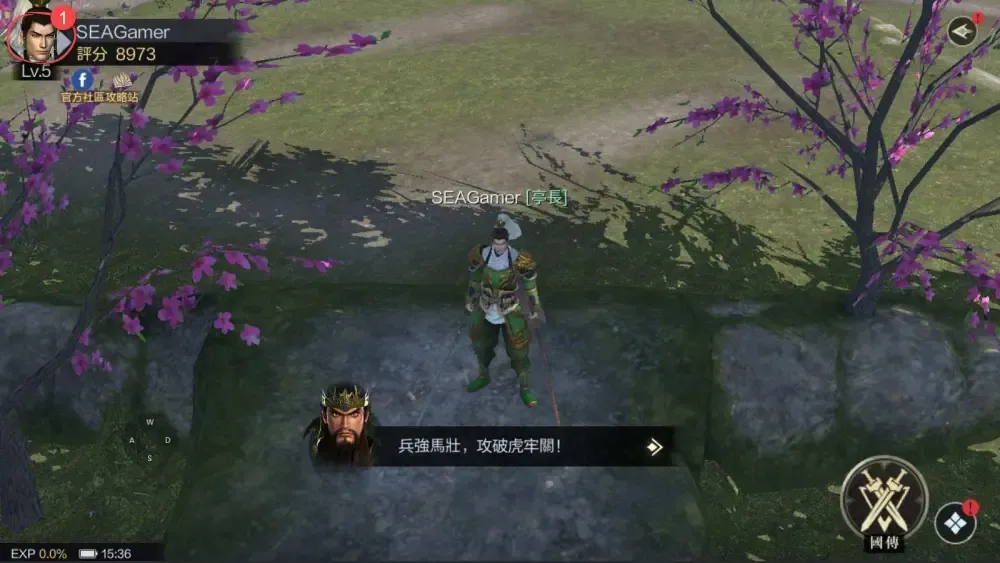
- From the main game lobby screen, look at the top-left corner to check your Game Server name (e.g., S1, S2, etc.).
- Tap on your Avatar / Profile Icon in the top-left corner to open the Officer Info panel.
- Find the Player ID (a series of numbers) displayed next to your character name.
- Tap the Copy icon next to your Player ID to paste it directly during checkout on BitTopup.
Tip: Always use the in-game copy button to eliminate manual typing errors before placing your order.
Available Coupon Packages and In-Game Value Guide
Different Coupon quantities serve different goals in Dynasty Warriors: Overlords. The table below outlines how players typically allocate Coupon purchases:
| Package Type | In-Game Target | Recommended Use |
|---|---|---|
| Small Coupon Packs | Daily stamina refreshes and basic daily shop resets | Active daily progression |
| Medium Coupon Packs | Weekly rate-up recruitment pulls and growth bundles | Targeted officer summoning |
| Large Coupon Packs | Seasonal battle passes, officer rank-up packs, weapon forging | Fast mid-to-endgame progression |
| Ultimate Coupon Bundles | Guaranteeing limited SSR officers and premium exclusive mounts | Competitive syndicate and PvP ranking |
Note: Live pricing, special bundle promotions, and regional currencies are updated automatically on the BitTopup checkout interface.
Account Security: Why ID-Only Top-Up Protects Your Account
Account safety is a critical priority when purchasing mobile game currencies. BitTopup uses a direct Player ID recharge protocol that ensures complete protection for your gaming profile:
- Zero Password Requirements: You never need to share your Google, Apple ID, Facebook, or game account passwords.
- No Account Sharing: Your account remains strictly in your hands. There is no need for third-party logins or device verification codes.
- Direct Game Server Crediting: Orders are processed through standard server-side delivery systems directly to your character UID.
- Encrypted Checkout: All personal transaction data and payment details are processed through secure, encrypted payment gateways.
Troubleshooting Common Dynasty Warriors: Overlords Top-Up Issues
If your Coupons do not appear immediately after payment, follow this troubleshooting checklist:
- Restart the Game App: Completely close Dynasty Warriors: Overlords and re-open it. In many cases, an app restart forces the client to sync with the server and refresh your balance.
- Check In-Game Mailbox: Some promotional bundles or event-linked Coupon credits are sent via the in-game mailbox rather than direct wallet adjustments. Check your inbox and claim all attachments.
- Verify Server Selection: Confirm that you selected the exact server where your active character resides. If you play on multiple servers under the same account, verify which server was specified during order entry.
- Check BitTopup Order Status: Visit your BitTopup order history page to ensure your payment completed successfully and view real-time processing status.
- Contact 24/7 Support: If your order status shows completed but your Coupons have not arrived after restarting, reach out to BitTopup customer support with your Order Number, Player ID, and transaction receipt for immediate assistance.
Frequently Asked Questions
What information is required to recharge Dynasty Warriors: Overlords Coupons?
You only need to provide your in-game Player ID and select your Game Server. No login credentials, email passwords, or phone verification codes are required.
How do I find my Dynasty Warriors: Overlords Player ID and Game Server?
Tap your avatar in the upper-left corner of the main lobby screen. Your Player ID is listed on your profile card with a copy button next to it. Your server name appears on the profile screen and the initial game start screen.
Do I need to provide my game login password to buy Coupons?
No. BitTopup operates strictly through Player ID-based direct top-ups. You should never share your account login passwords with anyone.
How long does it take for Coupons to arrive after completing payment?
Recharges are processed automatically once your payment is confirmed. Most orders credit directly to your in-game balance within moments of transaction completion.
What should I do if I entered the wrong Player ID or Game Server?
If you realize you submitted incorrect details, contact BitTopup 24/7 customer support immediately. If the order has not yet been processed by the system, our support team can help update your details.
Can I recharge Dynasty Warriors: Overlords Coupons for another player?
Yes. Because the recharge only requires a Player ID and Game Server, you can purchase Coupons for friends, guildmates, or family members by entering their respective details at checkout.