


GrabGifts Cash Voucher PH Recharge: Instant Digital Codes for Grab Philippines
GrabGifts Cash Vouchers provide a flexible, prepaid digital balance designed specifically for Grab users in the Philippines. Whether booking rides, ordering meals, purchasing daily groceries, or sending parcels across Metro Manila, Cebu, Davao, and other service areas, GrabGifts codes offer a frictionless checkout experience.
A GrabGift voucher acts as a digital promo code with a fixed Philippine Peso (PHP) denomination. When you apply the code to your Grab account or directly at the checkout screen, the voucher value deducts from your total ride fare or delivery bill. Purchasing digital Grab vouchers on BitTopup gives you instant code access without linking credit cards or banking apps directly to your daily transport and food accounts.
Supported Grab Services in the Philippines
GrabGifts Cash Vouchers purchased for the Philippines region can be applied across several core Grab services:
- GrabCar & GrabTaxi: Apply your voucher toward daily commutes, airport transfers, and long-distance city rides.
- GrabFood: Offset the cost of restaurant meal orders, snacks, and beverages from partnered merchants nationwide.
- GrabMart: Use voucher balances to purchase groceries, pharmacy items, packaged goods, and personal care essentials.
- GrabExpress: Pay for on-demand package deliveries, document couriers, and same-day parcel logistics.
How to Buy GrabGifts Cash Voucher PH on BitTopup
Securing a Grab voucher code takes only a few moments on BitTopup. You do not need to share account passwords or sensitive personal credentials.
- Select your preferred GrabGifts Cash Voucher denomination on the BitTopup product page.
- Review the live order amount shown on the checkout screen.
- Enter your active email address where the digital voucher code and redemption receipt will be delivered.
- Choose your preferred secure payment method and complete the transaction.
- Access your BitTopup Order History or check your email inbox to retrieve the digital alphanumeric voucher code instantly.
Step-by-Step Guide: How to Redeem GrabGifts Voucher Codes in the Grab App
You can claim your GrabGifts cash voucher using two distinct methods: saving the voucher directly to your Grab Rewards wallet for future use, or applying the promo code during the booking checkout flow.
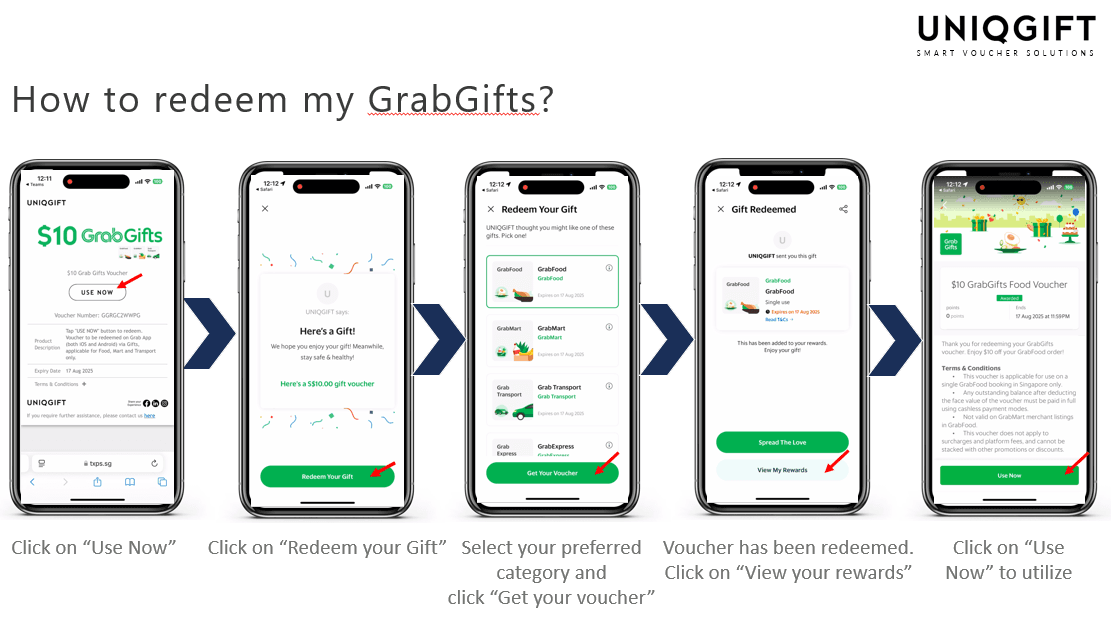
Method 1: Save Voucher to Grab Rewards Wallet (Recommended)
- Open the Grab App on your iOS or Android device and ensure your location is set to the Philippines.
- Tap the Account tab in the bottom navigation bar.
- Select Rewards and tap on My Rewards or the top banner labeled Add Promo / Gift Code.
- Enter or paste the digital GrabGifts voucher code received from BitTopup.
- Tap Apply or Add to Rewards. The voucher will be stored in your active rewards list until you choose to apply it to a ride, food, or delivery booking.
Method 2: Apply Directly at Checkout / Booking Screen
- Select your desired service within the Grab app (GrabFood, GrabCar, GrabMart, or GrabExpress).
- Set your pickup and drop-off locations or add items to your merchant basket.
- On the final checkout summary screen, tap the Offer, Promo, or Use Offers to get discounts field.
- Type your GrabGifts code into the promo code entry bar and tap Use Now.
- Verify that the voucher discount reflects in your total order breakdown before tapping Book or Place Order.
GrabGifts Voucher Specifications and Usage Rules
| Service / Feature | Supported Details | Key Limitation |
|---|---|---|
| Region | Philippines (PH) Accounts Only | Cannot be used on accounts registered outside PH |
| Supported Verticals | GrabCar, GrabFood, GrabMart, GrabExpress | Does not top up GrabPay e-wallet balance |
| Usage Policy | Single-Use Voucher Code | Unused remainder is forfeited after application |
| Validity Window | Up to 180 Days from issuance | Strictly non-extendable past expiration date |
| Fee Inclusions | Base fares, trip costs, item totals | Excludes platform fees, small order fees, tips |
Important Voucher Terms: Single-Use Policy, Exclusions, and Validity
Understanding Grab's redemption terms guarantees that you maximize the financial value of every code purchased.
The Single-Use Policy
GrabGifts Cash Vouchers are strictly single-use digital coupons. The entire value of the voucher must be consumed in a single order or booking transaction.
- If you apply a 500 PHP GrabGift voucher to an order totaling 380 PHP, the remaining 120 PHP is automatically forfeited and cannot be stored or transferred for subsequent orders.
- If your transaction total exceeds the voucher amount (for example, a 650 PHP booking using a 500 PHP voucher), you simply pay the remaining 150 PHP balance via cash, credit/debit card, or linked GrabPay balance.
Non-Covered Charges & Fee Exclusions
Grab voucher discounts apply exclusively to the base transport fare, delivery charge, and merchant item subtotal. Vouchers cannot be applied toward:
- Platform Fees: Standard application service charges added to transactions.
- Small Order Fees: Levied on food/grocery orders that do not meet minimum merchant thresholds.
- Toll Fees & Parking Charges: Express highway tolls and parking surcharges incurred during transport rides.
- Driver and Rider Tips: Optional gratuity paid to your driver or courier.
Validity Window and Non-Refundable Rules
Grab digital codes carry a set expiration timeframe (typically up to 180 days from generation). Once expired, codes cannot be reactivated, reissued, or extended. Digital codes are non-refundable and cannot be converted into withdrawable cash or direct GrabPay wallet funds.
Troubleshooting Grab Voucher Redemption Errors (2026 Guide)
If you encounter an issue applying your GrabGift voucher in the Philippines, check the following common causes:
- "Promo code is invalid or expired": Re-check your alphanumeric input carefully for spacing or character mistakes (such as confusing "0" with "O" or "1" with "I"). Verify that the code has not expired.
- "Voucher cannot be used in your country/region": Grab vouchers are geo-locked. GrabGifts Cash Voucher (PH) can only be redeemed within the Philippines Grab application environment. Ensure your device GPS and account country settings reflect the Philippines.
- "Code cannot be stacked with other discounts": Grab enforces a one-voucher-per-transaction policy. You cannot combine a GrabGifts cash code with another merchant promo code or auto-applied GrabRewards discount on the same booking.
- "Voucher already claimed": If you added the code to your My Rewards wallet earlier, it cannot be entered again in the promo code box. Instead, tap Offers/Vouchers at checkout and select it directly from your saved rewards list.
Why Buy GrabGifts Vouchers on BitTopup?
- Instant Digital Code Access: Receive your active GrabGifts alphanumeric code directly on screen in your order center and via your email inbox.
- Strict Security & Privacy: BitTopup never asks for your Grab account login credentials, OTPs, or passwords. Your personal data remains entirely safe.
- Zero Concealed Charges: Transparent order totals ensure you know exact costs before completing checkout.
- Dedicated Customer Assistance: Live support agents are standing by to assist with transaction queries and digital voucher validation whenever needed.
Frequently Asked Questions (FAQ)
How do I redeem a GrabGifts cash voucher in the Grab app?
You can redeem your voucher by going to Account > Rewards > Add Promo / Gift Code to save it to your wallet, or by pasting the code directly into the Offer / Promo Code bar at the checkout screen before confirming your ride or order.
Can I convert a Grab voucher into cash or GrabPay balance?
No. GrabGifts Cash Vouchers are non-convertible digital coupons. They cannot be withdrawn as cash, refunded to bank accounts, or credited into your GrabPay electronic wallet balance.
Why is my Grab voucher code not working or showing an error?
Voucher errors usually stem from typing mistakes, trying to combine multiple promo codes on a single order, region restrictions outside the Philippines, or attempting to redeem an expired code. If you previously saved the voucher to your Grab Rewards wallet, select it from your saved vouchers list rather than typing it again at checkout.
Does a GrabGift voucher cover delivery and platform fees?
GrabGifts vouchers cover base delivery fees, trip fares, and item costs. However, they do not cover platform service fees, small order surcharge fees, toll fees, or optional driver tips. These excluded amounts must be covered using another active payment method.
What happens if my order amount is less than the Grab voucher value?
Grab vouchers operate under a strict single-use policy. Any unconsumed balance from an order that costs less than the face value of the voucher is automatically forfeited and cannot be recovered.
Where can I use my GrabGifts voucher in the Philippines?
You can use your voucher across all Philippine cities and municipalities where Grab operates, across supported vertical services including GrabCar, GrabTaxi, GrabFood, GrabMart, and GrabExpress.
Can I use multiple GrabGift vouchers in a single order?
No. Grab permits only one promo code or voucher discount per order. You cannot stack multiple GrabGifts vouchers together on a single ride or food delivery checkout.