

Fast and Secure Nimo TV Diamonds Top Up Online
Nimo TV stands out as one of the premier live-streaming hubs for gaming, esports tournaments, and interactive creator broadcasts. To actively participate in your favorite streams, send virtual gifts, and engage with top broadcasters, you need diamonds—the primary premium currency on the platform. Securing a quick Nimo TV Diamonds top up ensures you never miss a moment to back your favorite streamers during high-stakes gaming tournaments or community events.
BitTopup provides an automated, direct UID top-up service designed for speed and account safety. You do not need to share your password or wait for manual operators to handle your account. By providing your Nimo TV User ID, you can reload your diamond wallet in seconds and get back to the live stream.
What Are Nimo TV Diamonds and Their In-App Uses
Diamonds function as the central virtual economy on Nimo TV. When you buy Nimo TV Diamonds, they are credited directly to your platform wallet, allowing you to access various premium features across the mobile application and desktop browser interface:
- Supporting Content Creators: Convert diamonds into dynamic digital gifts, ranging from basic cheers to elaborate animated super gifts. Gifting increases streamer popularity rankings and helps them climb event leaderboards.
- Unlocking Exclusive Badges: Regular supporters earn fan club badges, special chat text effects, and higher user levels that display prominently in stream chat rooms.
- Participating in Stream Events: Broadcast creators frequently host community prize wheels, lucky draws, and interactive mini-games where diamonds serve as entry points for winning rewards.
- VIP Room and Channel Perks: Certain exclusive streamer broadcasts or interactive chat channels grant entry or priority access to active diamond supporters.
How to Locate Your Nimo TV User ID
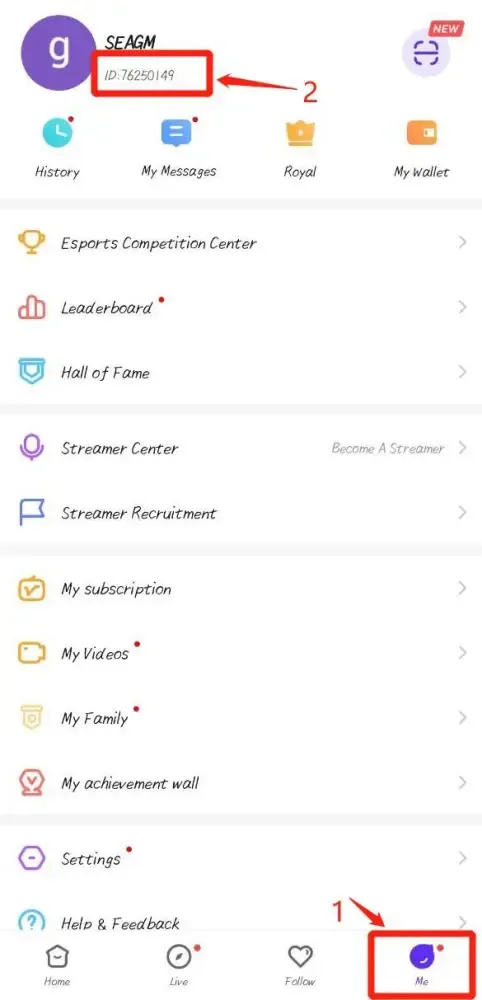
To complete a Nimo TV Diamonds recharge on BitTopup, you only need your unique numeric User ID. Follow these simple steps on your device:
On the Nimo TV Mobile App (Android / iOS):
- Open the Nimo TV application on your smartphone or tablet.
- Tap the Mine or Profile icon located in the bottom right corner of the screen.
- Look directly beneath your profile avatar and display name.
- You will see your User ID (a series of digits).
- Tap the copy icon next to the number or write it down carefully.
On the Nimo TV Web Browser:
- Visit the official Nimo TV website and log in to your account.
- Click on your profile avatar in the top right corner of the page.
- Open your personal account center or profile overview.
- Locate the ID displayed beneath your username.
Step-by-Step Guide: How to Recharge Nimo TV Diamonds on BitTopup
To top up your diamond balance without hassle, follow this straightforward purchase process:
- Select Diamond Denomination: Browse the available diamond packages on the BitTopup product page and select the amount you wish to purchase.
- Enter Your User ID: Type or paste your exact Nimo TV User ID into the required field. Double-check the numbers to avoid sending diamonds to an incorrect account.
- Choose Your Preferred Payment Method: Select from a variety of trusted global and local payment solutions at checkout.
- Complete Checkout: Review your order details and confirm the transaction.
- Check In-App Balance: Once the transaction is processed, open your Nimo TV app, go to your profile wallet, and verify your updated diamond balance immediately.
Direct UID Top-Up vs. Manual Account Login
Understanding how your recharge is fulfilled is critical for account protection. BitTopup utilizes direct API UID processing rather than manual account login.
| Feature | Direct UID Recharge (BitTopup) | Third-Party Manual Login |
|---|---|---|
| Password Required | No (100% Password-Free) | Yes (High Risk) |
| Delivery Speed | Instant / Automated | Slow (Queue-dependent) |
| Account Security | Zero risk of account compromise | High risk of unauthorized access |
| Order Process | Direct entry of User ID | Requires chat with agent |
| Gift / Friend Support | Yes, enter any valid User ID | No, requires account credentials |
Account Safety and Security: UID-Only Top-Up Protection
Account safety should always be your top priority when purchasing digital currencies online. BitTopup strictly adheres to a direct UID recharge standard, which provides crucial security advantages:
- Zero Password Sharing: We will never ask for your Nimo TV password, email login, social media binding, or verification SMS codes.
- Protection Against Account Takeover: Because no login access is granted, your personal profile data, friend lists, and streamer settings remain completely private and untouched.
- Safe Gifting to Friends: You can easily surprise fellow viewers, friends, or streamers by entering their User ID at checkout without needing any access to their personal devices.
- Encrypted Checkout: Every transaction on BitTopup is protected by advanced SSL encryption protocols, securing your billing information during payment processing.
Available Payment Methods for Nimo TV Diamonds Recharge
BitTopup offers a versatile range of payment options to serve viewers globally. Depending on your region, you can complete your order using:
- Major credit and debit cards
- Secure digital e-wallets
- Local bank transfers and instant online banking gateways
- Regional localized payment methods
Real-time pricing and local currency equivalents are clearly displayed on the product checkout screen, allowing you to select the package that matches your budget.
Troubleshooting Nimo TV Diamond Top-Up Delays and Order Issues
While orders on BitTopup are processed automatically, occasional network delays or user entry errors can occur. Here is how to handle common situations:
- Diamonds Not Showing Up Immediately: Force close the Nimo TV app and reopen it, or log out and log back in to refresh your wallet cache.
- Checking Server Congestion: During major esports championships or global creator events, platform servers may experience slight sync delays. Allow a few minutes for the balance to update.
- Entered Incorrect User ID: UID top-ups process automatically to the specified ID. If an invalid or mistyped ID was submitted, contact BitTopup support immediately with your transaction reference.
- Contacting 24/7 Support: If your order status indicates completed but your diamonds have not appeared after 10 minutes, submit your BitTopup Order Number and Nimo TV User ID to our customer support team for prompt verification.
Why Choose BitTopup for Nimo TV Diamonds Recharge
BitTopup is dedicated to providing streamers and viewers with a dependable, convenient top-up platform. Here is why users trust BitTopup for their gaming currency:
- Direct Automated Delivery: Orders are fulfilled automatically through your User ID without manual delays.
- Transparent Pricing: Check out with clear rates displayed upfront with no hidden processing fees.
- Safe & Private: No passwords or personal credentials are ever requested.
- Broad Currency & Payment Support: Pay with familiar, secure local and international payment methods.
- 24/7 Customer Service: Responsive customer care is available around the clock to assist you with order inquiries and payment support.
Frequently Asked Questions
What is my Nimo TV User ID and where do I find it?
Your Nimo TV User ID is a unique numeric identifier assigned to your account. You can find it by opening the Nimo TV app, tapping the Mine profile tab in the bottom right corner, and checking the number displayed right below your avatar and username.
How long does it take for Nimo TV Diamonds to be credited after recharge?
Diamonds are credited directly to your Nimo TV wallet within seconds after your payment is successfully confirmed. In rare instances of high platform traffic, delivery may take a few minutes.
Do I need to provide my Nimo TV account password to top up?
No. BitTopup only requires your Nimo TV User ID. You never need to share your account password, email login, or verification codes to recharge your diamonds.
Can I recharge Nimo TV Diamonds for a friend using their User ID?
Yes. You can purchase diamonds for any user by entering their specific Nimo TV User ID during checkout. The diamonds will be delivered straight to their in-app wallet.
What should I do if my Nimo TV Diamonds do not show up after payment?
First, refresh your Nimo TV app by closing and reopening it. If the diamonds do not appear within a few minutes, verify your payment confirmation and contact BitTopup 24/7 customer support with your Order ID for swift assistance.
What can I use Nimo TV Diamonds for on the live streaming platform?
Nimo TV Diamonds allow you to send interactive animated gifts to broadcasters, join fan clubs, unlock special chat badges, enter lucky draws, and support creators in climbing official live stream leaderboards.