

The Walking Dead: Survivors Gold Bars Top Up: Overview & In-Game Use
Gold Bars serve as a primary premium exchange currency in The Walking Dead: Survivors. Instead of making separate credit card transactions for individual packages, players use Gold Bars as an account-level balance to acquire special survival bundles, daily deals, building speed-ups, combat buffs, and survivor recruitment items.
Maintaining a ready stock of Gold Bars lets you react immediately during Clan Wars, regional defense operations, and competitive seasonal events. Whenever your base needs urgent healing, wall repairs, or rapid troop training, Gold Bars allow you to bypass waiting times and secure tactical advantages without delay.
| Feature | Details |
|---|---|
| Game Title | The Walking Dead: Survivors |
| Top-Up Currency | Gold Bars |
| Fulfillment Method | Direct UID Top-Up (No password required) |
| Server Compatibility | All Global Servers |
| Account Safety | 100% Secure via Official Player ID Routing |
| Pricing | Displayed in real-time on the live checkout selector |
What Are Gold Bars in The Walking Dead: Survivors and How to Use Them
Gold Bars function as flexible purchase tokens inside the in-game shop. When you decide to buy a resource crate, skin bundle, or survivor growth pack, the game offers you the choice to deduct the cost from your current Gold Bar balance rather than triggering an app store payment prompt.
Where to Spend Gold Bars
- Survivor Recruitment: Acquire recruitment tickets and exclusive survivor fragments to unlock legendary characters like Rick, Michonne, and Negan.
- Settlement Upgrades: Instantly purchase construction and research speed-ups to expand your town hall and defensive perimeter.
- Troop Training & Healing: Replenish lost forces quickly after fierce clashes with walkers or rival clans.
- VIP & Milestone Perks: Activate VIP privileges to gain continuous resource production bonuses and combat march boosts.
Important Usage Restrictions
Gold Bars are intended to replace standard direct-purchase packs and store bundles. However, specific promotional Ruby conversion packages or unique third-party event vouchers may have separate purchasing rules. Always verify the in-game store item requirements before planning your balance spending.
How to Recharge The Walking Dead: Survivors Gold Bars with User ID
Recharging on BitTopup is straightforward and requires only your player identification details. Follow these simple steps to complete your order:
- Select Package: Choose the Gold Bar denomination you wish to purchase from the selection menu above. Live pricing is displayed directly on the checkout screen.
- Enter User ID: Input your numeric The Walking Dead: Survivors User ID (UID) into the designated field.
- Select Payment Method: Pick your preferred payment option from the available regional checkout methods.
- Confirm Payment: Complete the payment verification process securely.
- Receive Items: The system processes the transaction and credits the Gold Bars straight to your in-game account.
How to Find Your The Walking Dead: Survivors User ID (UID)
Finding your User ID is quick and does not require opening complicated settings menus. Follow this walkthrough to copy your ID accurately:
- Launch The Walking Dead: Survivors on your device.
- Tap your Survivor Avatar in the top-left corner of the main base view.
- In the Commander Profile window that appears, look below your username.
- Locate your numeric User ID (UID).
- Tap the small Copy button next to the numbers to copy your UID directly to your clipboard.
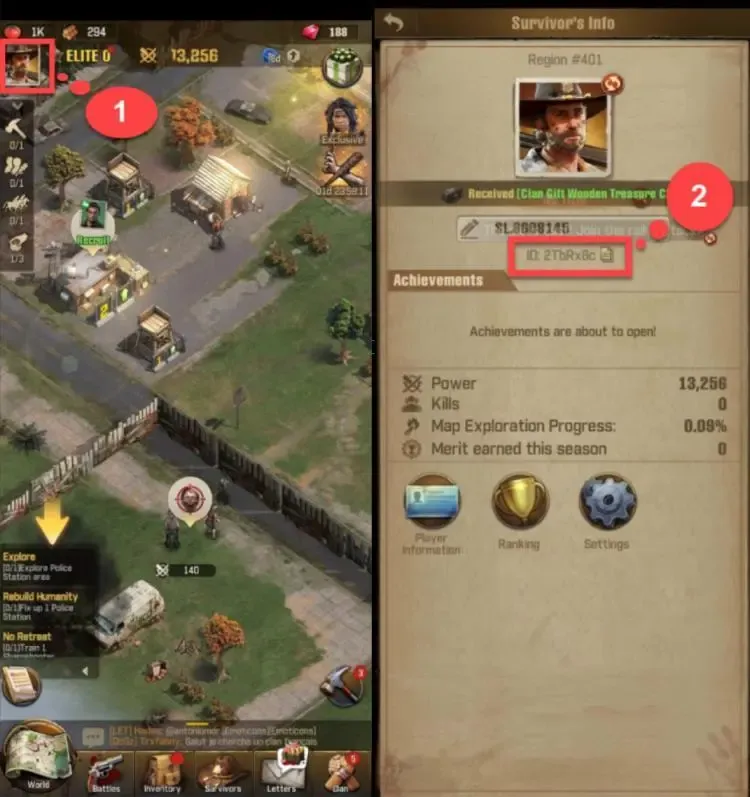
Make sure to paste this exact numeric string into the User ID box on BitTopup to avoid delivery mistakes.
Safe & Direct Top-Up: Why You Never Need to Share Your Password
Account safety is a top priority when topping up online. BitTopup uses a direct UID delivery system, which means your account credentials remain completely private.
- No Password Required: We never ask for your game password, Google Play login, Apple ID, or social network credentials.
- No Account Sharing: Your profile stays firmly in your control at all times. There is zero risk of unauthorized account access or unintended login sessions.
- Encrypted Checkout: Every transaction on BitTopup is processed through encrypted payment pathways to safeguard your financial details.
- Zero Policy Violations: Direct UID recharges follow official routing methods, keeping your game standing fully compliant.
Delivery Time and What to Do If Your Gold Bars Are Delayed
Orders placed on BitTopup are processed automatically. Under regular operating conditions, Gold Bars arrive in your account shortly after payment confirmation.
Steps to Take If Your Balance Has Not Updated
- Restart the Game Client: Completely close The Walking Dead: Survivors from your recent apps list and reopen it. This forces the game to establish a fresh sync with the server.
- Check In-Game Mail: Sometimes server deliveries arrive as an attached claimable item in your system inbox.
- Verify BitTopup Order Status: Check your BitTopup order history to make sure payment confirmation went through successfully.
- Contact 24/7 Support: If your balance still does not reflect the recharge, reach out to BitTopup customer support with your BitTopup Order ID and game UID for immediate manual checking.
The Walking Dead: Survivors Gold Bars Top-Up FAQ
What can I purchase with Gold Bars in The Walking Dead: Survivors?
Gold Bars can be used to acquire in-game bundles, speed-up packs, recruitment tokens, resource caches, shield buffs, and VIP points. They replace direct real-money transactions inside the game store.
Where do I find my The Walking Dead: Survivors User ID (UID)?
Tap your player avatar in the top-left corner of the game screen. Your numeric User ID is listed on your Commander Profile page directly under your character name. Use the copy button next to it for accuracy.
Do I need to provide my game account password to recharge Gold Bars?
No. BitTopup only requires your numeric User ID (UID) to credit the Gold Bars directly to your profile. Never share your password or login verification codes with anyone.
How long does it take for Gold Bars to be credited to my account?
Delivery occurs almost immediately after payment is confirmed. In rare instances of high server traffic, delivery may take a few moments. Restarting your game app will refresh your balance.
Can Gold Bars be used to buy Ruby packs in TWD: Survivors?
Gold Bars serve as an alternative currency to purchase standard in-game packs and bundles directly. However, direct Ruby-specific standalone packs follow their own store conversion rules and may not accept Gold Bars depending on active in-game promotions.
What should I do if I entered an incorrect User ID at checkout?
If you realize you entered the wrong User ID, contact BitTopup customer support immediately with your order reference number. If the order has not yet been processed by the automated dispatch system, our support agents will assist you in correcting the account details.