


Nike Gift Card BE Top Up: Digital Balance for Nike Belgium
A Nike Gift Card (BE) is the fastest and most flexible way to fund purchases on Nike.com Belgium and within the official Nike App. Whether you are shopping for the latest Air Max releases, performance running apparel, or training gear, a digital prepaid voucher allows you to pay without linking a personal credit card or bank account directly to your shopping profile.
BitTopup delivers your 16-digit gift card number and 6-digit security PIN instantly upon purchase. Because the card is issued in Euros (EUR) specifically for the Belgian storefront, you receive full face-value purchasing power without unexpected currency conversion fees at checkout.
Can You Reload an Existing Nike Gift Card?
Many shoppers ask if they can reload funds directly onto a physical or digital card they already own. Nike gift cards are fixed-value prepaid instruments and cannot be topped up or reloaded with additional funds once depleted.
To add balance to your Nike shopping budget:1. Purchase a new digital gift card code on BitTopup.2. Keep your unique 16-digit card number and PIN ready.3. Apply the new code during your next checkout on Nike.com or the Nike App.
You can combine up to 10 gift cards on a single order on Nike.com, making it simple to aggregate multiple vouchers to cover larger transactions.
Locating Your Nike Gift Card Number and Security PIN
When you complete an order on BitTopup, your digital voucher credentials appear directly in your user dashboard and order history. Unlike in-game top-ups that require an account UID, a Nike gift card requires two key credentials for checkout:
- Gift Card Number: A unique 16-digit numeric sequence.
- Security PIN: A 6-digit numeric security code.
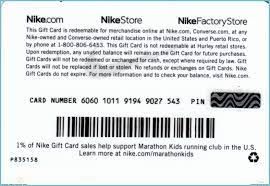
Ensure that you copy both the 16-digit card number and the PIN accurately without leading or trailing spaces when applying them at checkout.
Step-by-Step Guide to Redeeming Your Nike Gift Card in Belgium
Redeeming your digital code is simple. Follow these steps on either desktop or mobile:
Redeeming on Nike.com (Belgium)
- Visit the official Belgian store (nike.com/be).
- Log in to your Nike Member account and add your desired items to your shopping bag.
- Proceed to the Checkout screen.
- In the Payment section, check the box that says Do you have a Nike gift card?
- Enter your 16-digit gift card number and 6-digit PIN.
- Click Apply. The gift card balance will immediately deduct from your order subtotal.
- If your gift card does not cover the full order total, select a secondary payment method for the remaining balance and complete the purchase.
Redeeming on the Nike App
- Open the Nike App on your mobile device (ensure your region setting is Belgium).
- Select your items and proceed to the checkout screen.
- Tap Payment Method and choose Add Gift Card.
- Type your card number and PIN into the designated fields.
- Confirm the application and complete your order.
| Specification | Details |
|---|---|
| Region | Belgium (BE) |
| Currency | Euro (€ / EUR) |
| Platforms | Nike.com (BE), Nike App, SNKRS App (BE) |
| Expiration | No expiration date |
| Maximum Cards per Order | Up to 10 gift cards |
| Delivery Method | Instant digital code delivery via BitTopup |
Regional Restrictions and Validity for Nike Belgium Vouchers
Gift cards issued for Belgium are formatted in Euros (EUR) and are configured specifically for the Belgian regional storefront (nike.com/be) as well as Nike retail stores located within Belgium.
- Storefront Matching: You must use the card on the Belgian localized site or within an app profile set to Belgium. Using a BE card on a store configured for the UK (GBP), the US (USD), or other non-EUR domains will result in a currency mismatch error.
- Cross-Border EU Usage: While certain European retail locations accept EUR-denominated Nike gift cards, online redemption requires that your delivery address and billing match the Belgian shipping area.
- Member Benefits: Nike gift cards are fully compatible with Nike Member free standard shipping promotions and seasonal discount codes.
Checking Your Nike Gift Card BE Balance Online
You can check the remaining credit on your voucher at any point without making a purchase:
- Go to the official Nike Belgium Gift Card Balance page (nike.com/be/help/a/giftcard-balance).
- Type your 16-digit card number.
- Enter the corresponding 6-digit PIN.
- Click Check Balance to see your remaining EUR funds immediately.
If you make a purchase that costs less than the card value, the remaining balance stays on the same voucher code for future orders.
Common Nike Gift Card Errors and How to Fix Them
- "Invalid Card Number or PIN": Double-check for typographical errors. Avoid copying extra spaces. Ensure you are not confusing the digit
0with the letterO. - "Card Currency Not Supported": This error occurs if your Nike shopping region is set to a country outside Belgium (such as France, Germany, or the US). Check the website footer and set your region selector back to Belgium.
- "Gift Card Has Zero Balance": Verify if the card was partially redeemed on a prior order. Use the online balance checker to view transaction history.
- Applying During Checkout Stalls: Clear your browser cache or switch from the mobile app to a desktop browser to complete the redemption process.
Safe Digital Delivery and Payment Options on BitTopup
BitTopup provides a fast, dependable platform to buy Nike Gift Card Belgium vouchers online:
- Zero Account Risk: You never need to provide your Nike login email or password. You receive a standalone digital code and PIN to apply yourself.
- Instant Digital Code Delivery: Codes are generated directly in your BitTopup account once payment confirms, eliminating shipping delays.
- Flexible Payment Choices: Choose from a wide range of secure checkout methods available at live checkout.
- Dedicated Customer Support: If you ever experience issues with your voucher code, our support team is available to assist you promptly.
Check the live checkout page on BitTopup for current package availability and real-time EUR pricing.
Frequently Asked Questions
Can you add more money to an existing Nike gift card?
No. Nike gift cards are non-reloadable. Once the initial EUR balance is spent, you cannot reload funds onto the same card. To add more purchasing power, buy a new digital gift card code on BitTopup and apply it at checkout.
How do I redeem my Nike gift card on Nike.com Belgium?
Add your items to the shopping bag and proceed to checkout on nike.com/be. Under the payment section, select "Do you have a Nike gift card?", enter your 16-digit voucher number and 6-digit PIN, and click apply to deduct the balance from your total.
Can I use a Belgium (BE) Nike gift card in other EU countries?
Nike Gift Cards issued for Belgium in EUR are primarily intended for nike.com/be and official Nike retail stores within Belgium. Online orders must ship to a Belgian address. If you are shopping on a different European storefront, you will need a voucher matched to that specific country's store.
How do I check my Nike gift card balance online?
Visit the official Nike balance checker tool on the Nike Belgium website. Enter your 16-digit card number alongside the 6-digit PIN to view your remaining EUR balance instantly.
Can I convert a Nike gift card into cash?
No. Nike gift cards cannot be redeemed for cash, returned for a cash refund, or transferred to a bank account, except where required by applicable local consumer law.
My Nike gift card isn't working. What should I do?
Confirm that your shipping country on Nike.com is set to Belgium. Make sure you entered the 16-digit number and 6-digit PIN correctly with no spaces. If the balance checker shows zero or the error persists, contact BitTopup customer support with your order details.
Do Nike Gift Cards for Belgium have an expiration date?
No. Nike gift cards issued for Belgium do not have an expiration date. Your funds remain valid until completely spent.