

Apple Gift Card CA Top Up: Overview and Supported Purchases
An Apple Gift Card (CA) is a digital voucher denominated in Canadian Dollars (CAD) that adds funds directly to your Canadian Apple Account balance. Modern Apple Gift Cards in Canada serve as a universal payment method across the entire Apple ecosystem, replacing older, single-purpose cards.
Once redeemed to your Canadian Apple ID, your balance can be spent on:
- Digital Media and Entertainment: Subscriptions for Apple Music, Apple TV+, Apple Arcade, Apple Fitness+, and Apple News+.
- App Store and In-App Purchases: Premium games, productivity software, in-game currencies, and expansion packs across iOS, iPadOS, and macOS.
- Cloud Storage: Monthly or annual upgrades for iCloud+ storage tiers.
- Books and Audiobooks: Purchases directly within Apple Books.
- Apple Hardware and Accessories: Official products such as iPhones, iPads, MacBooks, AirPods, and accessories purchased directly through the Apple Store Canada online or the Apple Store app.
How to Locate and Verify Your Canadian Apple ID Region
Apple Gift Cards are strictly region-locked. A Canadian (CA) Apple Gift Card requires an Apple ID whose country/region is set to Canada. Before purchasing or redeeming your code, verify your account's regional settings to avoid activation errors.
How to Check Your Account Region on iOS and iPadOS
- Open the Settings app on your iPhone or iPad.
- Tap your Name / Apple ID profile banner at the very top of the screen.
- Select Media & Purchases, then tap View Account.
- Authenticate using Face ID, Touch ID, or your account password.
- Tap Country/Region to view your active storefront. It must say Canada to accept CAD gift codes.
How to Check Your Account Region on macOS
- Open the App Store application on your Mac.
- Click your name or profile image in the bottom-left corner.
- Click Account Settings in the top-right corner of the window.
- Under the Apple ID Summary section, locate Country/Region and confirm it is set to Canada.
Step-by-Step Guide to Redeem Apple Gift Card Canada 2026
Redeeming your digital code is instant and binds the CAD value directly to your account. Choose your platform below for exact redemption instructions.
Redeeming on iPhone, iPad, or iPod Touch
- Open the App Store app.
- Tap your profile icon in the top-right corner of the screen.
- Tap Redeem Gift Card or Code.
- Choose Enter Code Manually.
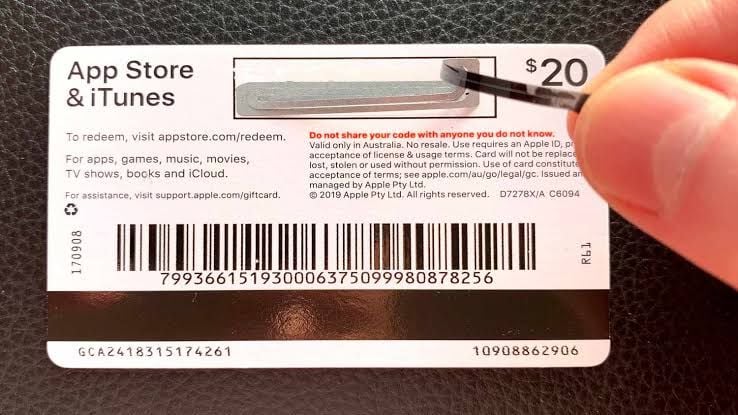
- Type or paste the 16-digit alphanumeric code received from BitTopup.
- Tap Redeem in the upper-right corner. The CAD balance updates instantly.
Redeeming on Mac
- Launch the App Store on macOS.
- Click your name or sign-in button in the lower-left sidebar.
- Click Redeem Gift Card in the top right.
- Enter the 16-digit digital code into the text field.
- Click Redeem to confirm.
Redeeming on Windows PC
- Open the Apple Music or Apple TV app for Windows (or iTunes for Windows on older configurations).
- Sign in with your Canadian Apple ID.
- Click your account name at the bottom of the sidebar, then select Redeem.
- Input the 16-digit code and select Redeem.
Canadian Apple Account Balance vs Legacy iTunes Cards: Comparison
Older iTunes gift cards were limited purely to digital media. The current universal Apple Gift Card offers full flexibility across digital software and official hardware storefronts in Canada.
| Feature | Universal Apple Gift Card (CA) | Legacy iTunes Canada Card |
|---|---|---|
| Currency | Canadian Dollar (CAD) | Canadian Dollar (CAD) |
| App Store & In-App Purchases | Supported | Supported |
| iCloud+ & Apple Subscriptions | Supported | Supported |
| Apple Books & TV Media | Supported | Supported |
| Hardware Purchases (Apple Store CA) | Supported | Not Supported |
| Physical Store / Apple Store App | Supported | Not Supported |
| Account Region Lock | Canada Apple ID Only | Canada Apple ID Only |
How to Recharge Your Canadian Apple Account Balance Without a Credit Card
Using prepaid Apple Gift Card CA digital codes is the safest way to maintain an Apple Account balance without linking personal banking cards or international credit cards.
- Budget Control: Prepaid amounts let you control monthly spending on apps, mobile games, and recurring subscription renewals without unexpected overage charges.
- Privacy Protection: You do not need to link a primary credit card or debit card to your Apple profile to make purchases.
- Accessibility for International Users: If you manage a Canadian secondary Apple ID while living abroad, digital gift cards provide the only reliable method to fund purchases without possessing a Canadian-issued credit card.
- Safe for Family Members: Apply digital balance directly to children's or students' Apple IDs so they can buy study tools and games without open access to parental payment cards.
Troubleshooting Common Apple Gift Card CA Redemption Errors
If you experience an issue while redeeming your code, refer to these resolutions for common Apple errors:
1. "Code is Not Valid in This Country or Region"
- Cause: Your Apple ID is registered to a country other than Canada (e.g., US, UK, Australia).
- Fix: Change your Apple ID country/region to Canada in account settings, or create a dedicated Canadian Apple ID to redeem the CAD code.
2. "Card Has Already Been Redeemed"
- Cause: The code was already submitted to an account.
- Fix: Sign out of the App Store and sign back in to refresh your balance display. If you manage multiple Apple IDs, check if you were logged into a secondary profile when redeeming.
3. "Code Must Be 16 Digits"
- Cause: Typing error or confusing alphanumeric characters.
- Fix: Verify you are entering the 16-character code sent to your order dashboard. Avoid confusing the number
0with the letterO, or the number1with capitalI.
4. "Card is Inactive"
- Cause: The retail activation signal was interrupted.
- Fix: Contact BitTopup 24/7 customer support with your order ID for immediate code verification.
Why Buy Apple Gift Card (CA) Digital Codes on BitTopup
BitTopup provides a direct, secure process to recharge Apple Gift Card Canada balances without friction:
- Direct Digital Delivery: Your 16-digit code is generated directly to your order screen and sent to your email immediately upon payment approval.
- Total Account Security: BitTopup never asks for your Apple ID password, answers to security questions, or remote access to your device. You receive an independent code and redeem it yourself.
- Guaranteed Regional Validity: Every Apple Gift Card (CA) code is verified for Canadian storefront compatibility.
- Multiple Checkout Options: Access flexible global and local payment methods at live checkout.
- 24/7 Support Assistance: Customer support is available around the clock to assist with code retrieval and redemption questions.
Frequently Asked Questions
Can an Apple gift card CA be topped up or reloaded directly?
No. Apple Gift Cards are single-use digital codes. You cannot add money directly onto an existing physical or digital gift card. Instead, you purchase a new Apple Gift Card (CA) code on BitTopup and redeem it to increase your existing Canadian Apple Account balance.
Can I use a Canadian Apple Gift Card outside Canada?
Yes, as long as your Apple ID region is set to Canada. The physical location of your device does not matter, but the storefront setting on your account must be Canada, and transactions will process in CAD.
How do I redeem my Apple Gift Card CA code on an iPhone or iPad?
Open the App Store, tap your Profile Icon, select Redeem Gift Card or Code, choose Enter Code Manually, paste your 16-digit code, and tap Redeem.
How can I check my Apple Account CAD balance after redeeming?
On iOS, open the App Store and tap your profile icon in the top right. Your available Canadian Dollar balance appears directly under your name. On macOS, open the App Store and look at the bottom of the left sidebar.
What should I do if my Apple Gift Card CA code shows an error?
First, confirm your Apple ID region is set to Canada. Then, check the 16-digit code for input typos. If the issue persists, take a screenshot of the error message and contact BitTopup customer support with your order number for fast resolution.
Can I buy an Apple gift card online and send it to someone in Canada?
Yes. When you purchase an Apple Gift Card (CA) on BitTopup, the 16-digit digital code can be shared with any recipient who uses a Canadian Apple ID. They can redeem it directly on their own device.