





Google Play Gift Card US Top Up: Fast, Secure Digital Codes
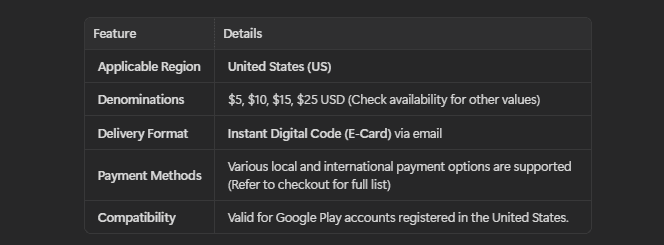
A Google Play Gift Card (US) is a pre-funded digital voucher containing a unique alphanumeric code that adds credit directly to your United States Google Play balance. When you complete a Google Play Gift Card US top up on BitTopup, you receive a genuine, unused digital redemption code delivered straight to your order screen and email address. You do not need a US credit card or local bank account to access the complete library of the US Google Play Store.
US Google Play gift cards are non-reloadable codes sold in fixed denominations. Once you redeem a code, the entire face value transfers permanently into your Google Play balance, ready for immediate use across games, applications, digital books, and eligible digital subscriptions.
US Account Region Requirements and Geo-Restriction Policies
Google maintains strict geo-location and account region policies. A United States Google Play gift code can only be redeemed on a Google account whose Play Store country profile is set explicitly to the United States.
Before purchasing and attempting to redeem a code, ensure that your setup complies with the following platform requirements:
- Account Country Setting: Your Google Play Store account country must show "United States".
- US Billing Profile: Your Google Payments profile (pay.google.com) must be configured with a valid US address and postal code.
- Physical / Network Location: Google uses advanced security signals to verify redemption requests. Attempting to redeem a US gift card while physically located outside the US or using an unsupported proxy network may trigger regional security flags.
- Currency Uniformity: Google Play balance is strictly denominated in USD ($). It cannot be transferred to accounts registered in other regions or converted into foreign currencies.
How to Check Your Google Play Account Country and UID
To ensure smooth redemption without region mismatch errors, verify your current Google Play Store country profile before buying your gift card.
Follow these steps on your Android device to check your account country and profile details:
- Open the Google Play Store app on your Android phone or tablet.
- Tap your profile icon in the top-right corner of the screen.
- Select Settings, then expand the General section.
- Tap Account and device preferences.
- Scroll down to the Country and profiles section. Verify that your profile displays United States with a green checkmark next to it.
- Note the exact Google account email address shown at the top to make sure you redeem your new code on the intended profile.
Step-by-Step Guide to Redeem US Google Play Digital Codes on Android & Web
Redeeming your digital code from BitTopup takes less than a minute. You can apply the credit through the mobile application on Android devices or via any standard web browser.
Method 1: Redeeming on an Android Mobile Device
- Open the Google Play Store app on your device.
- Tap your profile icon in the upper-right corner.
- Tap Payments & subscriptions.
- Select Redeem code.
- Carefully enter the 16-character alphanumeric digital code received from your BitTopup order.
- Tap Redeem, then confirm the account email address when prompted. Your Google Play balance will update immediately.
Method 2: Redeeming on a Desktop or Mobile Web Browser
- Open your browser and navigate directly to
play.google.com/redeem. - Make sure you are signed in to the correct Google account.
- Paste or type your 16-character digital gift code into the text field.
- Click Redeem and confirm the transaction.
| Platform / Device | Redemption Path | Requirements |
|---|---|---|
| Android Smartphone / Tablet | Play Store App > Profile > Payments & subscriptions > Redeem code | Android OS, US Profile |
| Desktop Web Browser | play.google.com/redeem | Web Browser, Signed-in US Google Account |
| In-App Checkout Prompt | Select item > Payment methods > Redeem code | US Region in-game store |
What You Can Buy with Your US Google Play Balance
Once your code is redeemed, your US Google Play balance acts as a direct payment method across Google's digital ecosystem. You can spend your credit on:
- In-Game Currencies & Bundles: Buy premium currency, battle passes, summon packs, and exclusive cosmetics in popular mobile titles.
- Paid Mobile Games & Apps: Purchase premium utilities, productivity software, and standalone mobile games directly from the Play Store.
- Digital Entertainment: Buy or rent movies, television series, and digital books available on Google Play Books and Google TV.
- Eligible Subscriptions: Pay for recurring digital services such as Google One cloud storage, YouTube Premium, and select third-party app subscriptions managed through Google Play billing.
Note: Google Play balance cannot be used to purchase physical hardware from the Google Store, nor can it be transferred to external payment accounts.
Troubleshooting Common Google Play Gift Card Redemption Errors
If you run into an error during redemption, use the solutions below to resolve the issue:
- "We need more info to redeem your gift card": Google triggers this automated verification when location signals do not align with the card's issue region. Ensure your device language, account address, and connection reflect standard US settings. If prompted, submit the proof of purchase provided in your BitTopup order details to Google's support form.
- "Your Play balance can only be used in United States": This occurs if you attempt a purchase while your active network IP points outside the US. Verify your Google Payments country profile at
pay.google.comunder Settings > Country/Region and ensure no conflicting payment profiles exist in other countries. - "Code already redeemed": Refresh your Google Play balance by closing and reopening the Play Store app. Check your purchase history under Payments & subscriptions > Budget & history to confirm whether the funds were already credited.
- "Invalid code": Check for common typographical errors. Digital codes do not use spaces or hyphens. Be careful with similar-looking characters like the number 0 and the letter O, or the number 1 and the capital letter I.
Google Play Balance Limits, Expiration Rules, and Terms in 2026
Under US state and federal regulations, Google Play gift cards and redeemed account balances do not expire in 2026. No maintenance fees, inactivity penalties, or service charges are deducted from your balance over time.
Google enforces maximum balance thresholds to protect consumer accounts. A standard verified US Google Play account can maintain a maximum balance of up to $2,000 USD at any given time. Individual in-app and store transactions are also subject to daily spending limits outlined in Google Play's standard Terms of Service.
Safe and Instant Digital Code Delivery with BitTopup
BitTopup provides a secure, efficient platform to buy digital vouchers. Here is what you get when ordering on BitTopup:
- Instant Digital Delivery: Your code generates automatically upon payment confirmation, displayed on screen and sent to your email address.
- Complete Account Safety: You never share your Google password, recovery keys, or sensitive login credentials. You only receive the digital code to redeem yourself.
- Transparent Pricing: Check real-time pricing and available denominations directly on the live checkout page.
- 24/7 Customer Support: Our dedicated help desk is on standby around the clock to assist you with order tracking and code verification inquiries.
Frequently Asked Questions
How do I recharge my US Google Play balance with a gift card?
To recharge your balance, open the Google Play Store app on your Android device, tap your profile icon, go to Payments & subscriptions, select Redeem code, enter the 16-character code from BitTopup, and tap Redeem.
Can I use a US Google Play gift card outside the United States?
Google Play gift cards are region-locked. A US gift card can only be redeemed on a Google account configured with a United States country profile and US payment settings. Google enforces geo-compliance checks during code redemption.
Are Google Play gift cards reloadable?
No. Google Play gift cards are single-use, non-reloadable digital vouchers. Once you redeem the code, the total credit transfers to your Google Play account balance. To add more funds later, buy an additional digital code on BitTopup.
How do I fix the 'Play balance can only be used in United States' error?
Make sure your Google account country is set to the United States in the Play Store settings and that your primary Google Payments profile at pay.google.com contains only a US address. Close all other payment profiles registered in different regions.
Can I convert my Google Play gift card balance to cash?
No. Google Play balances and gift codes cannot be redeemed for cash, refunded, or transferred to bank accounts, PayPal, or other Google accounts, except where required by applicable US law.
Do US Google Play gift codes expire in 2026?
No. In 2026, US Google Play gift cards and redeemed Play balances do not expire. There are no monthly inactivity fees or balance deductions.





































































































