

Discord Nitro Subscription Top Up: Features and 2026 Perks
A Discord Nitro subscription gives your Discord account premium communication tools, visual upgrades, and server boosting capabilities. Purchasing a subscription top up unlocks full platform functionality across desktop, mobile, and browser clients.
Core Perks Included with Full Discord Nitro
- Large File Sharing: Upload videos, project files, and images up to 500MB directly into voice chats, direct messages, and servers.
- HD Video and Screen Streaming: Stream your gameplay, apps, and desktop in 4K resolution at up to 60 FPS for clear broadcasting.
- Custom and Animated Expressions: Use custom emojis, animated stickers, and soundboard audio clips from any server across your entire direct message and channel history.
- Two Free Server Boosts: Receive two monthly Server Boosts to support your favorite communities, along with a 30% discount on any extra boost purchases.
- Complete Profile Customization: Apply animated avatars, custom profile banners, unique bio themes, and distinct profile avatars per server.
- Extended Server Limit: Join up to 200 servers simultaneously, doubling the standard 100-server cap.
- Longer Messages: Send expanded messages containing up to 4,000 characters per message to share long-form guides, notes, and announcements.
- Special Nitro Badge: Showcase an exclusive subscriber badge on your profile card.
Discord Nitro vs Discord Nitro Basic: Feature Breakdown and Comparison
Discord offers two distinct subscription tiers: the full Discord Nitro plan and Discord Nitro Basic. Understanding the exact feature set ensures you choose the correct digital recharge for your communication needs.
| Feature | Discord Nitro | Discord Nitro Basic |
|---|---|---|
| File Upload Size | Up to 500MB | Up to 50MB |
| Screen Sharing Quality | Up to 4K at 60 FPS | Up to 1080p at 30 FPS |
| Included Server Boosts | 2 Server Boosts + 30% off extra boosts | None included |
| Custom Emojis & Stickers | Usable anywhere globally | Usable anywhere globally |
| Server Limit | 200 Servers | 100 Servers |
| Message Character Limit | 4,000 Characters | 2,000 Characters |
| Custom Profile Themes & Banners | Full banner, theme, & per-server profiles | Nitro badge only |
| Custom Sounds & Soundboard | Anywhere globally | Anywhere globally |
How to Recharge and Redeem Your Discord Nitro Subscription Code
Redeeming your digital code from BitTopup takes only a few moments and applies directly to your personal Discord account without requiring password sharing.
Step 1: Complete Your Order on BitTopup
- Select your desired Discord Nitro subscription duration on the product page.
- Enter your email address to receive your order receipt and digital code.
- Proceed to checkout using your preferred payment method.
Step 2: Redeem on Desktop or Browser
- Open the Discord app or visit discord.com/app in your web browser.
- Log in to the Discord account you wish to upgrade.
- Click the User Settings gear icon located in the bottom-left corner next to your username.
- In the left-hand sidebar under Billing Settings, click Gift Inventory.
- Paste your redemption code into the Redeem Codes field.
- Click Redeem. Your account will immediately activate Nitro or add the value as Subscription Credit.
Step 3: Redeem Direct Gift Links
If your order provides an activation gift URL, paste the full URL into your web browser while logged into your Discord account. Click Accept Gift to confirm activation.
Locating Your Discord Account Details
When purchasing digital codes, you do not need to share your account credentials. However, confirming that you are logged into your correct Discord account before redeeming prevents activating the code on an alternate account.
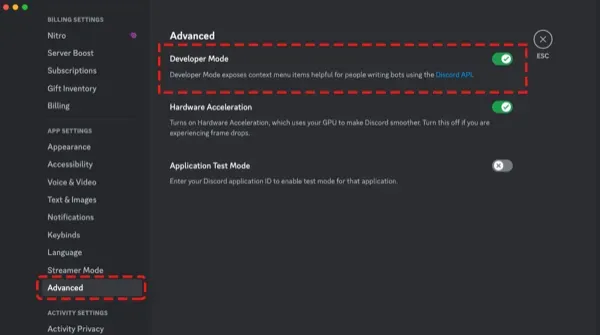
How to Verify Your Active Discord User Profile
- Open Discord on desktop or mobile.
- Look at the bottom-left profile card to confirm your current Username and Display Name.
- To locate your numeric Discord User ID (UID): * Go to User Settings > Advanced. * Toggle Developer Mode to ON. * Right-click your own avatar or profile name and click Copy User ID.
- Always double-check your logged-in profile before clicking redemption links or entering gift codes.
Subscription Credit and Stacking Rules: Extending an Existing Membership
Discord uses a Subscription Credit system to manage gift codes and balance stacking.
How Subscription Stacking Works
- Redeeming While on an Active Desktop/Web Plan: If you currently have an active Nitro subscription paid via web or desktop, redeeming a gift code adds that subscription time as Account Credit. When your current billing cycle ends, Discord automatically uses your subscription credit instead of charging your payment method.
- Matching Subscription Tiers: Gift codes must match your active tier to apply automatically. A full Discord Nitro code stacks toward a full Nitro plan. If you have Nitro Basic active and redeem a full Nitro code, the full Nitro subscription will activate, and your Basic credit will remain banked in your account inventory until your full Nitro ends.
- App Store Subscriptions (iOS / Android): If your current active subscription was purchased directly through Apple App Store or Google Play, Discord cannot automatically apply subscription credit over those third-party recurring charges. You must cancel the auto-renewal in your App Store or Play Store account settings first. Once the mobile billing period lapses, you can apply your code directly via the desktop or web client.
Why Buy Discord Nitro Subscription on BitTopup: Safe, Instant, No Recurring Billing
Recharging your subscription via BitTopup provides complete control over your payment schedule without tying your personal bank card to recurring automated subscription renewals.
- No Password Sharing Required: You receive a secure digital code or redemption link. BitTopup will never ask for your Discord account login, password, or direct access permissions.
- One-Time Checkout: Avoid unexpected automated monthly renewal charges. Purchase exactly the duration you want, when you want it.
- Instant Digital Delivery: Codes and links are generated and displayed in your order screen immediately after payment confirmation.
- 24/7 Dedicated Support: If you run into redemption questions or need verification help, our customer support team is available around the clock.
Payment Methods and Digital Delivery Guarantee
BitTopup supports a wide range of global and regional payment options to ensure an accessible checkout experience. View the live checkout page to see the exact payment gateways, local currencies, and real-time prices available for your region.
Every order comes with an instant digital delivery guarantee. Your redemption details will be displayed on screen and sent to your order confirmation email instantly upon payment clearance.
Frequently Asked Questions
How do I redeem my Discord Nitro subscription code?
Log in to your Discord account on a web browser or desktop client. Open User Settings (gear icon), select Gift Inventory under Billing Settings, paste your code into the redemption box, and click Redeem.
Can Discord Nitro subscriptions stack with an active subscription?
Yes. When you redeem a code of the same tier on an account with an active desktop/web subscription, Discord converts the code into Subscription Credit. When your current billing month ends, Discord applies your credit automatically rather than charging a card.
Do I need to link a credit card to activate a Discord Nitro gift code?
Standard gift codes and subscription credit redemptions do not require linking a personal payment card, provided your account does not have pending billing holds. Some promotional trial links may request verification, but standard gift inventory codes apply straight to your account balance.
What is the difference between Discord Nitro and Nitro Basic in 2026?
Full Discord Nitro includes 500MB uploads, 4K 60FPS streaming, 2 Server Boosts with a 30% discount on extra boosts, custom profile themes, animated banners, and a 200-server limit. Nitro Basic provides 50MB uploads, standard HD streaming, and custom emoji access, but excludes server boosts, profile banners, and expanded server caps.
How can I buy Discord Nitro without automatic recurring charges?
Buying a digital gift code on BitTopup allows you to pay a one-time charge for your chosen subscription period. Because it is a direct code delivery, no recurring billing profiles or auto-renewals are established on your personal cards.
Why is my Discord Nitro code or activation link not working?
Common reasons for redemption issues include:1. Already Claimed: The link or code has already been claimed by another account.2. Logged into the Wrong Account: Ensure you are logged into your primary Discord account in your active browser window before opening the link.3. Active App Store Conflict: If you currently subscribe via Apple or Google Play, cancel that store renewal before applying web subscription credit.