

Idol Party Diamonds Top Up on BitTopup
Idol Party is a premier mobile music, dance, and social simulation game across Southeast Asia, combining rhythm gameplay, karaoke battles, virtual dating, and extensive avatar customization. To fully personalize your character, stand out on stage, and access exclusive social events, you need Idol Party Diamonds.
Diamonds are the primary premium currency in Idol Party. With Diamonds, you can unlock high-tier fashion outfits, purchase rare wings and mounts, host lavish Century Weddings, and access premium gacha pools. BitTopup provides a direct, secure, and hassle-free way to complete your Idol Party Diamonds top up using only your User ID and server selection.
Prices and package availability are updated live on our checkout page, ensuring complete transparency whenever you buy Idol Party Diamonds.
Uses and Benefits of Idol Party Diamonds
Having a steady balance of Diamonds gives you full access to the creative and social features of Idol Party:
- Exclusive Wardrobe and Designer Sets: Purchase trendy outfits, rare designer dresses, stage costumes, and animated accessories to increase your character's charm rating.
- Wings, Mounts, and Special Effects: Unlock luminous wings, luxury vehicles, and glowing footprints that make your avatar stand out in public plazas and dance lobbies.
- Century Wedding and Romance Features: Propose to your in-game partner, buy premium wedding rings, reserve luxury venues, and invite your entire circle of friends to celebrate your Century Wedding.
- Karaoke Enhancements and Stage Themes: Customize private karaoke rooms with special sound packs, lighting effects, and interactive gifts to send to other singers.
- Gacha and Lucky Wheel Draws: Use Diamonds to roll for limited-edition seasonal items, rare collectible badges, and premium pet accessories.
- VIP Privilege Levels: Recharging Diamonds increases your VIP tier, unlocking permanent daily rewards, profile frames, and exclusive shopping privileges.
How to Find Your Idol Party User ID and Server
To ensure your Diamonds are credited accurately, you need to provide your exact in-game User ID and the server where your character resides. Finding this information takes only a few seconds.
- Launch Idol Party on your mobile device and log in to your account.
- Tap your Avatar / Profile icon located in the top-left corner of the main lobby screen.
- Your User ID (a series of numbers) will be visible on your personal profile card.
- Take note of your active server (Idol School or Shining Star), which is displayed on your login screen or character profile.
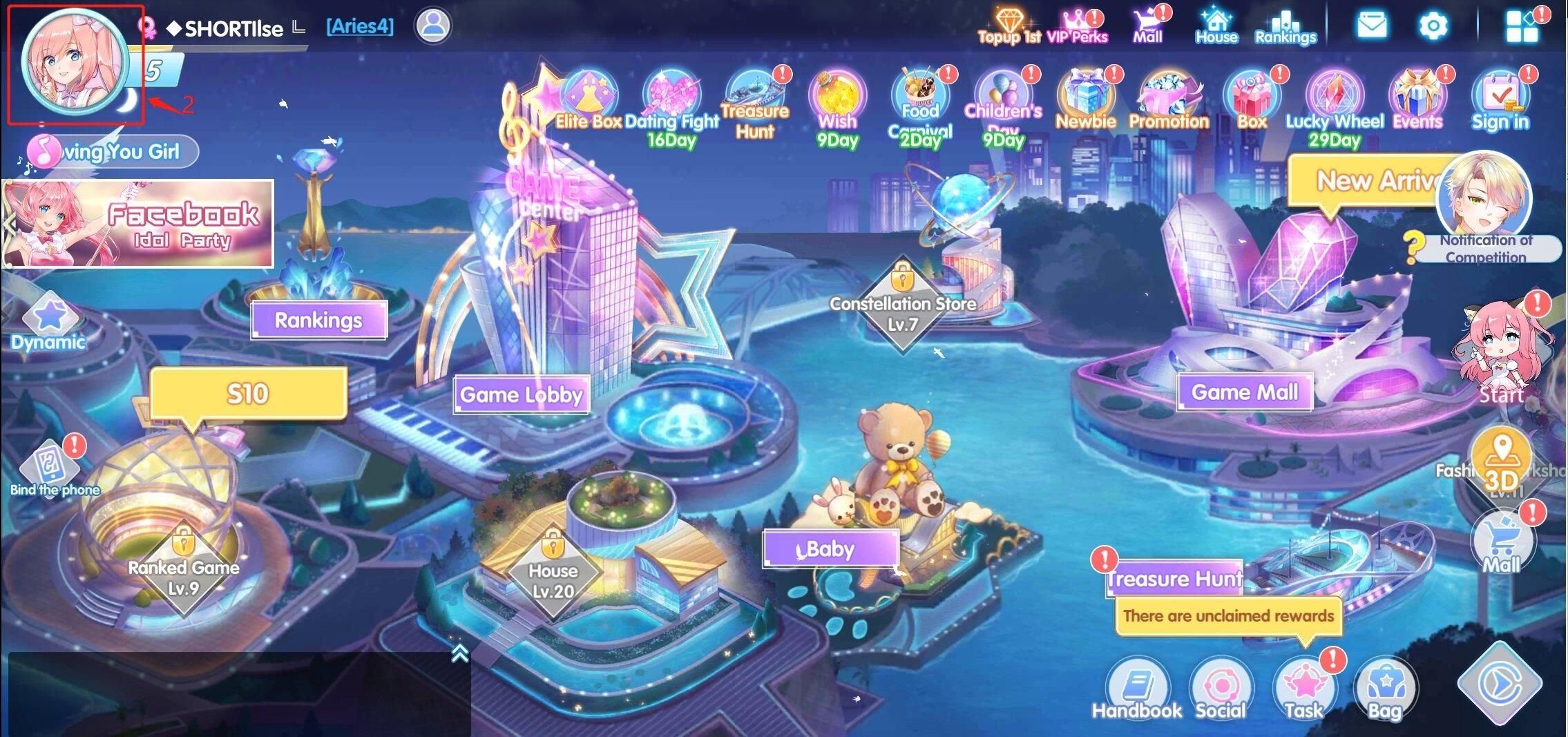
Double-check the numeric ID before placing your order to avoid sending Diamonds to an incorrect account.
Supported Idol Party Servers
Idol Party operates regional servers tailored for Southeast Asian players. When placing your order on BitTopup, select the specific server where your character is registered.
| Server Name | Region / Platform | Required Information |
|---|---|---|
| Idol School | Southeast Asia (SEA) | Numeric User ID |
| Shining Star | Southeast Asia (SEA) | Numeric User ID |
Selecting the correct server ensures that the automated delivery system routes your Diamonds directly to your active character profile.
Step-by-Step Guide: How to Recharge Idol Party Diamonds
Recharging on BitTopup is designed to be direct and efficient. Follow these steps to complete your purchase:
- Choose Your Diamond Package: Browse the available Diamond denominations and select the pack that suits your needs.
- Enter Your User ID: Type your numeric Idol Party User ID into the required field.
- Select Your Server: Choose either
Idol SchoolorShining Starfrom the server dropdown menu. - Proceed to Checkout: Check the live order summary and select your preferred payment method from the available local and global options.
- Complete the Transaction: Follow the prompts to authorize payment.
- Receive Diamonds in Game: Once your payment is confirmed, the Diamonds are delivered directly to your Idol Party account. Open the game to verify your updated balance.
Direct UID Top-Up: Safe and Password-Free
Account safety is a fundamental priority. BitTopup uses a direct User ID recharge method that protects your account privacy:
- No Passwords Required: You never need to share your game password, social media logins, or recovery codes.
- No Account Handover: Your login credentials remain strictly in your control. The system only requires public profile information (User ID and Server).
- Encrypted Transactions: Every checkout transaction is protected with standard payment encryption protocols.
- Zero Risk of Unauthorized Access: Because no one logs into your game profile, your character items, social bonds, and personal details remain completely safe.
Troubleshooting and Order Support
If you experience any issues during or after your recharge, follow these standard troubleshooting steps:
- Restart the Game App: If you were logged in during payment, close Idol Party completely and relaunch it to refresh your balance from the game server.
- Check Your Order Status: Look up your transaction under your BitTopup account order history to confirm that the payment status is marked as completed.
- Verify User ID and Server: Check your receipt to ensure the User ID and server match your in-game character profile.
- Contact Customer Support: If your Diamonds have not arrived after a brief period, contact the 24/7 BitTopup support team. Provide your Order ID, User ID, and selected server for quick assistance.
Frequently Asked Questions
How do I find my Idol Party User ID?
Open Idol Party, tap your character avatar in the top-left corner of the main lobby, and view your profile card. Your numeric User ID is listed clearly under your character name.
Which servers are supported for Idol Party Diamond recharge?
BitTopup supports both active servers: Idol School and Shining Star. Be sure to select the server where your character was created.
Do I need to share my Idol Party password to top up?
No. You only need to provide your User ID and server name. BitTopup will never ask for your password, email login, or social account credentials.
How long does it take for Idol Party Diamonds to arrive after payment?
Diamonds are processed automatically as soon as payment is confirmed. In most cases, the currency reflects on your character profile within a few moments.
What can I purchase with Idol Party Diamonds?
Diamonds can be used to buy premium fashion sets, wings, mounts, marriage rings for Century Weddings, karaoke room cosmetics, gacha draws, and VIP level progression.
What should I do if my recharged Diamonds do not show up in-game?
First, restart the Idol Party app to force a balance sync. If the Diamonds still do not show up, check your BitTopup order history to verify your payment status and contact 24/7 customer support with your Order ID.