




Hero GO Top Up: What is Hero GO and How In-Game Vouchers Work
Hero GO is an engaging mobile RPG where players assemble powerful teams of heroes, clear strategic campaign stages, challenge tough bosses, and compete in arena battles. To accelerate progression, summon top-tier heroes, and participate in limited-time events, players rely on premium in-game currencies and Vouchers.
Vouchers in Hero GO serve as a universal exchange currency. Instead of binding purchases to individual item packs directly, Vouchers allow you to acquire in-game bundles, summon tickets, VIP experience, and event-exclusive resources directly inside the game store. Purchasing Vouchers through BitTopup offers a direct, flexible way to manage your in-game budget while ensuring you are always ready for banner rotations and seasonal promotions.
Step-by-Step Guide: How to Find Your Hero GO User ID (UID)
To ensure your recharge reaches your account without delay, you only need to provide your exact User ID (UID). You do not need to share your login credentials or password. Follow these steps to find your UID:
- Launch Hero GO on your mobile device or emulator.
- Tap your character Avatar located in the top-left corner of the main game screen.
- Open your profile overview window.
- Locate your User ID (UID) displayed beneath your nickname or character profile details.
- Tap the Copy icon next to your UID to prevent typing mistakes.
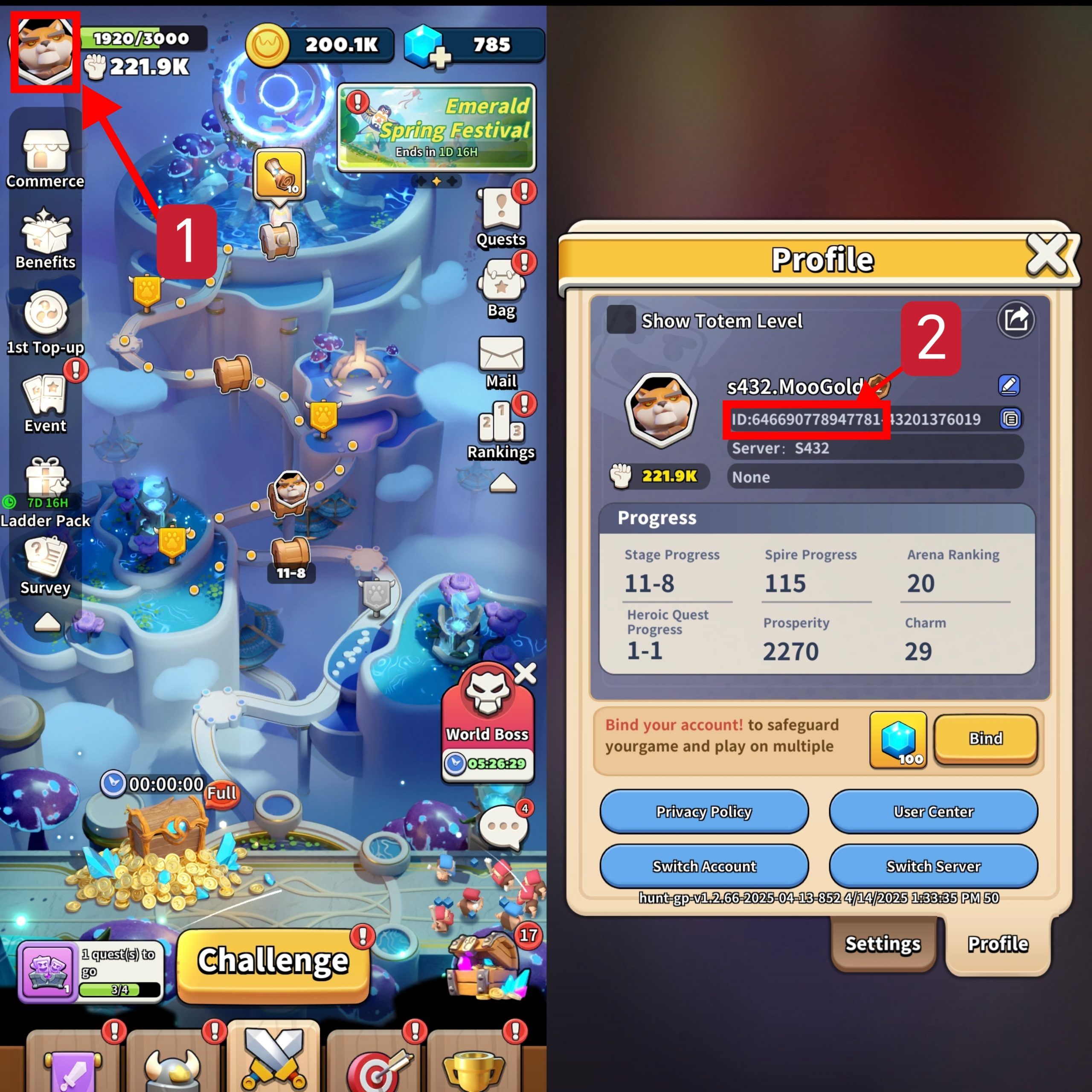
Double-check that you have copied the entire numeric string before placing your order on BitTopup.
How to Recharge Hero GO on BitTopup
Topping up Hero GO on BitTopup is quick and straightforward. Follow this direct guide to complete your purchase:
- Select Voucher Package: Browse the available Hero GO Voucher denominations on the BitTopup product page and choose the amount you wish to buy.
- Enter Account Details: Paste your copied User ID (UID) into the input field labeled
User ID. - Select Payment Method: Choose your preferred payment option from the live checkout selection, featuring secure regional and international methods.
- Confirm and Pay: Review your order summary and complete the checkout process.
- Receive Vouchers In-Game: Once the payment is verified, the Vouchers are sent directly to your Hero GO account balance.
Hero GO Recharge Overview
| Feature | Details |
|---|---|
| Game Name | Hero GO |
| Required Account Info | User ID (UID) only |
| Credentials Needed | No password or third-party login required |
| Delivery Target | Direct credit to in-game account |
| Platform Region | Global |
| Support Available | 24/7 Live Customer Service |
Hero GO In-Game Voucher Benefits and Spending Strategy
Vouchers provide total flexibility for planning your account growth in Hero GO. Here is how to maximize the value of your Vouchers:
- Summon Banners & Hero Recruitment: Use Vouchers to buy premium recruitment packs during rate-up banners to guarantee high-tier heroes for your core team.
- Daily and Weekly Growth Packs: Convert Vouchers into resource boxes containing gold, hero exp, promotion stones, and skill materials to bypass early progression gates.
- Battle Pass and Event Unlocks: Activate seasonal passes using Vouchers to gain extra milestone rewards and exclusive cosmetic items.
- Stamina & Dungeon Refills: Replenish daily dungeon attempts to maximize gear farming and artifact drops during double-drop weekends.
- VIP Progression: Direct top-ups contribute toward your VIP level, unlocking permanent account perks like auto-battle speedups and bonus quest dispatches.
Why Choose BitTopup for Hero GO Top Up
BitTopup is built to provide mobile gamers with a reliable, transparent, and user-friendly recharge experience:
- Direct UID Delivery: We never ask for your account password or social login details. Recharges are processed solely via your public User ID.
- Live, Transparent Pricing: View exact package pricing and available denominations clearly on the checkout page with no hidden charges.
- Global & Localized Payment Options: Select from a wide variety of safe payment channels tailored to your region and currency preferences.
- Fast Order Fulfillment: Orders are processed automatically around the clock, delivering your Vouchers straight to your account.
- Dedicated 24/7 Support: If you have questions about order confirmation or need assistance, our support team is available at any time to assist you.
Hero GO Top Up Safety, Delivery, and Customer Support
Account safety is the top priority for every transaction on BitTopup. Because our system only requires your User ID (UID), your personal account credentials, passwords, and linked third-party accounts remain completely secure on your own device.
What to Do After Placing an Order
- Check In-Game Balance: After completing your payment, open Hero GO and check your Voucher wallet or in-game mailbox.
- Restart the Game Client: If your balance does not update instantly, close the app completely and relaunch it to refresh your server connection.
- Keep Your Order ID: Save the order confirmation number generated at checkout for easy reference if you need to contact customer support.
Frequently Asked Questions About Hero GO Top Up
How do I find my Hero GO User ID for top up?
Open Hero GO, tap your character avatar in the top-left corner of the screen, and view your profile info. Your numeric User ID is listed under your player name. Use the copy button next to it to copy the UID directly to your clipboard.
Do I need to share my game account password to recharge Hero GO?
No. BitTopup only requires your User ID (UID). You should never share your account password, email access, or verification codes with anyone.
What can I buy in Hero GO using Vouchers?
Hero GO Vouchers can be used inside the game store to buy hero summons, event packs, battle pass upgrades, daily stamina supplies, upgrade materials, and VIP growth bundles.
How long does it take to receive my Hero GO Vouchers after payment?
Orders are processed promptly after payment verification. Your Vouchers are credited directly to your Hero GO account in real time.
What should I do if my Hero GO recharge does not show up in-game?
First, restart the Hero GO app to ensure your client has synced with the game server. If the Vouchers still do not appear, check your in-game mailbox. If you still need help, contact the BitTopup 24/7 customer support team with your order number and UID for immediate assistance.
Can I recharge Hero GO for a friend using their User ID?
Yes. As long as you enter your friend's correct Hero GO User ID (UID) during checkout, the Vouchers will be delivered directly to their in-game account.