


Dead by Daylight Mobile Auric Cells Top Up: Overview and In-Game Value
Auric Cells serve as the primary premium currency in the NetEase version of Dead by Daylight Mobile across Southeast Asia and East Asia. While Iridescent Shards can be accumulated gradually through gameplay to acquire select original characters, Auric Cells are required to access exclusive licensed content, premier customization items, and seasonal reward tracks.
Core Uses for DBD Mobile Auric Cells
- Licensed Survivors and Killers: Obtain iconic horror characters that cannot be purchased with free in-game currency. This includes licensed figures such as The Shape (Michael Myers), The Cannibal (Leatherface), The Pig, Laurie Strode, and other franchise-specific additions.
- The Rift Pass (The Entity's Pass): Unlock the Premium track of seasonal battle passes to claim exclusive character skins, charms, profile banners, and earn back a portion of Auric Cells by completing challenge tiers.
- Entity's Treasure and Gacha Draws: Spend Auric Cells on exclusive cosmetic gacha pools to secure Platinum and Gold tier outfits equipped with unique visual effects, weapon skins, and mori animations.
- Store Outfits and Customization: Purchase outfits, heads, torsos, and weapons directly from the in-game store to customize your favorite Survivors and Killers.
NetEase SEA vs Global Version Compatibility Requirements
Dead by Daylight Mobile operates under different regional publishers. The products on this page are strictly for the NetEase version covering regional servers in Southeast Asia and parts of East Asia.
| Feature / Metric | NetEase Version (This Product) | Global Version (Behavior Interactive) |
|---|---|---|
| Supported Regions | Southeast Asia, HKMOTW, Japan, Korea | North America, Europe, South America, Oceania |
| Publisher | NetEase Games | Behavior Interactive |
| Account Identifier | Numeric Personal ID + Server Selection | Google Play / Apple ID / Social Link |
| Cross-Platform Sync | Independent mobile servers | Independent mobile servers |
| Direct ID Recharge | Supported via BitTopup | Not supported on this product page |
Note: Attempting to top up a Global version account using this page will result in delivery failure. Please confirm that your game app displays the NetEase logo upon launch before ordering.
Supported Servers for NetEase DBD Mobile (SEA)
During checkout on BitTopup, you must specify your exact regional server alongside your Personal ID. The service supports all active NetEase regional clusters:
- Southeast Asia (SEA): Serves players in the Philippines, Indonesia, Malaysia, Thailand, Singapore, and adjacent territories.
- HKMOTW: Dedicated to accounts registered in Hong Kong, Macau, and Taiwan.
- Japan: Dedicated server for players located in Japan.
- Korea: Dedicated server for players located in South Korea.
Selecting the correct server ensures that the system routes your Auric Cells directly to your game profile without delay.
How to Find Your Personal ID, Server, and Character Name
To ensure your Auric Cells arrive without issues, you must retrieve your account details directly from the in-game profile interface.
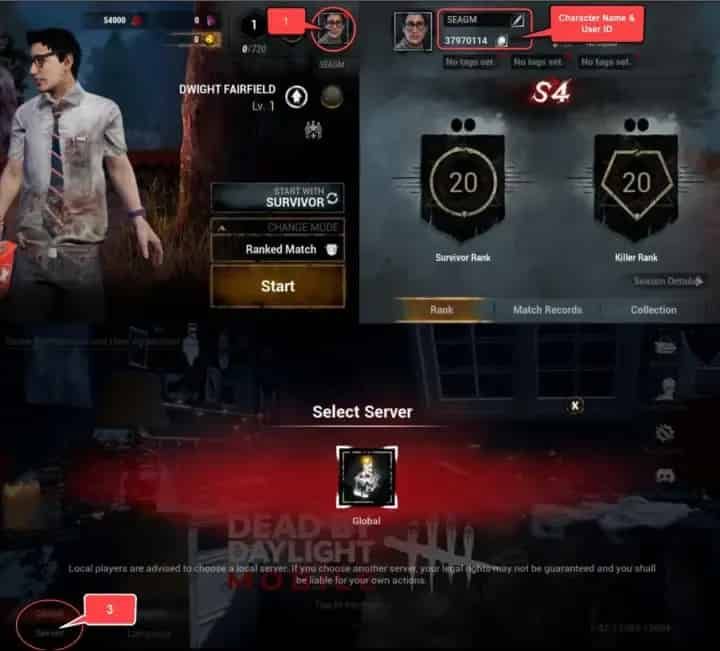
Step-by-Step ID Retrieval Instructions
- Launch Dead by Daylight Mobile on your device.
- On the main menu screen, tap on your Profile Avatar located in the top-left corner.
- Open the User Profile / Player Card tab.
- Locate your Personal ID (a series of numbers) displayed beneath your avatar or profile overview.
- Copy or write down the exact numeric Personal ID.
- Note down your exact Character Name as spelled in-game.
- Check your login screen or settings to confirm which Server (Southeast Asia, HKMOTW, Japan, or Korea) your account resides on.
Step-by-Step Guide to Recharge DBD Mobile Auric Cells on BitTopup
BitTopup provides a straightforward process to buy Auric Cells without needing account passwords or third-party login credentials.
- Select Package: Choose the desired amount of Dead by Daylight Mobile Auric Cells from the product denomination list. Current pricing and active package options are visible directly on the live checkout interface.
- Enter Player Information: Fill in your numeric Personal ID, select your Server from the dropdown menu, and input your in-game Character Name.
- Confirm Details: Double-check that your Personal ID and Server match your in-game profile precisely to prevent order delays.
- Proceed to Checkout: Click the purchase button and select your preferred payment option from the available regional and international payment methods.
- Receive Auric Cells: Once payment is processed, the system delivers the Auric Cells directly to your account. Relaunch or refresh your game to view your updated balance.
Direct ID Top-Up vs. Account Sharing Security
Account safety is critical when purchasing in-game currency. Direct ID recharges offer distinct advantages over services that require login sharing:
- Zero Password Requirements: BitTopup only requires your public Personal ID, Server, and Character Name. You never share your Google, Apple, Facebook, or NetEase login passwords.
- No Risk of Account Lockouts: Logging into your account from unfamiliar foreign IP addresses can trigger NetEase security locks or temporary bans. Direct ID recharge eliminates this risk completely.
- Data Privacy: Your private chat logs, friends lists, and account settings remain inaccessible to third parties.
- Simultaneous Play: You do not need to log out of the game while waiting for an order to complete.
Order Verification and Troubleshooting Guidelines
If your Auric Cells do not display immediately after completing an order, follow these troubleshooting steps:
- Restart the Application: Completely close Dead by Daylight Mobile from your device's recent apps switcher and reopen it to force a server synchronization.
- Check the In-Game Mailbox: Some promotional bundles or event-linked Auric Cell items are delivered via the in-game mail system and require manual claiming.
- Verify Order Status on BitTopup: Log into your BitTopup profile to verify that your transaction status shows as completed.
- Contact Customer Support: If the currency has not arrived, reach out to BitTopup's 24/7 customer service team with your Order ID, Personal ID, and Character Name for immediate verification and resolution.
Frequently Asked Questions
How do I find my Dead by Daylight Mobile Personal ID and Server?
Open Dead by Daylight Mobile and tap your profile avatar in the upper-left corner of the screen. Your numeric Personal ID is visible on your profile card. Your server is the region (Southeast Asia, HKMOTW, Japan, or Korea) you select when connecting at the start screen.
Is this Auric Cells top up compatible with the Global version or PC?
No. This product is strictly for the NetEase version of Dead by Daylight Mobile operating in the Southeast Asia, HKMOTW, Japan, and Korea regional clusters. It will not work for the PC, console, or Global (Behavior Interactive) mobile releases.
Do I need to provide my account login password to recharge?
No. BitTopup utilizes direct player ID processing. You only provide your Personal ID, Server selection, and Character Name. Never share your account passwords with anyone.
What can I unlock with Auric Cells in Dead by Daylight Mobile SEA?
Auric Cells allow you to purchase licensed Killers and Survivors, unlock the Premium Rift Pass, draw from limited-time Entity's Treasure gacha banners, and purchase outfits and weapon skins in the store.
Can I earn free Auric Cells without paying in Dead by Daylight Mobile?
Free Auric Cells are extremely limited in-game. Players can occasionally earn a small amount back by completing tiers of the Premium Rift Pass after an initial Auric Cell purchase, but standard gameplay rewards primarily yield Iridescent Shards and Bloodpoints.
What should I do if I selected the wrong server during checkout?
If you realize you selected an incorrect server or typed the wrong Personal ID, contact BitTopup customer support immediately before the transaction is processed. Provide your order number and the corrected account information.
How long does it take for Auric Cells to reflect in my DBD Mobile account?
Orders are processed through automated direct routing upon payment completion. In most instances, your Auric Cells reflect in your in-game balance shortly after transaction confirmation. If a delay occurs, restart your game client.