How to Get Your PoppoLive User ID
Your PoppoLive User ID is the unique code that identifies your profile for gifting, friend requests, and event participation. Follow these simple steps to find and confirm your ID:
Log In
Open the PoppoLive app and sign in to your account.Open Your Profile
Tap the 【My 】 button in the top-right corner of the screen.Find Your User ID
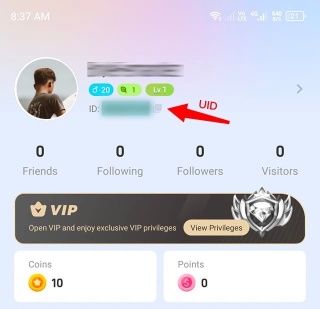
Below your profile picture, you will see your User ID displayed.Verify Carefully
Double-check that this is the exact ID you intend to use—once you successfully recharge or make a purchase, you will not be able to change your User ID.