

Asphalt 9: Legends Tokens Top Up on BitTopup
Tokens (the blue A-currency) serve as the premium currency in Asphalt 9: Legends. While Credits handle routine garage maintenance and standard component installs, Tokens give you access to exclusive Class S and Class A blueprints, limited-time card packs, special event ticket refills, and car key hunts. Acquiring rare supercars and keeping your competitive edge in Multiplayer World Series events requires a steady reserve of Tokens.
BitTopup provides a direct top-up service for Asphalt 9: Legends players worldwide. By utilizing your unique Player ID and selecting your active operating system, you can purchase Token packs directly without sharing account passwords or personal login credentials. Review current pack sizes and real-time pricing directly on the live checkout interface to pick the exact amount your garage needs.
Where to Find Your Asphalt 9 Player ID and Select Your Platform
To ensure your purchased Tokens arrive at your profile without delays, you must provide your exact Player ID and choose your matching platform (Windows, Android, or iOS).
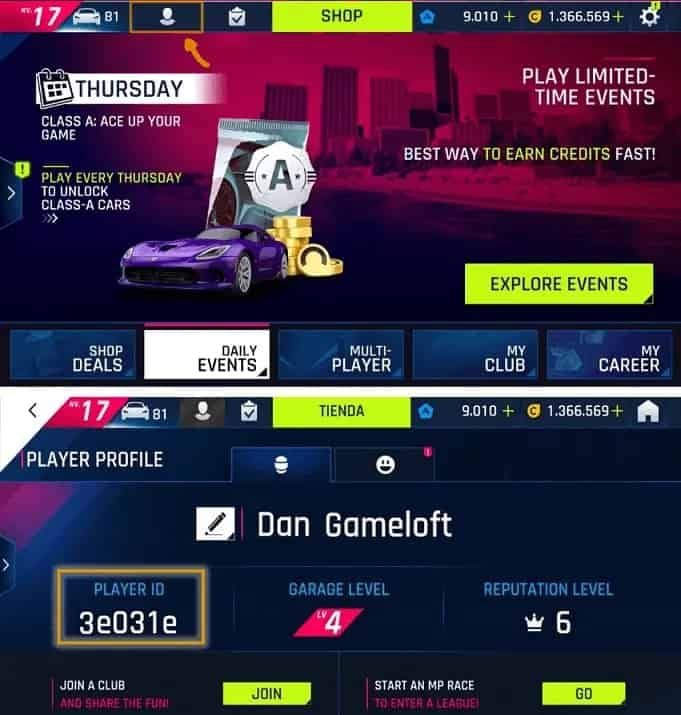
Locating Your Player ID in Asphalt 9
- Launch Asphalt 9: Legends on your device.
- From the main garage menu, locate the Settings icon (gear symbol) in the top-right corner of the screen.
- Tap or click on Player Profile.
- Your unique alphanumeric Player ID appears directly on your profile card under your display name.
- Copy or record this sequence accurately for your BitTopup order.
Always verify that your platform selection on BitTopup matches the operating system running your game account. Asphalt 9 structures profile routing according to platform databases, making precise platform selection essential for order fulfillment.
How to Recharge Asphalt 9: Legends Tokens via BitTopup
Recharging your Asphalt 9: Legends account takes only a few quick steps:
- Select Your Token Pack: Choose the Token denomination you wish to purchase from the available product list on BitTopup.
- Input Your Player ID: Type or paste your exact Asphalt 9 Player ID into the required account field.
- Select Your Operating System: Choose Windows, Android, or IOS from the platform dropdown menu.
- Proceed to Checkout: Click the buy button to move to the secure payment screen.
- Complete Payment: Pick your preferred payment method and finalize the transaction.
- Receive Tokens: Your Tokens credit directly to your in-game account balance upon payment confirmation.
Tokens vs. Credits: What to Spend Asphalt 9 Tokens On in 2026
Managing your economy efficiently separates casual racers from top-tier leaderboard contenders. In 2026, competitive events require precise resource allocation between Credits and Tokens.
| Currency Type | Primary Acquisition Methods | Best Uses & Strategic Spending |
|---|---|---|
| Tokens (Blue Currency) | BitTopup direct recharges, Special Events, Club Milestones, MP Tier Rewards | Featured Card Packs (x10 pulls), Car Key Packs, Event Ticket Refills, Relay Bundles, Burst of Speed (BoS) events |
| Credits (Gold Coins) | Career Races, Daily Events, Multiplayer Races, Credit Heists | Stage Upgrades (Top Speed, Accel, Handling, Nitro), Installing Import Parts, Standard Blueprints in Legend Store |
Recommended Token Spending Priorities
- Multipack Card Bundles (10x Packs): Always save Tokens for 10x card pack pulls rather than single packs to guarantee featured blueprints.
- Special Event Key Hunts: Use Tokens for ticket refills during time-limited Car Key events to unlock high-tier vehicles without relying on random drop luck.
- Burst of Speed (BoS) Packs: High-tier competitive packs feature premium Class S cars that define multiplayer metas. Stockpiling Tokens for these scheduled releases offers the highest return on investment.
- Avoid Skipping Regular Timers: Do not spend Tokens on minor car delivery timers or low-tier upgrade skips; reserve your balance strictly for blueprints and exclusive events.
Supported Platforms: Windows, Android, and iOS Token Top-Up
BitTopup supports token recharges across all major operating systems supported by Asphalt 9: Legends:
- Android: Covers devices downloading the game through official Android app channels.
- iOS: Covers iPhone and iPad devices using Apple operating systems.
- Windows: Covers installations running via the Windows PC Store and Xbox ecosystem.
Because account server IDs map differently across platform environments, selecting the correct option in the dropdown ensures your recharge targets the active data server tied to your profile.
Safe and Password-Free Asphalt 9 Token Delivery
Account safety remains the primary focus of every transaction on BitTopup. Our delivery process relies entirely on direct ID injection:
- Zero Password Requirements: You will never be asked for your Apple ID, Google Play credentials, Microsoft login, or social network passwords.
- No Account Sharing: Your account stays securely in your hands. There is no need for third parties to log in, preventing unauthorized access or accidental progress resets.
- Secure Payment Channels: BitTopup uses encrypted transaction gateways to protect billing details during checkout.
By operating strictly through your public Player ID, your profile remains protected from security risks associated with shared access.
Troubleshooting Asphalt 9 Token Delivery Delays
Token deliveries process automatically once payment clears. If your balance does not update immediately, follow these troubleshooting checks:
- Restart the Game Client: Completely shut down Asphalt 9: Legends on your device and restart it. This forces the client to pull fresh balance data from the game servers.
- Check Payment Status: Confirm that your payment successfully completed and that you received an order confirmation on BitTopup.
- Verify Player ID Accuracy: Review your order details to confirm that no typos were entered during the Player ID submission.
- Check Platform Selection: Confirm that the platform selected during purchase (Windows, Android, or iOS) matches the operating system where you play.
- Contact BitTopup Support: If your Tokens have not arrived after completing these checks, submit your Order ID and Player ID to BitTopup 24/7 customer support for immediate investigation.
Frequently Asked Questions
How do I find my Player ID in Asphalt 9: Legends?
Open Asphalt 9, click the Settings gear icon in the upper-right corner of your garage, and select Player Profile. Your Player ID is displayed on your profile overview card.
Do I need to provide my game account password to recharge tokens?
No. BitTopup requires only your Player ID and selected platform. You never need to share passwords, email logins, or authentication codes.
Can I buy Asphalt 9 Tokens for Windows, Android, and iOS accounts?
Yes. BitTopup provides top-ups for Windows, Android, and iOS. Simply select your operating system from the platform dropdown before completing your purchase.
What is the best way to spend Tokens in Asphalt 9: Legends?
The most effective use of Tokens is purchasing 10x Featured Card Packs, participating in Burst of Speed events, and buying ticket refills for Special Event Key Hunts.
How long does it take for Asphalt 9 Tokens to appear in my account?
Orders are transmitted to your account once your payment clears. In most cases, restarting your game client immediately displays your updated Token balance.
What should I do if I entered the wrong Player ID or platform?
If you realize you submitted an incorrect Player ID or platform, contact BitTopup customer support immediately with your order details before order processing completes.