



What Is Wallet Balance Top Up and How Does It Work in 2026?
A Wallet Balance top up allows you to add prepaid digital funds directly to your user account. Instead of entering payment details every time you make an in-game purchase, buy a gift card, or grab a downloadable expansion, your wallet balance acts as an instant payment source. Once loaded, the funds stay tied to your profile until you decide to spend them across supported digital goods and games on BitTopup.
In 2026, digital store credits provide an efficient way to manage entertainment budgets while cutting down checkout friction during limited-time sales and patch updates. By pre-funding your profile, you avoid payment gateway delays and keep your spending organized in one secure place.
Benefits of Keeping a Funded Wallet Balance for Instant Game Purchases
Maintaining a ready balance on your profile provides several practical advantages for digital purchases:
- Instant Checkout: Skip multi-step payment gateway confirmations during peak sale events or flash promotions.
- Enhanced Account Safety: You do not need to link debit or credit cards for recurring microtransactions.
- Budget Control: Preload a fixed gaming allowance to track monthly spending without surprise bank statements.
- Cross-Game Flexibility: Use your stored credits across various top-up categories, game passes, and digital vouchers without converting currencies repeatedly.
- Zero Bank Transaction Delays: Eliminate sudden payment declines from your bank during late-night gaming transactions.
How to Locate Your Account Information for Balance Top Up
Before placing an order on BitTopup, ensure you have your account identifier ready. For Wallet Balance recharges, you do not need to provide passwords or sensitive verification codes. You only need your registered BitTopup account email or user ID.
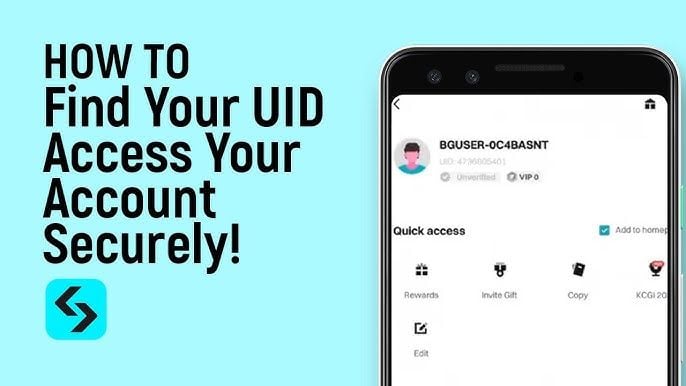
To locate your user identifier:
- Log in to your profile on the website or mobile portal.
- Open your user dashboard or click on your profile icon in the top navigation bar.
- Find your User ID (UID) listed directly beneath your profile name.
- Copy the identifier and verify that the numbers match before submitting your recharge request.
Step-by-Step Guide: How to Recharge Wallet Balance Online
Recharging your wallet balance on BitTopup takes only a few quick steps. Follow this guide to add funds:
- Choose Your Top-Up Package: Review the available balance recharge denominations on the product page and select the amount you wish to add.
- Enter Account Details: Input your user ID or registered email into the checkout field. Double-check the information to ensure the funds go to the correct account.
- Select a Payment Method: Pick your preferred payment channel from the live checkout list, including bank cards, regional e-wallets, or supported cryptocurrencies.
- Complete the Payment: Follow the on-screen instructions on the secure gateway to authorize the transaction.
- Receive Your Funds: Once payment verification is complete, the balance will credit directly to your account. Refresh your dashboard to see your updated total.
| Feature | Details |
|---|---|
| Product Type | Digital Wallet Balance Recharge |
| Required Information | User ID / Account Identifier |
| Account Password Required | No (100% Password-Free) |
| Applicable Currency | Displayed live at checkout |
| Delivery Method | Direct account credit |
| Usage Scope | Digital items, top-ups, and vouchers on BitTopup |
Supported Payment Options for Wallet Balance Top Up
BitTopup provides multiple global and regional payment channels so buyers worldwide can top up with ease:
- Credit and Debit Cards: Standard international cards for direct, secure payments.
- Regional E-Wallets: Local mobile wallets and regional digital banking apps optimized for specific countries.
- Cryptocurrency Options: Major crypto assets for private and decentralized funding.
- Online Bank Transfers: Direct wire and bank clearance methods tailored to local currencies.
Live exchange rates, promotional pricing, and payment processing fees are displayed transparently during checkout before you finalize your purchase.
How to Check and Manage Your Active Wallet Balance
Once your recharge is completed, you can monitor and manage your available funds in your user center:
- Viewing Active Credits: Click your profile icon to see your current available balance displayed in your preferred currency format.
- Transaction History: Access the Order History or Wallet Logs section to view every recharge, deduction, and game purchase made with your funds.
- Invoice Records: Download payment receipts and review timestamps for every completed transaction.
- Auto-Deduction at Checkout: When making future purchases on BitTopup, choose Wallet Balance at checkout to deduct funds instantly with one click.
Common Wallet Top Up Errors and Troubleshooting Tips
If your balance recharge does not appear immediately, check the following solutions:
- Refresh Your Dashboard: Log out of your account, clear browser cache, and log back in to force a fresh data sync.
- Check Transaction Status: Look at your payment bank or crypto transaction ledger. If the payment is still marked pending, the store credit will trigger once the network confirms clearance.
- Verify Inputted Account ID: Confirm that the user ID entered at checkout matches your active logged-in profile.
- Review Currency Settings: If you changed your display currency, verify that your account balance conversion settings align with your selected storefront region.
- Contact Support: If your funds have not arrived after confirmation from your payment provider, submit an inquiry to BitTopup customer support with your order number and transaction receipt.
Why Choose BitTopup for Your Balance Recharge
- Zero Password Sharing: BitTopup operates on a password-free recharge model. You never share your account login credentials, security questions, or two-factor authentication keys.
- Live Dynamic Rates: Get up-to-date pricing and accurate conversion rates directly on the live checkout screen.
- Global and Local Coverage: Choose from international payment methods or regional options suited to your local currency.
- Broad Ecosystem Access: A single funded balance on BitTopup lets you buy top-ups, gift cards, and game passes across hundreds of supported titles.
Frequently Asked Questions
How do I add money to my wallet balance?
Select your desired balance denomination on the BitTopup product page, enter your account identifier, choose your payment option at checkout, and complete the transaction. Your balance updates automatically after payment confirmation.
What does wallet top up mean?
A wallet top up is the process of depositing prepaid funds into your online store account. These funds serve as a digital credit balance, allowing you to buy games, microtransactions, and vouchers without entering card information for every single order.
How can I use my wallet balance to buy games and in-game items?
When checking out on BitTopup for any game top-up, voucher, or digital product, select Wallet Balance as your payment method. The order total will be deducted directly from your available balance, completing the purchase instantly.
Do I need to share my account password to recharge wallet balance?
No. BitTopup does not ask for your account password, private security codes, or login credentials. You only need to provide your public user ID or account identifier to complete a recharge.
Which payment methods are accepted for wallet balance recharge?
BitTopup supports credit cards, regional e-wallets, bank transfers, and popular cryptocurrency networks. Available payment methods vary by region and are shown in real time on the checkout page.
Does my wallet balance expire?
Your deposited wallet balance remains active on your BitTopup profile and does not expire under standard account terms. You can keep your funds stored and spend them whenever you choose.