

Fast and Direct Ludo Club Top Up for Cash and Coins
Ludo Club is one of the most popular digital board games worldwide, bringing classic multiplayer competition straight to mobile devices. Success in high-stakes matches relies not only on strategy and roll luck but also on maintaining a healthy balance of Cash and Coins.
Whether you need Coins to enter competitive tables or Cash to secure critical tactical advantages during heated matches, BitTopup provides a direct recharge solution. You can top up your Ludo Club profile in seconds using only your Player ID, keeping your gameplay smooth without interruption.
Overview of Ludo Club Cash and Coins Utility
Understanding how each currency functions helps you decide which pack fits your current gameplay goals.
Ludo Club Coins
Coins serve as the foundational currency for basic game participation:* Match Buy-Ins: Every classic, rush, and private match requires an entry fee in Coins. Playing on higher-tier boards with bigger prize pools requires larger coin reserves.* Table Progression: As you gain experience, access to higher-stakes rooms demands a steady supply of Coins to compete against top-ranked players.* Social Matches: Hosting games with friends and family requires room creation fees paid in Coins.
Ludo Club Cash
Cash represents the premium currency in Ludo Club, offering direct tactical and cosmetic benefits:* Reroll and Undo Mechanics: In critical game situations, Cash allows you to use in-game aids like rerolling the dice or undoing unfavorable moves depending on the active game mode rules.* Exclusive Customization: Cash unlocks unique dice designs, colorful frame effects, custom tokens, and animated chat expressions that distinguish your profile at the table.* Lucky Wheel and Mini-Games: Use Cash to buy extra spins and attempts in bonus events to collect rare rewards.
How to Recharge Ludo Club Cash and Coins on BitTopup
Recharging your balance on BitTopup is straightforward and requires no complex configuration or personal account logins.
- Select Your Currency & Denomination: Choose between Ludo Club Cash or Coins packs from the product catalog above.
- Enter Your Player ID: Type your unique Player ID into the designated input box. Double-check your numbers to ensure direct delivery to your profile.
- Review Current Pricing: View the live price clearly displayed on the checkout screen alongside your selected payment method.
- Complete the Payment: Finalize your order securely. Your Cash or Coins will credit directly to your Ludo Club balance automatically.
Step-by-Step: How to Find Your Ludo Club Player ID
Your Player ID is the only identifier needed to route your purchase directly to your profile. Finding it in the app takes just a few taps.
- Open the Ludo Club application on your mobile device.
- Tap your Profile Avatar located in the top-left corner of the main lobby screen.
- In your profile overview window, locate the string of numbers shown directly under your display name. This is your Player ID.
- Tap the Copy icon next to your ID to copy it directly to your clipboard, preventing manual typing errors.
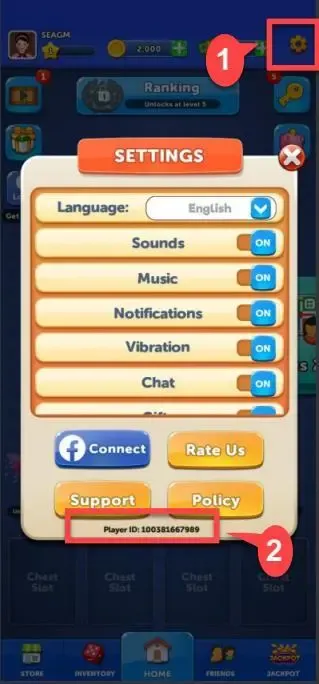
Paste this copied ID directly into the Player ID field on BitTopup during checkout.
Ludo Club Cash vs Coins: What is the Difference?
Choosing between Cash and Coins depends on whether you need game access or tactical customization.
| Feature / Utility | Ludo Club Coins | Ludo Club Cash |
|---|---|---|
| Primary Role | Match entry stakes & room creation | Tactical assists & premium cosmetics |
| Table Access | Required for Classic & Rush rooms | Not used for match buy-ins |
| In-Game Aids | None | Rerolls, bonus dice features, special boosts |
| Customization | Standard board unlocks | Exclusive dice themes, tokens, and frames |
| Gifting Utility | Friendly table wagers | Direct balance replenishment |
How to Send Ludo Club Cash or Coins to Friends
You can easily surprise a friend or family member by sending Ludo Club currency directly to their game account via BitTopup.
- Ask your friend to copy their Player ID from their Ludo Club profile.
- Select the desired Cash or Coins pack on BitTopup.
- Enter your friend's Player ID in the Player ID input field instead of your own.
- Proceed through checkout. Once the transaction completes, the balance is added directly to their account the next time they launch the game.
This makes gifting completely frictionless, requiring no password sharing or linked account access.
Account Safety: Player ID Only Checkout Without Password
Security is a fundamental priority when purchasing in-game assets. BitTopup uses a direct Player ID delivery system that protects your personal credentials:
- Zero Password Requirements: You will never be asked for your Facebook login, Google Play credentials, Apple ID, or phone numbers.
- No Account Sharing: Your profile remains entirely in your hands, eliminating the risk of unauthorized access or security breaches.
- Safe Delivery Protocol: Orders process through standard game ID routing, ensuring full compliance with account safety standards.
Troubleshooting Delivery and Common Top-Up Questions
If you encounter any delays or have questions regarding your order status, follow these practical troubleshooting steps:
- Restart the Game App: If your balance does not update immediately after checkout, fully close Ludo Club from your device's recent apps list and reopen it to force a server refresh.
- Verify Your Internet Connection: Ensure your mobile device has an active Wi-Fi or cellular data connection so the game client syncs with the server.
- Confirm the Submitted Player ID: Check your order confirmation email to ensure the Player ID submitted matches your in-game profile number.
- Reach Out to 24/7 Support: If your currency does not reflect in your account after refreshing, contact BitTopup Customer Support with your order number for prompt verification.
Frequently Asked Questions
Where can I find my Ludo Club Player ID?
Open Ludo Club, tap your profile picture in the top-left corner of the home screen, and look directly below your username. Your numerical Player ID is displayed there with a convenient copy button next to it.
What is the difference between Cash and Coins in Ludo Club?
Coins are spent to enter matches, join rush games, and create private tables. Cash is the premium currency used for special features like tactical rerolls, undoing moves, and unlocking exclusive cosmetic dice and frames.
Do I need to provide my Ludo Club password to recharge?
No. BitTopup requires only your public Player ID to process the recharge. You should never share your game account passwords, social media logins, or recovery codes with anyone.
Can I recharge Ludo Club Cash for a friend?
Yes. Simply enter your friend's Player ID into the checkout field instead of your own. The purchased Cash or Coins will deliver directly to their game profile.
How long does it take to receive Ludo Club Cash after recharging?
Recharges are processed automatically upon payment completion. Your in-game balance updates almost instantly once the transaction confirms.
What should I do if my Ludo Club Cash or Coins do not appear?
Close and restart the Ludo Club app to refresh your account data. If the balance remains unchanged, check your payment receipt and contact the BitTopup 24/7 support team with your order details.