


Steam Wallet Code (INR) Top Up: What It Is and How It Works
A Steam Wallet Code (INR) is a prepaid digital voucher used to credit Indian Rupees (₹) directly into your Steam account balance. Instead of linking a credit card or debit card directly to the Steam platform, you purchase a digital redemption code that converts directly into store credit upon activation. This wallet credit can be used across the entire Steam catalog to buy PC games, downloadable content (DLC), in-game items, software, soundtracks, and Community Market goods.
Digital wallet codes eliminate the need for recurring credit card authorizations and prevent unintended recurring charges. Once credited, your Steam wallet balance never expires, allowing you to save funds for major promotional events, publisher sales, and game releases throughout 2026.
Steam Region and Currency Policy: Why INR Codes Require an Indian Account
Valve applies strict regional currency controls to Steam Wallet Codes to preserve regional pricing structures. Steam codes denominated in Indian Rupees (INR) can only be activated on Steam accounts whose store country is set to India.
Key regional guidelines:- Your Steam account store currency must show INR (₹).- If your account is registered to another country (such as the United States, United Kingdom, or Eurozone), an INR code will not convert automatically. Steam will reject the redemption with a currency mismatch notification.- Using VPNs or proxy services to bypass regional restrictions violates the Steam Subscriber Agreement and can lead to account limitations.- Ensure your Steam profile region matches India before purchasing and attempting to redeem INR vouchers.
How to Check Your Steam Account Details and Region
To ensure your account is ready for an INR code redemption, verify your current store country setting:1. Open the Steam desktop client or log in via a web browser.2. Click on your profile name in the top right corner and select "Account details".3. Under "Store & Purchase History", check the line labeled "Country".4. Confirm that the country is listed as "India" and the displayed wallet currency is "INR" (₹).
Your Steam Account Name (or Steam ID / login username) is the identifier associated with your profile, but you do not need to share your account credentials or login passwords with anyone to redeem a digital code. All wallet redemptions occur privately through your own authenticated Steam account.
Supported Steam Wallet INR Denominations in 2026
Steam wallet codes come in various fixed denominations tailored for Indian gamers, ranging from small values suitable for microtransactions to larger amounts for premium AAA releases. Current live pricing for each voucher amount is displayed on the BitTopup checkout catalog.
| Denomination (INR) | Typical Use Case | Compatibility |
|---|---|---|
| ₹100 | In-game microtransactions, battle passes, stickers | Indian Steam Accounts only |
| ₹250 | Indie titles, early access games, cosmetic DLC | Indian Steam Accounts only |
| ₹500 | Mid-tier games, seasonal event passes | Indian Steam Accounts only |
| ₹1000 | Standard game purchases, bundle packages | Indian Steam Accounts only |
| ₹2500 | AAA title pre-orders, premium game editions | Indian Steam Accounts only |
| ₹5000 | Collector editions, multiple game wishlist hauls | Indian Steam Accounts only |
Note: Exact listing rates and denomination availability are shown on the live checkout page on BitTopup.
How to Recharge Steam Wallet Code (INR) on PC and Mobile (Step-by-Step)
You can redeem your digital voucher code across desktop, browser, and mobile interfaces. Follow these direct steps:
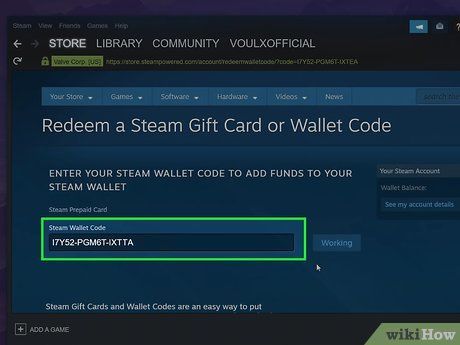
Redeeming via Steam Desktop Client or Web Browser:1. Open Steam and log into your Indian Steam account.2. Click your account username in the top-right corner and select "View my wallet" (or click "Games" in the top menu and select "Redeem a Steam Wallet Code").3. In the "Steam Wallet Code" input field, type or paste the digital voucher key received from BitTopup.4. Click "Continue".5. The system verifies the code, and the INR balance will instantly appear in your Steam wallet balance in the upper right corner.
Redeeming via the Steam Mobile App:1. Open the Steam Mobile application on iOS or Android.2. Tap your profile icon or open the navigation menu.3. Select "Store" and tap "Account Details".4. Tap "Add funds to your Steam Wallet".5. Select "Redeem a Steam Gift Card or Wallet Code".6. Enter your digital voucher code and tap "Continue" to finalize the balance update.
Fixing Common Steam Code Activation and Redemption Errors
If you encounter an issue during voucher redemption, check these standard troubleshooting steps:- Currency Mismatch Error: Occurs when an INR code is entered on an account registered to another country. Verify that your store country in "Account details" is set to India.- Invalid Code Error: Verify that there are no accidental spaces before or after the code. Check easily confused characters, such as the letter "O" versus the number "0", or the letter "I" versus the number "1".- Code Already Redeemed: If you receive a notice that the voucher has already been used, refresh your account wallet page. Sometimes the balance updates on the server before the confirmation page loads. If the balance remains unchanged, contact BitTopup customer support with your order reference.- Unexpected Error / Rate Limiting: Entering incorrect codes multiple times triggers a temporary cooldown on Steam. Wait 30 to 60 minutes before retrying the redemption.
Why Buy Steam Wallet Code (INR) on BitTopup
BitTopup provides a straightforward, safe purchasing process for Indian gamers looking to fund their Steam libraries.- Direct Digital Delivery: Codes are delivered straight to your order screen and dashboard account immediately after payment confirmation.- Account Safety & Privacy: You never need to provide your Steam password, login credentials, or account sharing access. You receive a digital code that you redeem yourself.- Multiple Local Payment Methods: Complete transactions using familiar payment solutions without requiring international credit cards enabled for overseas billing.- Clear Value Structure: Transparent listings show verified INR denominations clearly before you pay. Check the live checkout screen for current pricing and availability.- 24/7 Dedicated Support: Customer service is available around the clock to assist with order tracking and code redemption verification.
Best Uses for Steam Wallet Balance: In-Game Items and Seasonal Sales
Loading your Steam wallet in advance gives you immediate buying power during major platform events and seasonal promotions throughout 2026.- Steam Seasonal Sales: Pre-funding your wallet ensures fast checkouts during major events like the Steam Autumn Sale, Winter Sale, and Summer Sale without payment gateway delays or bank server downtime.- In-Game Purchases: Use your balance directly inside games like Counter-Strike 2, Dota 2, Apex Legends, and PUBG for weapon skins, battle passes, keys, and case openings.- Steam Community Market: Trade and buy player-listed items, trading cards, profile backgrounds, and emotes directly using your stored INR balance.- Software & VR Applications: Purchase digital productivity tools, game development software, benchmark utilities, and VR games available across the Steam store.
Frequently Asked Questions
How to recharge a Steam wallet in India?
To recharge your Steam wallet in India, purchase an INR Steam Wallet Code on BitTopup. Once your code is delivered, log into your Steam account, open the "Redeem a Steam Wallet Code" page, enter the key, and click "Continue". The funds credit to your account balance immediately.
Can I redeem an INR Steam Wallet Code on a non-Indian Steam account?
No. Due to Valve regional currency policies, Steam Wallet Codes denominated in INR can only be activated on accounts whose store country is set to India. Accounts set to other regions will receive a currency error.
How to add 100 rupees to my Steam wallet balance?
Select the ₹100 denomination voucher on BitTopup and proceed through the checkout. Once generated, paste the code into the Steam redemption page. Your account will be credited with exactly ₹100.
Do Steam Wallet Code (INR) digital vouchers expire?
Steam Wallet digital codes do not carry an expiration date prior to activation. Once redeemed, the funds remain in your Steam wallet balance indefinitely until you choose to spend them.
Where do I receive my digital Steam Wallet code after purchasing on BitTopup?
Your digital code is displayed directly on the order confirmation screen on BitTopup and is saved in your BitTopup user account order history for easy access.
What should I do if Steam gives an invalid code or currency mismatch error?
First, double-check that your Steam account country is set to India under "Account details". Next, verify the code characters to ensure no typos or extra spaces were included. If the error continues, reach out to BitTopup 24/7 customer support with your order ID.