

Kumu Live Coins Top Up: Fast & Direct Username Recharge
Kumu is one of the most vibrant social entertainment platforms, connecting creators, streamers, and viewers through live video broadcasts, audio rooms, and interactive mini-games. To actively participate in community events, support your favorite livestreamers, and stand out in public chat rooms, you need Kumu Coins.
BitTopup provides a direct Kumu Live Coins top up service that credits coins straight to your account balance. With no account passwords requested, direct username processing, and a secure checkout system, topping up your Kumu account takes only a few quick steps.
What Are Kumu Live Coins and How Do They Work?
Kumu Coins serve as the primary in-app virtual currency for viewers on the Kumu platform. Users purchase coins to perform multiple interactive actions across livestreams:
- Send Virtual Gifts: Drop animated gifts, stickers, and special effects during live streams to show appreciation to your favorite creators.
- Support Creator Campaigns: Assist streamers in reaching leaderboard goals, platform tier milestones, and live battle competitions.
- Access Interactive Features: Participate in exclusive audio streams, VIP events, and mini-games hosted directly in the app.
- Stand Out in Live Chats: Higher-tier gifts and coin badges highlight your presence in crowded streaming rooms.
Once coins are credited to your Kumu profile, they remain in your wallet balance until you spend them during live streams.
Step-by-Step Guide to Recharge Kumu Live Coins on BitTopup
Recharging your Kumu account on BitTopup is designed to be straightforward and secure. Follow these steps to complete your order:
- Select Your Coin Amount: Browse the available Kumu Coin packages listed on the product page and choose the amount you wish to purchase.
- Enter Your Kumu Username: Type your exact Kumu Username into the input field. Do not include your password.
- Proceed to Checkout: Select your preferred payment method from the available local and international options.
- Review Real-Time Pricing: Confirm your order details and final balance on the live checkout screen.
- Complete Payment: Finalize the transaction. Once the payment clears, your Kumu Coins are processed and delivered directly to your Kumu wallet.
How to Find Your Kumu Username in the App
To ensure your coins are delivered to the right account, you must provide your exact Kumu Username rather than your display nickname. Follow these visual steps inside the Kumu app:
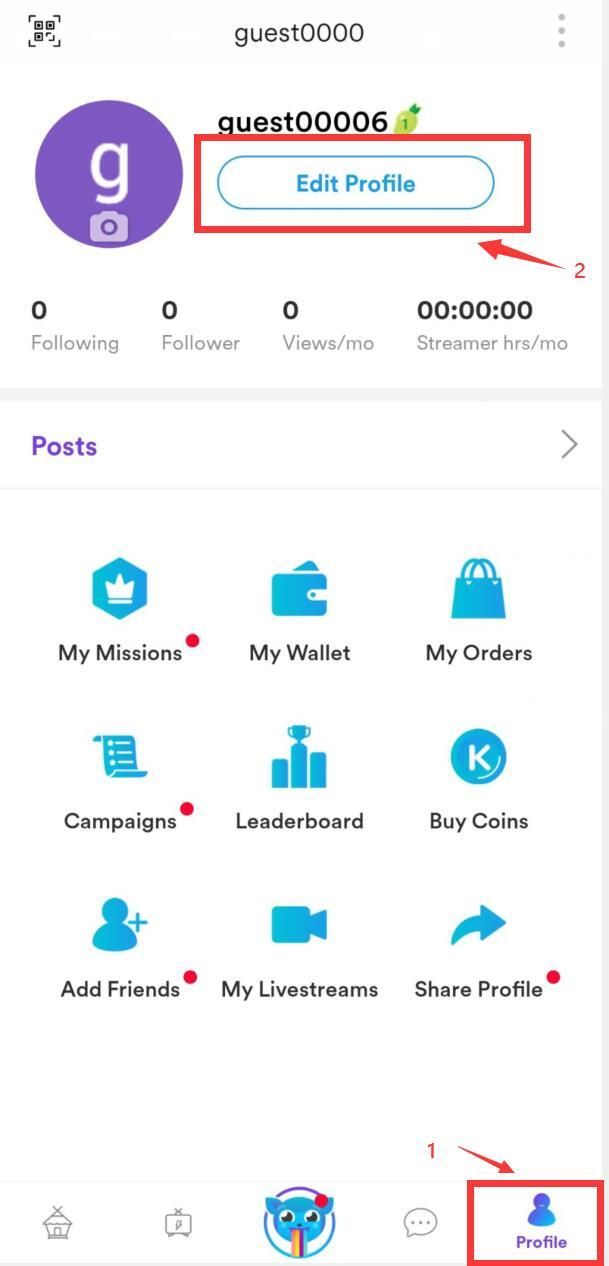
- Open the Kumu application on your mobile device.
- Tap the Profile icon located in the bottom right corner of the main screen.
- Look directly beneath your profile picture and display name.
- Locate your Username (it usually begins with the
@symbol, such as@username). - Copy or accurately type this username (without the
@symbol if prompted) into the BitTopup order field.
Tip: Double-check for special characters, underscores, or numbers in your username before submitting your payment to avoid delivery delays.
Kumu Coins vs. Diamonds: What You Need to Know
Understanding the difference between Kumu Coins and Diamonds prevents confusion when managing your balance and earnings on the platform:
| Feature | Kumu Coins | Kumu Diamonds |
|---|---|---|
| Primary Role | Viewer spending currency | Creator earnings currency |
| How to Obtain | Purchased via top-up on BitTopup or in-app | Received as gifts during livestreams |
| Primary Use | Sending virtual gifts, entering games | Redeeming for real-world cash or rewards |
| Transferability | Non-withdrawable; used exclusively in-app | Can be cashed out by verified broadcasters |
When you buy Kumu Live Coins, you receive spending currency. Streamers receive a portion of the value in Diamonds whenever you send them gifts using your coins.
Benefits of Sending Virtual Gifts and Unlocking Exclusive Streams
Topping up your Kumu Coins gives you immediate access to premium community perks:
- Build Direct Connections: Streamers give shoutouts, personalized interactions, and special badges to viewers who send animated gifts.
- Influence Leaderboards: High-value gifts push creators higher on the weekly and monthly Kumu ranking charts, helping them win platform-wide contests.
- Enter Premium Live Rooms: Certain creators host private audio or video events that require virtual gifts or coin entries to join.
- Access Mini-Games: Play in-app trivia and arcade games using your active coin wallet.
Secure Username-Only Top-Up: No Password Required
Account safety is a top priority when purchasing digital game and streaming currencies. BitTopup uses a direct top-up system that only requires your public Kumu Username:
- Zero Password Sharing: You will never be asked for your login credentials, email passwords, or phone verification codes.
- Encrypted Transactions: All checkouts are processed through secure, encrypted payment gateways to safeguard your billing details.
- Direct System Delivery: Coins are transferred directly through standard system endpoints, keeping your account safe from unauthorized access.
Troubleshooting Kumu Coin Top-Up and Delivery Issues
If your coins do not appear immediately after completing your order, check the following troubleshooting steps:
- Restart the Kumu App: Fully close the Kumu app from your recent apps switcher and reopen it. This forces the app to fetch the latest server wallet balance.
- Verify Your Profile Screen: Go to your profile and tap on the Coin Wallet icon to inspect your transaction log.
- Check Username Accuracy: Ensure that you entered your exact Kumu Username during checkout rather than an alternate nickname.
- Contact 24/7 Customer Support: If your order status shows completed on BitTopup but your coins are not visible after refreshing, contact the BitTopup 24/7 customer support team with your Order ID for immediate assistance.
Frequently Asked Questions
How to buy coins in Kumu?
To buy coins, select your preferred coin package on BitTopup, enter your Kumu Username, choose a payment method, and complete the checkout. Your coin balance updates directly in the app.
Where can I buy Kumu coins safely online?
You can buy Kumu coins safely online through BitTopup. The platform uses encrypted payment channels and only requires your Kumu Username, ensuring your personal account login details remain secure.
What information do I need to provide to recharge Kumu Live Coins?
You only need to provide your exact Kumu Username (found under your profile picture in the Kumu app). No passwords or private account credentials are required.
What is the difference between Kumu Coins and Diamonds?
Coins are the purchasing currency used by viewers to buy and send virtual gifts. Diamonds are earned by streamers when they receive gifts from viewers, which creators can convert into cash payouts.
Do I need to share my Kumu account password to recharge?
No. BitTopup never asks for your password or verification codes. You only need your Kumu Username to receive your coins.
How long does it take for Kumu Coins to be credited after payment?
Coin top-ups are processed directly after your payment clears. In most cases, the coins reflect in your Kumu wallet balance shortly after the transaction is confirmed.
What should I do if my Kumu Coins do not show up?
First, force-close and restart the Kumu app to refresh your wallet balance. If the coins do not display, check your BitTopup order confirmation to verify that your username was spelled correctly, then reach out to BitTopup 24/7 customer support with your Order ID.