


MICO Live Coins (MENA) Top Up: Fast, Safe, and Instant Crediting
MICO Live coins are the primary in-app virtual currency used across the MICO Live streaming and social platform. In the Middle East and North Africa (MENA) server environment, coins give you direct access to interactive features, premium digital gifting, broadcaster support, and exclusive profile customization.
BitTopup provides a direct, secure method to complete your MICO Live Coins (MENA) top up without sharing passwords or linking sensitive social accounts. All recharges process directly through your numeric MICO Live User ID (UID), ensuring that your account credentials stay completely private. Select your preferred coin package from the live catalog above, enter your User ID, and receive your balance instantly upon successful payment.
Live pricing, promotional rates, and available coin amounts are updated in real time on the selection grid above.
How to Recharge MICO Live Coins (MENA) Using User ID
Recharging your MICO Live account takes less than a minute. Follow these simple steps to complete your order:
- Select Your Coin Package: Choose the denomination of MICO Live Coins that fits your streaming and gifting needs from the options listed on the product page.
- Enter Your MICO Live ID: Input your exact numeric User ID in the account field labeled "User ID". Double-check your numbers to ensure the coins route to the correct profile.
- Choose a Payment Method: Select your preferred regional or international payment option from the checkout screen.
- Complete the Transaction: Finalize your payment. The system validates the transaction and pushes the coins directly to your MICO Live account.
- Check Your In-App Balance: Open MICO Live and check your coin wallet to verify that your balance has been updated.
Where to Find Your MICO Live ID in the App
To ensure your recharge arrives without delay, you must provide your exact numeric MICO Live ID. Your ID is linked to your registration profile and is distinct from your display nickname.
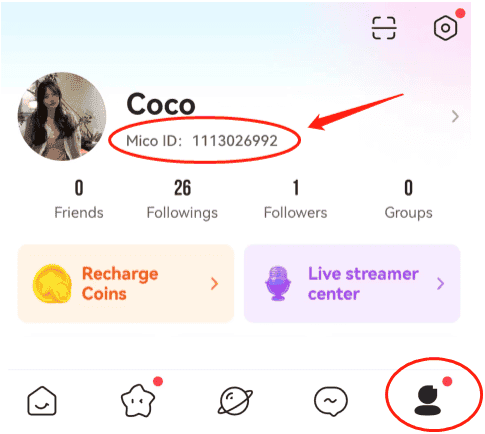
Here is how to locate your User ID inside the official app:
- Open the MICO Live application on your mobile device.
- Tap the Profile icon (labeled "Me") in the bottom right corner of the navigation bar.
- Look beneath your avatar picture and display name at the top of your profile screen.
- You will see your unique numeric code labeled ID: XXXXXXX.
- Tap the copy icon next to the number or write it down carefully to paste directly into the BitTopup checkout field.
Important Tip: Avoid typing your username or custom nickname. The top-up system requires the exact numeric User ID to credit your account automatically.
Eligible Countries and Server Rules for MICO Live MENA
MICO Live partitions coin inventories by regional server zones to align with local currency standards and regional user clusters. The MICO Live Coins (MENA) product is strictly reserved for accounts registered within the Middle East, North Africa, and associated regional server zones.
Before ordering, confirm that your MICO Live account was registered in one of the eligible MENA territories listed below:
| Region Zone | Eligible Countries / Territories | Account Compatibility |
|---|---|---|
| GCC & Gulf States | Saudi Arabia (KSA), United Arab Emirates (UAE), Qatar, Kuwait, Bahrain, Oman | Fully Supported |
| North Africa | Egypt, Morocco, Algeria, Tunisia, Libya | Fully Supported |
| Levant & Middle East | Jordan, Lebanon, Iraq, Palestine | Fully Supported |
| Regional Neighbors | Turkey, Yemen | Fully Supported |
| Non-MENA Regions | United States, Europe, Southeast Asia, Latin America | Incompatible (Requires Global SKU) |
If your account was registered outside the MENA region, please select the corresponding global or regional catalog entry on BitTopup to avoid balance assignment issues.
What You Can Buy with MICO Live Coins (Gifts, Multi-Guest Rooms, VIP)
MICO Live coins power all social interaction and audience participation tools across the platform. Once your account is topped up, you can use your coins for:
- Virtual Animated Gifts: Send entry-level roses, themed event gifts, or premium full-screen dynamic effects like luxury cars, yachts, and rocket animations to your favorite streamers during live broadcasts.
- Broadcaster Rankings & PK Battles: Support content creators during competitive live PK battles. Gifting increases streamer popularity points and pushes them up the daily and weekly leaderboards.
- Multi-Guest Audio & Video Chat Rooms: Join interactive multi-host rooms, unlock spotlight privileges, and activate interactive room effects to stand out in active community discussions.
- VIP Memberships & Badges: Purchase VIP status levels to obtain special entrance animations, golden nickname banners, dedicated avatar frames, and exclusive chat bubble designs.
- Direct Messaging & Connect Features: Use coins to initiate premium chat sessions, send special stickers, and interact directly with global users across the discovery feed.
Payment Methods Supported for MICO Live Coins Recharge
BitTopup supports a comprehensive range of secure payment options tailored for users across the Middle East, North Africa, and internationally. Depending on your location, you can complete your transaction using:
- Major credit and debit cards (Visa, Mastercard, American Express)
- Regional online banking networks
- Local digital wallets and mobile payment solutions
- Global e-wallet systems
All transactions run through encrypted payment gateways. BitTopup does not store private banking passwords or card security codes, ensuring safe and reliable checkouts on every order.
Delivery Timeframes and Verifying Your MICO Coin Balance
MICO Live coin orders on BitTopup are automated for immediate dispatch. Under standard conditions, coins reflect in your account within seconds of payment approval.
How to Confirm Coin Delivery:
- Open your MICO Live app.
- Tap the Me / Profile tab at the bottom right.
- Select Wallet or check the coin counter displayed on your profile overview.
- If your balance does not update immediately after a successful order, swipe down on the screen to trigger a refresh, or force-close and relaunch the app.
If your balance has not refreshed after a few minutes, double-check your order receipt on BitTopup to verify the User ID submitted. You can reach out directly to the 24/7 BitTopup customer support team via live chat with your Order ID for rapid verification and status checks.
Frequently Asked Questions About MICO Live Recharge
Where can I buy MICO Live coins recharge online?
You can buy official MICO Live coins safely on BitTopup. Simply select the MENA coin denomination you need, enter your MICO Live User ID, and check out using your preferred payment method for fast, automated delivery.
What is MICO Live recharge used for?
MICO Live recharge adds coins to your in-app wallet. You can spend coins to send virtual gifts to live streamers, boost creators during PK matches, unlock VIP status badges, join multi-guest audio rooms, and access premium profile customizations.
How do I find my MICO Live ID for top-up?
Open MICO Live, tap the Me (Profile) icon in the bottom right corner, and look right below your avatar and display name. Your numeric User ID is shown after "ID:". Tap the copy icon to copy it directly.
Which countries belong to the MICO Live MENA region?
The MICO Live MENA region covers countries in the Middle East and North Africa, including Saudi Arabia, UAE, Qatar, Kuwait, Bahrain, Oman, Egypt, Turkey, Jordan, Iraq, Lebanon, Morocco, Algeria, and Tunisia.
Do I need to share my MICO Live password to recharge coins?
No. BitTopup requires only your public MICO Live User ID (UID) to process your coin recharge. You should never share your account password, SMS verification codes, or third-party login credentials with anyone.
Can I recharge MICO Live coins for a friend using their User ID?
Yes. Because the top-up process only requires a numeric User ID, you can surprise friends or support your favorite creators by entering their MICO Live ID at checkout. The coins will be delivered directly to their wallet.