



MangaToon Coins Top Up: Read Comics and Novels Without Interruption
MangaToon is a premier digital reading platform hosting thousands of colored comics, manga, manhua, web novels, and audio stories across romance, fantasy, action, drama, and modern life. While MangaToon provides many free introductory chapters, ongoing premium stories and trending serials reserve their latest releases for VIP readers.
A MangaToon Coins top up gives you direct access to paid chapters, advanced chapter previews, and exclusive series. With BitTopup, you can top up your account balance directly by entering your MangaToon Player ID, bypassing complex account linking while keeping your private credentials safe.
What Are MangaToon Coins and How to Use Them
MangaToon Coins serve as the primary paid virtual currency within the MangaToon application and web reader. They allow readers to unlock premium content and support official creators.
Core Uses for MangaToon Coins
- Unlocking VIP Chapters: Gain immediate access to paywalled comic episodes and novel chapters as soon as authors publish them.
- Early Access / Fast Pass: Read ahead of regular publishing schedules on top-ranking serials.
- Complete Series Purchases: Unlock full volumes of completed romance, comedy, and fantasy stories for permanent library access.
- Supporting Authors: Tip and support your favorite writers and illustrators directly through the reading reader interface.
- Audiobook Unlocks: Access premium narrated versions of popular web novels in the audio section.
MangaToon VIP Chapters vs Free Content Breakdown
MangaToon structures its extensive library across different reading tiers. Understanding how content locks work ensures you get the highest value from every coin top-up.
| Content Tier | Access Requirements | Release Timing | Offline Reading | Permanent Ownership |
|---|---|---|---|---|
| Free Chapters | Open to all users | Day 1 release | Cached while online | Viewable anytime while hosted |
| Ad-Supported Chapters | Watch rewarded video ads | Daily unlock limits | Temporary cache | Expiring session access |
| Daily Voucher Unlocks | Use daily quest vouchers | 1 chapter per 24 hours | Online only | Temporary reader unlock |
| VIP / Coin Chapters | Unlocked with MangaToon Coins | Instant, zero waiting | Downloadable in-app | Permanent account unlock |
| Completed Premium Novels | Direct coin purchase per chapter/book | Instant full access | Full volume download | Lifetime library access |
Using MangaToon Coins eliminates reading cooldown timers and ad interruptions, giving you an unbroken reading experience.
Where to Find Your MangaToon Player ID in the App
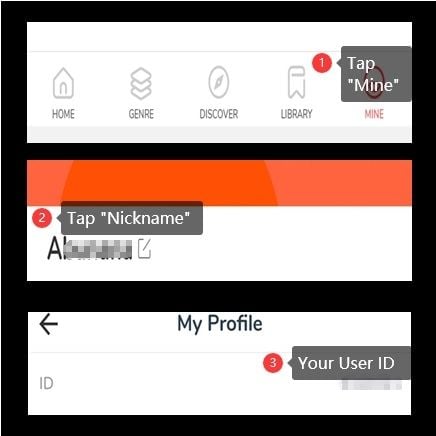
To process a direct recharge on BitTopup, you only need your unique numeric MangaToon Player ID (also referred to as User ID). You do not need to share your password or social media login.
Steps to Locate Your Player ID:
- Open the MangaToon app on your iOS or Android mobile device.
- Tap the Mine (or Profile) icon in the bottom-right corner of the main navigation bar.
- Look beneath your display avatar and nickname near the top of the profile screen.
- Locate your User ID / Player ID (a series of numbers).
- Tap the copy icon next to the number, or write it down carefully to enter during checkout.
Step-by-Step: How to Recharge MangaToon Coins on BitTopup
BitTopup provides a streamlined ordering process designed for quick digital processing. Follow these steps to complete your top-up:
- Select Coin Denomination: Browse the available coin packages on this page and choose the amount that fits your reading plans.
- Enter Your Player ID: Input your numeric MangaToon User ID into the designated field. Double-check the digits to ensure accurate delivery.
- Proceed to Checkout: Click Buy Now to review your order details on the secure checkout screen.
- Select Payment Method: Choose from the available local or international payment options listed at checkout.
- Confirm and Receive: Complete your payment. Once confirmed, the system delivers the coins directly to your MangaToon account balance.
Sending Coins to a Friend: You can easily gift coins to fellow readers. Simply enter your friend's MangaToon Player ID in the ID field instead of your own. Once the order completes, the coins deposit straight into their account balance.
Benefits of Recharging MangaToon Coins on BitTopup
- ID-Only Direct Recharge: Your account security remains intact. BitTopup requires only your public Player ID—never your email password, Google login, Facebook credentials, or Apple ID.
- Transparent Checkout Pricing: View competitive coin values and live checkout calculations without hidden maintenance fees.
- Broad Global and Local Payment Options: BitTopup supports diverse regional payment channels, digital wallets, and cards on the live checkout interface.
- Rapid Automated Processing: Digital orders initiate immediately upon payment validation, minimizing waiting times so you can resume reading.
- Dedicated 24/7 Customer Service: Reach our support team anytime via live chat or ticket assistance if you have questions regarding your order status or Player ID entry.
Troubleshooting Common MangaToon Coin Recharge Issues
If your coins do not reflect in your balance immediately after completing payment, follow these verification steps:
1. In-App Synchronization Delay
The MangaToon mobile application caches local profile data. If your balance shows previous totals:* Swipe down on the Mine / Profile screen to force a balance refresh.* Completely close the MangaToon application from your recent apps switcher and reopen it.* Check your network connection to confirm the app can reach MangaToon servers.
2. Verify Account Login Type
If you have multiple MangaToon profiles (e.g., Google login, Facebook login, or Guest account), verify that you are currently logged into the exact profile corresponding to the Player ID you entered during checkout.
3. Clearing App Cache
Accumulated temporary cache files can prevent the app from displaying updated wallet balances:* Open the MangaToon app Settings menu.* Tap Clear Cache.* Restart the app and check your coin balance.
4. Player ID Verification
If the coins still have not appeared after 15 minutes, check your BitTopup order receipt to ensure there was no typo in the Player ID submitted. Contact BitTopup 24/7 support with your order number and Player ID for rapid verification.
MangaToon Top-Up FAQ
Where can I find my MangaToon Player ID?
Open the MangaToon app, tap the Mine tab in the bottom-right corner, and locate your numeric User ID directly beneath your profile picture and nickname.
Do I need to provide my MangaToon password to recharge coins?
No. BitTopup uses an ID-only direct delivery system. You never need to share passwords, verification codes, or third-party linked accounts.
How quickly will MangaToon Coins be credited to my account?
Top-ups are processed automatically after payment confirmation. Coins typically reflect in your MangaToon balance within minutes.
What should I do if my MangaToon Coins do not appear after payment?
First, refresh the Mine profile tab inside MangaToon or restart the application. If your balance still does not update, check your order status on BitTopup and reach out to our 24/7 customer support team with your order ID.
Can I recharge MangaToon Coins for another user or friend?
Yes. Enter your friend's MangaToon Player ID into the order field during checkout. The purchased coins will credit directly to their profile.
Do MangaToon Coins expire after purchase?
Paid MangaToon Coins credited to your account balance remain valid until consumed. Unlike promotional daily vouchers, purchased coins do not carry short daily expiration dates.