

KALEOZ Gift Card (EU) Top Up: Overview and Supported Denominations
A KALEOZ Gift Card (EU) is a prepaid digital voucher used to reload your balance on the KALEOZ gaming marketplace. It allows players across the European Union and compatible international regions to fund their accounts securely without linking personal bank accounts or credit cards directly to seller transactions.
Once redeemed, the entire Euro (EUR) value of the card is credited directly to your KALEOZ account balance. You can use this balance to purchase in-game items, top up mobile and PC titles, buy digital gift cards, or acquire game keys offered across the platform.
Supported EUR Denominations and Availability
BitTopup provides multiple EUR denominations to fit your specific budget and purchase goals. Available balance amounts update dynamically based on live inventory.
| Card Denomination (EUR) | Primary Use Case | Region Compatibility |
|---|---|---|
| 5 EUR - 10 EUR | Micro-transactions, battle passes, starter packs | European Union / EUR Account |
| 20 EUR - 50 EUR | Premium bundles, mid-tier in-game currencies | European Union / EUR Account |
| 100 EUR - 200 EUR | High-tier packages, multiple game top-ups | European Union / EUR Account |
Note: Exact live pricing and denomination availability are shown directly on the BitTopup checkout page.
How to Find Your KALEOZ Account Details and Currency Setting
Before you purchase or redeem a KALEOZ EUR gift card, verify that your account profile is configured to receive and manage EUR currency balances. KALEOZ ties balance redemptions to your account profile settings.
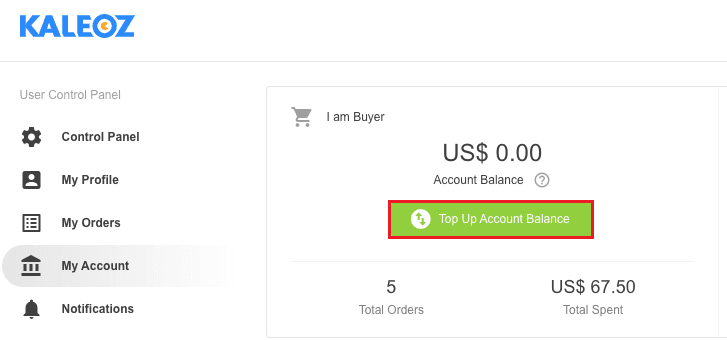
Steps to Check Your KALEOZ Account Profile
- Go to the official KALEOZ website on your browser.
- Log in using your registered email, mobile number, or connected social ID.
- Click on your profile avatar or go directly to the Control Panel / My Account section.
- View your profile overview to check your displayed Username, User ID (K-ID), and current Account Balance.
- Verify that your primary display currency or wallet balance shows EUR. If your account is locked to a non-EUR regional currency, adjust your account preferences or contact support before attempting voucher redemption.
Step-by-Step Guide: How to Redeem KALEOZ Gift Card (EU) Online
Redeeming your digital voucher code takes less than a minute. You can complete the process using either a desktop web browser or a mobile browser interface.
Desktop Browser Redemption Walkthrough
- Open your browser and log in to your official KALEOZ account.
- Click your username in the top navigation bar to open your Control Panel.
- Locate and click on the Reload Balance or KALEOZ Gift Card redemption tab in the user menu.
- Select KALEOZ Gift Card / Voucher as your payment or top-up method.
- Copy the digital code you received from your BitTopup order details page and paste it into the voucher input field.
- Click Confirm or Redeem. Your account balance will reflect the credited EUR funds instantly.
Mobile Browser Redemption Walkthrough
- Open your preferred mobile browser and go to the KALEOZ homepage.
- Log in to your account.
- Tap the Menu icon (three horizontal lines) or your profile icon at the top of the screen.
- Tap My Account, then select Top Up / Redeem Voucher.
- Enter your digital EUR code carefully, ensuring no extra trailing spaces are included.
- Tap Submit to finalize the balance reload.
Account Currency Compatibility and EUR Region Restrictions
KALEOZ enforces currency compatibility rules to protect buyers and sellers across regional markets. Understanding these rules ensures a smooth top-up experience.
EUR Currency Locking
KALEOZ Gift Cards issued in EUR are designed strictly for accounts that support or default to Euro transactions. If your KALEOZ profile is locked to an incompatible fiat currency (such as USD, MYR, IDR, or PHP), the system may reject the voucher during checkout or balance reload.
- Check Currency Settings: Ensure your account currency is set to EUR before redeeming.
- No Automatic Cross-Currency Conversion: KALEOZ does not automatically convert regional prepaid cards across incompatible currency wallets at the redemption prompt.
Troubleshooting Common Redemption Errors
- "Currency Mismatch / Unsupported Region": This error occurs when attempting to apply an EU voucher to a profile registered under a non-EUR country zone. Set your regional preferences to EUR or register a compatible EUR profile.
- "Invalid PIN / Code Not Found": Verify that you did not accidentally copy extra spaces before or after the code. Digital codes are case-sensitive; copy and paste directly from your BitTopup order history.
- "Code Already Redeemed": Refresh your account balance page. If the balance did not update, log out and log back in to clear cached wallet figures.
Validity Period, Expiration Rules, and Non-Refundable Balance Policies
- Digital Code Validity: BitTopup recommends redeeming your KALEOZ Gift Card (EU) immediately upon purchase to ensure rapid verification and balance safety.
- Wallet Balance Expiration: Once successfully credited to your KALEOZ account, the EUR balance remains available according to KALEOZ terms of service and does not face rapid expiration.
- Non-Refundable Policy: Digital voucher codes cannot be cancelled, refunded, or exchanged once delivered and accessed. Ensure you have selected the correct region (EU) and desired EUR denomination before finalizing your BitTopup checkout.
- Non-Transferable Funds: Once loaded onto a specific KALEOZ profile, balance amounts cannot be transferred directly to another user account.
Why Buy KALEOZ Gift Cards on BitTopup
BitTopup provides a direct, secure pathway for gamers to recharge their marketplace balances with complete peace of mind.
- No Account Password Required: BitTopup only delivers digital voucher codes directly to your screen and account order page. You never have to share your KALEOZ login credentials, passwords, or authentication codes.
- Direct Code Delivery: Retrieve your purchased EUR voucher codes instantly from your BitTopup order history screen as soon as transaction processing completes.
- Secure Payment Channels: Choose from trusted European and international payment methods with encrypted, protected transaction workflows.
- Clear Pricing: Review exact rates on the live checkout screen with full transparency before payment confirmation.
- Dedicated Customer Support: Access prompt support assistance if you have questions regarding your order status or code retrieval.
Frequently Asked Questions About KALEOZ Gift Card (EU)
How do I redeem my KALEOZ Gift Card (EU)?
Log in to your KALEOZ account on desktop or mobile, open the Control Panel, select the KALEOZ Gift Card reload option, enter the digital voucher code provided by BitTopup, and confirm to update your EUR balance instantly.
Can I use a KALEOZ EU Gift Card if my account currency is not EUR?
No. KALEOZ Gift Cards issued in EUR require your KALEOZ account to be compatible with Euro balance redemptions. Attempting to redeem an EU card on an account restricted to another currency may result in a currency mismatch error.
Will my KALEOZ Gift Card digital code expire?
While unused prepaid digital codes maintain validity over a standard operational period, we recommend redeeming your code immediately upon purchase to safeguard your funds and update your wallet balance without delay.
Can I refund or transfer my KALEOZ account balance after redeeming?
No. Once a digital voucher code has been redeemed, the funds are permanently credited to that specific KALEOZ account. Wallet balances cannot be refunded into cash or transferred directly between separate KALEOZ accounts.
Where will I receive my digital KALEOZ Gift Card code after purchase?
Your digital voucher code is displayed directly on the BitTopup order confirmation screen right after your payment succeeds. You can also review and copy your code at any time by visiting your BitTopup order history.
What can I purchase with my KALEOZ account balance?
You can use your redeemed KALEOZ EUR balance to buy any eligible digital products on the KALEOZ marketplace, including in-game top-ups, game keys, gift cards, virtual items, and account services offered by verified sellers.