



Last Ultima Coupons Recharge: What Are In-Game Coupons and How They Work in 2026
Last Ultima is a next-generation fantasy action MMORPG developed for mobile and PC platforms. In the game economy, Coupons serve as the universal direct-recharge currency. Unlike standard free currencies earned through quests, Coupons hold a direct 1:1 equivalent value with cash recharge packs inside the in-game Mall.
Many web searches confuse Last Ultima Coupons with physical supplement promo codes. In Last Ultima, Coupons are digital voucher credits tied directly to your gaming account. When you recharge Coupons, you gain the freedom to purchase any in-game pack, monthly pass, growth fund, or Diamond bundle without needing to initiate individual payment transactions each time.
In-Game Utility of Last Ultima Coupons
- Direct Diamond Conversion: Exchange Coupons directly for Diamonds to spend on limited-time summons, gear refinement, and cosmetic wings.
- VIP Privilege Progression: Every Coupon credited to your account counts toward your VIP tier progression, unlocking permanent combat stat boosts and daily privilege reward chests.
- Event Bundle Purchases: Spend Coupons directly during weekly cross-server events to obtain exclusive mount skins, divine artifacts, and high-tier skill books.
- Flexible Pack Activation: Hold Coupons in your in-game balance to immediately buy flash sale bundles or daily discount chests as soon as game events rotate.
| Coupon Tier | Typical In-Game Application | VIP Experience Contribution |
|---|---|---|
| 60 - 300 Coupons | Daily supply packs, basic summon cards, stamina potions | Direct 1:1 VIP Point credit |
| 680 - 1980 Coupons | Weekly growth packs, monthly privilege cards, mount upgrades | Full tier milestone progression |
| 3280 - 6480 Coupons | Limited summon events, mythical artifact chests, high-tier wings | Major VIP tier unlock |
How to Find Your Last Ultima Character UID and Server ID
To ensure your Last Ultima Coupons recharge reaches your exact character without delay, you need your unique numeric User ID (UID) and your assigned server name.
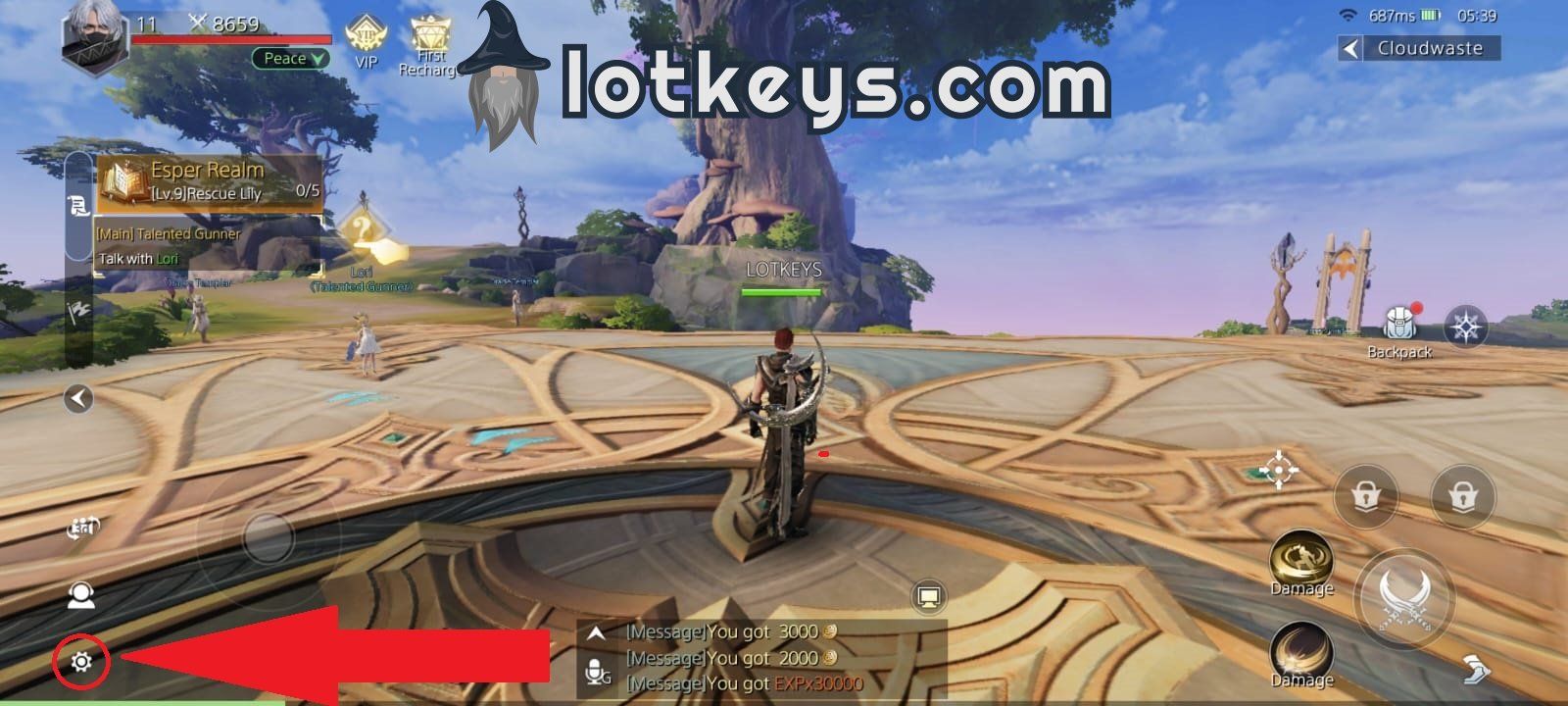
Step-by-Step UID Retrieval:
- Open the Last Ultima application on your mobile device or emulator.
- Log into your active game server.
- Tap your Character Avatar located in the top-left corner of the primary gameplay screen.
- In the profile popup window, locate your Character Name, Server Name (such as US-S10 or EU-S4), and the numeric UID.
- Tap the small Copy icon next to the UID number to copy it directly to your clipboard.
Double-check your Server ID before placing an order. Because characters are server-locked, providing the wrong server can cause delivery delays.
Step-by-Step Guide: How to Recharge Last Ultima Coupons on BitTopup
BitTopup provides a direct, secure ordering flow designed to deliver your Last Ultima Coupons within moments of purchase.
- Select Your Coupon Package: Review the available Last Ultima Coupon packages on this page and pick the quantity that matches your in-game goals.
- Provide Account Information: Enter your numeric Character UID and choose your active Server from the selection options. No passwords or login credentials are required.
- Review Order Details: Confirm that your UID and server match your active character profile.
- Select Payment Method: Choose from our wide selection of regional and global payment options.
- Complete Checkout: Finalize your order. Once payment is confirmed, the system processes your recharge directly to your game account.
How to Redeem Coupons in the Last Ultima Game Client
Once your BitTopup transaction is marked completed, the Coupons are credited directly to your character. You do not need to enter lengthy alphanumeric gift codes.
Activating Your Purchased Coupons:
- Log into Last Ultima on the server specified during your BitTopup order.
- Open your in-game Mailbox by clicking the envelope icon on your HUD. If delivered via direct balance credit, check your balance directly in the Mall.
- If sent via in-game mail, tap Claim All to transfer the Coupons into your character's voucher inventory.
- Navigate to the in-game Mall or Recharge Store.
- Select any Diamond pack, Privilege Card, or Event Gift Box. When prompted for payment, select Coupons as your primary payment currency.
- The cost will deduct from your Coupon balance, and the purchased items and VIP EXP will credit to your account immediately.
Safe and Secure Recharge Methods Without Account Passwords
Account safety is critical when purchasing game top-ups online. BitTopup uses direct API and UID-based processing methods that never require your account password, email login, or social login credentials.
Why UID-Only Top Up Is the Safest Option:
- Zero Risk of Account Compromise: Because you never share passwords or authentication tokens, your private personal data remains completely protected.
- No Account Sharing Violations: Logging into another user's account from foreign IP addresses can trigger automatic anti-cheat bans. UID top-ups avoid this risk entirely by operating as authorized direct credits.
- Encrypted Transactions: Every transaction processed on BitTopup uses industry-standard TLS encryption protocols to protect your payment details at every checkout step.
Supported Payment Options and Global Currency Processing on BitTopup
BitTopup supports players across multiple regions by offering a diverse selection of localized and international payment channels.
- Live Catalog Pricing: Real-time exchange rates and localized pricing are calculated automatically at checkout based on your selected region and currency.
- Multiple Payment Channels: Choose from major global credit/debit cards, regional e-wallets, direct bank transfers, and convenient digital payment solutions.
- Multi-Currency Support: Pay in your local currency without worrying about excessive cross-border conversion fees.
- Dedicated 24/7 Support: If you ever have a question about currency conversion or order processing, our international customer service team is available around the clock to assist you.
Troubleshooting Missing or Delayed Coupon Deliveries
While most recharges process immediately, technical delays can occasionally occur due to game server maintenance or network congestion. Use the following checklist if your balance does not update right away:
- Restart the Game Client: Completely close Last Ultima and relaunch the app. This forces the client to synchronize its local cache with the live server database.
- Check Your In-Game Mail: Some promotional packages and recharge confirmations are delivered through the in-game system mail rather than direct bag balance.
- Verify Server and UID: Check your BitTopup order receipt to confirm that the numeric UID and Server entered match your active character.
- Check In-Game Mail Capacity: If your mailbox has reached its maximum message limit, delete old system notices to make room for new delivery messages.
- Contact Customer Support: If your order status shows completed but items have not arrived after 15 minutes, reach out to BitTopup Customer Support with your Order ID and UID. Our team will verify the transaction status with the network provider.
Last Ultima Coupons Recharge FAQ
What are Last Ultima Coupons used for?
Last Ultima Coupons are premium voucher currencies that act as a substitute for direct cash payments inside the game Mall. You can spend Coupons to purchase Diamonds, Monthly Cards, Growth Funds, VIP levels, and special event gift boxes.
How do I redeem my Last Ultima Coupons in-game?
Once the recharge is processed to your UID, open Last Ultima, claim any delivery mail if prompted, and open the in-game Mall. Select the pack you want to buy and choose your Coupon balance to complete the purchase.
Do I need to share my password to recharge Last Ultima Coupons?
No. BitTopup only requires your numeric Character UID and your Server ID. You should never share your account password or third-party login credentials with anyone.
How long does it take for Last Ultima Coupons to arrive after purchase?
Recharges typically arrive within a few minutes after payment verification. During peak server events or maintenance windows, delivery may take slightly longer.
What payment methods are supported for Last Ultima recharges?
BitTopup supports a broad array of payment methods including credit/debit cards, regional e-wallets, online banking, and localized digital payment options. Check the live checkout page to see all options available for your country.
What should I do if my Last Ultima Coupons do not appear in my account?
First, restart the game client to refresh your balance. If the Coupons still do not show, verify that your mailbox is not full, then contact BitTopup 24/7 customer support with your order number for prompt investigation.