




Nike Gift Card (US) Top Up: Digital Codes for Gear and Kicks
Equip yourself with the latest drops, performance sportswear, and iconic footwear across Nike platforms. A digital US Nike Gift Card provides a secure, straightforward method to fund purchases on Nike.com, the Nike App, the SNKRS App, and Converse.com within the United States. Whether you are aiming for high-demand SNKRS releases or upgrading your training apparel, using a digital voucher eliminates credit card friction at checkout.
BitTopup provides authentic digital gift card codes delivered directly to your account dashboard and email. You maintain full security over your personal login credentials while enjoying fast code access.
How to Buy and Recharge Nike Gift Card (US) Online
Securing your digital gift card through BitTopup takes only a few steps. Follow this process to complete your purchase:
- Select Denomination: Choose your desired card value from the available denominations listed on the live checkout page.
- Confirm Region: Ensure you are purchasing the United States (US) region card. These vouchers function exclusively within US-based stores and regional accounts.
- Provide Delivery Information: Enter the email address where you want to receive your redemption voucher.
- Complete Payment: Finalize your transaction using our secure checkout system.
- Retrieve Your Digital Code: Once processed, your 16-digit card number and 6-digit security code (PIN) will appear in your order history and be sent to your email.
How to Locate and Redeem Your Digital Nike Gift Card Code
When purchasing digital vouchers, you do not need to provide your Nike account password. Your order confirmation contains two essential pieces of information:
- Card Number: A 16-digit numeric string.
- Card PIN / Security Code: A 6-digit alphanumeric or numeric code.
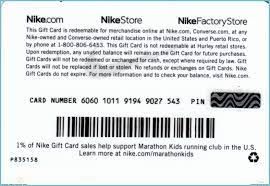
Keep both the 16-digit number and 6-digit PIN ready when placing an order on Nike platforms. You will enter these credentials directly during payment selection at checkout.
Step-by-Step Guide: How to Redeem Nike Gift Card on Nike.com, Nike App, and Converse
Redemption takes place directly in the payment section during checkout rather than pre-loading funds to a wallet balance.
Redeeming on Nike.com and Converse.com (Web Browser)
- Sign in to your Nike or Converse account (or proceed as a guest).
- Add your desired apparel, footwear, or accessories to your bag.
- Proceed to the Checkout screen and complete the shipping address details.
- In the Payment section, locate and select the checkbox or link labeled Do you have a gift card, product voucher, or promo code? (or Add Gift Card).
- Enter your 16-digit gift card number and 6-digit PIN.
- Click Apply. The card balance will automatically deduct from your order total.
Redeeming on the Nike App and SNKRS App (Mobile)
- Open the Nike App or SNKRS App on your mobile device.
- Select your items and proceed to the checkout screen.
- Tap on the Payment Method section.
- Select Add Gift Card.
- Type or paste your 16-digit card number and 6-digit PIN.
- Tap Save or Apply to deduct the balance before confirming your purchase.
Nike Gift Card (US) Regional Compatibility and Limitations
US Nike Gift Cards operate under specific geographic and platform constraints. Review the compatibility matrix below before finalizing your order:
| Platform / Storefront | US Nike Gift Card Supported? | Requirements & Limitations |
|---|---|---|
| Nike.com (US) | Yes | Requires shipping to a valid US address |
| Nike App (US) | Yes | Account region must be set to United States |
| SNKRS App (US) | Yes | Applicable on standard and raffle/draw drops |
| Converse.com (US) | Yes | Valid for US orders and domestic delivery |
| Nike Retail Stores (US) | Yes | Present digital barcode/PIN at register |
| International Nike Sites | No | Incompatible across different currencies/regions |
| Nike Clearance/Employee Stores | Varies | Check specific US store policy prior to visit |
How to Check Your Nike Digital Gift Card Balance
You can verify the remaining balance on your card at any time without initiating a purchase:
- Visit the official Nike website balance check tool (Nike.com/gift-cards).
- Scroll down to the Check Your Balance module.
- Enter your 16-digit card number.
- Enter your 6-digit security code (PIN).
- Click Check Balance to display the remaining US dollar value immediately.
Alternatively, during online checkout on Nike.com, entering your credentials and clicking Apply will show the exact card value available before you confirm your order.
Can You Reload or Add Funds to an Existing Nike Gift Card?
Nike digital gift cards cannot be reloaded with additional funds once their balance is depleted. The card number is generated for a single allocated credit value. If you need more funds to complete an order or want to prepare for future releases, purchase a new digital gift card code on BitTopup and apply it alongside your existing balance at checkout.
Payment Rules: Combining Nike Gift Cards with Credit Cards and Promo Codes
Nike offers flexible checkout rules when using gift card balances:
- Multiple Gift Cards: You can apply up to ten (10) separate Nike gift cards on a single online order.
- Split Payments: If your gift card does not cover the complete order total, you can pay the remaining balance using an accepted credit card, debit card, PayPal account, or Apple Pay.
- Promotional Codes: You can combine digital gift cards with valid promotional discount codes. The promo code applies first to discount the order subtotal, and the gift card covers the remaining amount.
- Excess Balance: If your gift card balance exceeds the order total, the remaining funds stay on that same card number and PIN for future purchases.
Troubleshooting Common Nike Gift Card Redemption Issues and PIN Errors
If you encounter an error when applying your code, verify the following details:
- PIN Discrepancy: Ensure there are no spaces or extra characters when copying the 6-digit security code.
- Region Mismatch: Confirm that your browser or app is set to the US storefront (
nike.com/usor US App Store region). US gift cards will display an invalid error if used on European, Canadian, or other international portals. - Card Number Formatting: Verify that all 16 digits are entered sequentially without dashes or special characters.
- Zero Balance Display: Check your balance via the official Nike balance checker to confirm previous transactions did not exhaust the funds.
- Session Timeouts: If a raffle or checkout crashes on SNKRS, wait 15–30 minutes for any reserved balance holds to clear before attempting to re-apply the card.
Why Choose BitTopup for Your Nike Gift Card (US)
- Account Security: We never ask for your personal Nike account passwords or private credentials. You receive an independent voucher code to redeem yourself.
- Fast Digital Delivery: Codes are generated and delivered directly to your BitTopup profile and email inbox without unnecessary processing delays.
- Reliable Global Payments: Choose from diverse payment methods suited for domestic and international buyers seeking US vouchers.
- 24/7 Dedicated Support: Our customer support team is available around the clock to assist with order verification and delivery inquiries.
Frequently Asked Questions
Can you add more money to an existing Nike gift card?
No. Nike gift cards are non-reloadable. Once the card balance reaches zero, the card cannot have funds added back to it. To obtain more store credit, purchase a new digital gift card on BitTopup.
Where can I use and redeem my US Nike gift card?
You can redeem your US gift card on Nike.com, the Nike App, the SNKRS App, Converse.com, and at physical Nike-owned and Converse-owned retail stores within the United States.
Does a Nike Gift Card (US) ever expire or charge maintenance fees?
No. US Nike gift cards do not have an expiration date, and Nike does not charge dormancy, inactivity, or maintenance fees against your stored balance.
Can I use a US Nike gift card on the SNKRS app and Converse.com?
Yes. The SNKRS App and Converse.com share Nike's unified US checkout system. Select gift card as your payment method and enter the 16-digit number along with the 6-digit PIN.
How do I check my Nike gift card balance?
Navigate to the gift card section on Nike.com, enter your 16-digit card number and 6-digit PIN into the balance check tool, and click Check Balance. You can also view the balance during the checkout stage.
Can I use a US Nike gift card in another country?
No. US Nike gift cards are restricted to US currency (USD) and can only be redeemed on US storefronts, apps configured to the US region, and physical US retail locations.
Can I exchange my Nike gift card for cash or refund it?
Nike gift cards cannot be redeemed for cash or refunded, except where required by specific state laws. Once a digital voucher code has been delivered, sales are final.