


How to Recharge and Buy Nike Gift Card (AT) Top Up Online in 2026
Buying an official digital voucher for Nike Austria gives you immediate access to footwear, athletic apparel, and training equipment on Nike.com and the Nike App. A Nike Gift Card (AT) top up is a flexible payment method that allows shoppers to fund their purchases without linking a personal credit card or bank account directly to their retail profile.
To purchase your digital code on BitTopup:
- Select the desired Euro (EUR) denomination for your Nike Gift Card (AT).
- Review the live order total displayed on the BitTopup product page.
- Enter your contact email address where you wish to receive the digital code.
- Complete your payment using one of the secure checkout methods available on BitTopup.
- Once processed, your 16-digit gift card number and security PIN will appear instantly in your order confirmation screen and will be sent directly to your email inbox.
BitTopup provides official digital codes that work directly within the Austrian Nike storefront, ensuring immediate access to the latest product drops and member exclusives.
Step-by-Step Guide: How to Redeem a Nike Gift Card Code in Austria
Redeeming your digital code is simple and applies directly at checkout on the official Austrian Nike website or through the mobile app.
Redeeming on Nike.com (Austria)
- Visit the official Nike Austria storefront (nike.com/at) and log in to your Nike Member account.
- Add your chosen footwear, apparel, or gear to your shopping cart.
- Proceed to the checkout page and enter your Austrian delivery address.
- At the Payment stage, check the box that says Do you have a gift card, product voucher, or promo code?
- Select Gift Card.
- Enter the 16-digit digital gift card number and the accompanying 6-digit numeric PIN.
- Click Apply. The card balance will automatically deduct from your order total.
- If your order total exceeds the gift card balance, pay the remaining amount with another accepted payment method.
Redeeming on the Nike App
- Open the Nike App on your mobile device (ensure your region setting is set to Austria).
- Add items to your bag and tap Checkout.
- Scroll down to the payment section and select Add Gift Card.
- Type in your 16-digit card number and the PIN code received from BitTopup.
- Confirm the entry to update your total before completing the order.
Locating Your Code and Understanding Account Credentials
When completing a digital voucher purchase on BitTopup, you never need to share your Nike account password, login email, or personal security credentials. Digital vouchers function as independent prepaid tender.
Your digital code consists of two vital pieces of information:- Card Number: A 16-digit unique identifier.- PIN: A 6-digit security code used to authenticate the balance during redemption.
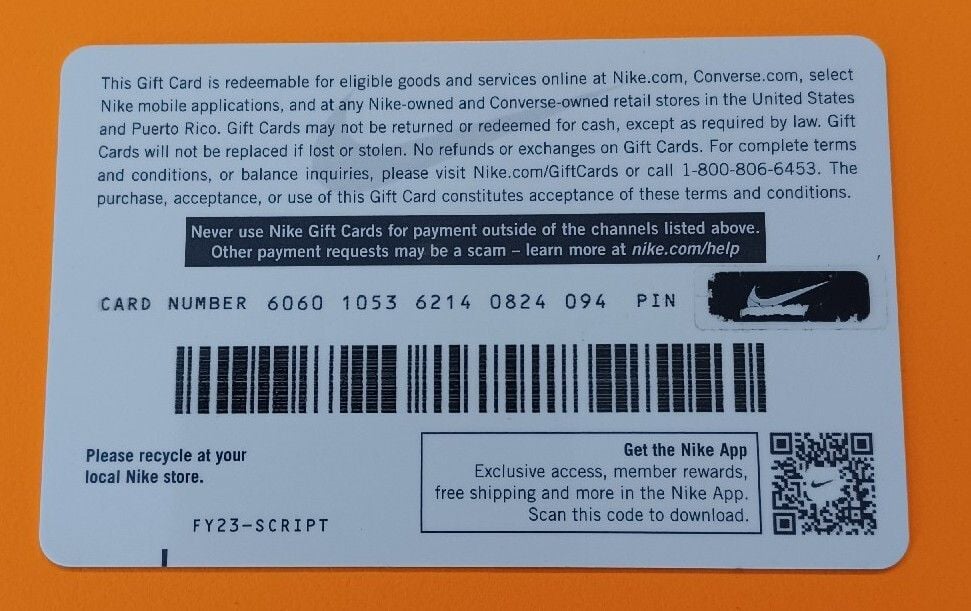
Both numbers are delivered together in your BitTopup order receipt. Keep these details secure until you apply them to your Nike checkout. BitTopup staff will never ask for your account password or your personal Nike login information.
Nike Gift Card AT Compatibility, Regional Restrictions, and Expiration Policies
Nike gift cards are region-locked and currency-specific. Before purchasing, verify that your account and shopping region match the voucher's regional specifications.
Regional Compatibility Table
| Feature | Details |
|---|---|
| Region / Country | Austria (AT) |
| Currency | Euro (EUR) |
| Redeemable Platforms | Nike.com/at, Nike App (AT Store), Official Nike Retail Stores in Austria |
| Third-Party Retailers | Not valid at partner stores (e.g., foot retail chains) |
| Expiration Date | No expiration date |
| Maintenance Fees | €0.00 (No dormancy or maintenance deductions) |
| Stacking Limit | Up to 10 gift cards per single order on Nike.com |
Usage Rules and Restrictions
- Regional Lock: The Nike Gift Card (AT) is denominated in EUR and can only be redeemed on the Austrian Nike web store, the Austrian Nike App, or at participating official Nike-owned retail and factory stores located inside Austria. It cannot be used on regional stores outside Austria (such as the US, UK, or non-EUR regional sites).
- Stacking Multiple Cards: You can combine up to 10 Nike gift cards on a single order during checkout. This allows you to split large purchases across multiple vouchers.
- Balance Rollover: If your purchase total is less than the value on your card, the remaining balance stays on your card for future orders.
How to Check Your Nike Gift Card Balance Online
You can verify the available funds on your card at any point prior to making a purchase without placing an active order:
- Go to the official Nike Austria Balance Checker tool at
nike.com/at/help/a/check-gift-card-balance. - Enter your 16-digit gift card number.
- Enter the 6-digit PIN.
- Click Check Balance.
- The system will display the exact remaining Euro balance on the screen instantly.
Accepted Payment Methods for Instant Digital Delivery on BitTopup
BitTopup offers a direct, secure purchasing channel for digital vouchers. Live prices, applicable currencies, and current exchange rates are displayed dynamically at the live checkout stage.
Why choose BitTopup for your voucher order:- Instant Delivery: Digital codes are generated and sent immediately upon payment confirmation.- Complete Privacy: No Nike login credentials, passwords, or account linking required.- Verified Codes: Every voucher is sourced to ensure 100% validity on the Austrian Nike storefront.- Flexible Checkout: A wide range of international and local payment options are supported directly on the checkout screen.
Common Nike Gift Card Redemption Errors and Troubleshooting
If you experience an issue when applying your code on Nike.com or the Nike App, review these common troubleshooting steps:
1. Invalid Card Number or PIN Alert
- Spacing and Typos: Ensure you do not add extra spaces before, between, or after the 16 digits. Copy-pasting directly from your BitTopup receipt prevents mistyping.
- Number Confusion: Check that numbers like
0(zero) and letters likeOare not swapped. The PIN code contains numbers only.
2. Regional Mismatch Error
- Store Location: Check the bottom of the Nike website or your app settings to confirm your browsing region is set to Austria (Österreich). If your store is set to Germany, France, the US, or the UK, the Austrian EUR card will return a regional mismatch error.
3. Promo Code vs. Gift Card Box
- Ensure you are entering your details in the Gift Card payment section, not the Promo Code / Voucher Code field. Promo code boxes are reserved for temporary percentage-off promotional discounts, while gift cards represent prepaid funds entered under Payment options.
4. Technical Checkout Glitches
- Clear your web browser cache and cookies, or attempt redemption using an incognito window if the page fails to update after clicking Apply.
Frequently Asked Questions About Nike Gift Card (AT)
Can I reload or add more money to an existing Nike gift card?
Digital Nike gift cards cannot be topped up or reloaded with additional funds once their initial balance is depleted. To add more purchasing power to your Nike shopping balance, purchase a new Nike Gift Card (AT) voucher code on BitTopup and apply it at checkout.
Can I use a Nike Gift Card (AT) outside of Austria?
Nike Gift Cards are region-specific. An Austrian (AT) voucher can only be used on the Austrian version of Nike.com, the Nike App set to Austria, or in official brick-and-mortar Nike retail stores located within Austria. It cannot be redeemed on international Nike storefronts with different currencies or regional divisions.
How do I redeem my Nike digital gift card on Nike.com or the Nike app?
During step 2 (Payment) of checkout, select the Gift Card option. Type in your 16-digit card number and 6-digit PIN, then click Apply. The amount will deduct from your total. You can pay any remaining balance using a secondary payment method.
Do Nike gift cards for Austria expire or carry maintenance fees?
Nike gift cards issued for Austria do not have an expiration date and carry zero maintenance, dormancy, or service fees. Your balance remains available until fully spent.
Can I convert my Nike gift card to cash or use it at third-party retailers like Footlocker?
Nike gift cards cannot be redeemed for cash or refunded, except where mandated by local consumer law. They can only be used directly through official Nike distribution channels (Nike.com, Nike App, and official Nike-owned stores) and are not valid at independent or third-party sneaker and sporting goods retailers.
What should I do if my Nike gift card code or PIN is invalid?
First, double-check that you are on the Austrian Nike storefront (nike.com/at) and that the 16 digits and 6-digit PIN are entered without extra spaces. If the issue persists, check your balance using the official Nike balance verification page. For assistance regarding your purchase delivery, contact BitTopup customer support with your order number.