

Nova Fantasy Gold Ingots Top Up Overview and In-Game Value
Nova Fantasy is an anime-themed mobile fantasy action MMORPG centered on dynamic skill combat, hero recruiting, pet cultivation, and open-world dungeon raids. Nova Fantasy is a distinct mobile game and should not be confused with unrelated titles such as Fantasy Life or community-modded items in sandbox building games.
Gold Ingots serve as the core premium currency in Nova Fantasy. Having an ample supply of Gold Ingots gives you a continuous advantage across all game modes, helping you strengthen your character and maintain high battle ranking (BR):
- Summoning Banners: Draw top-tier heroes, rare battle companions, elemental spirits, and exclusive mounts to build powerful team compositions.
- Equipment Refinement: Purchase refinement stones, enhancement charms, and breakthrough crests to upgrade weapon stats without risking downgrade penalties.
- Cosmetics & Wardrobe: Unlock limited-edition outfits, weapon skins, customized wings, and glowing title badges.
- Growth & Privilege Passes: Activate monthly progression cards, Starlight passes, and VIP tiers for daily resource claim bonuses.
- Auction House Trading: Bid on rare boss crafting blueprints, high-grade skill tomes, and tradeable materials posted by other players.
- Daily Energy & Raid Resets: Reset daily dungeon attempts and refresh stamina to accelerate level progression.
How to Recharge Nova Fantasy Gold Ingots on BitTopup
Recharging your Gold Ingots online through BitTopup is quick, direct, and secure. Follow this step-by-step process:
- Choose Your Ingot Package: Review the available Gold Ingot amounts displayed on the product catalog above and pick the tier you need.
- Enter Character Credentials: Provide your numerical Nova Fantasy User ID (UID) and choose your active Game Server.
- Confirm Details: Verify that the server and UID match your in-game profile to prevent delivery errors.
- Proceed to Checkout: Select your preferred payment option from the live checkout interface and complete the transaction.
- Check In-Game Balance: Once the order status updates to completed, open Nova Fantasy to find your Gold Ingots credited directly to your character.
How to Find Your Nova Fantasy User ID and Game Server
To ensure your recharge reaches the correct character profile, copy your exact User ID and confirm your server code directly inside the game:
- Open Nova Fantasy on your mobile device and log in to your account.
- Tap your Character Avatar located at the upper-left corner of the main gameplay screen.
- Open the Basic Info / Profile tab.
- Locate your numerical UID displayed beneath or next to your character name.
- Tap the Copy icon next to your UID to save it to your clipboard.
- Check your Server Name / Server ID, which is listed on the profile screen and the opening server select gate.
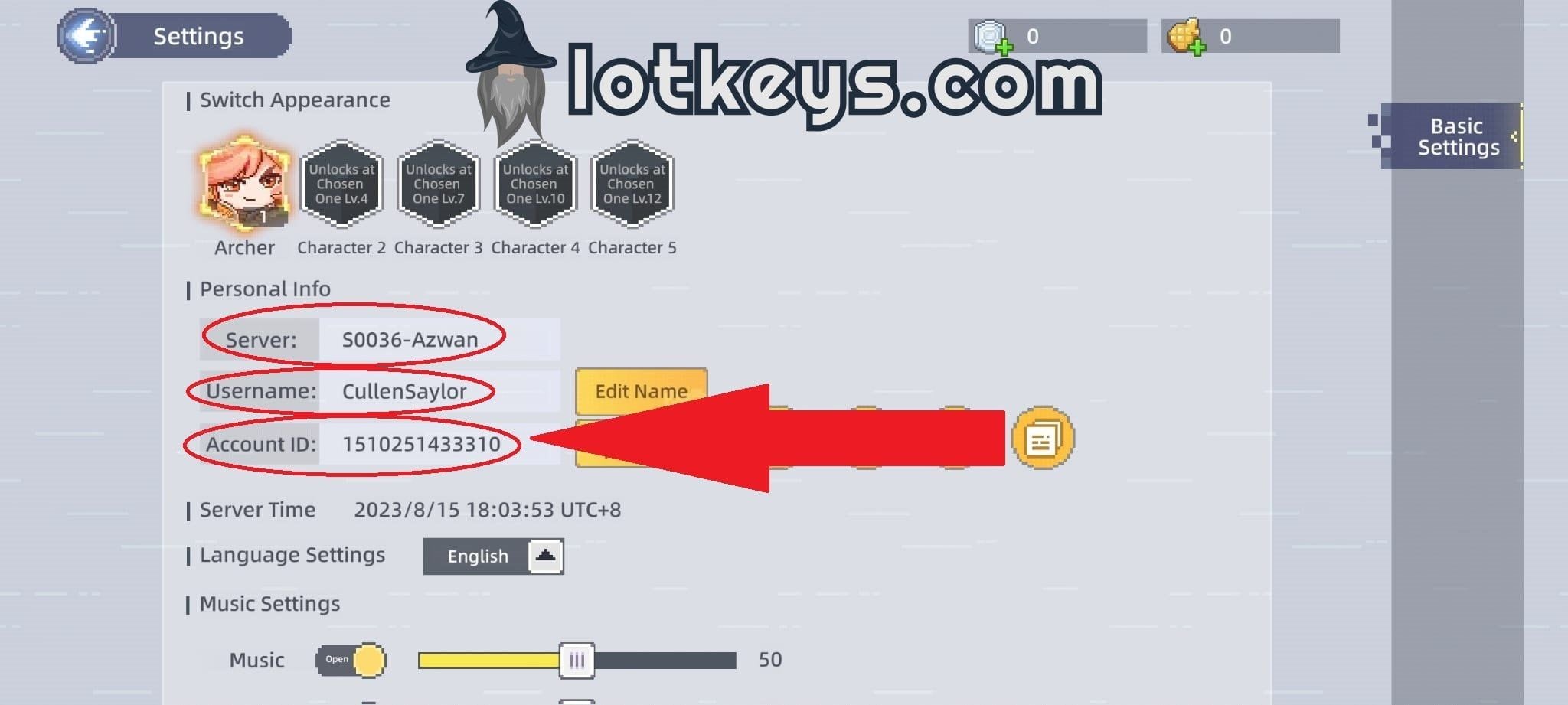
Always copy and paste your UID directly into the order field to eliminate typing mistakes.
Gold Ingot Tiers and Recommended In-Game Allocation
Different Gold Ingot bundles support specific progression goals in Nova Fantasy. Live prices for each package are updated continuously on the BitTopup checkout catalog.
| Package Tier | Primary Purpose | Best In-Game Application |
|---|---|---|
| Starter Bundles (60 - 300 Ingots) | Daily upkeep | Stamina refreshes, daily bounty resets, basic crafting reagents |
| Medium Packs (680 - 1,980 Ingots) | Steady progression | Monthly privilege cards, weekly progression chests, battle pass unlock |
| Advanced Packs (3,280 - 6,480 Ingots) | Event focus | Limited summon banners, pet evolution catalysts, high-grade refinement |
| High-Tier Bundles (12,800+ Ingots) | Competitive endgame | VIP ranking milestones, exclusive auction bids, legendary mount unlocks |
First-purchase double rewards and in-game top-up rebate events are handled by Nova Fantasy servers and apply automatically to your character if eligible.
Account Safety: Why Direct UID Recharge Protects You
Security is paramount when buying digital game currencies. BitTopup processes your Nova Fantasy Gold Ingots order using only your public User ID and Server selection:
- No Password Required: You never have to share your game password, linked Google/Apple login credentials, or SMS verification codes.
- No Account Sharing: Your account remains strictly in your hands, eliminating the risk of unauthorized device logins or account theft.
- Full Terms of Service Compliance: Direct UID recharges route through standard balance crediting channels, protecting your account from third-party login flags or ban penalties.
Server Compatibility and Region Guidelines
Nova Fantasy hosts separate servers across global, regional, and Southeast Asian (SEA) clusters. Keep the following operational rules in mind:
- Server-Specific Balances: Character progression and Gold Ingot balances are locked to the specific server where your character was created. A UID on Server 1 cannot access currency delivered to Server 2.
- Cross-Border Purchasing: You can place an order from any country regardless of where your game server is hosted. BitTopup handles currency conversion smoothly during checkout.
- Multiple Characters on One Account: If you have characters across multiple servers under the same login, ensure you select the server where your active character lives before placing your order.
Troubleshooting Delayed Delivery and Balance Verification
If your payment completes but your Gold Ingots do not appear immediately in your account, follow these diagnostic steps:
- Restart the Game Client: Force-close Nova Fantasy completely and reopen the app. A fresh login forces the client to synchronize its balance with the game server.
- Inspect the In-Game Mailbox: Certain event top-up packs, first-time recharge bonus boxes, and VIP reward tokens are delivered via system mail rather than added directly to your HUD counter.
- Verify UID Accuracy: Double-check your BitTopup order receipt to confirm that the server and UID entered match your active character profile.
- Check BitTopup Order Status: Visit your BitTopup account dashboard to ensure your payment has settled.
- Contact 24/7 Support: If your balance does not update within a few minutes after restarting, reach out to BitTopup customer support with your Order ID and a screenshot of your in-game profile for rapid assistance.
Frequently Asked Questions
Where can I find my Nova Fantasy User ID and Server?
Tap your character avatar in the upper-left corner of the main screen. Your numeric UID is visible in the profile summary window. Tap the copy icon next to the number. Your server name appears on the profile screen and the initial game start gate.
What can I buy with Gold Ingots in Nova Fantasy?
You can spend Gold Ingots on hero summons, pet awakening items, equipment refinement stones, seasonal wardrobe sets, auction house goods, daily dungeon resets, and premium progression passes.
Do I need to provide my account password to recharge Nova Fantasy Gold Ingots?
No. Recharging on BitTopup requires only your public User ID and Server name. You never need to share passwords, email logins, or security codes.
How long does it take for Gold Ingots to appear in my account?
Orders are dispatched immediately through direct server crediting once your payment is confirmed. Most recharges reflect in your account within moments. Restarting your game client will refresh your balance.
What should I do if I entered the wrong User ID or Server?
If your order has not yet been processed, reach out to BitTopup 24/7 customer support immediately with your order number and the correct UID/Server. Once an order is fully processed and delivered to an existing account on that server, digital currency deliveries cannot be undone.
Is Nova Fantasy Gold Ingot recharge available for all regional servers?
Yes. BitTopup supports Nova Fantasy players across all active global and regional game servers. Simply select your server name and enter your UID during checkout.