




Revelation Mobile Jade Malaysia Top Up: Fast & Secure Role ID Recharge
Power up your character in Revelation Mobile with direct Divine Jade top ups on BitTopup. Divine Jade is the core premium currency in Revelation: Infinite Journey, required to summon rare Familiars, purchase exclusive fashion outfits and wings, unlock battle passes, and acquire essential progression materials.
BitTopup provides a direct Role ID top up service designed specifically for players in Malaysia. You never need to share your account login credentials, passwords, or link external social media accounts. Simply input your in-game Role ID, select your desired Jade package, complete your payment using your preferred Malaysian payment channel, and receive your Divine Jade directly in your in-game mailbox or account balance.
Understanding Revelation Mobile In-Game Currencies
Revelation Mobile features multiple distinct currencies. Understanding the difference between them ensures you make the right recharge decisions for your gameplay goals.
| Currency Name | How to Obtain | Primary In-Game Uses |
|---|---|---|
| Divine Jade | Direct top up via BitTopup | Limited gacha banners, exclusive fashion, rare mounts, VIP passes, currency exchange |
| Bound Jade | Quests, achievements, events, maintenance rewards | Energy refresh, daily consumables, basic enhancement stones, select shop items |
| Gold Coins / Coins | Daily activities, dungeon drops, guild events | Gear repairs, skill leveling, NPC trade, basic crafting supplies |
Divine Jade is the most versatile asset in the game. It can also be converted into Bound Jade or other resources when needed, but Bound Jade cannot be converted back to Divine Jade. Recharging Divine Jade on BitTopup gives you full purchasing freedom across all in-game shops and limited-time events.
How to Find Your Revelation Mobile Role ID
To ensure your Divine Jade arrives instantly to the correct character, you must provide your exact Role ID. Follow these steps to locate your Role ID inside the game client:
- Launch Revelation Mobile on your mobile device or PC client.
- Log into your server and select your character.
- Tap your Character Avatar / Profile Icon located in the top-left corner of the main screen.
- Open the Basic Info or Settings tab.
- Locate the Role ID (a unique string of numbers) displayed below your character name.
- Tap the Copy icon next to your Role ID to copy it to your clipboard.
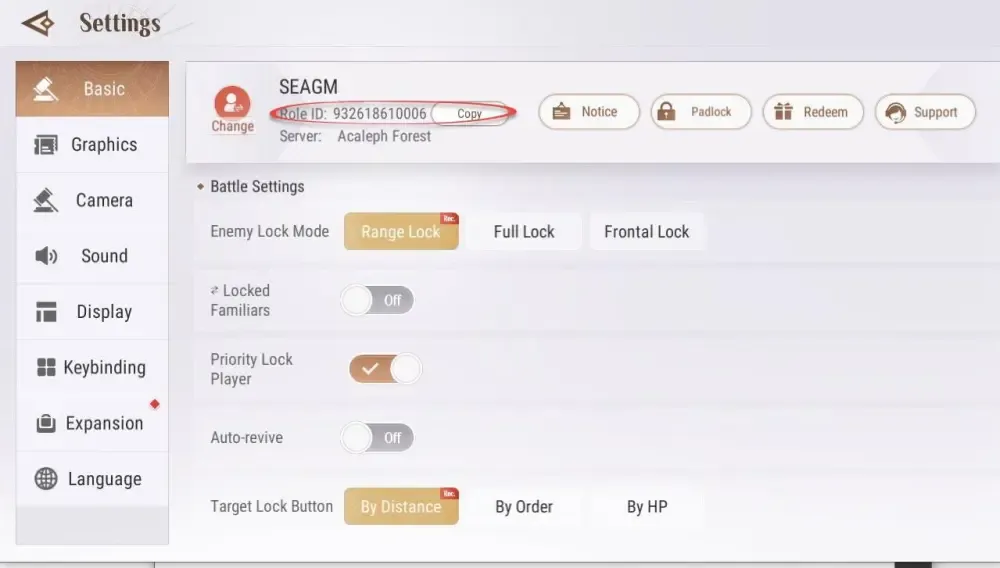
Double-check that you have selected the correct character if you maintain multiple characters across different servers on the same account.
Step-by-Step Guide: How to Buy Revelation Mobile Jade on BitTopup
Recharging your Revelation Mobile account on BitTopup takes only a few moments. Follow this straightforward walkthrough:
- Select Your Jade Package: Choose the quantity of Divine Jade or special pack you wish to purchase from the product catalog.
- Enter Your Role ID: Paste your numeric Role ID into the required input field. Confirm the numbers are accurate.
- Proceed to Checkout: Click the Buy Now button to proceed to the secure payment screen.
- Choose Payment Method: Select your preferred Malaysian payment option (such as FPX online banking, Touch 'n Go eWallet, Boost, or credit/debit card).
- Complete the Transaction: Follow the on-screen prompts to finalize your payment.
- Receive Your Jade: Once the payment is verified, your Divine Jade will be credited automatically to your Revelation Mobile account.
Why Choose BitTopup for Revelation Mobile Recharges in Malaysia?
BitTopup is built to provide a reliable, transparent, and direct recharge experience for gamers in Malaysia. Here is what sets our service apart:
- 100% Account Safety (No Password Needed): We only require your public Role ID. We will never ask for your account password, email verification codes, or third-party login credentials. Your account remains completely under your control.
- Automated Direct Processing: Unlike peer-to-peer marketplaces where you must wait for manual sellers to respond in a chat window, BitTopup processes your order through an automated delivery system.
- Localized Malaysian Payment Methods: Pay easily using familiar local channels including FPX online banking (Maybank2u, CIMB Clicks, Public Bank, RHB, Hong Leong), Touch 'n Go eWallet, Boost, and major credit or debit cards.
- Live MYR Pricing: Check the live product list to see exact pricing in Malaysian Ringgit (MYR) with no surprise currency conversion fees at checkout.
- 24/7 Dedicated Customer Support: If you ever have a question regarding your order, our professional customer support team is available around the clock to assist you.
What Can You Buy with Divine Jade in Revelation Mobile?
Divine Jade gives you access to high-value items and premium features in the world of Revelation: Infinite Journey:
- Familiar Summons: Pull for top-tier SSR Familiars on limited-rate banners to boost your team's combat rating and elemental synergy.
- Wings & Mounts: Acquire legendary wings and celestial mounts to travel across the skies and ocean depths with enhanced flight speed.
- Fashion & Cosmetics: Stand out with seasonal outfits, hair dyes, weapon skins, and custom accessories.
- Battle Pass & Growth Funds: Unlock premium reward tracks for leveling up, completing seasonal objectives, and reaching milestone achievements.
- Refinement & Enhancement Materials: Accelerate your equipment progression with premium upgrade stones and protection charms.
Order Troubleshooting & Delivery Support
If you experience any delay or issue with your Revelation Mobile Jade recharge, review the following troubleshooting checkpoints:
- Check In-Game Mail and Refresh: In some instances, the game client requires a quick restart. Log out to the main menu, close the app completely, and log back in. Check your in-game mailbox as well as your direct Divine Jade currency counter.
- Verify Your Role ID: Check your BitTopup order confirmation receipt to verify that the submitted Role ID matches the character you are currently playing.
- Check Bank / Wallet Status: Ensure that your payment was successfully deducted from your bank account or e-wallet balance and that the transaction status shows completed.
- Contact 24/7 Support: If your Jade has not arrived after a short period, reach out to BitTopup customer support with your Order Number and Role ID. Our support team will trace the delivery status immediately.
Frequently Asked Questions
How do I find my Revelation Mobile Role ID for top up?
Open Revelation Mobile, tap your character profile picture in the top-left corner of the screen, and go to your profile info. Your Role ID is the numeric code shown under your character name. Use the copy button next to it to avoid typing errors.
Do I need to provide my Revelation Mobile password to recharge Jade?
No. BitTopup uses a direct Role ID recharge system. You only need to enter your in-game Role ID. We never ask for your password, login tokens, or social media credentials.
What is the difference between Divine Jade and Bound Jade in Revelation Mobile?
Divine Jade is the primary paid currency used for premium gacha pulls, exclusive cosmetic sets, battle passes, and auction trading. Bound Jade is an earned currency used for standard daily consumables, energy refreshes, and basic enhancement items.
How fast will the Jade be credited to my Revelation Mobile account after payment?
Orders are processed automatically once payment is confirmed. In most cases, your Divine Jade will appear directly in your account balance or in-game mailbox within moments of completing your transaction.
Which payment options are available for Revelation Mobile top up in Malaysia?
BitTopup supports a wide range of Malaysian payment methods, including FPX online banking (supported by all major Malaysian banks), Touch 'n Go eWallet, Boost e-wallet, as well as Visa and Mastercard debit/credit cards. Current options are displayed at checkout.
What should I do if I entered the wrong Role ID during checkout?
If your order has not yet been processed by the automated system, contact BitTopup 24/7 live customer support immediately with your order number and the corrected Role ID. If the order has already been successfully delivered to the submitted ID, completed digital transactions cannot be reversed, so always double-check your Role ID before confirming payment.