



Onmyoji Arena Top Up on BitTopup: Fast UID Recharge
Jade is the core premium currency in Onmyoji Arena, allowing players to purchase elite Shikigami skins, summon scrolls, Battle Passes, and limited-edition cosmetics. BitTopup provides a direct, secure Onmyoji Arena top up service designed for global players across all supported mobile platforms.
By recharging Jade through BitTopup, you never need to share your account passwords or login credentials. All transactions are completed strictly via your numeric User ID and Character Name, sending your purchased Jade balance directly to your in-game account.
How to Recharge Onmyoji Arena Jade on BitTopup
To complete an Onmyoji Arena recharge on BitTopup, follow these quick steps:
- Select Your Jade Pack: Browse the available Jade denominations on the BitTopup product page and pick the amount you need.
- Input Account Details: Enter your Onmyoji Arena User ID and Character Name in the designated input fields.
- Verify Information: Double-check your numeric ID and character name to prevent misdelivery.
- Select Payment Method: Choose your preferred payment option from the available options at live checkout.
- Complete Checkout: Finalize your payment. Once confirmed, your Jade will be processed and credited directly to your Onmyoji Arena account balance.
Jade Denominations and In-Game Utility
| Jade Pack Range | Common Uses in Onmyoji Arena | In-Game Benefits |
|---|---|---|
| 60 – 300 Jade | Daily bundles, Mystery Amulets, utility items | Quick top-ups for urgent daily summon goals |
| 680 – 1,280 Jade | Epic Shikigami skins, Battle Pass unlock | Unlocks seasonal progression and themed skins |
| 1,980 – 3,280 Jade | Legendary skins, exclusive return packs | Premium visual upgrades and special animations |
| 6,480+ Jade | Limited crossover skins, high-tier summoning events | Maximum value for major seasonal rollouts in 2026 |
Note: Exact pack costs and regional conversions are calculated in real time at checkout on the live BitTopup catalog.
How to Find Your Onmyoji Arena User ID and Character Name
Finding your account credentials in Onmyoji Arena takes only a few seconds through the in-game profile menu. Make sure to copy the correct numeric ID to ensure your Jade arrives without delay.
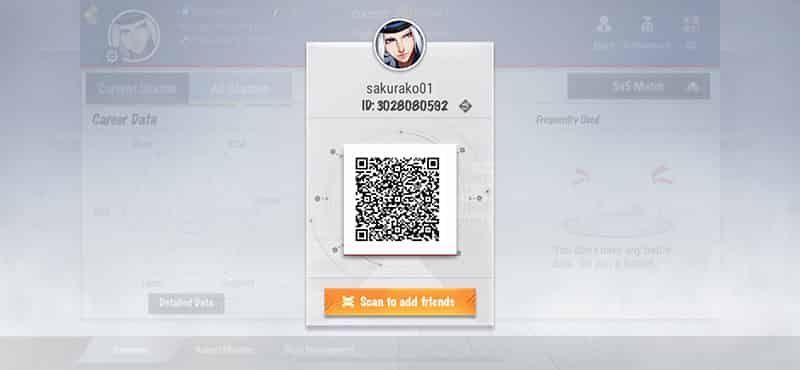
- Launch Onmyoji Arena on your device and log into your account.
- Tap your Avatar/Profile Icon located in the top-left corner of the main lobby screen.
- Stay on the Basic Info or tap the QR Code / Business Card tab on your profile page.
- Locate your Character Name displayed near the top, and your numeric User ID displayed directly below your name or avatar details.
- Copy or carefully write down the exact numeric string and name before entering them into the BitTopup checkout fields.
What Is Jade and How to Use It in Onmyoji Arena
Jade is the lifeblood of character customization and competitive progression in Onmyoji Arena. Unlike Gold or Coins earned through standard matches, Jade must be purchased and serves as the primary currency for high-value items.
1. Shikigami Skins and Royal Costumes
Onmyoji Arena is renowned for its character models and skin lines, including Cyberpunk, Season-exclusive, and Collab series. Jade allows you to purchase Epic and Legendary skins directly from the skin shop or exchange them during special seasonal showcases.
2. Battle Pass (Feat Pass) Activation
Each competitive season features a multi-tiered Battle Pass offering exclusive skins, avatar frames, recall effects, and upgrade materials. Recharging Jade lets you unlock the premium tier to collect milestone rewards as you play.
3. Shikigami Summons and Amulets
Use Jade to buy Amulets for summoning banners and limited-time gacha draws. This is essential for obtaining exclusive Shikigami variants and rare seasonal effects during 2026 events.
4. Account Customization and Renaming
Jade can also be used to buy Name Change Cards, customized dye schemes, chat bubbles, and broadcast banners to personalize your profile.
Platform and Account Compatibility for Onmyoji Arena Recharges
BitTopup supports Onmyoji Arena top-ups across global server regions. Because the top-up process uses direct User ID crediting, it works across both Android and iOS devices connected to global servers.
- Universal ID Delivery: As long as your numeric User ID corresponds to a valid global server profile, your purchased Jade will appear on your account regardless of the mobile device you use to play.
- No Client Downloads Needed: You do not need third-party APKs or modified game files. The transaction operates on the server level directly to your official game account.
- Cross-Device Safety: Since you do not share login credentials, your account security remains completely in your hands.
Why Choose BitTopup for Onmyoji Arena Top-Ups
- Zero Password Risk: BitTopup only requires your User ID and Character Name. We will never ask for your account password, email access, or two-factor authentication codes.
- Secure Payment Processing: BitTopup provides a range of global and regional payment channels, safeguarding your financial information with high-grade data encryption.
- Real-Time Order Processing: Orders are dispatched directly through automated delivery pipelines to ensure fast processing times.
- Responsive Customer Support: If you ever experience issues with order status or payment validation, BitTopup’s customer support team is available to assist you with order verification.
Troubleshooting Common Onmyoji Arena Top-Up Issues
If you experience any issues after completing your purchase, use the following troubleshooting steps:
- Jade Not Showing Immediately: Restart your Onmyoji Arena app. In some cases, the client cache must refresh to reflect the new Jade balance. Check your in-game mailbox in case bonus items or confirmation notices were attached.
- Incorrect User ID Entered: If you submitted an incorrect User ID that belongs to an active account, the Jade may be delivered to that account and cannot be refunded. If the ID is invalid, the order will fail to process. Contact BitTopup customer support immediately with your order number.
- Payment Pending: Some payment providers require extra processing time to authorize transactions. Once your payment clears, the order updates automatically.
Frequently Asked Questions
How do I find my User ID and Character Name in Onmyoji Arena?
Tap your avatar icon in the top-left corner of the main game screen to open your profile. Your Character Name is visible at the top, and your numeric User ID is listed below your profile picture and in the QR business card tab.
Do I need to share my game account password to recharge Jade?
No. BitTopup uses direct ID recharge. You only need to enter your User ID and Character Name. Never share your password with anyone.
Is Onmyoji Arena ID top-up compatible with Android accounts?
Yes. Direct ID top-ups work for all official global server accounts on both Android and iOS devices.
How fast will the Jade be credited to my Onmyoji Arena account?
Once your payment is approved at checkout, the order is processed automatically and the Jade balance is credited directly to your in-game wallet.
What should I do if I entered the wrong User ID or Character Name?
Check your order status on BitTopup. If the order has not yet been processed by the automated system, contact BitTopup customer support right away with your order number and the correct User ID.
What can I purchase with Jade in Onmyoji Arena in 2026?
You can spend Jade on Shikigami skins (Epic, Legendary, Collab), the seasonal Battle Pass (Feat Pass), summoning Amulets, custom lobby effects, and name change vouchers.